
1. Giriş
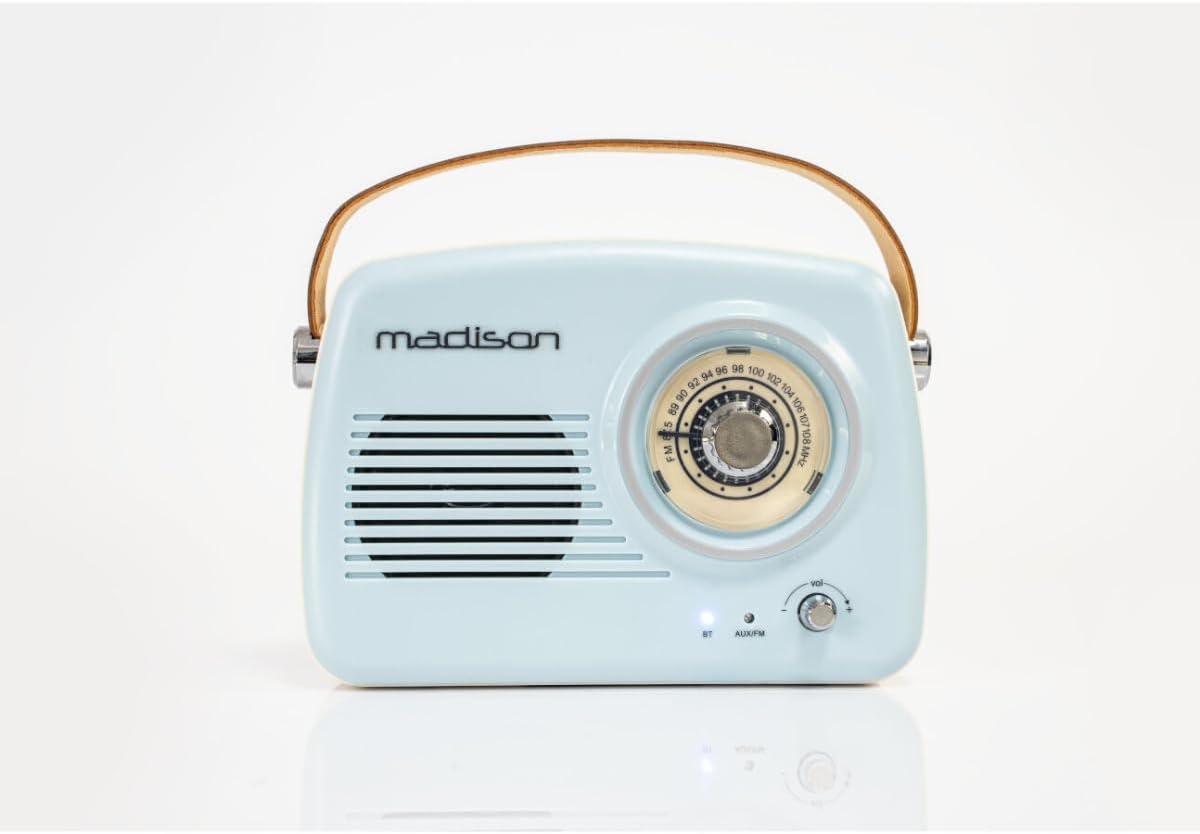
The Madison FREESOUND-VR30 is a vintage-style portable radio designed to combine classic aesthetics with modern audio technology. This device features FM radio, Bluetooth connectivity, and an AUX input, allowing you to enjoy your favorite music and radio stations from various sources. Its compact design, long-lasting rechargeable battery, and integrated carrying handle make it ideal for portable use.

Şekil 1: Ön view of the Madison FREESOUND-VR30 radio.
2. Ürün Özellikleri
- Analog Dial Tuner: For precise FM radio station selection.
- Bluetooth Bağlantısı: Uyumlu cihazlardan kablosuz olarak ses akışı sağlayın.
- AUX Girişi: Harici ses kaynaklarını 3.5 mm ses kablosuyla bağlayın.
- FM Radyo: Enjoy local and national radio broadcasts.
- Bass Reinforcement: Integrated subwoofer at the rear for enhanced low-frequency sound.
- USB Şarj Edilebilir: Convenient charging via USB (cable included).
- Taşıma kolu: Durable faux leather handle for easy portability.
- Teleskopik Anten: FM radyo sinyalini daha iyi almak için uzatılabilir anten.
- Uzun Pil Ömrü: Up to 16 hours of playback at medium volume.
3. Kurulum ve İlk Kullanım
3.1 Paketin açılması
Carefully remove the radio from its packaging. Ensure all components, including the USB charging cable and this user manual, are present.
3.2 Pilin Şarj Edilmesi
Before first use, fully charge the radio's internal lithium-polymer battery. Connect the supplied USB charging cable to the micro-USB port on the back of the radio and plug the other end into a compatible USB power adapter (not included) or a computer's USB port. The charging indicator light will illuminate during charging and turn off or change color when fully charged.
Şekil 2: Arka view of the radio with charging and AUX ports.
3.3 Extending the Antenna
For optimal FM radio reception, extend the telescopic antenna located on the back of the unit to its full length and adjust its direction as needed.
4. Kullanım Talimatları
4.1 Güç Açma/Kapatma ve Ses Kontrolü
To power on the radio, rotate the volume knob clockwise. Continue rotating to increase the volume. To power off, rotate the volume knob counter-clockwise until it clicks.
4.2 Selecting Modes (FM / Bluetooth / AUX)
Press the 'MODE' button located on the back of the radio to cycle through the available input modes: FM Radio, Bluetooth (BT), and AUX. The indicator light on the front will change to reflect the selected mode.
4.3 FM Radyo Çalışması
- Ensure the telescopic antenna is fully extended.
- Select FM mode using the 'MODE' button.
- Rotate the large tuning dial on the front of the radio to scan for FM stations. The frequency scale will indicate the current tuning position.
- Ses düğmesini kullanarak sesi ayarlayın.

Figure 3: Analog tuning dial for FM radio.
4.4 Bluetooth Eşleştirme
- Select Bluetooth mode using the 'MODE' button. The Bluetooth indicator light on the front will blink, indicating it is in pairing mode.
- Akıllı telefonunuzda, tabletinizde veya Bluetooth özellikli diğer cihazınızda Bluetooth'u etkinleştirin ve kullanılabilir cihazları arayın.
- Select "FREESOUND-VR30" from the list of devices.
- Once paired, the Bluetooth indicator light will stop blinking and remain solid. You can now stream audio wirelessly to the radio.
4.5 AUX Girişi Çalışması
- Connect one end of a 3.5mm audio cable (not included) to the AUX input port on the back of the radio.
- Ses kablosunun diğer ucunu harici cihazınızın kulaklık girişine veya ses çıkışına bağlayın.
- Select AUX mode using the 'MODE' button.
- Play audio from your external device. Control the volume using the radio's volume knob and your external device's volume controls.
Video 1: Bittiview of Madison FREESOUND-VR30 features, including tuning, volume, antenna extension, and AUX connection.
5. Bakım
To ensure the longevity and optimal performance of your Madison FREESOUND-VR30 radio, follow these maintenance guidelines:
- Temizlik: Radyonun dış yüzeyini temizlemek için yumuşak, kuru bir bez kullanın. Aşındırıcı temizleyiciler, cilalar veya çözücüler kullanmayın.
- Depolamak: Uzun süre kullanılmadığı zamanlarda radyoyu serin, kuru bir yerde, doğrudan güneş ışığından ve aşırı sıcaklıklardan uzakta saklayın.
- Pil Bakım: To maintain battery health, avoid fully discharging the battery frequently. Recharge the radio periodically if it is not used for a long time.
6. Sorun Giderme
| Sorun | Olası Neden | Çözüm |
|---|---|---|
| Radyo açılmıyor. | Pil boşalmış. | Connect the radio to a USB power source using the charging cable and allow it to charge. |
| FM radyo alımı zayıf. | Anten uzatılmamış veya sinyal alanı zayıf. | Teleskopik anteni tamamen açın ve konumunu ayarlayın. Radyoyu farklı bir yere taşımayı deneyin. |
| Bluetooth cihazı eşleştirilemiyor. | Radyo Bluetooth eşleştirme modunda değil veya cihaz çok uzakta. | Press the 'MODE' button until the Bluetooth indicator light blinks. Ensure your device's Bluetooth is on and within range (approx. 10 meters). Forget previous pairings on your device if necessary. |
| AUX modunda ses yok. | Yanlış mod seçildi veya kablo tam olarak takılmadı. | Ensure AUX mode is selected. Check that the 3.5mm audio cable is securely connected to both the radio and the external device. Verify volume levels on both devices. |
7. Özellikler

Şekil 4: Ürün boyutları.
| Özellik | Detay |
|---|---|
| Model Numarası | 10-5546MA |
| Marka | Madison |
| Bağlantı Teknolojisi | Bluetooth, Yardımcı |
| Tuner Teknolojisi | FM |
| Güç Kaynağı | Pil ile çalışır |
| Pil Türü | 1 Lityum-polimer (dahil) |
| Ürün Boyutları (U x G x Y) | 21x8x16 cm |
| Max Product Power Output | 30 Watt |
| Uyumlu Cihazlar | Smartphone, Tablet, Laptop, Speaker (any device with Bluetooth or AUX output) |
| Görüntü Türü | Analog |
| İç Malzeme | Plastik |
8. Garanti ve Destek
This Madison FREESOUND-VR30 radio is covered by a legal warranty. Spare parts availability is guaranteed for 2 years from the date of purchase.
For further assistance, technical support, or warranty claims, please refer to the contact information provided with your purchase documentation or visit the official Madison webalan.