
1. Giriş
The Canon PowerShot G5 X is a compact digital camera featuring a 1.0-inch, 20.2 Megapixel High-Sensitivity CMOS sensor and a built-in 2.36 million dot electronic viewfinder. This camera is designed for advanced photographers seeking high-quality stills and video with comprehensive control. It includes Wi-Fi and NFC capabilities for easy sharing and remote operation.
Temel özellikler şunlardır:
- 1.0-inch, 20.2 Megapixel High-Sensitivity CMOS sensor.
- Canon DIGIC 6 Image Processor for enhanced image quality and fast operation.
- Built-in 2.36 million dot electronic viewbulucu.
- Multi-angle capacitive 3.0-inch touch panel LCD with 1.04 million dots.
- Full HD 1080p video recording at 60p/30p/24p.
- Integrated Wi-Fi and NFC for wireless connectivity.
2. Kutuda Neler Var?
İlk kullanımdan önce tüm öğelerin mevcut olduğundan emin olun:
- Canon PowerShot G5 X Camera Body
- Pil Paketi
- Pil Şarj Cihazı
- Boyun Askısı

Figure 2.1: Included items with the Canon PowerShot G5 X camera.
3. İlk Kurulum
3.1 Pilin Şarj Edilmesi
- Pili pil şarj cihazına takın.
- Şarj cihazını elektrik prizine takın. Şarj gösterge ışığı yanacaktır.
- Once charging is complete, the indicator light will change or turn off. Remove the battery.
3.2 Pil ve Hafıza Kartının Takılması
- Fotoğraf makinesinin altındaki pil/kart yuvası kapağını açın.
- Insert the charged battery into the compartment, ensuring correct orientation.
- Insert a compatible SD, SDHC, or SDXC memory card into the card slot until it clicks into place.
- Bölme kapağını güvenli bir şekilde kapatın.
3.3 Kamerayı Açma
Basın AÇIK/KAPALI button located on the top of the camera to power it on. The lens will extend, and the LCD screen will activate.

Şekil 3.1: Ön view of the Canon PowerShot G5 X.
4. Kameranın Çalıştırılması
4.1 Temel Çekim Modları
The mode dial on the top of the camera allows selection of various shooting modes:
- Otomatik mod: For automatic settings.
- P (Program AE): Camera sets aperture and shutter speed, but allows other adjustments.
- Av (Aperture Priority AE): Diyaframı siz ayarlarsınız, kamera enstantaneyi ayarlar.
- Tv (Shutter Priority AE): Enstantaneyi siz ayarlarsınız, kamera diyaframı ayarlar.
- M (Manuel): Hem diyaframı hem de enstantaneyi siz kontrol edersiniz.
- Custom Modes (C1/C2): Save and recall your preferred settings.
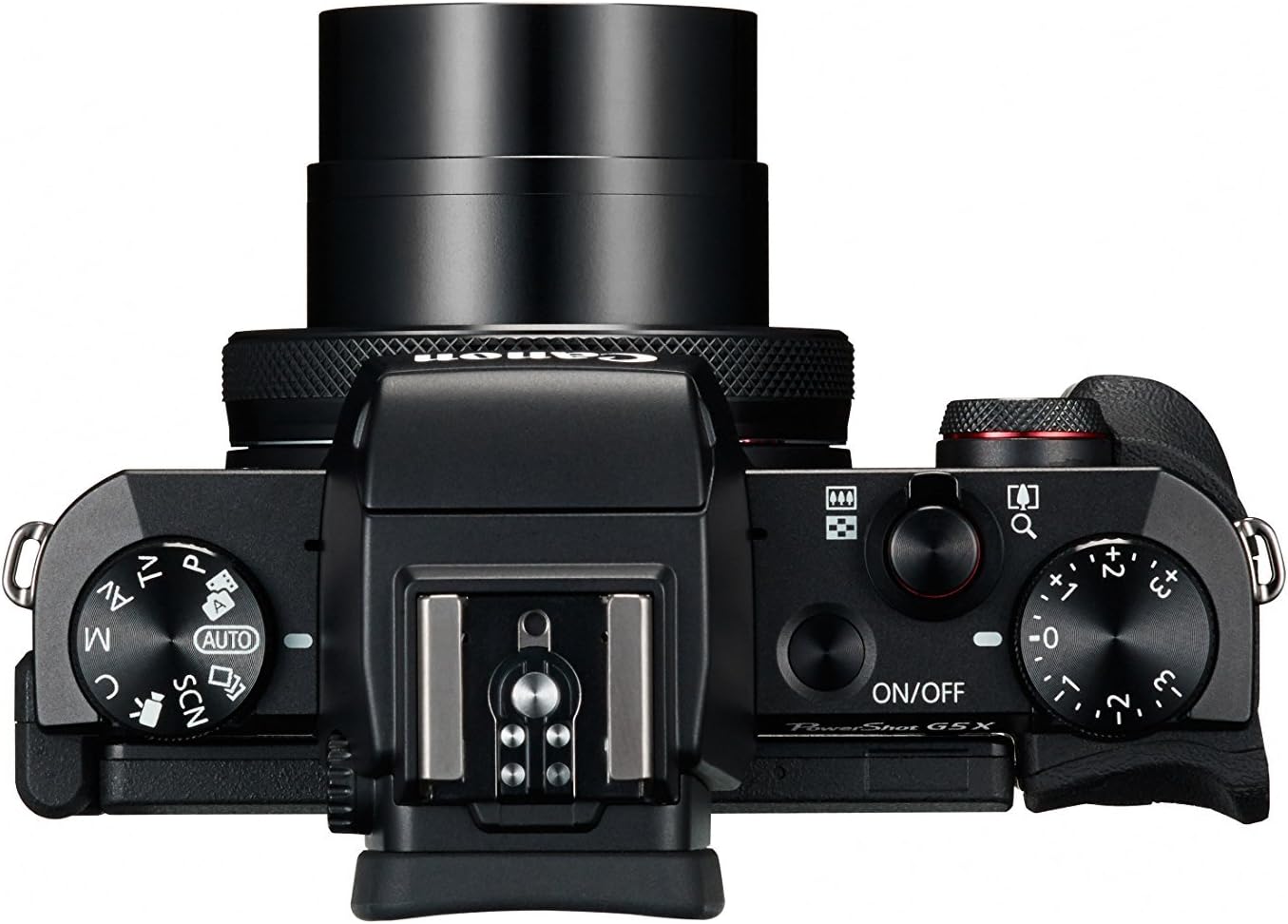
Figure 4.1: Top controls of the Canon PowerShot G5 X.
4.2 Viewbulucu ve LCD Ekran
The camera features both an electronic viewfinder (EVF) and a multi-angle touch panel LCD. You can switch between them or use the EVF for composing shots in bright conditions. The LCD screen can be articulated for various shooting angles and touch operations.

Figure 4.2: Canon PowerShot G5 X with articulated LCD screen.

Şekil 4.3: Arka view of the Canon PowerShot G5 X.
4.3 Videoları Kaydetme
To record video, set the mode dial to the movie mode icon. Press the dedicated movie button to start and stop recording. The camera supports 1080p Full HD video at various frame rates (60p/30p/24p).
4.4 Wi-Fi and NFC Connectivity
The camera's built-in Wi-Fi and NFC functions allow for wireless transfer of images and videos to compatible smart devices or computers. Refer to the camera's menu for detailed instructions on setting up these connections.
5. Bakım ve Özen
5.1 Kamerayı Temizleme
- Mercek: Use a lens brush or blower to remove dust, then gently wipe with a microfiber lens cloth. Avoid touching the lens surface directly.
- LCD Ekran: Wipe gently with a soft, dry cloth. For stubborn smudges, use a screen cleaner specifically designed for electronics.
- Kamera Gövdesi: Wipe with a soft, dry cloth. Do not use organic solvents or strong cleaning agents.
5.2 Depolama
Kullanılmadığı zamanlarda, kamerayı doğrudan güneş ışığından ve aşırı sıcaklıklardan uzakta, serin ve kuru bir yerde saklayın. Kamera uzun süre kullanılmayacaksa pilini çıkarın.
6. Sorun Giderme
This section addresses common issues you might encounter with your Canon PowerShot G5 X camera.
| Sorun | Olası Neden / Çözüm |
|---|---|
| Kamera açılmıyor. | Battery is depleted. Charge the battery. Ensure battery is inserted correctly. |
| Görüntüler bulanık. | Lens is dirty. Clean the lens. Shutter speed is too slow. Increase shutter speed or use image stabilization. Camera shake. Hold the camera steady or use a tripod. |
| Cannot connect to Wi-Fi/NFC. | Ensure Wi-Fi/NFC is enabled in camera settings. Check device compatibility and network settings. Refer to the camera's connectivity guide in the menu. |
| Hafıza kartı hatası. | Hafıza kartı dolu. Gereksiz dosyaları silin. files or replace card. Card is corrupted. Format the card (this will erase all data). Card is incompatible. Use a supported SD, SDHC, or SDXC card. |
| Flaş çalışmıyor. | Flash is set to OFF. Change flash mode to Auto or On. Subject is too far. Check flash range. |
7. Özellikler
| Özellik | Detay |
|---|---|
| Sensör Tipi | 1.0-inch High-Sensitivity CMOS |
| Etkili Hareketsiz Çözünürlük | 20.2 MP |
| Görüntü İşlemcisi | DIGIC 6 |
| Optik Yakınlaştırma | 4.2x |
| lens Diyaframı | f/1.8-2.8 |
| Odak Uzaklığı (35 mm eşdeğeri) | 24-100 mm |
| Görüntü Sabitleme | Dijital |
| Viewbulucu | Built-in Electronic Viewfinder (2.36 million dots) |
| LCD Ekran | 3.0-inch Multi-angle Capacitive Touch Panel (1.04 million dots) |
| Video Çözünürlüğü | 1080p Full HD (60p/30p/24p) |
| Bağlantı | Wi-Fi, NFC, HDMI, USB |
| Depolama Ortamı | SD, SDHC, SDXC Memory Cards |
| Ürün Ağırlığı | 1.8 Pound |
| Model Numarası | 0510C001 |
| UPC | 748926548632 |
8. Garanti ve Destek
8.1 Garanti Bilgileri
This Canon PowerShot G5 X camera comes with a 90-day limited warranty from the date of purchase. This warranty covers manufacturing defects under normal use. Please retain your proof of purchase for warranty claims.
8.2 Müşteri Desteği
For technical assistance, service, or further inquiries, please refer to the official Canon support webweb sitesini ziyaret edin veya müşteri hizmetleri departmanıyla iletişime geçin. İletişim bilgileri genellikle üreticinin web sitesinde bulunabilir. webalan.


