
1. Giriş
Satın aldığınız için teşekkür ederizasing the Homtime D2qi Bluetooth Speaker with Wireless Charging and Alarm Clock. This device is designed to provide a versatile audio experience with convenient features for your daily life. Please read this manual carefully before use to ensure proper operation and to maximize the product's lifespan.
2. Güvenlik Bilgileri
- Cihazı aşırı sıcaklıklara, neme veya doğrudan güneş ışığına maruz bırakmayın.
- Su ve diğer sıvılardan uzak tutunuz.
- Cihazı kendiniz sökmeyin veya tamir etmeye çalışmayın. Tüm servis işlemlerini yetkili personele yaptırın.
- Use only the provided or recommended power adapter.
- Cihazı düşürmekten veya güçlü darbelere maruz bırakmaktan kaçının.
3. Paket İçeriği
Lütfen paketi aşağıdaki öğeler açısından kontrol edin:
- Homtime D2qi Bluetooth Speaker
- Güç Adaptörü
- Kullanıcı Kılavuzu
4. Ürün Bittiview
The Homtime D2qi combines a high-quality Bluetooth speaker with a digital alarm clock and a convenient wireless charging pad. It features intuitive controls for easy operation.

Şekil 4.1: Ön view of the Homtime D2qi speaker with a smartphone placed on its top surface for wireless charging.

Figure 4.2: The Homtime D2qi speaker positioned on a book, showcasing its compact design and the digital clock display.

Figure 4.3: The Homtime D2qi speaker in a home setting, demonstrating wireless charging functionality.
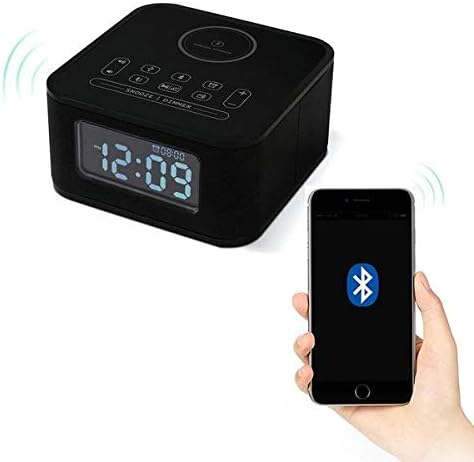
Figure 4.4: The Homtime D2qi speaker connected via Bluetooth to a smartphone.
5. Kurulum
5.1 Güç Bağlantısı
- Connect the provided power adapter to the DC input port on the back of the Homtime D2qi.
- Güç adaptörünü standart bir duvar prizine takın.
- Ekran yanarak cihazın açık olduğunu gösterecektir.
5.2 Başlangıç Zaman Ayarı
Upon first power-on or after a power outage, you may need to set the time. Refer to the 'Operating Instructions' section for detailed steps on setting the clock.
6. Kullanım Talimatları
6.1 Bluetooth Bağlantısı
- Basın Bluetooth düğmesi on the top panel to enter Bluetooth pairing mode. The Bluetooth indicator will flash.
- Akıllı telefonunuzda veya ses cihazınızda Bluetooth'u etkinleştirin ve kullanılabilir cihazları arayın.
- Select "Homtime D2qi" from the list.
- Bağlantı kurulduktan sonra, Bluetooth göstergesi yanıp sönmeyi bırakacak ve sabit kalacaktır. Artık hoparlörden ses çalabilirsiniz.
6.2 Kablosuz Şarj
- Place your Qi-compatible smartphone centrally on the wireless charging pad located on the top surface of the speaker.
- Ensure the phone is properly aligned with the charging coil.
- The charging indicator on your phone will show that charging has begun.
6.3 Çalar Saat Fonksiyonu
- Basın Alarm butonu Alarm ayar moduna girmek için
- Kullanın +/- düğmeleri Saat ve dakikayı ayarlamak için.
- Basın Alarm butonu again to confirm each setting.
- Alarmı etkinleştirmek/devre dışı bırakmak için, Alarm butonu briefly when not in setting mode.
- Ertelemek için düğmeye basın. Erteleme/Kısıklama düğmesi alarm çaldığında.
6.4 Radyo İşlevi
- Basın Mod düğmesi FM radyo moduna geçmek için.
- Basılı tutun Oynat/Duraklat düğmesi to auto-scan and save available stations.
- Kullanın Önceki/Sonraki düğmeleri to navigate through saved stations.
6.5 Çağrı Cevaplama
Bluetooth ile bağlandığında, hoparlör eller serbest görüşme için kullanılabilir.
- Gelen bir aramayı cevaplamak için tuşuna basın. Oynat/Duraklat düğmesi.
- Bir aramayı bitirmek için tuşuna basın. Oynat/Duraklat düğmesi Tekrar.
7. Bakım
- Cihazı yumuşak ve kuru bir bezle temizleyin. Aşındırıcı temizleyiciler veya çözücüler kullanmayın.
- Kablosuz şarjın verimli bir şekilde gerçekleşmesi için şarj pedini toz ve kirden uzak tutun.
- Uzun süre kullanılmayacaksa cihazı serin ve kuru bir yerde saklayın.
8. Sorun Giderme
| Sorun | Olası Neden | Çözüm |
|---|---|---|
| Güç yok | Güç adaptörü bağlı değil veya priz arızalı. | Ensure power adapter is securely plugged into the device and a working wall outlet. |
| Hoparlörden ses gelmiyor | Bluetooth not connected; volume too low; incorrect mode. | Ensure Bluetooth is paired. Increase volume on both the speaker and your device. Check if the speaker is in the correct mode (Bluetooth/Radio). |
| Kablosuz şarj çalışmıyor | Phone not Qi-compatible; phone not aligned; phone case too thick. | Verify phone supports Qi wireless charging. Realign phone on the charging pad. Remove thick phone cases. |
| Buttons difficult to locate in the dark | Buttons are flush with the surface. | Familiarize yourself with button layout during daylight. Use the dimmer function to adjust display brightness. |
| Bluetooth disconnects automatically | Power saving feature; device out of range. | Reconnect Bluetooth manually. Keep devices within Bluetooth range (approx. 10 meters). |
9. Özellikler
| Özellik | Detay |
|---|---|
| Marka | zaman |
| Model Numarası | D2qi |
| Renk | Siyah |
| Hoparlör Tipi | Bluetooth Hoparlörler |
| Bağlantı | Kablosuz |
| Uyumlu Cihazlar | Akıllı telefonlar |
| Çıkış Gücü | 5 - 10 Watt |
| Ürün Ağırlığı | 0.5 kilo |
| Paket Boyutları | 19.6x18.8x14.8 cm |
| Donanım Arayüzü | Audio/Video Port |
10. Garanti ve Destek
Homtime products are manufactured to the highest quality standards. For warranty information and customer support, please refer to the warranty card included in your package or visit the official Homtime webSite. Satın alma belgeniz olarak satın alma fişinizi saklayın.