
Bytech BCAUBS134BK
Bytech Massive Bluetooth Long Bar Speaker-BK User Manual
Model: BCAUBS134BK
1. Giriş
Satın aldığınız için teşekkür ederizasing the Bytech Massive Bluetooth Long Bar Speaker-BK. This manual provides essential information for the proper setup, operation, and maintenance of your new speaker. Please read this manual thoroughly before using the product to ensure optimal performance and longevity.
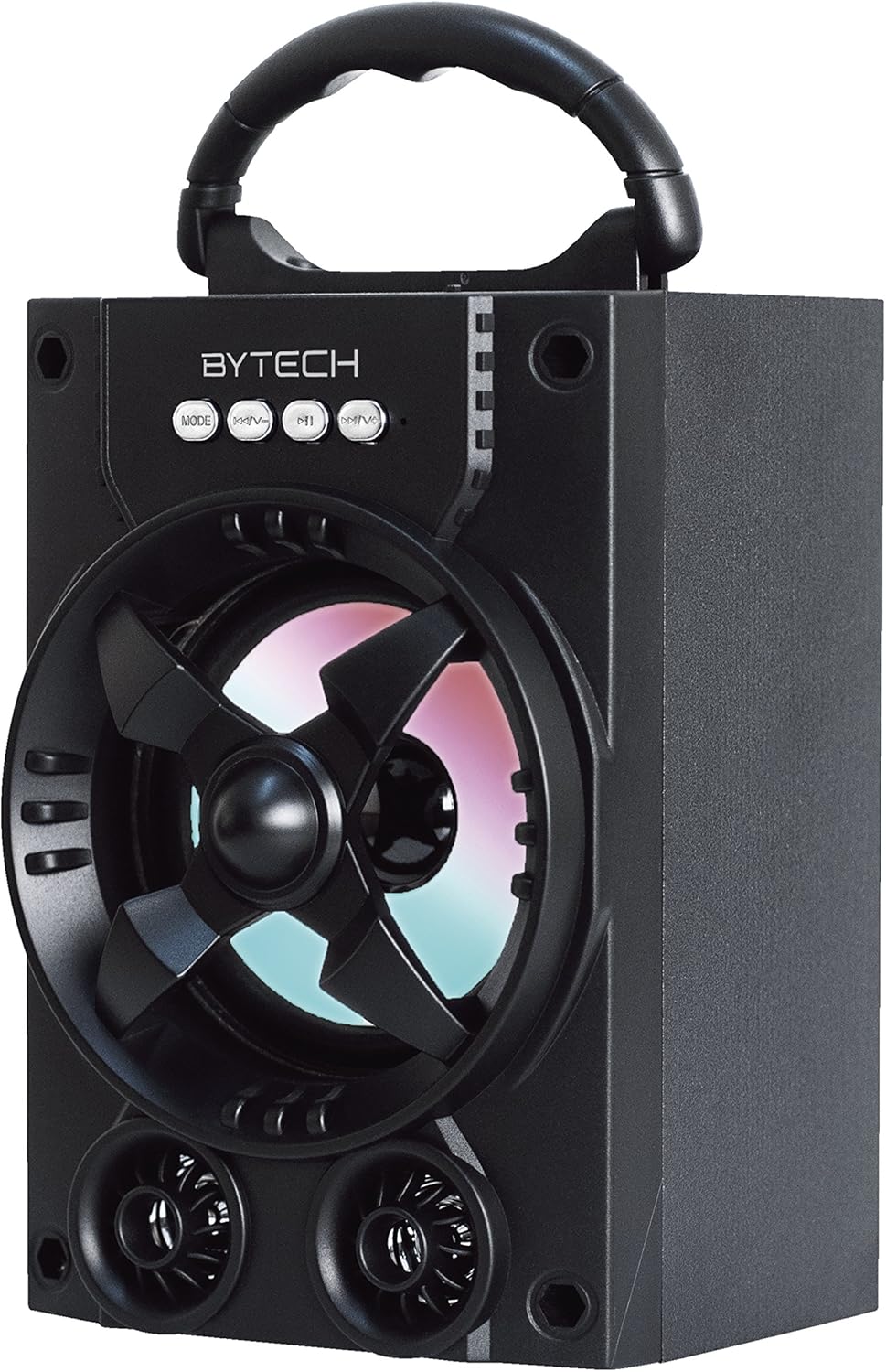
Şekil 1.1: Ön view of the Bytech Massive Bluetooth Long Bar Speaker-BK, showcasing its design, handle, and speaker grille with LED lights.
2. Paket İçeriği
Lütfen paketi aşağıdaki öğeler açısından kontrol edin:
- Bytech Massive Bluetooth Long Bar Speaker-BK
- USB Şarj Kablosu
- Kullanım Kılavuzu (bu belge)
Herhangi bir ürün eksik veya hasarlıysa lütfen müşteri desteğiyle iletişime geçin.
3. Ürün Özellikleri
- LED Performance Lights: Dynamic LED lights that synchronize with your music for an enhanced audio-visual experience.
- Convenient Carrying Handle: Integrated handle for easy portability, allowing you to take your music anywhere.
- Evrensel Bluetooth Bağlantısı: Seamlessly connect wirelessly to your smartphone, tablet, or other Bluetooth-enabled devices.
- Surround Ses: Designed to deliver a high-quality surround sound experience.
- Taşınabilir Tasarım: Ideal for various settings, including parties, outdoor gatherings, and personal use.

Figure 1.2: The speaker shown with its retail packaging, illustrating its key features such as multi-color LED lights, Bluetooth connectivity, and surround sound capability.
4. Kontroller ve Göstergeler
The speaker features intuitive controls and indicators for easy operation:
- MOD Düğmesi: Press to switch between available input modes (e.g., Bluetooth).
- V-Düğmesi: Press to decrease volume. Long press to skip to the previous track.
- V+ Düğmesi: Sesi artırmak için basın. Sonraki parçaya geçmek için uzun süre basılı tutun.
- M Düğmesi: (Function not explicitly detailed, typically for mode or mute)
- LED Işıklar: Indicate power status, charging status, and provide dynamic light effects during audio playback.
5. Kurulum Kılavuzu
5.1 Hoparlörü Şarj Etme
- USB şarj kablosunun küçük ucunu hoparlör üzerindeki şarj portuna takın.
- USB şarj kablosunun büyük ucunu bir USB güç adaptörüne (dahil değildir) veya bilgisayarın USB portuna bağlayın.
- LED göstergesi şarj durumunu gösterecektir (örneğin, şarj olurken kırmızı yanar, tamamen şarj olduğunda söner).
- İlk kullanımdan önce tam şarj için yaklaşık 3-4 saat bekleyin.
5.2 Açma/Kapatma
- To power on, press and hold the Power button (location not specified, typically near charging port or on control panel) for a few seconds until you hear an audible prompt or see the LED lights activate.
- Cihazı kapatmak için, hoparlör kapanana kadar Güç düğmesine tekrar basılı tutun.
5.3 Bluetooth Eşleştirme
- Ensure the speaker is powered on and in Bluetooth pairing mode (indicated by a flashing LED light or audible prompt).
- Akıllı telefonunuzda veya tabletinizde Bluetooth ayarlarına gidin.
- Arama available devices. The speaker will appear as "BYTECH" or a similar name.
- Eşleştirmeyi başlatmak için listeden konuşmacıyı seçin.
- Once successfully paired, the LED indicator will typically become solid, and you may hear a confirmation tone.
6. Kullanım Talimatları
6.1 Bluetooth Üzerinden Ses Çalma
- After successful Bluetooth pairing, open your preferred music application on your connected device.
- Select and play your desired audio. The sound will be streamed wirelessly to the speaker.
- Use the V+ and V- buttons on the speaker or your connected device to adjust the volume.
- Long press V+ or V- to skip tracks.
6.2 LED Performance Lights
The speaker features integrated LED lights that enhance your listening experience. These lights typically activate automatically when the speaker is powered on and playing audio. Specific controls for light modes are not detailed, but they are designed to provide dynamic visual effects.
6.3 Mod Değiştirme
Basın MOD button to cycle through available input modes. While Bluetooth is the primary connectivity, other modes (if available, such as FM radio or AUX input) can be accessed via this button.
7. Bakım ve Özen
- Temizlik: Hoparlörün dış yüzeyini temizlemek için yumuşak ve kuru bir bez kullanın. Aşındırıcı temizleyiciler, cilalar veya çözücüler kullanmayın.
- Depolamak: Uzun süre kullanılmayacaksa hoparlörü serin, kuru ve doğrudan güneş ışığından ve aşırı sıcaklıklardan uzak bir yerde saklayın.
- Pil Bakım: Pil ömrünü uzatmak için pili sık sık tamamen boşaltmaktan kaçının. Pil sağlığını korumak için, kullanılmasa bile hoparlörü düzenli olarak şarj edin.
- Suya Dayanıklılık: Bu ürün OLUMSUZ waterproof. Avoid exposure to water, rain, or excessive moisture to prevent damage.
8. Sorun Giderme
Hoparlörünüzle ilgili sorunlarla karşılaşırsanız, aşağıdaki yaygın sorunlara ve çözümlere bakın:
| Sorun | Olası Neden | Çözüm |
|---|---|---|
| Hoparlör açılmıyor. | Pil zayıf. | Hoparlörü tam olarak şarj edin. |
| Hoparlörden ses gelmiyor. | Ses seviyesi çok düşük; Eşleştirilmemiş; Yanlış mod. | Increase volume on speaker and device; Ensure successful Bluetooth pairing; Press MODE button to select correct input. |
| Bluetooth bağlantısı kararsız veya başarısız oluyor. | Device too far; Interference; Pairing issue. | Move device closer to speaker (within 33 ft/10m); Avoid obstacles; Forget device on your phone and re-pair. |
| LED ışıklar çalışmıyor. | Speaker not powered on or playing audio. | Ensure speaker is on and audio is playing. |
9. Özellikler
| Özellik | Detay |
|---|---|
| Marka | Baytek |
| Model Adı | BYTECH |
| Ürün Model Numarası | BCAUBS134BK |
| Hoparlör Tipi | Çevresel Ses |
| Bağlantı Teknolojisi | Bluetooth |
| Kablosuz İletişim Teknolojisi | Bluetooth |
| Uyumlu Cihazlar | Akıllı telefon |
| Hoparlör Maksimum Çıkış Gücü | 20 Watt |
| Frekans Tepkisi | 20 KHz |
| Empedans | 1 Ohm |
| Hoparlör Boyutu | 5 inç |
| Güç Kaynağı | Kablolu Elektrikli (şarj için) |
| Pil Türü | 1 Lityum İyon pil gerekli |
| Renk | Siyah |
| Ürün Boyutları | 4.75 x 5.5 x 8.5 inç |
| Ürün Ağırlığı | 1.3 pound |
| Su Geçirmez | HAYIR |
| Menşei ülke | Çin |
| UPC | 805112038121 |
10. Garanti Bilgileri
Bytech products are manufactured to the highest quality standards. For specific warranty terms and conditions, please refer to the warranty card included with your purchase or visit the official Bytech webSite. Satın alma belgenizi garanti talepleriniz için saklayın.
11. Müşteri Desteği
For technical assistance, troubleshooting, or general inquiries, please contact Bytech customer support. Contact information can typically be found on the product packaging, the official Bytech websiteyi veya satın alma fişinizi inceleyebilirsiniz.
Not: Sağlanan verilere göre satıcıdan eklenmeye uygun resmi ürün videosu bulunmamaktadır.
Ask a question about this manual
Ask about setup, troubleshooting, compatibility, parts, safety, or missing instructions. Manuals+ will review the question and use this page’s manual context to help answer it.