
1. Giriş
This manual provides essential instructions for the proper use and maintenance of your KECHAODA K115 basic mobile phone. Please read this guide thoroughly before operating your device to ensure optimal performance and longevity.
2. Paket İçeriği
Ürün paketinizde tüm öğelerin mevcut olduğunu doğrulayın:
- KECHAODA K115 Handset
- USB kablosu
- Lithium-ion Battery (800mAh)
3. Cihaz Bittiview
Familiarize yourself with the physical components of your KECHAODA K115 phone.

Şekil 3.1: Ön View. This image displays the front of the KECHAODA K115 phone, highlighting its 1.44-inch display and the well-spaced numeric keypad.
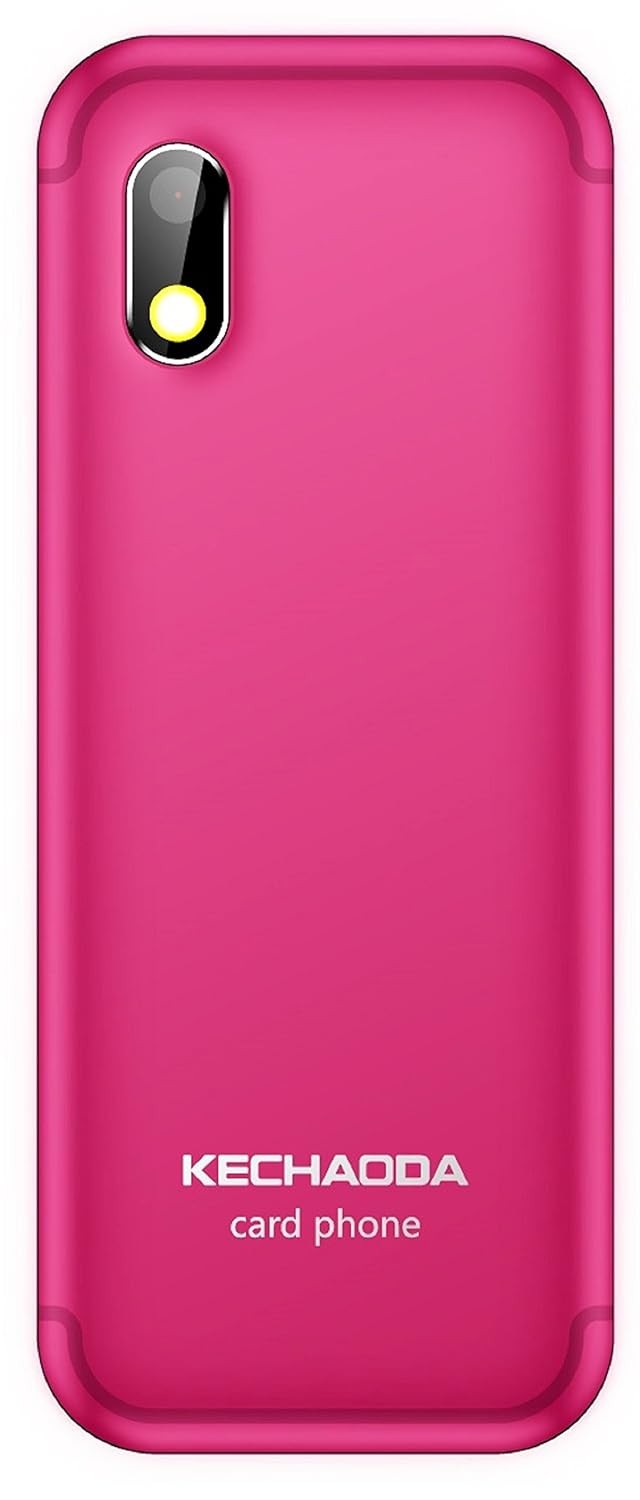
Şekil 3.2: Geri View. This image shows the rear of the KECHAODA K115, featuring the 0.3MP primary camera lens and the KECHAODA branding.

Şekil 3.3: Üst ve Alt Views. This image illustrates the top and bottom edges of the KECHAODA K115, indicating the location of the 3.5mm audio jack and the USB charging port.
4. Kurulum
4.1. Pil Kurulumu
- Remove the back cover of the phone by gently prying it from the designated notch.
- Pil kontaklarını pil bölmesinin içindeki terminallerle hizalayın.
- Press the battery down firmly until it is securely in place.
- Arka kapağı yerine takın ve yerine oturduğundan emin olun.
4.2. SIM Kart Kurulumu
The KECHAODA K115 supports dual SIM cards.
- Pili çıkardıktan sonra SIM kart yuvalarını bulun.
- Insert your SIM card(s) into the respective slots, ensuring the gold contacts face downwards and the cut corner aligns correctly.
- Gently push the SIM card(s) until they are fully seated.
4.3. Memory Card Installation (MicroSD)
The device supports a microSD card up to 32GB for expanded storage.
- Locate the microSD card slot, usually adjacent to the SIM card slots.
- Insert the microSD card with the gold contacts facing downwards, pushing it gently until it locks into place.
4.4. İlk Güç Açma ve Şarj Etme
- After installing the battery and SIM card(s), press and hold the Power/End Call button until the screen illuminates.
- To charge the phone, connect the USB cable to the phone's charging port and the other end to a compatible USB power adapter or computer.
- Ekranda şarj göstergesi görünecektir.
5. Kullanım Talimatları
5.1. Temel İşlevler
- Arama Yapma: Tuş takımını kullanarak telefon numarasını girin ve Ara düğmesine basın.
- Çağrıları Cevaplama: Press the Call button when the phone rings.
- Mesaj Gönderme: Navigate to the 'Messages' menu, select 'Write Message', enter your text, and choose a recipient.
- Hızlı arama: Assign frequently called numbers to specific keys for quick dialing. Refer to the phone's menu for speed dial setup.
5.2. Bluetooth Bağlantısı
The KECHAODA K115 supports Bluetooth for connecting to compatible devices, including a BT Dialer function.
- 'Ayarlar' menüsüne gidin ve 'Bluetooth'u seçin.
- Turn Bluetooth 'On' and search for available devices.
- Select the desired device from the list and follow the on-screen prompts to pair.
5.3. Medya Oynatma
The phone supports various audio (AMR/WAV/MP3) and video (3GP/MP4/AVI) formats.
- Access the 'Multimedia' or 'File Manager' menu to locate and play your media filehafıza kartında saklanır.
- Use the 3.5mm audio jack to connect headphones for private listening.
5.4. Dil Ayarları
The device supports English, Hindi, Tamil, and Kannada languages.
- Navigate to 'Settings' and then 'Phone Settings' or 'Language Settings'.
- Mevcut seçenekler arasından tercih ettiğiniz dili seçin.
6. Bakım
- Temizlik: Telefonun ekranını ve gövdesini temizlemek için yumuşak, kuru bir bez kullanın. Sıvı temizleyicilerden kaçının.
- Pil Bakım: Avoid extreme temperatures. Do not overcharge or fully discharge the battery regularly.
- Depolamak: Uzun süre kullanmayacağınız zaman telefonunuzu serin ve kuru bir yerde saklayın.
7. Sorun Giderme
7.1. Telefon Açılmıyor
- Pilin doğru şekilde takıldığından ve şarj edildiğinden emin olun.
- Connect the charger and wait a few minutes before attempting to power on again.
7.2. Cannot Make or Receive Calls
- Check if the SIM card(s) are properly inserted and activated.
- Verify that you have network signal.
- Ensure your account balance is sufficient (for prepaid services).
7.3. Kötü Ses Kalitesi
- Görüşme sırasında ses ayarlarını kontrol edin.
- Ensure the speaker/earpiece is not obstructed.
- If using a headset, ensure it is properly connected.
8. Özellikler
| Özellik | Şartname |
|---|---|
| Model Numarası | K115 |
| İşletim Sistemi | Konu X |
| Veri deposu | 32 MB |
| Dahili Bellek | 64 MB |
| Genişletilebilir Bellek | 32 GB'a kadar (MicroSD) |
| Görüntülemek | 1.44-inch TFT, 128 x 128 pixels resolution |
| Kamera | 0.3 MP Arka |
| Pil | 800 mAh Lithium-ion (Removable) |
| Konuşma Zamanı | Yaklaşık 4 Saat |
| Bağlantı | GSM (900/1800 MHz), Bluetooth |
| SIM Desteği | Çift SIM |
| Ses Jakı | 3.5 mm |
| Ürün Boyutları | 27.9x12.7x15.2 cm |
| Ürün Ağırlığı | 100 gr |
9. Garanti ve Destek
9.1. Garanti Bilgileri
Your KECHAODA K115 device comes with a 1 yıllık üretici garantisi Satın alma tarihinden itibaren geçerlidir. Piller dahil olmak üzere kutu içindeki aksesuarlar garanti kapsamındadır. 6 ay üretici garantisi Satın alma tarihinden itibaren geçerlidir. Bu garanti, normal kullanım koşulları altında üretim hatalarını kapsar.
9.2. Müşteri Desteği
For technical assistance, warranty claims, or further inquiries, please contact KECHAODA customer support through the details provided on your purchase receipt or the official KECHAODA webalan.