
giriiş
Thank you for choosing the Awei B923BL Wireless Magnetic Sports Bluetooth Earphones. This manual provides essential information for setting up, operating, maintaining, and troubleshooting your new earphones. Please read it carefully before use to ensure optimal performance and longevity of your device.
Paket İçeriği
Lütfen paketi aşağıdaki öğeler açısından kontrol edin:
- Awei B923BL Wireless Magnetic Sports Bluetooth Earphones
- USB Şarj Kablosu
- Çeşitli Boyutlarda Kulak Ucu
- Kullanıcı Kılavuzu
Ürün Bittiview
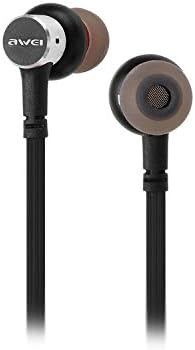
The Awei B923BL earphones are designed for active lifestyles, featuring a wireless Bluetooth connection and a magnetic design for convenient storage around your neck when not in use. They include an integrated microphone for hands-free calling.

Kurmak
1. Kulaklıkların Şarj Edilmesi
Before first use, fully charge your earphones. Connect the provided USB charging cable to the charging port on the earphones and the other end to a USB power source (e.g., computer USB port, wall adapter). The indicator light will show charging status and turn off or change color when fully charged.
2. Bluetooth Eşleştirme
- Kulaklıkların kapalı olduğundan emin olun.
- Press and hold the multi-function button (usually the power button) until the indicator light flashes red and blue alternately, indicating pairing mode.
- Cep telefonunuzda veya Bluetooth özellikli cihazınızda, Bluetooth ayarlarına gidin ve Bluetooth'u etkinleştirin.
- Arama available devices. You should see "Awei B923BL" or a similar name in the list.
- Select "Awei B923BL" to connect. Once connected, the indicator light will usually flash blue slowly or turn off, and you may hear a confirmation tone.
- Şifre sorulursa "0000" girin.
Once paired, the earphones will automatically connect to the last paired device when turned on, if the device's Bluetooth is active and within range.
Kullanım Talimatları
Güç Açık/Kapalı
- Güç Açık: Mavi gösterge ışığı yanıp sönene kadar çok fonksiyonlu düğmeyi yaklaşık 3 saniye basılı tutun.
- Kapat: Çok fonksiyonlu düğmeye yaklaşık 5 saniye basılı tutun; kırmızı gösterge ışığı yanıp sönecek ve ardından sönecektir.
Müzik Çalma
- Oynat/Duraklat: Çok işlevli düğmeye bir kez basın.
- Sonraki Parça: Ses açma (+) düğmesine basılı tutun.
- Önceki parça: Ses kısma (-) düğmesine basılı tutun.
Yönetim Çağrı
- Çağrıyı Cevapla/Sonlandır: Çok işlevli düğmeye bir kez basın.
- Çağrıyı Reddet: Çok fonksiyonlu düğmeye yaklaşık 2 saniye basılı tutun.
- Son Numarayı Tekrar Ara: Çok fonksiyonlu düğmeye iki kez basın.
Ses Kontrolü
- Sesi arttır: Ses + düğmesine basın.
- Sesi Azalt: Ses kısma düğmesine (-) basın.
Bakım
- Clean the earphones regularly with a soft, dry cloth. Do not use harsh chemicals or abrasive materials.
- Kulak uçlarını çıkarın ve gerekirse hafif sabun ve suyla temizleyin, tekrar takmadan önce tamamen kuruduklarından emin olun.
- Kulaklıklarınızı serin, kuru ve doğrudan güneş ışığından ve aşırı sıcaklıklardan uzak bir yerde saklayın.
- Avoid exposing the earphones to water or excessive moisture.
- Do not attempt to disassemble or modify the earphones, as this will void the warranty.
Sorun giderme
- Kulaklıklar açılmıyor: Kulaklıklarınızın tam şarjlı olduğundan emin olun.
- Cihazla eşleştirilemiyor:
- Make sure the earphones are in pairing mode (flashing red and blue).
- Cihazınızda Bluetooth'un etkin olduğundan emin olun.
- Kulaklıkları cihazınıza daha yakın tutun.
- Hem kulaklıklarınızı hem de cihazınızı yeniden başlatmayı deneyin.
- Cihazınızda çok fazla Bluetooth bağlantısı varsa önceki bağlantıları temizleyin.
- Ses yok veya ses seviyesi düşük:
- Hem kulaklığınızdaki hem de bağlı cihazınızdaki ses seviyelerini kontrol edin.
- Kulaklıkların cihazınıza düzgün şekilde bağlandığından emin olun.
- Farklı ses kaynaklarını çalmayı deneyin.
- Çağrı kalitesi sorunları:
- Mikrofonun engellenmediğinden emin olun.
- Daha az parazit olan bir alana geçin.
Özellikler
| Özellik | Detay |
|---|---|
| Marka Adı | Awei |
| Model Numarası | B923BL |
| Renk | Siyah |
| Kulaklık Form Faktörü | Kulakta |
| Bağlantı Teknolojisi | Kablosuz |
| Kablosuz İletişim Teknolojisi | Kablosuz |
| Yaş Aralığı Açıklaması | Yetişkin |
| Malzeme | Lastik |
| Uyumlu Cihazlar | Cep Telefonları |
| Kablo Özelliği | Kablosuz |
| Kontrol Yöntemi | Dokunmak |
| Öğe Sayısı | 1 |
| Üretici | Awei |
| Özel Özellikler | Microphone Included (Note: This model does not feature active noise cancellation as per product description.) |
Garanti ve Destek
Garanti Bilgileri
This product comes with a 1-year manufacturer's warranty from the date of purchase. For warranty claims or service, please contact the manufacturer or their authorized service agent. For further details, you may also contact the retailer where the product was purchased.
Müşteri Desteği
If you encounter any issues not covered in this manual or require further assistance, please refer to the contact information provided with your product packaging or visit the official Awei webDestek kaynakları için site.