
1. Giriş
Satın aldığınız için teşekkür ederizasing the Sharp HT-SB140MT 2.0 150W Soundbar. This soundbar is designed to enhance your audio experience, providing clear and powerful sound for your television, music, and other media. With its sleek design and versatile connectivity options, including Bluetooth, HDMI ARC/CEC, Optical, and Auxiliary inputs, it integrates seamlessly into any home entertainment setup. This manual provides essential information for safe and effective use, including setup, operation, maintenance, and troubleshooting.
2. Güvenlik Bilgileri
- Güç Kaynağı: Güç kaynağı hacmini sağlayıntage matches the requirements specified on the soundbar. Use only the provided power cable.
- Havalandırma: Do not block any ventilation openings. Maintain adequate space around the soundbar for proper airflow.
- Su ve Nem: Do not expose the soundbar to dripping or splashing water. Do not place objects filled with liquids, such as vases, on the apparatus.
- Sıcaklık: Do not place the soundbar near heat sources such as radiators, heat registers, stoves, or other apparatus (including amp(ısı üreten)
- Temizlik: Unplug the soundbar from the power outlet before cleaning. Use a dry, soft cloth for cleaning. Do not use liquid cleaners or aerosol cleaners.
- Servis: Bu ürüne kendiniz servis vermeye çalışmayın. Tüm servis işlemleri için kalifiye servis personeline başvurun.
- Piller: The remote control uses a CR2 battery. Ensure correct polarity when inserting batteries. Do not mix old and new batteries.
3. Paket İçeriği
Lütfen paketin içindeki tüm ürünlerin eksiksiz olduğundan emin olun:
- Sharp HT-SB140MT Soundbar
- Uzaktan kumanda
- Güç kablosu
- Kullanım Kılavuzu (bu belge)
4. Ürün Bittiview

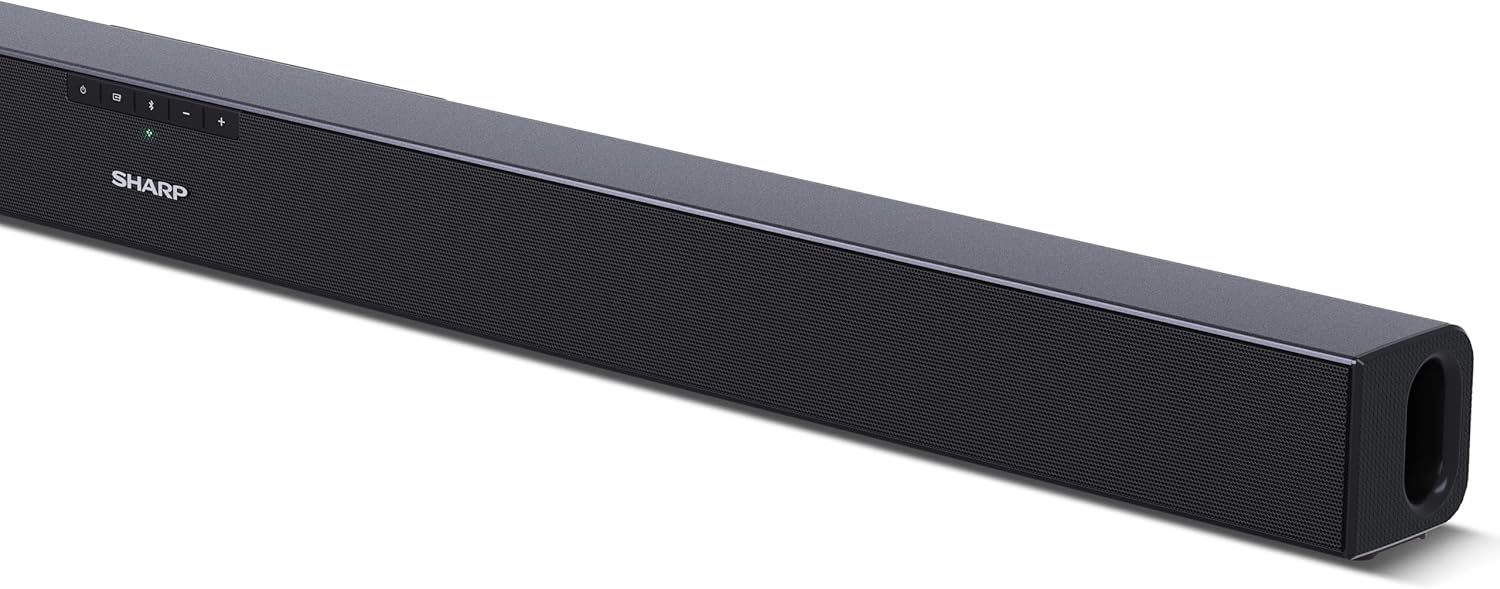
Şekil 4.1: Ön View
The front of the soundbar features the Sharp logo and LED indicators for source selection and status. Control buttons for power, input, and volume are located on the top panel.
Şekil 4.2: Arka View (Connections)
The rear panel provides all necessary connection ports: HDMI ARC, Optical (S/PDIF), and Auxiliary (3.5mm) input, along with the power input.

Şekil 4.3: Uzaktan Kumanda
The included remote control allows for convenient operation of the soundbar, including power, input selection, volume, bass, and treble adjustments.
5. Kurulum
5.1 Yerleştirme
The Sharp HT-SB140MT Soundbar can be placed on a flat surface, such as a TV stand, or wall-mounted. Its slim profile of 6 cm allows it to fit easily under most TV screens without obstructing the view.

Figure 5.1: Soundbar Placement
The soundbar is ideally positioned directly in front of your television for optimal sound projection.
5.2 Televizyonunuza Bağlanma
Aşağıdaki bağlantı yöntemlerinden birini seçin:
- HDMI ARC/CEC (Önerilir): Connect an HDMI cable (not included) from the HDMI ARC port on your TV to the HDMI ARC port on the soundbar. This allows your TV remote to control the soundbar's volume and power. Ensure HDMI ARC/CEC is enabled in your TV's settings.
- Digital Optical Audio (S/PDIF): Connect an optical cable (not included) from the Optical Out port on your TV to the OPTICAL IN port on the soundbar. Select the Optical input on the soundbar.
- Auxiliary (AUX): Connect a 3.5mm audio cable (not included) from the headphone jack or AUX Out port on your TV to the AUX IN port on the soundbar. Select the AUX input on the soundbar.
5.3 Güç Bağlantısı
After connecting the audio cable, plug the power cable into the soundbar's power input and then into a wall outlet (220-240V / 50Hz).
6. Kullanım Talimatları
6.1 Güç Açma/Kapatma
Ses çubuğundaki veya uzaktan kumandadaki Güç düğmesine basarak cihazı açıp kapatabilirsiniz.
6.2 Kaynak Seçimi
Press the Input button on the soundbar or the remote control repeatedly to cycle through the available input sources: HDMI ARC, Optical, AUX, and Bluetooth. The LED indicator on the soundbar will change to reflect the selected source.
6.3 Ses Ayarı
Use the Volume Up (+) and Volume Down (-) buttons on the soundbar or the remote control to adjust the sound level.
6.4 Bluetooth Eşleştirme
Bir Bluetooth cihazını bağlamak için:
- Select Bluetooth input on the soundbar. The Bluetooth LED indicator will flash, indicating pairing mode.
- Akıllı cihazınızda (akıllı telefon, tablet vb.) Bluetooth'u etkinleştirin ve kullanılabilir cihazları arayın.
- Select "SHARP HT-SB140MT" from the list of devices.
- Once connected, the Bluetooth LED indicator will stop flashing and remain solid. You can now stream audio wirelessly to the soundbar.
6.5 Sound Modes (Equalizer)
The soundbar features an equalizer with different sound modes to optimize audio for various content types. Use the EQ button on the remote control to cycle through these modes (e.g., Movie, Music, News). You can also adjust Bass and Treble levels using dedicated buttons on the remote.
7. Bakım
7.1 Temizlik
To clean the soundbar, unplug it from the power outlet. Use a soft, dry, lint-free cloth to wipe down the surfaces. Do not use abrasive cleaners, waxes, or solvents as they may damage the finish.
7.2 Depolama
If you plan to store the soundbar for an extended period, disconnect it from the power supply and store it in a cool, dry place, away from direct sunlight and extreme temperatures.
8. Sorun Giderme
Soundbar'ınızla ilgili sorunlarla karşılaşırsanız, aşağıdaki yaygın sorunlara ve çözümlere bakın:
| Sorun | Olası Neden | Çözüm |
|---|---|---|
| Soundbar'dan ses gelmiyor. | Ses çubuğu kapalı veya sesi kısılmış durumda. Yanlış giriş kaynağı seçildi. Kablolar düzgün bağlanmamış. TV ses çıkış ayarları yanlış. | Ses çubuğunun açık olduğundan ve sessiz modda olmadığından emin olun. Select the correct input source (HDMI ARC, Optical, AUX). Check all cable connections (HDMI, Optical, AUX). Verify your TV's audio output settings are set to external speakers or the correct digital output. |
| Bluetooth cihazı bağlanamıyor. | Ses çubuğu eşleştirme modunda değil. Cihaz menzil dışında. Diğer cihazlardan kaynaklanan parazit. | Ensure the soundbar is in Bluetooth input mode and the LED is flashing. Move your Bluetooth device closer to the soundbar (within 10 meters). Turn off other Bluetooth devices nearby. Try unpairing and re-pairing. |
| Uzaktan kumanda çalışmıyor. | Battery is low or inserted incorrectly. Uzaktan kumanda ile ses çubuğu arasında engel bulunuyor. Remote control is faulty. | Replace the CR2 battery and ensure correct polarity. Remove any obstructions between the remote and the soundbar's sensor. Sorunlar devam ederse müşteri desteğiyle iletişime geçin. |
9. Özellikler
| Model Adı | HT-SB140(MT) |
| Hoparlör Tipi | Ses çubuğu |
| Çevresel Ses Kanalı Yapılandırması | 2.0 |
| Maksimum Hoparlör Çıkış Gücü | 150 Watt |
| Frekans Tepkisi | 60 Hz |
| Bağlantı Teknolojisi | Bluetooth, HDMI ARC/CEC, Digital Optical Audio (S/PDIF), 3.5mm Auxiliary (AUX) |
| Kablosuz İletişim Teknolojisi | Bluetooth |
| Maksimum Menzil (Bluetooth) | 10 Metre |
| Kontrol Yöntemi | Uzaktan kumanda |
| Güç Kaynağı | AC (Mains) |
| Giriş Voltage | 220-240 Volt |
| Renk | Siyah |
| Malzeme | Plastik, Metal |
| Montaj Tipi | Duvara Montaj, Masaüstü |
| Ürün Boyutları (U x G x Y) | 95x6x6 cm |
| Ürün Ağırlığı | 1.5 Kilogram |
| Dahil Bileşenler | Uzaktan kumanda |
| Pil gerekli | 1 CR2 batarya |
| Su geçirmez | HAYIR |
| Yedek Parça Bulunabilirliği | 5 Yıl |
| Yazılım Güncellemeleri Şu Tarihe Kadar Garantilidir | Bilgi mevcut değil |
10. Garanti ve Destek
The Sharp HT-SB140MT Soundbar comes with a Limited Warranty. Please refer to the warranty card included in your package for specific terms and conditions. Spare parts are available for up to 5 years from the date of purchase.
For technical support, service, or warranty claims, please contact Sharp customer service through their official website or the contact information provided in your product documentation. When contacting support, please have your product model number (HT-SB140(MT)) and purchase details ready.