
PureMate PM850
PureMate 43 inç Kule Tipi Vantilatör Kullanım Kılavuzu
Modeli: PM850
1. Güvenlik Bilgileri
Please read all instructions carefully before using this appliance and retain for future reference. Always follow basic safety precautions when using electrical appliances to reduce the risk of fire, electric shock, and personal injury.
- Güç kaynağının ses seviyesiyle eşleştiğinden emin oluntagDerecelendirme etiketinde belirtilmiştir.
- Fanı hasarlı kablo veya fişle çalıştırmayın.
- Keep the fan away from water and moisture. Do not immerse in water or other liquids.
- Fan çalışırken parmaklarınızı veya yabancı cisimleri ızgaranın içine sokmayın.
- Unplug the fan from the power outlet when not in use, when moving it, or before cleaning.
- Bu cihaz yalnızca iç mekanlarda kullanıma uygundur.
- Çocukların erişemeyeceği yerde saklayınız.
2. Ürün Bittiview
The PureMate 43-inch Tower Fan (Model PM850) is designed to provide efficient and comfortable air circulation for your home or office. It features multiple speed and wind modes, oscillation, a timer, and an aroma function for enhanced comfort.

Image: The PureMate 43-inch Tower Fan in black, showing its sleek design, the remote control, and an illustration of air movement.
Temel Özellikler:
- 3 Wind Modes: Normal, Natural, and Sleep for varied comfort.
- 3 Hız Ayarı: Hava akışı yoğunluğunu ayarlamak için Düşük, Orta ve Yüksek seçenekleri mevcuttur.
- 70 Derecelik Salınım: Provides widespread air distribution.
- 8 Saatlik Zamanlayıcı: Allows for automatic shut-off.
- Uzaktan kumanda: Uzaktan rahat kullanım için.
- Aroma Fonksiyonu: Integrated tray for essential oils to diffuse fragrance.
- Hava temizleyici: Helps improve air quality.
- Büyük LED Ekran: Clear indication of settings and room temperature.
- Sessiz Çalışma: Designed for low noise levels, ideal for bedrooms.

Image: Detailed diagram of the fan's control panel, illustrating the various buttons and their corresponding functions such as ON/OFF, Speed, Mode, and Oscillation.
3. Kurulum
The PureMate Tower Fan requires minimal assembly. Follow these steps to set up your fan:
- Vantilatörün ve parçalarının tüm ambalaj malzemelerini dikkatlice çıkarın.
- Attach the base to the main fan unit. Align the screw holes on the base with those on the bottom of the fan.
- Secure the base using the provided screws. Typically, four screws are used to firmly attach the base.
- Vantilatörü sağlam ve düz bir yüzeye yerleştirin.
- Güç kablosunu uygun bir elektrik prizine takın.
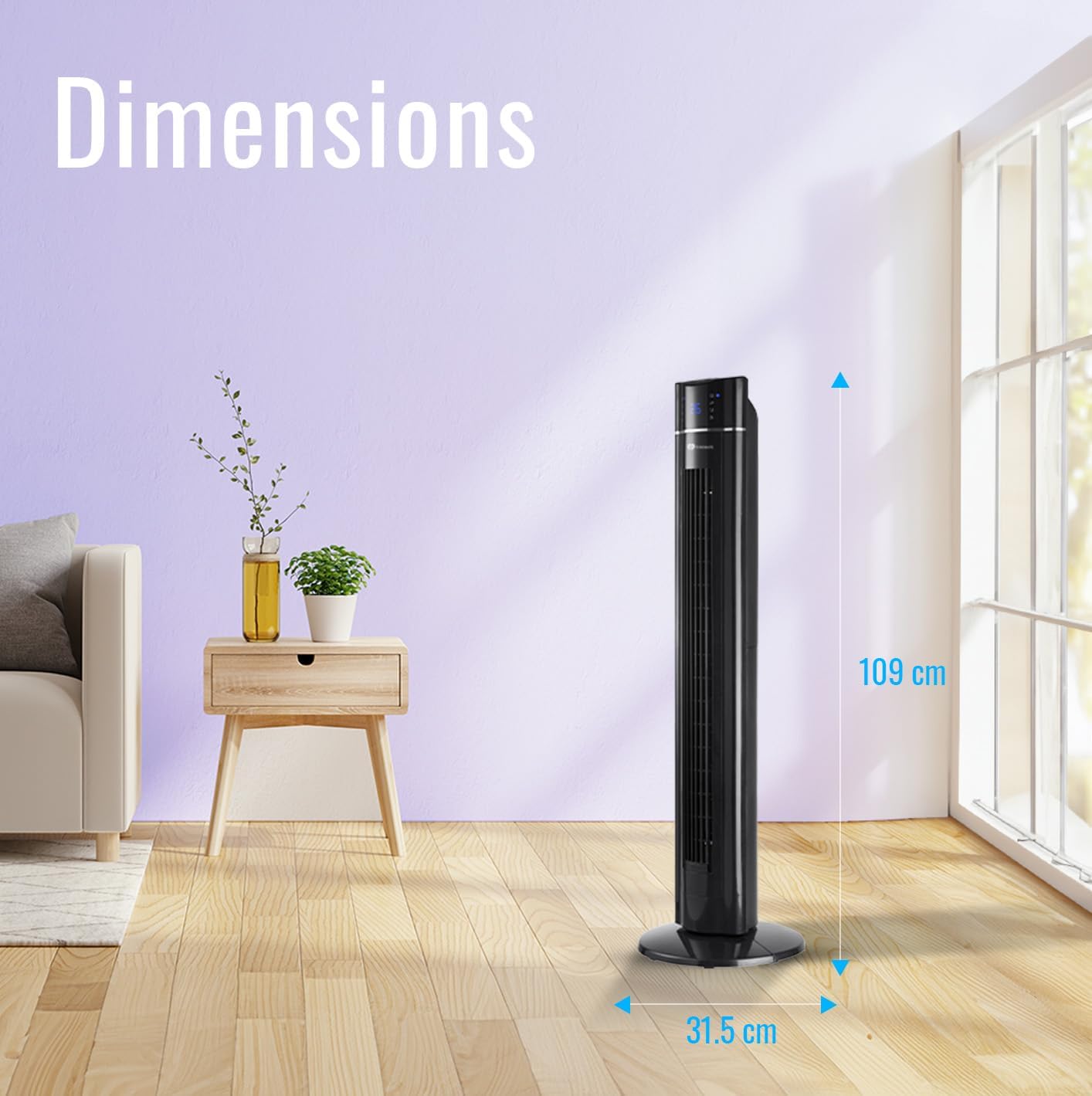
Image: The PureMate Tower Fan with its height (109 cm) and base width (31.5 cm) clearly marked, illustrating its compact and space-saving design.
4. Kullanım Talimatları
Your PureMate Tower Fan can be operated using the control panel on top of the unit or the included remote control.
4.1 Güç Açma/Kapatma
- Basın AÇIK/KAPALI button on the control panel or remote control to turn the fan on or off.
4.2 Hızın Ayarlanması
- Basın Hız button repeatedly to cycle through Low, Medium, and High settings. The current speed will be indicated on the LED display.
4.3 Selecting Wind Mode
- Basın Mod button repeatedly to select Normal, Natural, or Sleep wind mode.
- Normal Mod: Provides a constant airflow.
- Doğal Mod: Değişken fan hızlarıyla doğal bir esintiyi simüle eder.
- Uyku modu: Gradually decreases fan speed and dims the LED display for undisturbed sleep.
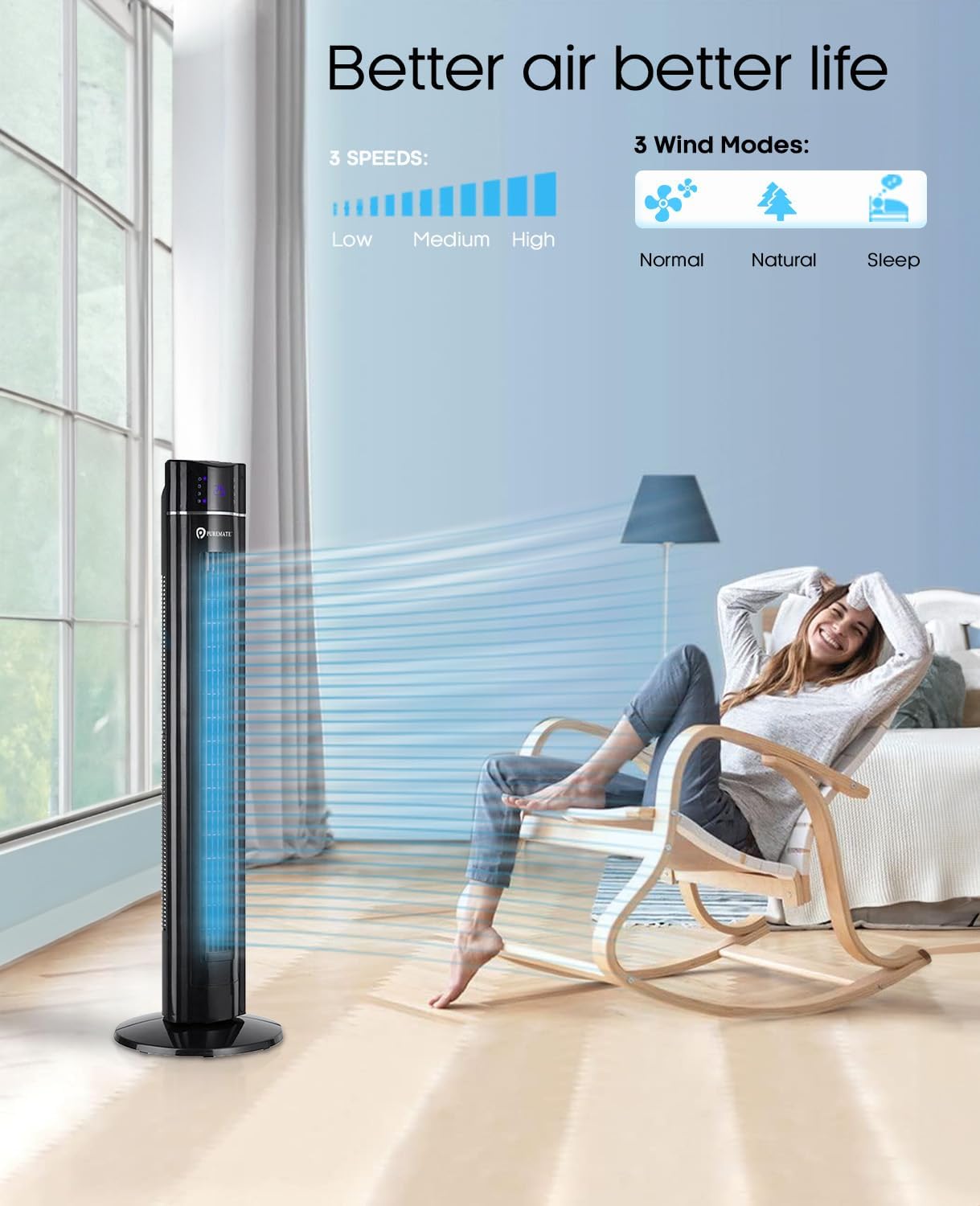
Image: The PureMate Tower Fan demonstrating its three speed settings (Low, Medium, High) and three wind modes (Normal, Natural, Sleep) for customized comfort.
4.4 Salınım Fonksiyonu
- Basın OSK (Oscillation) button to activate or deactivate the 70-degree oscillation feature, which helps distribute air across a wider area.
4.5 Zamanlayıcı İşlevi
- Basın Zamanlayıcı button repeatedly to set the desired operating time, from 1 to 8 hours, in 1-hour increments. The fan will automatically turn off after the set time.
4.6 Aroma Function
- Locate the aroma tray on the back or side of the fan.
- Pull out the tray and add a few drops of your preferred essential oil onto the sponge pad.
- Slide the tray back into its slot. The fan's airflow will diffuse the aroma.
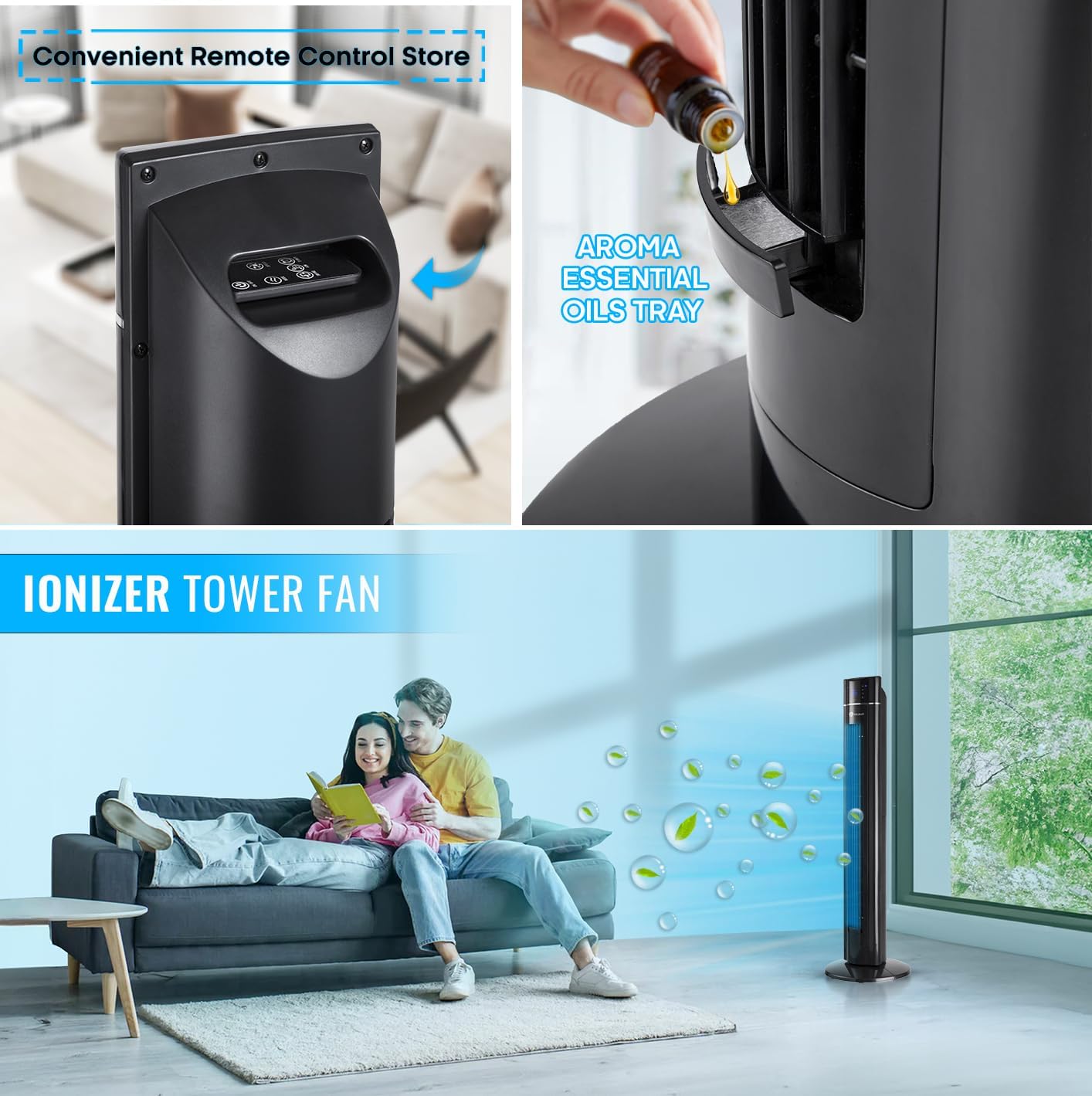
Resim: Yakın çekim view of the PureMate Tower Fan's aroma essential oils tray, showing how to add drops of oil for fragrance diffusion.
4.7 Uzaktan Kumanda
- The remote control provides full functionality of the fan from a distance. Ensure batteries are correctly inserted.
- Store the remote control in the designated slot on the fan when not in use to prevent misplacement.
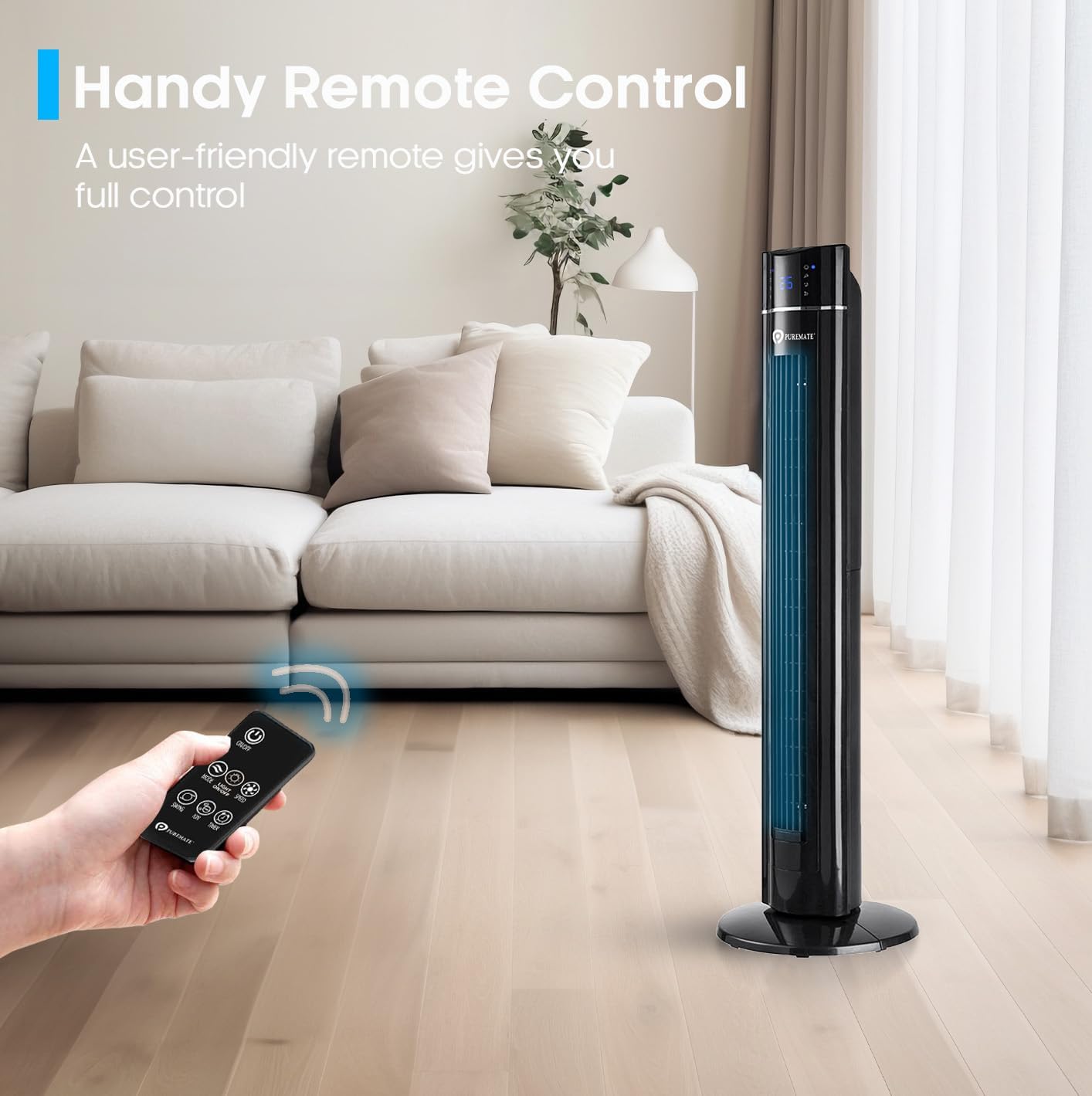
Image: A hand holding the remote control, demonstrating its use to operate the PureMate Tower Fan from a comfortable distance.
5. Bakım
Regular cleaning and maintenance will ensure the longevity and optimal performance of your PureMate Tower Fan.
- Dış Cephe Temizliği: Dış yüzeyleri yumuşak, damp bezle silin. Aşındırıcı temizleyiciler veya çözücüler kullanmayın.
- Hava Giriş/Çıkışının Temizlenmesi: Hava giriş ve çıkış ızgaralarındaki tozu temizlemek için fırça başlığına sahip bir elektrikli süpürge kullanın.
- Aroma Tepsisi: Periodically clean the aroma tray and replace the sponge pad if it becomes discolored or worn.
- Depolamak: When not in use for extended periods, unplug the fan, clean it, and store it in a cool, dry place, preferably in its original packaging.
Caution: Always unplug the fan before cleaning or performing any maintenance.
6. Sorun Giderme
If you encounter issues with your PureMate Tower Fan, refer to the following common problems and solutions:
| Sorun | Olası Neden | Çözüm |
|---|---|---|
| Fan çalışmıyor. | No power supply; Power button not pressed; Remote control batteries dead. | Check if the fan is plugged in and the outlet is working. Press the power button firmly. Replace remote control batteries. |
| Zayıf hava akışı. | Fan speed too low; Air inlets/outlets blocked by dust. | Increase fan speed. Clean the air inlets and outlets. |
| Fan makes unusual noise (rattling). | Loose components; Fan not on a level surface. | Ensure the base is securely attached. Place the fan on a stable, flat surface. If noise persists, contact customer support. |
| LED display is too bright at night. | Display light is active. | Use the 'Night Mode' or 'Light Off' button on the remote control or control panel to dim/turn off the display light. Note: Some models may reactivate the light upon power cycle. |
| Fan turns on/off unexpectedly. | Interference from other remote controls (e.g., TV remote). | Relocate the fan away from other devices that use infrared remote controls, or be mindful of other remote usage. |
| Loud beeping sound when changing settings. | Normal operational feedback. | This is a design feature. There is no option to disable the beeping sound. |
7. Özellikler
| Özellik | Detay |
|---|---|
| Marka | Saf Mate |
| Model Numarası | PM850 |
| Renk | Tower_fan_black |
| Ürün Boyutları | 31.5x31.5x109 cm |
| Ürün Ağırlığı | 4.3 kilo |
| Güç / Güçtage | 60 watt |
| Cilttage | 230 Volt |
| Gürültü Seviyesi | 52 dB |
| salınım | 70 derece |
| Zamanlayıcı | 8 saate kadar |
| Özel Özellikler | Aroma Function, Air purifier, Portable, Oscillating, Lightweight, Bladeless, Timer, Remote Controlled, Quiet Operation, Safety Certified |
8. Garanti ve Destek
PureMate products are manufactured with durability and quality in mind. For specific warranty details and customer support, please refer to the warranty card included with your product or visit the official PureMate webalan.
For further assistance, you may contact PureMate customer service through their official channels. You can also visit the PureMate Store on Amazon Daha fazla bilgi ve ürün kaydı için.
Ask a question about this manual
Ask about setup, troubleshooting, compatibility, parts, safety, or missing instructions. Manuals+ will review the question and use this page’s manual context to help answer it.