
giriiş
This manual provides detailed instructions for the TECWARE Phantom 87 Key RGB Mechanical Gaming Keyboard. Please read this manual thoroughly before using the product to ensure proper operation and to maximize your experience.
Güvenlik Bilgileri
- Klavyeyi sıvılara veya aşırı neme maruz bırakmayın.
- Aşırı sıcaklıklardan kaçının.
- Klavyeyi sökmeye veya üzerinde değişiklik yapmaya çalışmayın. Bu, garantinizi geçersiz kılabilir.
- Çocukların erişemeyeceği yerde saklayınız.
- Use only with compatible devices and power sources.
Paket İçeriği
Paketinizde tüm öğelerin mevcut olduğundan emin olun:
- TECWARE Phantom 87 Key RGB Mechanical Gaming Keyboard
- 4x Spare Mechanical Switches (Outemu Red)
- 1x Anahtar Çektirme
- 1x Tuş Çektirmesi
- 1x Kullanım Kılavuzu

Figure 1: TECWARE Phantom 87 Key RGB Mechanical Gaming Keyboard with key features such as low latency, 16.8M RGB colors, gaming-oriented design, full N-key rollover, and durable fiberglass PCB.
Kurmak
1. Klavyenin Bağlanması
- Locate the USB-A cable attached to your TECWARE Phantom keyboard.
- Plug the USB-A connector into an available USB port on your computer.
- The keyboard will automatically be detected and drivers will install (Windows/macOS).
2. Yazılım Kurulumu (İsteğe Bağlı)
For advanced customization, including per-key RGB lighting, macro recording, and user profiles, download the TECWARE software from the official TECWARE webSiteye gidin. Kurulum için ekrandaki talimatları izleyin.

Figure 2: The TECWARE software allows for custom per-key RGB lighting, 18 lighting effects control, macro recording and assignment, and up to 3 user profiles, along with brightness and speed adjustments.
Kullanım Talimatları
Temel Fonksiyonlar
- Yazma: The keyboard features Outemu Red linear switches for a smooth and quiet typing experience.
- N-Anahtar Geçişi: All key presses are registered simultaneously, preventing ghosting during rapid input.
- Windows Kilidi: Use the dedicated Windows Lock key (often Fn + Win key) to disable the Windows key during gaming to prevent accidental interruptions.
RGB Aydınlatma Kontrolü
The Phantom keyboard offers 16.8 million RGB colors and 18 pre-set lighting effects. These can be controlled directly on the keyboard or through the TECWARE software.
- Aydınlatma Modlarını Değiştirme: Use the Fn key combined with specific function keys (refer to your keyboard's keycaps for symbols) to cycle through the 18 pre-set lighting modes.
- Parlaklık/Hız Ayarlama: Use Fn + Arrow keys (or other designated keys) to adjust the brightness and speed of the lighting effects.
- Özelleştirme: For per-key lighting and advanced effects, use the TECWARE software.
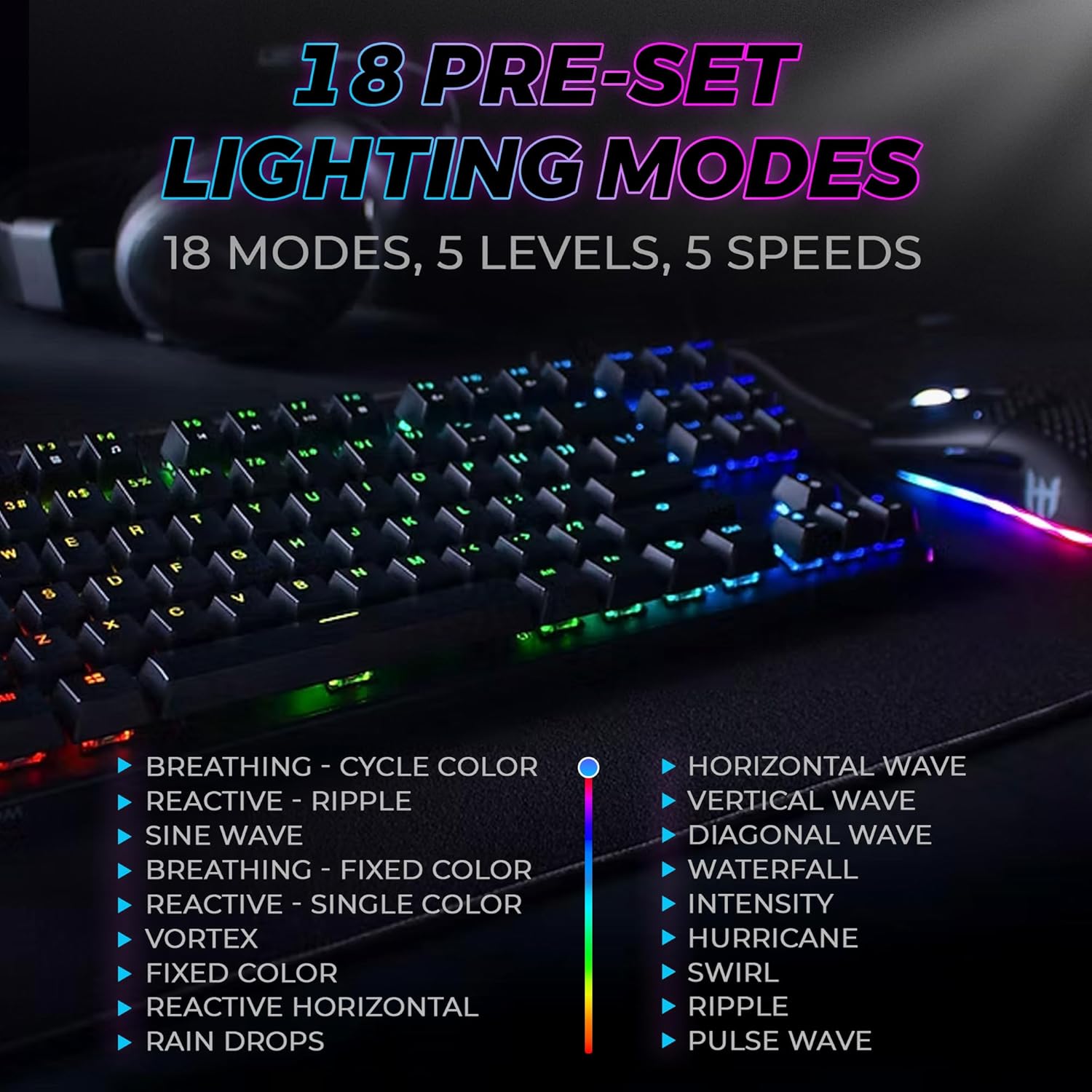
Figure 3: The keyboard features 18 pre-set lighting modes with 5 levels of brightness and 5 levels of speed, including effects like Breathing, Ripple, Sine Wave, Vortex, Waterfall, and Pulse Wave.
Multimedya Tuşları
Access multimedia controls by pressing the Fn key in combination with the F-keys (F1-F12). The specific functions are typically indicated by icons on the keycaps.
- Examptarih: Fn + F7 (Play/Pause), Fn + F8 (Stop), Fn + F9 (Mute).
Video 1: Official TECWARE branded video showcasing various products, including the Phantom keyboard, highlighting its features and design philosophy.
Bakım
Temizlik
- Temizlemeden önce klavyeyi bilgisayarınızdan ayırın.
- Tuş başlıklarını ve kasayı silmek için yumuşak, kuru bir bez kullanın.
- For deeper cleaning, use the provided keycap puller to remove keycaps and compressed air to clear debris from under the keys.
Anahtar Değiştirme
The TECWARE Phantom keyboard features hot-swappable Outemu mechanical switches, allowing for easy replacement without soldering.
- Birlikte verilen tuş kapağı sökme aparatını kullanarak istediğiniz tuş kapağını nazikçe çıkarın.
- Use the provided switch puller to carefully grip the switch and pull it straight up to remove it.
- Yeni anahtarın pimlerini PCB üzerindeki deliklerle hizalayın.
- Yeni anahtarı yerine güvenli bir şekilde oturana kadar yavaşça bastırın.
- Tuş kapağını tekrar takın.
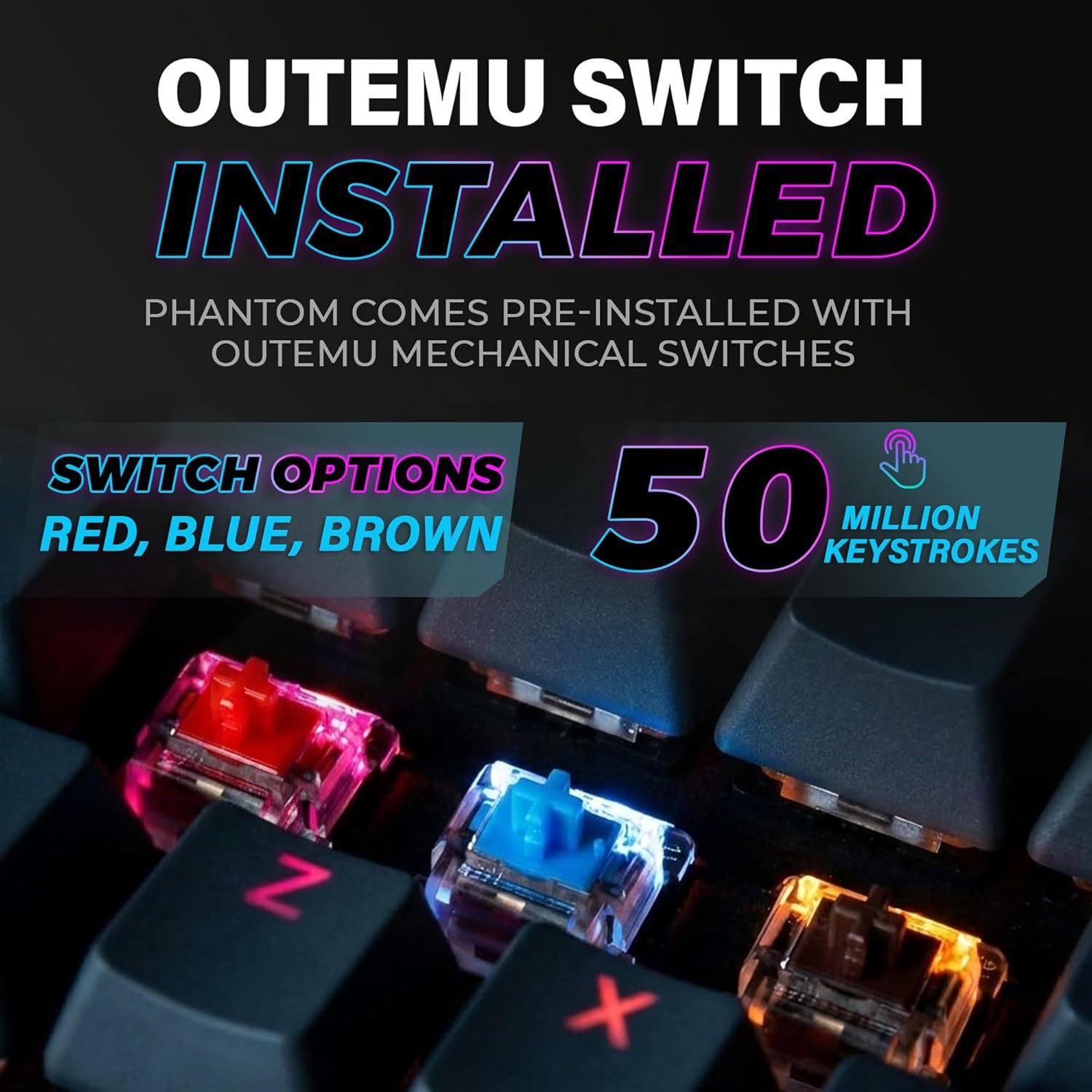
Figure 4: The keyboard comes with pre-installed Outemu switches, available in Red, Blue, and Brown options, rated for 50 million keystrokes.

Figure 5: An Outemu Red linear switch, detailing its pre-travel of 2.00mm, operating force of 45 gf/CN, and total travel of 4.00mm.
Sorun giderme
| Sorun | Olası Çözüm |
|---|---|
| Klavye yanıt vermiyor | Ensure the USB cable is securely connected to both the keyboard and the computer. Try a different USB port or computer. |
| RGB aydınlatma çalışmıyor | Check if the lighting is turned off or set to minimum brightness using the Fn key combinations. Reinstall the TECWARE software if using custom profiles. |
| Belirli tuşlar çalışmıyor | If you have hot-swappable switches, try replacing the faulty switch with one of the spare switches provided. Ensure the switch is properly seated. |
| Keys feel inconsistent | Ensure keycaps are fully pressed down. Clean under the keycaps for any debris. |
Video 2: Official TECWARE Phantom video demonstrating various features and functionalities of the keyboard.
Özellikler
| Özellik | Detay |
|---|---|
| Model Numarası | TWKB-P87ZORD |
| Anahtar Türü | Outemu Red Mechanical (Linear) |
| Anahtar Sayısı | 87 Anahtarlar |
| RGB Aydınlatma | 16.8 Million Colors, 18 Pre-set Modes |
| Anket Oranı | 1000Hz |
| N-Anahtar Devirme | Tam N-Anahtar Devirme |
| Bağlantı | Kablolu USB-A |
| PCB | Dual-layer Fiberglass PCB |
| Boyutlar (U x G x Y) | 14.21 x 5.24 x 1.61 inç |
| Ağırlık | 2.53 pound |
Garanti ve Destek
TECWARE products are designed for durability and performance. For warranty information, technical support, or to download the latest software and drivers, please visit the official TECWARE webSite üzerinden satın alabilir veya müşteri hizmetleriyle iletişime geçebilirsiniz. Garanti talepleriniz için satın alma belgenizi saklayın.
Çevrimiçi Kaynaklar:
- Official TECWARE Webalan: www.tecware.com
- Ürün Destek Sayfası: TECWARE Amazon Store