
1. Giriş
Thank you for choosing the Rampage SMX-R12 Hawker Gaming Mouse. This manual provides detailed instructions for setting up, operating, and maintaining your new gaming mouse. The SMX-R12 Hawker is designed for precision and comfort, featuring an advanced optical sensor, adjustable DPI settings, and multiple programmable buttons to enhance your gaming experience.
2. Ürün Bittiview
Familiarize yourself with the components of your Rampage SMX-R12 Hawker Gaming Mouse:
- Sol Tıklama Düğmesi: Standart birincil tıklama işlevi.
- Sağ Tıklama Butonu: Standart ikincil tıklama fonksiyonu.
- Kaydırma tekerleği: For scrolling and can also function as a middle click button.
- DPI Ayar Düğmeleri: Buttons to cycle through different DPI sensitivity levels.
- İleri/Geri Düğmeleri: Side-mounted buttons for navigation or custom functions.
- Optik sensör: Located on the bottom, provides high-resolution tracking.
- Açma/Kapama Anahtarı: Located on the bottom, to power the mouse on or off.
- Mikro USB Şarj Bağlantı Noktası: Located at the front, for charging the internal battery.
- USB Alıcı: Small dongle for wireless connectivity, often stored in a compartment on the mouse's bottom.

Şekil 2.1: Üst view R'ninampage SMX-R12 Hawker Gaming Mouse, showing the left/right click buttons, scroll wheel, and DPI adjustment buttons.

Şekil 2.2: Yan view R'ninampage SMX-R12 Hawker Gaming Mouse, highlighting the ergonomic design and side buttons.

Şekil 2.3: Alt view R'ninampage SMX-R12 Hawker Gaming Mouse, showing the optical sensor, On/Off switch, and USB receiver storage compartment.
3. Kurulum
- Fareyi Paketinden Çıkarın: Carefully remove the mouse and its accessories from the packaging. Ensure you have the Rampage SMX-R12 Hawker mouse, the USB wireless receiver, and the micro USB charging cable.
- USB Alıcısını Bulun: The small USB wireless receiver is typically stored in a compartment on the bottom of the mouse for safe keeping during transport. Remove it from its slot.
- USB Alıcısını bağlayın: Plug the USB wireless receiver into an available USB port on your computer. Your operating system should automatically detect and install the necessary drivers.
- Fareyi Açın: Locate the On/Off switch on the bottom of the mouse and slide it to the 'On' position. The mouse should now connect wirelessly to your computer.
- Initial Charge (Recommended): For optimal performance, it is recommended to fully charge the mouse before first use. Connect the micro USB charging cable to the mouse's charging port and the other end to a USB power source (e.g., computer USB port, USB wall adapter).
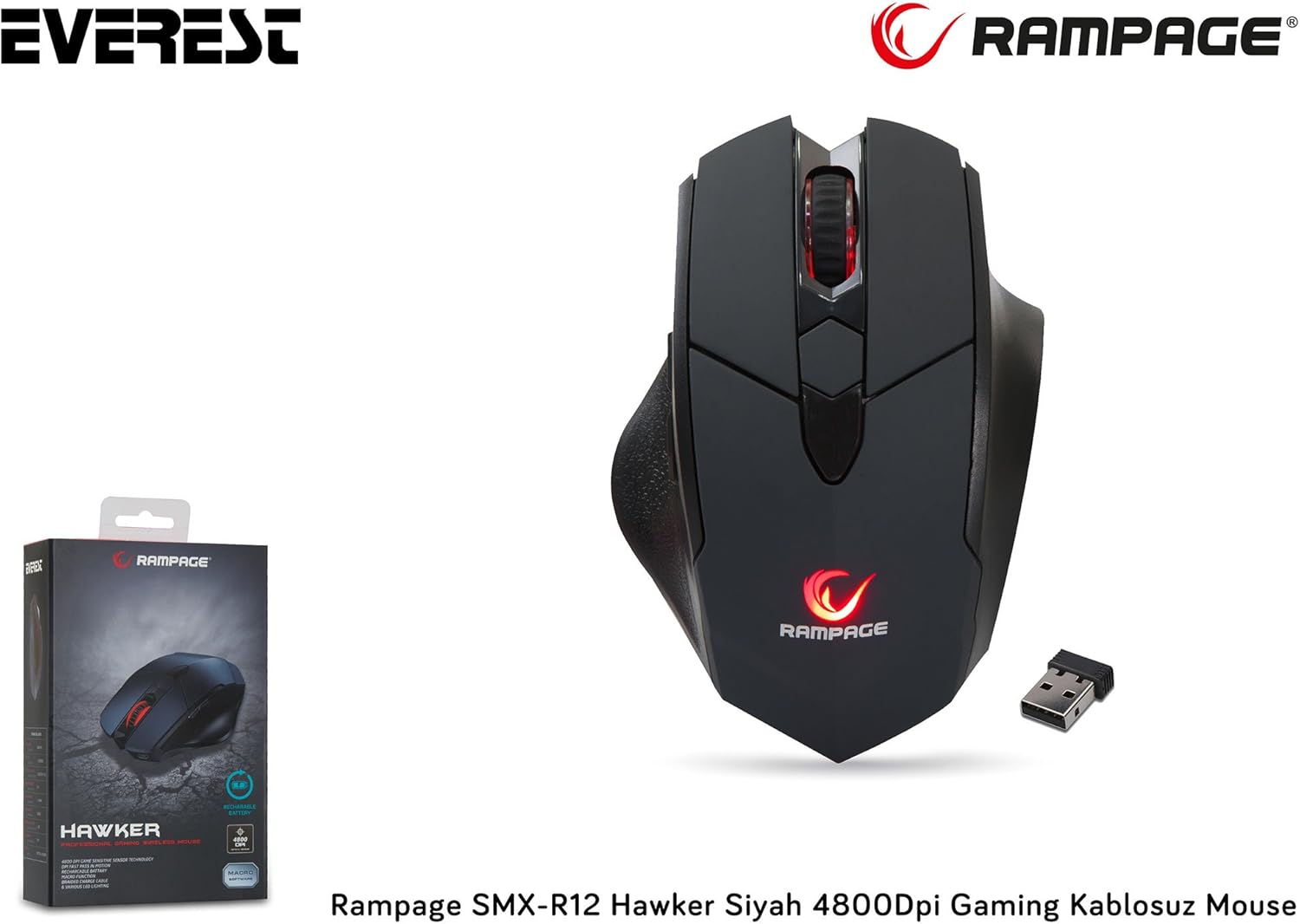
Figure 3.1: The Rampage SMX-R12 Hawker Gaming Mouse with its USB receiver and charging cable.
4. Kullanım Talimatları
Once connected, your Rampage SMX-R12 Hawker mouse is ready for use. Here are its primary functions:
- Temel Gezinme: Ekrandaki imleci kontrol etmek için fareyi düz bir yüzey üzerinde hareket ettirin.
- Tıklama: Use the left and right click buttons for primary and secondary actions.
- Kaydırma: Rotate the scroll wheel up or down to navigate through documents and web pages. Press the scroll wheel for a middle-click function.
- Yan Düğmeler: The side buttons typically function as 'Forward' and 'Backward' in web tarayıcılar ve file explorers. These buttons may be programmable through specific software (if available from the manufacturer) for custom in-game actions.
5. DPI Ayarları
Rampage SMX-R12 Hawker features an optical sensor with adjustable DPI (Dots Per Inch) settings, allowing you to change the mouse's sensitivity on the fly. Higher DPI means the cursor moves further with less physical mouse movement, ideal for fast-paced gaming. Lower DPI provides more precise control, suitable for tasks requiring accuracy.
Use the dedicated DPI adjustment buttons (usually located behind the scroll wheel) to cycle through the available DPI levels. The mouse typically has visual indicators (e.g., LED color changes) to show the current DPI setting, though specific details may vary.
The mouse supports a maximum DPI of 4800, offering a wide range of sensitivity options.
6. Fareyi Şarj Etme
Rampage SMX-R12 Hawker Gaming Mouse is equipped with a rechargeable internal battery, eliminating the need for disposable batteries. When the battery level is low, the mouse's indicator light may flash or change color.
- Kabloyu bağlayın: Insert the micro USB end of the charging cable into the charging port located at the front of the mouse.
- Güce Bağlanın: Plug the standard USB-A end of the charging cable into a powered USB port on your computer or a USB wall adapter.
- Şarj Göstergesi: The mouse will typically display an LED indicator to show that it is charging. This light may turn solid when fully charged.
- Şarj Süresi: A full charge usually takes a few hours. You can continue to use the mouse while it is charging.

Figure 6.1: The micro USB charging port located at the front of the Rampage SMX-R12 Hawker Gaming Mouse.
7. Bakım
Farenizin uzun ömürlü ve en iyi performansı göstermesi için aşağıdaki bakım yönergelerini izleyin:
- Temizlik: Farenin yüzeyini silmek için yumuşak ve kuru bir bez kullanın. İnatçı kirler için hafifçe silin.ampBezi suyla yıkayın. Sert kimyasallar veya aşındırıcı malzemeler kullanmaktan kaçının.
- Sensör Temizleme: Occasionally, dust or debris may accumulate around the optical sensor. Use a cotton swab or compressed air to gently clean the sensor area.
- Pil Bakım: Pil ömrünü uzatmak için fareyi sık sık tamamen boşaltmaktan kaçının. Pil göstergesi düşük olduğunda şarj edin.
- Depolamak: When not in use, especially during travel, store the USB receiver in its designated compartment on the mouse's bottom to prevent loss.
8. Sorun Giderme
If you encounter issues with your Rampage SMX-R12 Hawker mouse, refer to the following common solutions:
| Sorun | Olası Çözüm |
|---|---|
| Fare yanıt vermiyor |
|
| İmleç düzensiz veya titrek |
|
| Fare şarj olmuyor |
|
| Yan düğmeler çalışmıyor. |
|
9. Özellikler
| Özellik | Detay |
|---|---|
| Marka | Rampyaş |
| Örnek | SMX-R12 Hawker |
| Sensör Tipi | Optik |
| DPI (İnç Başına Nokta Sayısı) | 4800 DPI'a kadar |
| Düğme Sayısı | 7 (Left, Right, Scroll Click, 2 DPI, 2 Side) |
| Bağlantı | 2.4GHz Kablosuz (USB Alıcı aracılığıyla) |
| Pil Türü | Rechargeable (500mAh capacity) |
| Şarj Portu | Mikro USB |
| Şarj Kablosu Uzunluğu | 1.7 metre |
| Boyutlar (U x G x Y) | 12.5x4.2x8.3 cm |
| Ağırlık | 270 gram |
| İşletim Sistemi Uyumluluğu | Windows, macOS, ChromeOS (general compatibility) |
10. Garanti ve Destek
Rampage products are designed for quality and reliability. For information regarding warranty coverage, technical support, or service, please refer to the warranty card included with your product or visit the official Rampyaş webSite. Satın alma belgenizi herhangi bir garanti talebi için saklayın.
For further assistance, please contact Rampage customer support through their official channels.