
1. Giriş
Satın aldığınız için teşekkür ederizasing the Capello Play it All Bluetooth Wireless Home Stereo Speaker CI302. This device offers versatile audio playback options including Bluetooth wireless streaming, CD player functionality, and FM digital radio. This manual provides detailed instructions for setup, operation, maintenance, and troubleshooting to ensure optimal performance and longevity of your speaker system.
2. Önemli Güvenlik Bilgileri
- Cihazı çalıştırmadan önce tüm talimatları okuyun.
- Bu kılavuzu ileride başvurmak üzere saklayın.
- Yangın veya elektrik çarpması tehlikelerini önlemek için üniteyi yağmura veya neme maruz bırakmayın.
- Uygun havalandırmayı sağlayın; havalandırma açıklıklarını kapatmayın.
- Üniteyi sabit, düz bir yüzeye yerleştirin.
- Yalnızca üretici tarafından belirtilen aparatları/aksesuarları kullanın.
- Şimşekli fırtınalarda veya uzun süre kullanılmadığında ünitenin fişini çekin.
- Tüm bakımları yetkili servis personeline yaptırın.
3. Paket İçeriği
Lütfen tüm öğelerin mevcut olduğundan emin olun:
- Capello Play it All Bluetooth Wireless Home Stereo Speaker CI302
- Uzaktan kumanda
- AC Güç Adaptörü
- Kullanım Kılavuzu (bu belge)
4. Ürün Bittiview
Familiarize yourself with the main components and controls of your Capello Play it All speaker.
Ön View

Şekil 4.1: Ön view of the Capello Play it All speaker, showing the speaker grille, digital clock display, and subtle branding.
Üst Panel Kontrolleri

Şekil 4.2: Top panel of the Capello Play it All speaker, illustrating the CD compartment, 'capello' logo, and various control buttons including PRESET, MODE, PAIRING, PROGRAM/CLOCK SET, SKIP, PLAY/PAUSE, STOP, REPEAT, and VOLUME.
- PRESET +/-: Navigate through saved FM radio stations.
- TARİFİ: Switch between Bluetooth, CD, FM Radio, and Line-In modes.
- EŞLEŞTİRME: Bluetooth eşleştirme modunu başlatın.
- PROGRAM/CLOCK SET: Program CD tracks or set the clock.
- SKIP ◀◀ / ▶▶: Skip tracks on CD or adjust FM frequency.
- PLAY/PAUSE ▶▶: Play or pause CD playback.
- STOP ■: Stop CD playback.
- TEKRARLAMAK: Repeat current track or all tracks on CD.
- SES +/-: Ses seviyesini ayarlayın.
- AÇ KAPA: Open or close the CD compartment.
- YANINDA OLMAK: Cihazı açıp kapatın.
Rear Panel (Typical)
The rear panel typically includes the AC power input, FM antenna connection, and Line-In jack.
5. Kurulum
5.1 Güç Bağlantısı
- Connect the AC power adapter to the DC IN jack on the rear of the speaker.
- Adaptörün diğer ucunu standart bir duvar prizine takın.
- The unit will enter standby mode, and the digital clock display will illuminate.
5.2 FM Anten Kurulumu
For optimal FM radio reception, extend the FM wire antenna fully and position it for the best signal. Avoid placing it near other electronic devices that may cause interference.
5.3 Saati Ayarlama
- Bekleme modunda, tuşuna basın ve basılı tutun. PROGRAM/CLOCK SET düğme.
- The hour digits will begin to flash. Use the SKIP ◀◀ / ▶▶ Saati ayarlamak için düğmeler.
- Basmak PROGRAM/CLOCK SET Saati tekrar teyit etmek için.
- Dakika rakamları yanıp sönecektir. Kullanın SKIP ◀◀ / ▶▶ Dakikaları ayarlamak için düğmeler.
- Basmak PROGRAM/CLOCK SET one last time to save the setting.
6. Kullanım Talimatları
6.1 Güç Açma/Kapatma ve Mod Seçimi
- Basın YANINDA OLMAK button on the unit or the remote control to turn the speaker on or off.
- Basın MOD button repeatedly to cycle through available modes: Bluetooth, CD, FM Radio, and Line-In.
6.2 Bluetooth Wireless Streaming
- Hoparlörü açın ve aşağıdaki komutları kullanarak Bluetooth modunu seçin. MOD button. The display will show 'BT' and flash, indicating it's in pairing mode.
- On your Bluetooth-enabled device (smartphone, tablet, computer), enable Bluetooth and search for available devices.
- Select 'Capello CI302' (or similar) from the list of devices.
- Once paired, the speaker will emit a confirmation tone, and 'BT' on the display will stop flashing.
- You can now play audio from your device through the speaker. Use your device or the speaker's controls for volume and track navigation.
6.3 CD Oynatma
- Basın AÇIK/KAPALI CD bölmesini açmak için düğme.
- Carefully place an audio CD (CD, CD-R/-RW) with the label side facing up into the compartment.
- Close the CD compartment. The unit will read the disc.
- If not already in CD mode, press the MOD CD modunu seçmek için düğmesine basın.
- Basın OYNAT/DURDUR oynatmayı başlatmak için düğmesine basın.
- Kullanmak SKIP ◀◀ / ▶▶ to skip tracks, DUR ■ to stop, and TEKRARLAMAK to cycle through repeat options.
6.4 FM Digital Radio
- Basın MOD button to select FM radio mode. The current frequency will be displayed.
- Otomatik tarama: Basılı tutun OYNAT/DURDUR button to automatically scan and save available FM stations as presets.
- Manuel Ayarlama: Basmak SKIP ◀◀ / ▶▶ briefly to fine-tune the frequency. Press and hold to scan for the next strong station.
- Ön Ayarlara Erişim: Kullanın ÖN AYAR +/- Kaydedilmiş istasyonlar arasında geçiş yapmak için düğmeler.
6.5 Line-In Operation
- Connect an audio cable (not included) from the headphone jack or line-out of an external audio device to the HAT GİRİŞİ jack on the speaker.
- Basın MOD Line-In modunu seçmek için düğme.
- Play audio from your connected device. Volume can be controlled via the speaker or the external device.
6.6 USB'den Şarj Etme
The speaker features a USB port for charging compatible devices (e.g., smartphones, tablets). Connect your device's USB charging cable (not included) to the USB port on the speaker. The speaker does not need to be in a specific mode for USB charging to function.
6.7 Uzaktan Kumanda Kullanımı
The included remote control provides convenient access to all functions. Ensure the remote has working batteries and is pointed towards the front of the speaker.
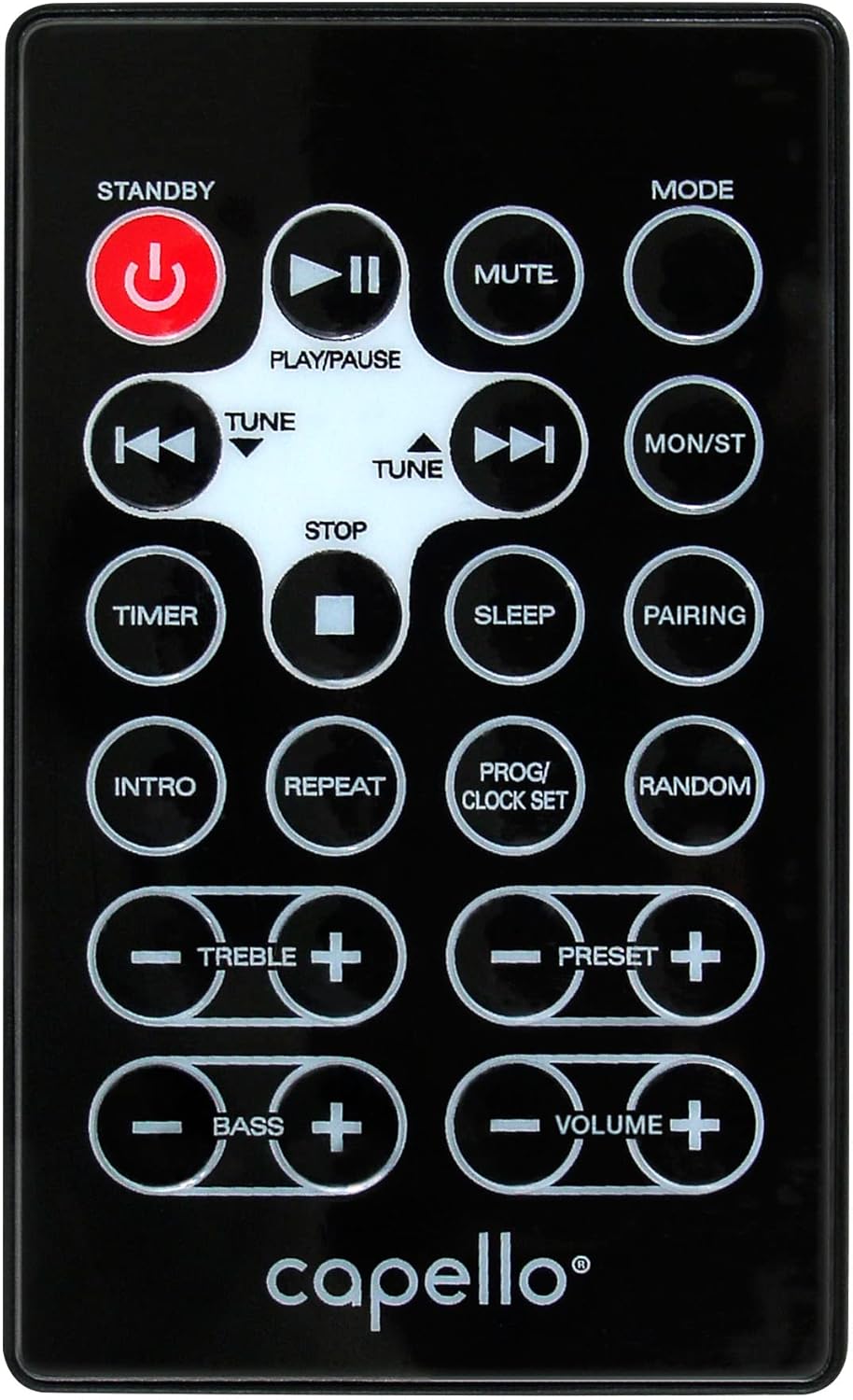
Şekil 6.1: Layout of the remote control for the Capello Play it All speaker, showing buttons for Standby, Play/Pause, Mute, Mode, Skip/Tune, Stop, Timer, Sleep, Pairing, Intro, Repeat, Program/Clock Set, Random, Treble, Bass, and Volume controls.
- YANINDA OLMAK: Güç açık / kapalı.
- OYNAT/DURDUR: Sesi oynatın veya duraklatın.
- SESSİZ: Sesi kapatın veya açın.
- TARİFİ: Cycle through input modes.
- SKIP/TUNE ◀◀ / ▶▶: Skip tracks or tune radio frequency.
- DURMAK: Oynatmayı durdur.
- ZAMANLAYICI: Uyku zamanlayıcısını ayarlayın.
- UYUMAK: Activate sleep function.
- EŞLEŞTİRME: Bluetooth eşleştirmesini başlatın.
- GİRİŞ: Play the first few seconds of each CD track.
- TEKRARLAMAK: Mevcut parçayı veya tüm parçaları tekrarlayın.
- PROG/CLOCK SET: Program CD tracks or set clock.
- RASTGELE: Play CD tracks in random order.
- TİZ +/-: Tiz ses seviyelerini ayarlayın.
- BAS +/-: Bas seviyelerini ayarlayın.
- SES +/-: Genel ses seviyesini ayarlayın.
7. Bakım
7.1 Temizlik
- Temizlemeden önce daima ünitenin fişini elektrik prizinden çekin.
- Dış yüzeyleri silmek için yumuşak ve kuru bir bez kullanın.
- Cilaya zarar verebileceğinden aşındırıcı temizleyiciler, cilalar veya çözücüler kullanmayın.
- CD merceği için özel bir CD mercek temizleme diski kullanın.
7.2 Depolama
If storing the unit for an extended period, unplug it from the power source and store it in a cool, dry place away from direct sunlight and extreme temperatures.
8. Sorun Giderme
| Sorun | Olası Neden | Çözüm |
|---|---|---|
| Güç yok | Güç kablosu bağlı değil; priz aktif değil. | Ensure power cord is securely plugged in; try a different outlet. |
| Ses yok | Volume too low; incorrect mode selected; external device muted. | Increase volume; select correct input mode; check external device volume/mute. |
| CD atlıyor veya çalmıyor. | Dirty or scratched CD; CD inserted incorrectly; dirty CD lens. | Clean or replace CD; insert CD label-side up; use a CD lens cleaner. |
| Bluetooth eşleştirme başarısız oldu | Device too far; Bluetooth not enabled on device; speaker not in pairing mode. | Move device closer; enable Bluetooth; ensure speaker is in BT pairing mode. |
| Zayıf FM alımı | Anten uzatılmamış; parazit. | Fully extend and reposition FM antenna; move away from other electronics. |
| Uzaktan kumanda çalışmıyor | Batteries depleted; obstruction; not pointed at sensor. | Replace batteries; remove obstructions; point remote directly at the unit. |
9. Özellikler
| Özellik | Şartname |
|---|---|
| Marka | Şapel |
| Model Numarası | CI302 |
| Bağlantı Teknolojisi | Bluetooth |
| Hoparlör Tipi | Stereo |
| Ses Çıkışı Modu | Stereo |
| Desteklenen Ses Biçimleri | CD, MP3 |
| Hoparlörlerin Nominal Çıkış Gücü | 10 Watt |
| Hoparlörlerin Maksimum Çıkış Gücü | 10 Watt |
| Hoparlör Surround Ses Kanalı Yapılandırması | 2.0 |
| Güç Kaynağı Türü | Kablolu Elektrik |
| Uyumlu Cihazlar | Dizüstü Bilgisayar, Akıllı Telefon, Tablet |
| Özel Özellikler | Digital Display, Portable, USB Port |
| Malzeme Türü | Plastik |
| Montaj Tipi | Masa Üstü |
| Ürün Ağırlığı | 2.57 Kilogram |
| Paket Boyutları | 38.3x24.2x18.5 cm |
| Piller Dahil | HAYIR |
| Piller Gerekli | HAYIR |
10. Garanti ve Destek
This product is covered by a limited warranty. Please refer to the warranty card included in your package for specific terms and conditions. For technical support or customer service inquiries, please contact Capello customer support through their official websatın alma belgelerinizle birlikte verilen site veya iletişim bilgileri.