
1. Ürün Bittiview
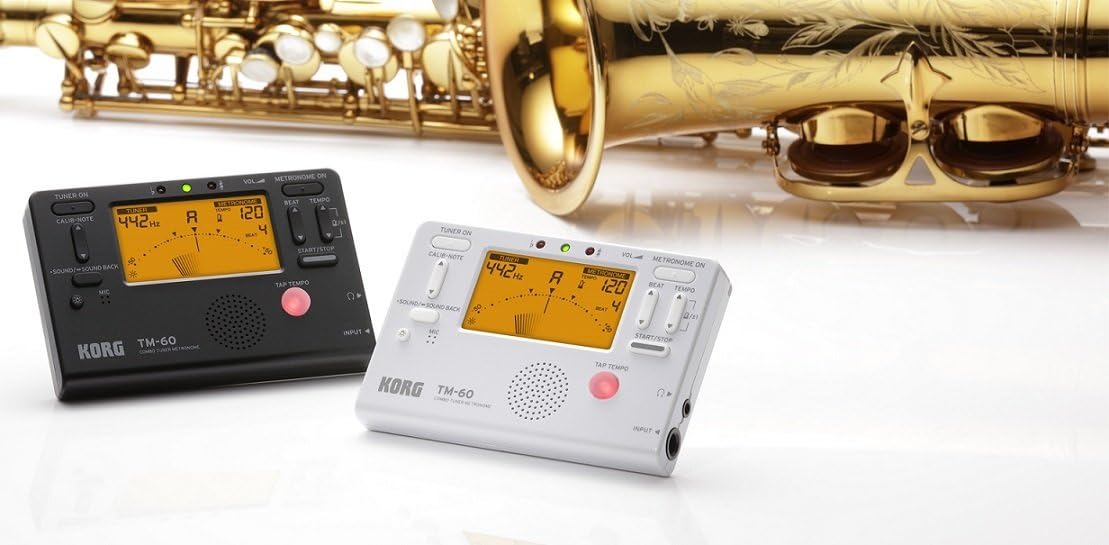
The KORG TM60CBK is a versatile combo tuner and metronome designed for musicians. It features a high-precision tuner function and a metronome function that can be used simultaneously. This model includes a CM-200 Contact Clip-on Microphone for enhanced tuning accuracy, especially in noisy environments. The large screen displays both tuner and metronome functions clearly, making it an essential tool for practicing.
- Çift İşlevsellik: High-precision tuner and metronome functions can be used concurrently.
- Dahil edilen mikrofon: Comes with a CM-200 Contact Clip-on Microphone for direct instrument tuning.
- Ekranı Temizle: Features a new, larger screen for simultaneous display of tuner and metronome.
- Renk: Siyah.
2. Kurulum
2.1 Pil Kurulumu
The KORG TM60CBK operates on AAA batteries. To install or replace batteries:
- Ünitenin arkasında bulunan pil bölmesi kapağını açın.
- AAA pilleri kutupların doğru olmasına dikkat ederek (+/-) yerleştirin.
- Pil bölmesi kapağını sıkıca kapatın.
2.2 Connecting the CM-200 Contact Clip-on Microphone
For precise tuning, especially with acoustic instruments or in loud settings, connect the included clip-on microphone:
- Plug the microphone's 1/4-inch (6.35mm) jack into the INPUT jack on the side of the TM60CBK unit.
- Attach the clip to the headstock or bell of your instrument. Ensure the clip is securely fastened and the microphone is positioned to pick up vibrations effectively.
3. Kullanım Talimatları
3.1 Tuner Modu
To use the tuner function:
- Press the 'TUNER ON' button to activate the tuner.
- Select the desired instrument mode (Chromatic, Guitar, Bass, Violin, Ukulele) using the 'ITEM' button.
- Adjust the A4 calibration pitch (default 440Hz) using the 'CALIB./NOTE' buttons if needed.
- Play a single note on your instrument. The display will show the detected note and indicate if it is sharp, flat, or in tune using the needle-style meter and LED indicators.
3.2 Metronom Modu
To use the metronome function:
- Press the 'METRONOME ON' button to activate the metronome.
- Set the desired tempo (BPM) using the 'TEMPO' buttons.
- Adjust the beat (time signature) using the 'BEAT' buttons.
- Select different rhythm patterns using the 'RHYTHM' button.
- Press 'START/STOP' to begin or pause the metronome.
- Adjust the volume using the 'VOL' slider on the side of the unit.
- For private practice, plug headphones into the 3.5mm headphone jack.
- Use the 'TAP TEMPO' button to set the tempo by tapping along to a desired rhythm.
3.3 Ton Üreteci
The TM60CBK can also generate reference tones:
- In Tuner Mode, press the 'SOUND/SOUND BACK' button to activate the tone generator.
- Use the 'CALIB./NOTE' buttons to select the desired reference note.
- Listen to the generated tone and tune your instrument by ear.
4. Ürün Görselleri



5. Özellikler
| Özellik | Detay |
|---|---|
| Model Adı | TM60 |
| Model Numarası | TM60C-BK |
| Renk | Siyah |
| Ürün Boyutları (U x G x Y) | 4.37 x 2.91 x 0.71 inç |
| Ürün Ağırlığı | 0.16 Gram |
| Dahil Bileşenler | Çanta |
| Bağlayıcı Türü | USB (for power, not data) |
6. Bakım
To ensure the longevity and optimal performance of your KORG TM60CBK:
- Temizlik: Cihazı yumuşak, kuru bir bezle silin. Aşındırıcı temizleyiciler veya çözücüler kullanmaktan kaçının.
- Pil Bakım: Ünite uzun süre kullanılmayacaksa, sızıntıyı önlemek için pilleri çıkarın.
- Depolamak: Üniteyi serin, kuru ve doğrudan güneş ışığından ve aşırı sıcaklıklardan uzak bir yerde saklayın.
7. Sorun Giderme
- Ünite açılmıyor: Pillerin montajını kontrol edin ve pillerin bitmediğinden emin olun.
- Tuner is inaccurate: Ensure the CM-200 microphone is securely attached to the instrument. Verify the correct instrument mode is selected. Check the A4 calibration pitch.
- No sound from metronome: Check the volume level. Ensure headphones are not plugged in if you intend to use the internal speaker.
8. Garanti ve Destek
For warranty information, technical support, or service inquiries, please refer to the official KORG website or contact KORG customer service directly. Keep your purchase receipt as proof of purchase for warranty claims.
