
1. Giriş
Thank you for choosing the Car and Driver CDC-632 Dash Cam. This device is designed to record your journeys in high definition, providing security and peace of mind on the road. It features 2K Ultra HD video recording, built-in Wi-Fi, GPS tracking, and app connectivity for convenient operation and file yönetmek.
2. Paket İçeriği
Lütfen aşağıdaki öğelerin kutucuğunu işaretleyin:
- Car and Driver CDC-632 Dash Cam
- Ön Cam Vantuzlu Montajı
- Araba Adaptörü
- 8 GB Mikro SD Kart

Image: The retail packaging for the Car and Driver CDC-632 Dash Cam, highlighting key features like G-sensor, 1080P Full HD HDR, Wi-Fi, Loop Recording, and GPS Tracking. An 8GB memory card is also indicated as included.
3. Ürün Bittiview
Familiarize yourself with the components of your dash cam.

Image: The Car and Driver CDC-632 Dash Cam attached to its suction mount. The 2.4-inch LCD screen is visible, displaying a road view with recording indicators, resolution (1920x1080 P60), and current date/time.
Ön View

Resim: Yakın çekim ön görünüm view of the Car and Driver CDC-632 Dash Cam, highlighting the central camera lens and ventilation grilles on the sides.
Arka View (LCD ekran)

Resim: Arka view of the Car and Driver CDC-632 Dash Cam, featuring the 2.4-inch LCD screen displaying a road scene with HDR indicator, exposure value, and battery status. Control buttons are visible below the screen.
4. Kurulum
4.1 Dash Cam'in Montajı
- Araç içi kamerayı monte etmeyi düşündüğünüz ön cam bölgesini temizleyin.
- Vantuzlu montaj aparatını araç kamerasına takın.
- Vantuzu ön cama sıkıca bastırın ve sabitlemek için kolu çevirin.
- Net bir görüş sağlamak için çizgi kameranın açısını ayarlayın view Önümüzdeki yolun.
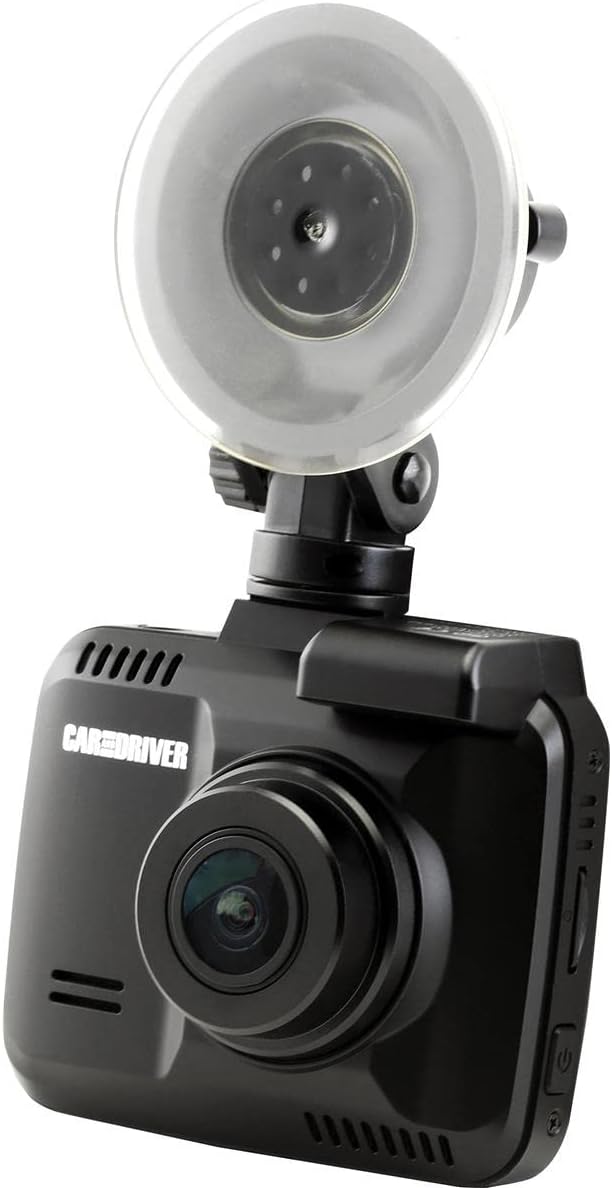
Image: The Car and Driver CDC-632 Dash Cam is shown mounted on a car's windshield using its suction cup. The camera is angled to capture the road ahead, with the power cable connected.
4.2 Cihaza Güç Verme
- Connect the car adapter to the dash cam's power input port.
- Plug the car adapter into your vehicle's 12V power outlet (cigarette lighter socket).
- The dash cam will typically power on automatically when the vehicle's ignition is turned on and begin recording.
5. İlk Kurulum
5.1 Inserting the Micro-SD Card
The dash cam supports Micro-SD cards up to 64GB. An 8GB Micro-SD card is included.
- With the dash cam powered off, locate the Micro-SD card slot on the side of the device.
- Insert the Micro-SD card with the gold contacts facing the back of the dash cam until it clicks into place.
- Çıkarmak için kartı yavaşça itin ve dışarı fırlamasını bekleyin.
5.2 Formatting the Micro-SD Card
It is recommended to format the Micro-SD card before first use and periodically thereafter to ensure optimal performance and prevent data corruption.
- Araç içi kamerayı açın.
- Navigate to the 'Settings' menu using the control buttons.
- 'SD Kartı Biçimlendir' seçeneğini seçin ve işlemi onaylayın. Karttaki tüm veriler silinecektir.
5.3 Tarih ve Saat Ayarları
Ensure the correct date and time are set for accurate timestamping of recordings.
- Access the 'Settings' menu.
- Locate 'Date/Time' settings.
- Adjust the year, month, day, hour, and minute using the navigation buttons.
- Seçimlerinizi onaylayın.
6. Temel İşlem
6.1 Otomatik Kayıt
Once powered on, the dash cam will automatically begin recording in a continuous loop. The recording indicator (usually a red dot or icon) will appear on the screen.
6.2 Döngü Kaydı
The dash cam records video in segments (e.g., 1, 3, or 5 minutes). When the Micro-SD card is full, the oldest unlocked fileÖnceki kayıtlar yeni kayıtlarla üzerine yazılacaktır. Bu, manuel müdahale olmadan sürekli kayıt yapılmasını sağlar.
6.3 G-Sensor Protection
The built-in G-sensor detects sudden impacts or collisions. When triggered, the current video segment will be automatically locked and saved to a protected folder, preventing it from being overwritten by loop recording. The sensitivity of the G-sensor can usually be adjusted in the settings menu.
6.4 NiteVision Recording
The dash cam features NiteVision technology with intelligent IR for enhanced recording clarity in low-light conditions or at night.
7. Gelişmiş Özellikler
7.1 Wi-Fi Bağlantısı ve Uygulama Kontrolü
The dash cam features 802.11 B/G/N 2.4GHZ Wi-Fi connectivity, allowing you to connect your smartphone via the Car and Driver App.
- Download the Car and Driver App from your smartphone's app store.
- Enable Wi-Fi on your dash cam through the settings menu.
- Akıllı telefonunuzda, araç kamerasının Wi-Fi ağına bağlanın (SSID ve şifre genellikle araç kamerasının ekranında görüntülenir).
- Open the Car and Driver App to access live view, kayıtları oynat, indir files, and adjust settings remotely.
7.2 GPS İzleme
The built-in GPS module accurately records your driving location and speed. This data can be viewed during video playback using the dedicated Car and Driver App or compatible desktop software, providing crucial information for incident analysis.
8. Oynatma ve File Yönetmek
8.1 On-Device Playback
- Stop recording (if active).
- Enter playback mode via the menu buttons.
- Browse through recorded videos. Locked files are usually in a separate folder.
- Select a video to play it on the 2.4-inch LCD screen.
8.2 App Playback and Download
Using the Car and Driver App, you can wirelessly view, download, and manage recorded videos on your smartphone. This is the most convenient method for accessing files.
8.3 Bilgisayarda Oynatma
You can also remove the Micro-SD card and insert it into a computer's card reader to access files directly. Dedicated player software may be required to view GPS data alongside the video.
9. Bakım
9.1 Araç Kamerasının Temizlenmesi
- Ensure the device is powered off and disconnected from power.
- Use a soft, dry cloth to wipe the dash cam body.
- Lensi çizilmelere karşı korumak için özel bir lens temizleme bezi ve solüsyonu kullanın.
- Sert kimyasallar veya aşındırıcı temizleyiciler kullanmayın.
9.2 Micro-SD Card Care
- Periodically format the Micro-SD card (monthly is recommended) to maintain optimal performance and prevent file hatalar.
- Use high-quality, reputable brand Micro-SD cards designed for dash cam use (Class 10 or higher).
10. Sorun Giderme
- Araç kamerası açılmıyor: Ensure the car adapter is securely plugged into both the dash cam and the vehicle's 12V power outlet. Check if the vehicle's power outlet is functional.
- Kayıt duruyor veya donuyor: Format the Micro-SD card. Ensure you are using a high-speed (Class 10 or higher) Micro-SD card. Try a different Micro-SD card.
- Kötü video kalitesi: Kamera merceğini temizleyin. Mercek üzerindeki koruyucu filmin çıkarıldığından emin olun. Video çözünürlüğü ayarlarını kontrol edin.
- Wi-Fi bağlantı sorunları: Ensure Wi-Fi is enabled on the dash cam. Restart both the dash cam and your smartphone. Make sure you are within close proximity to the dash cam.
- GPS çalışmıyor: Çizgi kameranın net bir görüşe sahip olduğundan emin olun view of the sky. It may take a few minutes for the GPS signal to be acquired after powering on.
- Tuşlar tepki vermiyor: Try resetting the device (if a reset button is available, use a thin object to press it).
11. Özellikler
| Özellik | Detay |
|---|---|
| Model Adı | Ultra HD Araç Kamerası |
| Model Numarası | CDC-632 |
| Video Yakalama Çözünürlüğü | 2K |
| Alanı View | 130 Derece |
| Ekran Boyutu | 2.4 inç |
| Bağlantı Teknolojisi | Wi-Fi (802.11 B/G/N 2.4GHZ) |
| Özel Özellikler | Built-In WiFi, Night Vision (NiteVision), Built-in G-sensor, GPS Tracking |
| Montaj Tipi | Emme Yuvası |
| Flash Bellek Türü | MicroSD (64 GB'a kadar) |
| Kare Hızı | 30 FPS |
| Kontrol Yöntemi | Touch (via physical buttons) |
| Ürün Ağırlığı | 10.4 Ons |
12. Garanti Bilgileri
This Car and Driver CDC-632 Dash Cam comes with a 1 yıllık üretici garantisi from the date of purchase. Please retain your proof of purchase for warranty claims. The warranty covers defects in materials and workmanship under normal use. It does not cover damage caused by misuse, accidents, unauthorized modifications, or natural disasters.
13. Müşteri Desteği
If you encounter any issues or have questions not covered in this manual, please contact Car and Driver customer support. Refer to the product packaging or the official Car and Driver webiletişim bilgileri için site.