
1. Giriş
The Moxa ioLogik E2210 is a smart Ethernet remote I/O device designed for industrial automation applications. It features 12 digital inputs (DIs) and 8 digital outputs (DOs), enabling efficient data acquisition and control over an Ethernet network. This device incorporates front-end intelligence with patented Click&Go control logic, supporting up to 24 rules for flexible automation tasks. It facilitates active communication with MX-AOPC UA Server and supports SNMPv1/v2c/v3 protocols.
Temel özellikler şunlardır:
- Front-end intelligence with patented Click&Go control logic, supporting up to 24 rules.
- Active communication with MX-AOPC UA Server and support for SNMPv1/v2c/v3.
- Peer-to-peer communication for reduced wiring costs and simplified setup.
- User-friendly configuration via a web tarayıcı arayüzü.
- Simplified I/O management with the MXIO library for Windows or Linux platforms.
- Wide operating temperature range of -40 to 75°C (-40 to 167°F) for harsh environments.
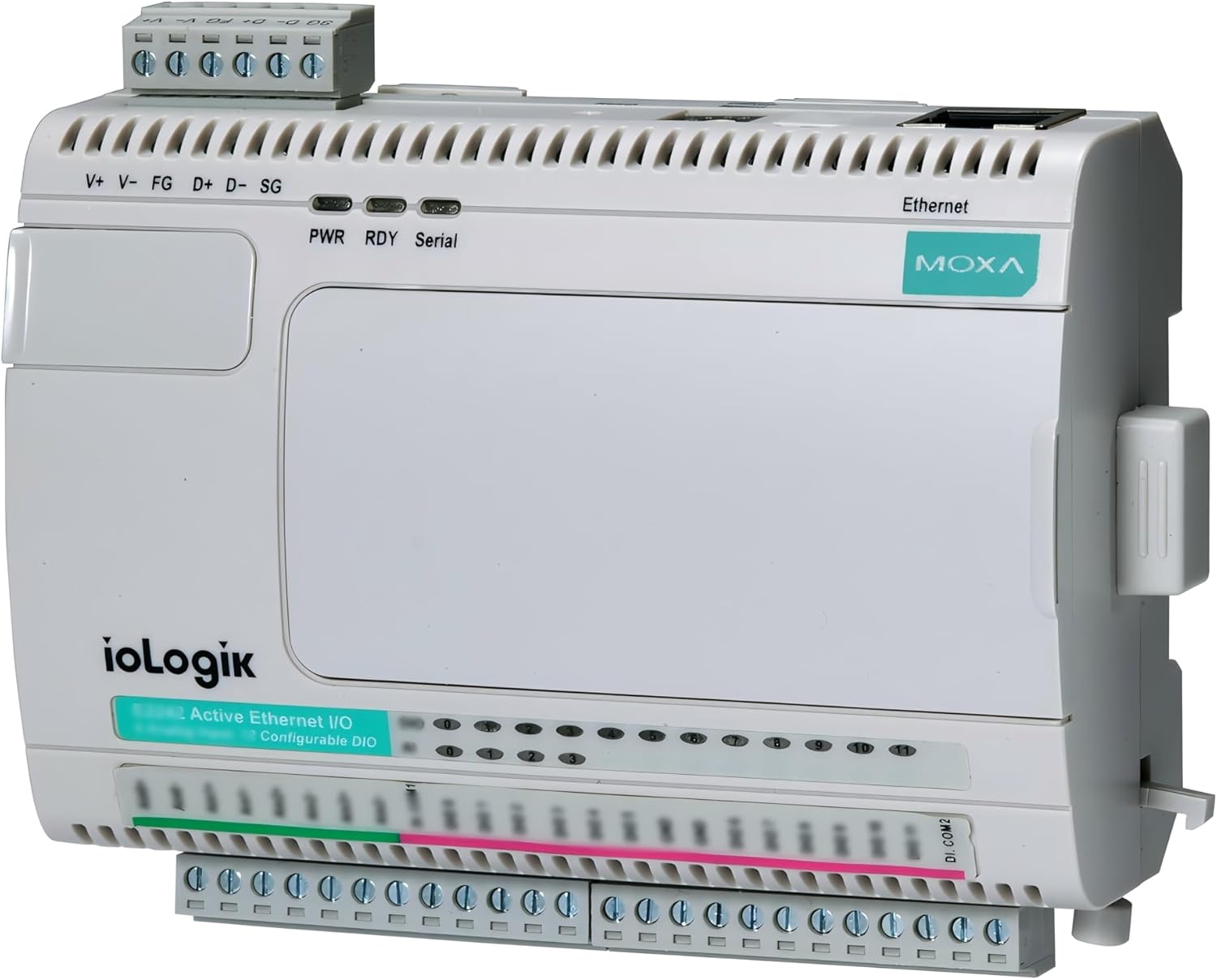
Şekil 1: Ön view of the Moxa ioLogik E2210 device, showing the digital input/output terminals and Ethernet port.
2. Kurulum ve Kurulum
2.1 Montaj
The ioLogik E2210 is designed for DIN-rail mounting. Ensure the mounting surface is stable and provides adequate ventilation. Snap the device onto a standard 35mm DIN rail until it clicks securely into place.
2.2 Güç Bağlantısı
Connect a 12-48 VDC power supply to the V+ and V- terminals on the device. Ensure proper polarity. The FG (Frame Ground) terminal should be connected to a protective earth ground for safety and noise reduction. The PWR LED on the front panel will illuminate when power is successfully applied.
2.3 Ethernet Bağlantısı
Connect a standard Ethernet cable from your network switch or router to the Ethernet port on the ioLogik E2210. The device supports 10/100 Mbps auto-negotiation. Verify network connectivity through the Ethernet status LEDs.
2.4 Digital Input (DI) Wiring
The ioLogik E2210 provides 12 digital input channels. Connect your digital sensors or switches to the DI terminals. Refer to the device's technical specifications for input voltage ranges and current requirements. Ensure all wiring is secure and correctly terminated.
2.5 Digital Output (DO) Wiring
The device includes 8 digital output channels. Connect your actuators, relays, or indicators to the DO terminals. Observe the maximum switching voltage and current ratings for the digital outputs to prevent damage to the device or connected equipment.

Şekil 2: Açısal view of the Moxa ioLogik E2210, highlighting the various connection points for power, Ethernet, and I/O.
3. Kullanım Talimatları
3.1 İlk Yapılandırma
Cihaza erişin web-based configuration interface by entering its IP address into a web browser. The default IP address can typically be found in the quick installation guide or by using Moxa's utility software. Log in using the default credentials (refer to the product documentation for default username and password).
3.2 Ağ Ayarları
İçinde web interface, configure the network settings, including the IP address, subnet mask, and gateway, to match your network infrastructure. It is recommended to assign a static IP address for reliable communication.
3.3 G/Ç Yapılandırması
Configure the digital input and output channels according to your application requirements. This includes setting input types (e.g., dry contact, wet contact) and output behaviors. Utilize the Click&Go control logic to define rules for automated responses based on input states.
3.4 İletişim Protokolleri
The ioLogik E2210 supports various communication protocols. Configure settings for MX-AOPC UA Server communication or SNMP (Simple Network Management Protocol) as needed for integration with your SCADA system or network management tools.
3.5 MXIO Library
For advanced programming and integration, use the MXIO library. This library provides APIs for Windows and Linux platforms, allowing developers to create custom applications to interact with the ioLogik E2210's I/O channels.
4. Bakım
Regular maintenance ensures the longevity and reliable operation of your ioLogik E2210 device.
- Çevresel Kontroller: Ensure the operating environment remains within the specified temperature and humidity ranges (-40 to 75°C).
- Temizlik: Periodically clean the device exterior with a soft, dry cloth. Avoid using liquid cleaners or solvents.
- Bağlantı Bütünlüğü: Routinely inspect all power, Ethernet, and I/O connections to ensure they are secure and free from corrosion or damage.
- Donanım Yazılımı Güncellemeleri: Moxa'yı kontrol edin website for available firmware updates. Applying updates can improve performance, add features, or address security vulnerabilities.
5. Sorun Giderme
This section provides solutions to common issues you might encounter with the ioLogik E2210.
- Cihaz Açılmıyor:
- Verify the power supply is connected correctly to V+ and V- terminals.
- Güç kaynağı hacmini sağlayıntage is within the 12-48 VDC range.
- İşlevsellik açısından güç kaynağını kontrol edin.
- Ağ Bağlantısı Yok:
- Confirm the Ethernet cable is securely connected to both the device and the network switch.
- Check the Ethernet status LEDs on the device.
- Verify the device's IP address, subnet mask, and gateway settings are correct and match your network configuration.
- Ping the device's IP address from a connected computer.
- I/O Not Responding:
- Check the wiring for the specific DI or DO channel.
- Verify the sensor or actuator connected to the I/O channel is functioning correctly.
- Review the I/O configuration in the web interface to ensure settings are appropriate for the connected device.
- If using Click&Go logic, ensure the rules are correctly defined and enabled.
- Web Arayüze erişilemiyor:
- Ensure your computer is on the same network segment as the ioLogik E2210.
- Verify the device's IP address.
- Tarayıcınızın önbelleğini temizlemeyi veya farklı bir tarayıcı kullanmayı deneyin.
6. Özellikler
| Özellik | Tanım |
|---|---|
| Model Numarası | ioLogic E2210 |
| Digital Inputs (DIs) | 12 |
| Dijital Çıkışlar (DO'lar) | 8 |
| Kontrol mantığı | Patented Click&Go, up to 24 rules |
| İletişim Protokolleri | MX-AOPC UA Server, SNMPv1/v2c/v3 |
| Yapılandırma | Web tarayıcı |
| I/O Management Library | MXIO library for Windows/Linux |
| Çalışma Sıcaklığı | -40 ila 75°C (-40 ila 167°F) |
| Paket Boyutları | 8.27 x 6.02 x 3.03 inç |
| Ürün Ağırlığı | 13.4 ons |
| Üretici | Moxa A.Ş. |
| İlk Mevcut Tarih | 14 Aralık 2017 |
7. Garanti Bilgileri
Moxa products are typically covered by a manufacturer's warranty. For detailed information regarding the warranty period and terms for your ioLogik E2210, please refer to the official Moxa webSatın alma belgenizi veya ürününüzle birlikte verilen garanti belgesini saklayın. Garanti talepleriniz için satın alma belgenizi saklayın.
8. Destek
For technical assistance, additional documentation, or software downloads related to your Moxa ioLogik E2210, please visit the official Moxa support webalan:
You can also contact Moxa customer service directly through the contact information provided on their webalan.