
1. Giriş
The Marshall MG10G is a compact 10-watt solid-state guitar amplifier designed for practice and home use. It features two channels (Clean and Overdrive), a Contour control for tone shaping, an auxiliary input for connecting external audio devices, and a headphone output for silent practice. This manual provides essential information for the safe and effective operation of your MG10G ampcankurtaran.
2. Güvenlik Bilgileri
WARNING: SHOCK HAZARD. DO NOT OPEN. TO REDUCE THE RISK OF FIRE OR ELECTRIC SHOCK DO NOT REMOVE COVER. NO USER-SERVICEABLE PARTS INSIDE. REFER SERVICING TO QUALIFIED SERVICE PERSONNEL.
Her zaman emin olun amplifier is connected to a grounded power outlet. Do not expose the amplifier to rain or moisture. Disconnect the power cord before cleaning or if the unit will be unused for extended periods. Ensure adequate ventilation around the ampcankurtaran.
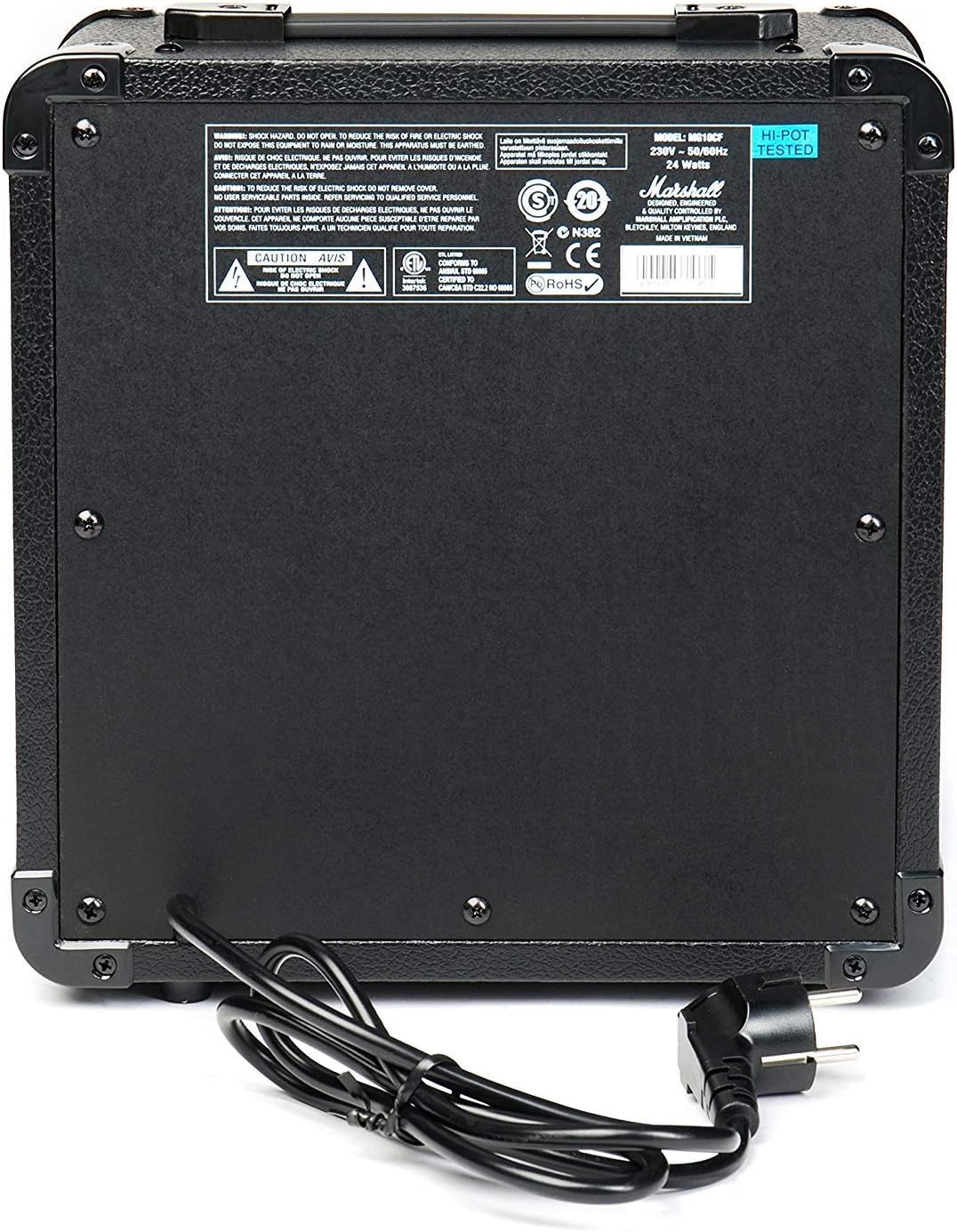
Figure 2.1: Rear panel of the MG10G amplifier, displaying safety warnings and power specifications.
3. Ürün Bittiview
The MG10G amplifier features a straightforward control layout for ease of use. Familiarize yourself with the front panel controls and rear panel connections before operation.

Figure 3.1: Front panel of the MG10G ampcankurtaran.
Ön Panel Kontrolleri:
- GİRİŞ: Elektro gitarınızı bağlamak için 1/4" jak.
- TEMİZ HACİM: Controls the volume of the Clean channel.
- KANAL SEÇİMİ: Button to switch between Clean and Overdrive channels.
- AŞIRI SÜRÜŞ KAZANCI: Adjusts the amount of distortion on the Overdrive channel.
- AŞIRI SÜRÜŞ HACMİ: Controls the volume of the Overdrive channel.
- KONTUR: Shapes the mid-range frequencies of your tone. Turning it clockwise scoops the mids, while counter-clockwise adds mids.
- MP3/LINE IN: 3.5mm jack for connecting external audio sources (e.g., MP3 player, phone).
- KULAKLIKLAR: 3.5mm jack for connecting headphones for silent practice. Connecting headphones mutes the main speaker.
- GÜÇ: Açma/kapama düğmesi ampcankurtaran.
Arka Panel Bağlantıları:
- GÜÇ GİRİŞİ: Connects the supplied power cable to a suitable mains power supply.
4. Kurulum
- Sağlamak amplifier's POWER switch is in the OFF position.
- Connect the power cable to the POWER INPUT on the rear panel of the amplifier and then to a grounded electrical outlet.
- Elektro gitarınızı şuraya bağlayın: GİRİŞ jack on the front panel using a standard 1/4" instrument cable.
- If desired, connect an external audio device (e.g., MP3 player) to the MP3/LINE IN 3.5 mm stereo kablo kullanarak jakı bağlayın.
- If desired, connect headphones to the KULAKLIKLAR Sessiz çalışma için jack.
- Çevir TEMİZ HACİM Ve AŞIRI SÜRÜŞ HACMİ controls to their minimum settings (fully counter-clockwise).
- Değiştir ampLifier's GÜÇ to the ON position. The power indicator light will illuminate.
5. Kullanım Talimatları
5.1 Clean Channel
To use the Clean channel, ensure the KANAL SEÇİMİ button is disengaged (out position). Adjust the TEMİZ HACİM control to achieve your desired output level. This channel provides a clear, un-distorted guitar tone.
5.2 Overdrive Channel
To engage the Overdrive channel, press the KANAL SEÇİMİ button (in position). Use the AŞIRI HIZ KAZANCI control to adjust the amount of distortion, from a subtle crunch to a heavier, saturated sound. The AŞIRI SÜRÜŞ HACMİ control sets the output level for this channel.
5.3 Tone Shaping with Contour
The KONTUR control allows you to sculpt the mid-range frequencies of your tone. Experiment with this control to find your preferred sound:
- Döndürme KONTUR clockwise will scoop the mid-range, often resulting in a more modern, aggressive tone.
- Döndürme KONTUR counter-clockwise will boost the mid-range, providing a warmer, fuller sound that can help your guitar cut through a mix.
5.4 Using MP3/LINE IN
Harici bir ses cihazını bağlayın. MP3/LINE IN jack. The volume of the external device is controlled by its own volume output. This feature allows you to play along with backing tracks or music.
5.5 Kulaklık Çıkışı
Kulaklıkları prize takın KULAKLIKLAR jack for silent practice. The amplifier's main speaker will be muted automatically. Adjust the volume using the respective channel volume controls (Clean or Overdrive) or the volume control on your external audio device if using the MP3/LINE IN.
6. Bakım
- Temizlik: Bağlantıyı kesin ampTemizlemeden önce amplifikatörü güç kaynağından ayırın. Dış yüzeyi silmek için yumuşak, kuru bir bez kullanın. Aşındırıcı temizleyiciler veya çözücüler kullanmayın.
- Depolamak: Sakla amplifier in a dry, cool environment away from direct sunlight and extreme temperatures.
- Toplu taşıma: Taşırken amplifier, ensure it is securely packed to prevent damage.
7. Sorun Giderme
| Sorun | Olası Neden | Çözüm |
|---|---|---|
| Hoparlörden ses gelmiyor |
|
|
| Zayıf veya bozuk ses |
|
|
| Kulaklıktan ses gelmiyor |
|
|
Bu çözümleri denedikten sonra sorun devam ederse, lütfen yetkili servis personeliyle iletişime geçin.
8. Özellikler

Figure 8.1: Dimensions of the MG10G ampcankurtaran.
| Özellik | Detay |
|---|---|
| Model Adı | MG10G |
| Ampkaldırıcı Tipi | Katı Hal |
| Çıkış Gücü | 10 Watt |
| Hoparlör Boyutu | 6.5 inç (16.51 cm) |
| Kanallar | 2 (Temiz, Overdrive) |
| Kontroller | Clean Volume, Channel Select, Overdrive Gain, Overdrive Volume, Contour, Power |
| Girişler | 1/4" Guitar Input, 3.5mm MP3/Line In |
| Çıktılar | 3.5 mm Kulaklık Çıkışı |
| Güç Kaynağı | Electric Cable (230V~50Hz, 24 Watts) |
| Boyutlar (D x G x Y) | 31.5 cm x 19.8 cm x 40 cm |
| Ürün Ağırlığı | 5.13 Kilogram |
| Malzeme | Metal, Plastik |
| Renk | Siyah |
| Menşei ülke | Çin |
9. Garanti ve Destek
9.1 Garanti Bilgileri
This Marshall MG10G ampLifier aşağıdakilerle birlikte gelir: 1 yıllık üretici garantisi. Please retain your proof of purchase for warranty claims. The warranty covers manufacturing defects and malfunctions under normal use. It does not cover damage caused by misuse, accidents, unauthorized modifications, or normal wear and tear.
9.2 Müşteri Desteği
For technical assistance, service, or warranty inquiries, please contact your authorized Marshall dealer or visit the official Marshall Amplifikasyon webDestek kaynakları ve iletişim bilgileri için site.