
1. Sistem Bittiview
This manual provides instructions for the SANNCE 16-channel 8MP NVR Wireless WiFi Security Camera System. This system is designed for comprehensive surveillance, offering high-resolution video recording and remote monitoring capabilities.
Temel Özellikler:
- 16-Channel 8MP NVR: Supports up to 16 cameras with 8-megapixel resolution for clear video.
- Kablosuz WiFi Bağlantısı: Utilizes 2.4/5.8GHz dual-band WiFi for stable and long-distance connections up to 985ft in open environments.
- H.264+ Video Coding: Advanced compression technology to optimize storage space while maintaining video quality.
- IP66 Outdoor Cameras: Weatherproof cameras suitable for various environmental conditions (-20℃ to 60℃).
- Gece Görüşü: Features up to 98ft IR night vision and 33ft full-color night vision for 24/7 monitoring.
- Human Motion Detection & Two-Way Talk: Enhanced security with intelligent detection and audio communication.
- Genişletilebilir Depolama: Supports up to 8TB local HDD storage and cloud storage options.
- Akıllı Entegrasyon: Sesli kontrol için Alexa ile uyumludur.
2. Sistem Kurulumu
The SANNCE security system is designed for quick and easy plug-and-play installation. Follow these steps for initial setup.
2.1 Unpacking and Initial Connection
- Carefully unpack all components: NVR, cameras, power adapters, and accessories.
- NVR'yi HDMI veya VGA kablosu kullanarak bir monitöre bağlayın.
- Verilen güç adaptörünü kullanarak NVR'yi bir güç kaynağına bağlayın.
- Connect the cameras to their respective power sources. The cameras will automatically pair with the NVR.
- Connect the NVR to your router via an Ethernet cable for network access and remote viewIng.

Şekil 2.1: Üzeriview of system installation, WiFi connection, and remote access via mobile application.
2.2 Ağ Yapılandırması
Once the NVR is connected to your router, access the NVR's interface on the connected monitor to configure network settings. Ensure DHCP is enabled on your router or assign a static IP address to the NVR if required by your network setup.
2.3 Mobil Uygulama Kurulumu
- Download the SANNCE mobile application from your device's app store.
- Bir hesap kaydedin ve giriş yapın.
- Add your NVR to the app by scanning the QR code displayed on the NVR's interface or by manually entering its ID.
- Bir kez eklendiğinde, şunları yapabilirsiniz: view live feeds, playback recordings, and receive alerts remotely.

Şekil 2.2: Uzaktan viewing of camera feeds on various devices.
3. Sistem Çalışması
This section details the various operational modes and features of your SANNCE security system.
3.1 Kayıt Modları
Sistem, esnek kayıt seçenekleri sunmaktadır:
- Sürekli Kayıt: 7/24 kesintisiz kayıt.
- Hareket Algılama Kaydı: Sadece hareket algılandığında kayıt yapar.
- İnsan Hareketi Algılama: Advanced detection specifically for human shapes, reducing false alarms.
- Planlanmış Kayıt: Kayıt için belirli zamanlar belirleyin.
- Alarm Triggered Recording: Records when an alarm event (e.g., motion, human detection) is triggered.

Figure 3.1: Intelligent human detection feature and various recording options.
3.2 Gece Görüşü
The cameras are equipped with advanced night vision technology to ensure clear surveillance in low-light conditions.
- IR Gece Görüşü: Provides black and white video up to 98 feet in complete darkness.
- Tam Renkli Gece Görüşü: Offers color video up to 33 feet in low-light conditions, enhancing detail and identification.

Figure 3.2: Demonstration of full-color night vision capability.
3.3 İki Yönlü Ses
Utilize the built-in microphone and speaker on the cameras for two-way communication. This feature allows you to speak to individuals near the camera and hear their responses through the mobile app or NVR interface.

Figure 3.3: System features including two-way audio.

Şekil 3.4: Ör.ample of two-way audio communication.
3.4 Remote Monitoring and Alerts
Stay informed with real-time notifications and remote access:
- Mobile App Notifications: Hareket veya insan algılama tetiklendiğinde akıllı telefonunuza anında uyarılar alın.
- E-posta Uyarıları: Configure the system to send email notifications with snapshots of events.
- Alexa Entegrasyonu: Use voice commands with Alexa-enabled devices to view kamera görüntüleri.

Figure 3.5: Notifications for intelligent people detection.

Figure 3.6: Seamless integration with Alexa for voice control.
4. Bakım
Düzenli bakım, güvenlik sisteminizin optimum performans göstermesini ve uzun ömürlü olmasını sağlar.
4.1 Kamera Temizliği
- Periyodik olarak fotoğraf makinesi lenslerini yumuşak bir bezle temizleyin.amp tıkanıklığa neden olabilecek toz, kir veya su lekelerini gidermek için bir bez kullanın view.
- Avoid using harsh chemicals or abrasive materials that could damage the lens coating.
4.2 NVR and Storage Management
- Aşırı ısınmayı önlemek için NVR'nin iyi havalandırılan bir alana yerleştirildiğinden emin olun.
- Regularly check the hard drive status through the NVR interface to ensure it is functioning correctly.
- Manage storage space by configuring recording settings or backing up important footage to external storage or cloud services.
4.3 Firmware Güncellemesi
Check the SANNCE official website or the mobile application periodically for firmware updates. Keeping your system's firmware updated ensures access to the latest features, security patches, and performance improvements.
5. Sorun Giderme
Bu bölümde karşılaşabileceğiniz yaygın sorunlar ele alınmakta ve çözümler sunulmaktadır.
5.1 Video Görüntüsü Yok
- Gücü Kontrol Edin: Ensure the NVR and all cameras are properly connected to power outlets and are turned on.
- Monitör Bağlantısı: Verify the HDMI/VGA cable connection between the NVR and your monitor.
- Kamera Eşleştirme: Confirm that cameras are successfully paired with the NVR. Refer to the setup section for pairing instructions if needed.
5.2 Poor Wireless Connection
- Sinyal Gücü: Check the wireless signal strength of the cameras in the NVR interface.
- obstrüksiyonlar: Reduce obstacles (thick walls, metal structures) between cameras and the NVR.
- Mesafe: Ensure cameras are within the effective wireless range (up to 985ft in open environments).
- Parazit yapmak: Minimize interference from other wireless devices. The system supports dual-band WiFi (2.4/5.8GHz) which can help.
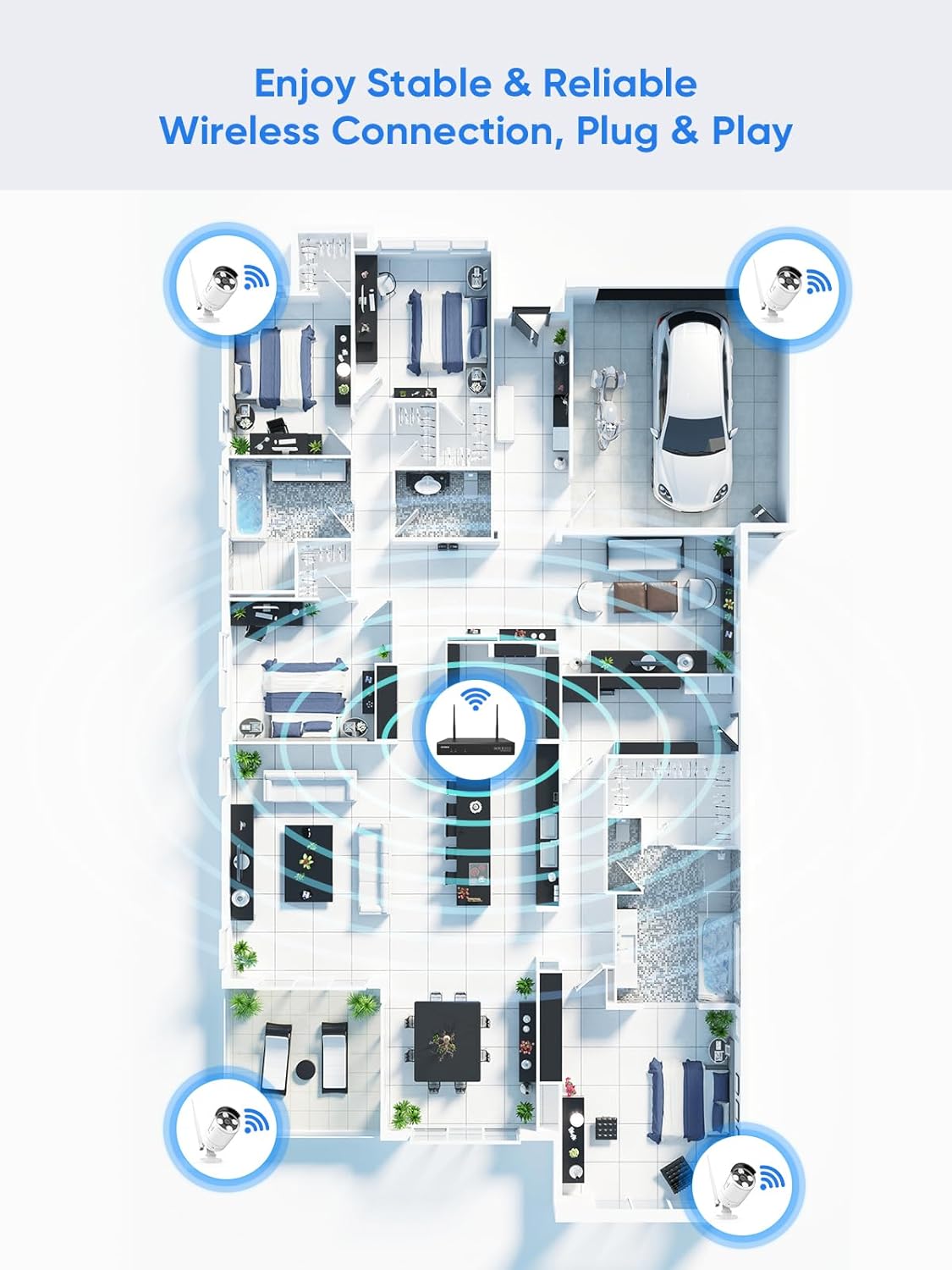
Figure 5.1: Wireless coverage and connection stability.
5.3 Kayıt Sorunları
- Sabit Disk: Verify the hard drive is installed correctly and is not full. Format the HDD if necessary (this will erase all data).
- Kayıt Programı: Check your recording schedule and motion detection settings to ensure they are configured as desired.
- Hareket Hassasiyeti: Adjust motion detection sensitivity if recordings are too frequent or not frequent enough.
5.4 Remote Access Problems
- İnternet Bağlantısı: Ensure both your NVR and mobile device have a stable internet connection.
- NVR Ağ Ayarları: Confirm the NVR's network settings are correct and it has access to the internet.
- Uygulama Girişi: Verify you are logged into the SANNCE app with the correct account.
6. Özellikler
| Özellik | Detay |
|---|---|
| Model Numarası | 4335041969 |
| Marka | SANCE |
| Bağlantı Teknolojisi | HDMI, USB, VGA, Wireless WiFi (2.4/5.8GHz) |
| Uyumlu Cihazlar | Kameralar |
| Bellek Depolama Kapasitesi | Up to 8 TB (HDD) |
| Sabit Disk Boyutu | 8 TB (Maximum Supported) |
| IP Derecelendirmesi | IP66 (Outdoor Cameras) |
| Çalışma Sıcaklığı | -20℃ ila 60℃ |
| Paket Boyutları | 13.78 x 11.42 x 3.19 inç |
| Ürün Ağırlığı | 3.14 pound |
| İlk Mevcut Tarih | 11 Aralık 2017 |
7. Garanti ve Destek
7.1 İade Politikası
This product is subject to a 30-day return policy from the date of purchase. Please refer to your retailer's specific return guidelines for detailed information.
7.2 Üretici Garantisi
SANNCE provides a limited warranty for this product against defects in materials and workmanship. For specific warranty terms, duration, and conditions, please refer to the warranty card included with your product or visit the official SANNCE webalan.
7.3 Müşteri Desteği
If you encounter any issues or have questions regarding the installation, operation, or maintenance of your SANNCE security system, please contact SANNCE customer support for assistance. You can typically find contact information on the SANNCE official websitede veya ürün ambalajının içinde.
Daha fazla bilgi için şu adresi ziyaret edin: SANNCE Store.