
giriiş
This manual provides comprehensive instructions for the setup, operation, and maintenance of your MASTER & DYNAMIC MH40 Over-Ear Headphones. Please read this guide thoroughly to ensure optimal performance and longevity of your device.
Paket İçeriği
Paketinizde tüm öğelerin mevcut olduğundan emin olun:
- MASTER & DYNAMIC MH40 Over-Ear Headphones
- Audio Cable with In-line Microphone
- USB-C Charging Cable (for Bluetooth functionality)
- Canvas Carrying Case
- Kullanım Kılavuzu (bu belge)
Ürün Bittiview
The MH40 headphones are designed with premium materials for durability and comfort. Key components include:
- Forged Aluminum Body: Provides a robust and lightweight structure.
- Lambskin Ear Pads: Offer comfort for extended listening sessions.
- Custom Neodymium Drivers: Engineered for superior sound reproduction.
- Ayarlanabilir Kafa Bandı: Güvenli ve rahat bir uyum sağlar.
- Ayrılabilir Kablolar: For both audio and charging.

Figure 1: MASTER & DYNAMIC MH40 Over-Ear Headphones, showcasing black metal and camo leather design.
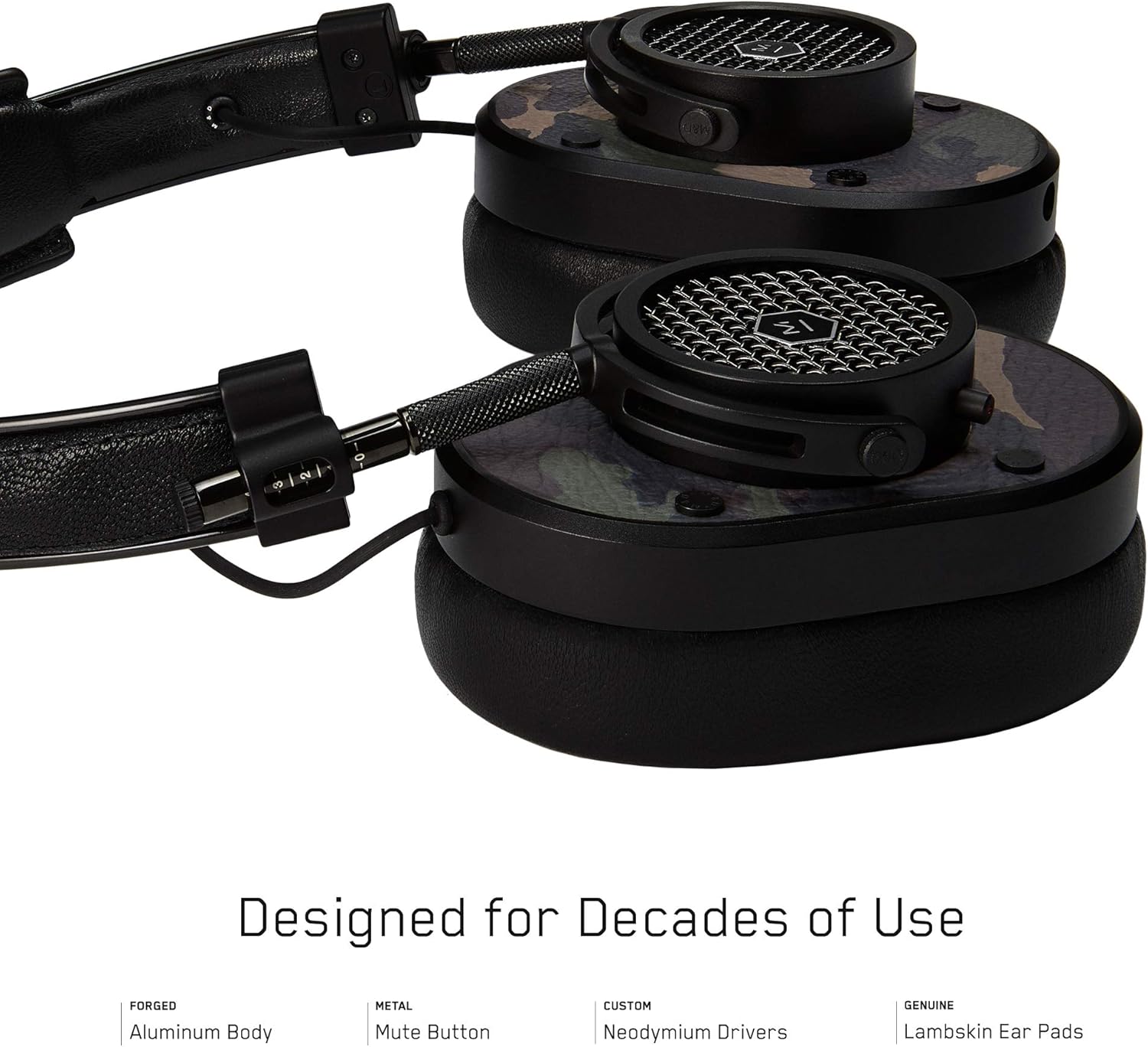
Şekil 2: Ayrıntılı view of the MH40 headphone earcups, highlighting the lambskin ear pads, metal grille, and adjustable hinge.
Kurmak
1. Uyumun Ayarlanması
- Gently extend or retract the metal arms on each side of the headband to adjust the height.
- Position the earcups so they fully cover your ears, ensuring a comfortable and secure fit.
- The lambskin ear pads are designed to conform to your head shape for optimal sound isolation and comfort.
2. Kablolu Bağlantı
- Locate the audio input port on the left earcup.
- Insert one end of the provided audio cable into the headphone's audio input.
- Connect the other end of the audio cable to your audio device's 3.5mm jack.
3. Bluetooth Eşleştirme (Kablosuz Bağlantı)
The MH40 headphones support Bluetooth connectivity for wireless audio. Ensure the headphones are charged before pairing.
- Güç Açık: Press and hold the power button (usually located on one of the earcups) until the indicator light flashes.
- Eşleştirme modu: Continue holding the power button or press a dedicated Bluetooth pairing button (if available) until the indicator light flashes rapidly, indicating pairing mode.
- Cihaz Bağlantısı: On your audio device (smartphone, tablet, computer), navigate to Bluetooth settings and select "MH40" from the list of available devices.
- Onay: The indicator light on the headphones will turn solid blue or green once successfully paired.
Not: Bluetooth'un menzili yaklaşık 10 metredir (33 fit).
Kullanım Talimatları
Ses Oynatma
- Oynat/Duraklat: Press the multi-function button (often on the in-line microphone or earcup) once.
- Sonraki Parça: Press the multi-function button twice rapidly.
- Önceki parça: Press the multi-function button three times rapidly.
- Ses Kontrolü: Use the volume up/down buttons on the in-line microphone or dedicated earcup controls.
Yönetim Çağrı
- Çağrıyı Cevapla/Sonlandır: Çok işlevli düğmeye bir kez basın.
- Çağrıyı Reddet: Çok fonksiyonlu düğmeye yaklaşık 2 saniye basılı tutun.
- Mikrofonun Sesini Kapat: The MH40 features a dedicated mute button, typically located on the earcup or in-line control. Press to mute/unmute during a call.
Bakım
- Temizlik: Use a soft, dry cloth to wipe the headphones. For leather parts, use a specialized leather cleaner if necessary. Avoid harsh chemicals or abrasive materials.
- Depolamak: When not in use, store the headphones in the provided canvas carrying case to protect them from dust and scratches.
- Kablo Bakımı: Handle cables gently. Avoid sharp bends or excessive pulling to prevent damage. The retractable cable feature helps manage cable length.
- Kulak Pedleri: The magnetic ear pads are removable for cleaning or replacement. Gently pull them off and reattach by aligning the magnets.
Sorun giderme
Ses Yok
- Kablolu: Ensure the audio cable is securely connected to both the headphones and the audio source. Check the volume level on both the headphones and the source device.
- Bluetooth: Verify that the headphones are powered on and successfully paired with your device. Check the volume levels. Try re-pairing the headphones.
Bluetooth ile Eşleştirilemiyor
- Kulaklıkların eşleştirme modunda olduğundan emin olun (gösterge ışığı hızla yanıp sönüyor).
- Kaynak cihazınızda Bluetooth'un etkinleştirildiğinden emin olun.
- Kulaklıkları cihazınıza daha yakın bir mesafeye (10 metre içinde) getirin.
- Hem kulaklığınızı hem de cihazınızı kapatıp tekrar açın, ardından eşleştirmeyi tekrar deneyin.
- If previously paired, try "forgetting" the device on your source and re-pairing.
Mikrofon çalışmıyor
- Mikrofon sessize alma düğmesinin etkin olup olmadığını kontrol edin.
- Ensure the audio cable with the in-line microphone is fully inserted.
- Bağlı cihazınızdaki mikrofon giriş ayarlarını doğrulayın.
Özellikler
| Model Adı | MH40 |
| Bağlantı Teknolojisi | Kablolu, Bluetooth |
| Kablosuz İletişim Teknolojisi | Bluetooth |
| Malzeme | Copper (components), Lambskin (ear pads), Canvas (carrying case) |
| Kontrol Türü | Çağrı Kontrolü, Dokunmatik |
| Kablo Özelliği | Geri çekilebilir |
| Ürün Ağırlığı | 0.36 Kilogram (12.7 ons) |
| Ses Sürücüsü Türü | Dinamik Sürücü |
| Bluetooth Menzili | 10 Metre |
| Kulaklık Şekli | Kulak üstü |
| Özel Özellikler | Carrying case included, Lightweight, Microphone Included, Noise Isolation, Wireless |
| Ürün Boyutları | 7.48 x 6.3 x 2.76 inç |
| Üretici | MASTER & DYNAMIC |
| Renk | Black Metal / Camo Leather |
| Kulak Yerleşimi | Kulak Üstü |
| Gürültü Kontrolü | Ses Yalıtımı |
| UPC | 858901007099 |
Garanti ve Destek
For detailed warranty information and customer support, please refer to the official MASTER & DYNAMIC webSite üzerinden satın alabilir veya doğrudan müşteri hizmetleriyle iletişime geçebilirsiniz. Satın alma belgenizi garanti talepleriniz için saklayın.
Çevrimiçi destek: www.masterdynamic.com/support (ExampBağlantı, gerçek bağlantı değişebilir)


