
1. Giriş
This manual provides detailed instructions for the installation, operation, and maintenance of the Aiphone IX-MV IP Video Master Station. The IX-MV is an IP addressable video and audio master station designed for use with Aiphone IX Systems, offering both handset and hands-free communication capabilities.
Please read this manual thoroughly before attempting to install or operate the unit to ensure correct usage and to prevent damage.
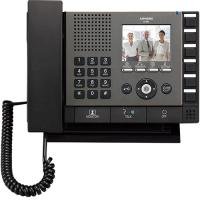
Şekil 1: Ön view of the Aiphone IX-MV IP Video Master Station, showing the display, buttons, and handset.
2. Güvenlik Bilgileri
Observe the following safety precautions to prevent injury, damage to the product, or property damage.
- Elektriksel Güvenlik: Ensure all power connections are made according to local electrical codes. Disconnect power before servicing.
- Çevre: Do not expose the unit to water, high humidity, extreme temperatures, or direct sunlight. Install in a well-ventilated area.
- İşleme: Cihazı dikkatli kullanın. Düşürmekten veya şiddetli darbelere maruz bırakmaktan kaçının.
- Değişiklikler: Cihazı değiştirmeye veya sökmeye çalışmayın. Tüm servis işlemlerini yetkili personele yaptırın.
- Temizlik: Temizlik için yumuşak ve kuru bir bez kullanın. Aşındırıcı temizleyiciler veya çözücülerden kaçının.
3. Paket İçeriği
Kurulum işlemine geçmeden önce paketteki tüm öğelerin eksiksiz olduğundan emin olun.
- Aiphone IX-MV IP Video Master Station
- Montaj braketi ve vidalar
- Kurulum kılavuzu (bu belge)
- Network cable (may be sold separately)
4. Kurulum
4.1 Fiziksel Kurulum
- Konum seç: Select a suitable indoor location, away from direct heat sources, moisture, and strong electromagnetic fields. Ensure adequate space for wiring and operation.
- Montaj:
- Secure the mounting bracket to a wall using appropriate screws and anchors.
- Ensure the bracket is level and securely fastened.
- Attach the IX-MV unit to the mounting bracket.
- Kablolama:
- Connect a standard Ethernet cable (Cat5e or higher) from your network switch/router to the LAN port on the back of the IX-MV unit.
- If using Power over Ethernet (PoE), no separate power adapter is needed. Otherwise, connect the appropriate DC power adapter (sold separately) to the power input.
4.2 İlk Yapılandırma
After physical installation and power-up, the unit will attempt to obtain an IP address via DHCP. For detailed network configuration and system integration, refer to the Aiphone IX System programming manual or consult a qualified installer.
- Erişim Web Arayüz: Birini kullan web browser to access the unit's IP address for advanced settings. The default IP address or method to discover it can be found in the Aiphone IX System documentation.
- Sistem Entegrasyonu: The IX-MV must be registered with an Aiphone IX System server for full functionality. Follow the server's configuration guide.
5. Kullanım Talimatları
5.1 Temel Çağrı Fonksiyonları
- Bir Aramayı Cevaplama: When an incoming call is received, the unit will ring and display the caller's information on the screen.
- To answer hands-free, press the KONUŞMAK düğme.
- To answer using the handset, lift the handset.
- Arama yapmak:
- Use the keypad or directory function to select the desired station or contact.
- Basın ARAMA Aramayı başlatmak için kullanılan düğme.
- Aramayı Bitirme:
- If using hands-free, press the SON düğme.
- If using the handset, replace the handset in its cradle.
5.2 Video Görüntüleme
During a video call, the caller's video feed will be displayed on the IX-MV screen. The video quality depends on network conditions and the camera capabilities of the calling station.
5.3 Door Release (if configured)
If connected to a door station with door release functionality, a dedicated KAPI AÇMA button may be available on the screen or physical panel. Press this button during a call with a door station to activate the door release mechanism.
6. Bakım
6.1 Temizlik
To clean the unit, gently wipe the surfaces with a soft, dry cloth. For stubborn marks, slightly dampen the cloth with water. Do not use harsh chemicals, abrasive cleaners, or solvents, as these can damage the finish and electronic components.
6.2 Yazılım Güncellemeleri
Periodically check the Aiphone website or consult your system administrator for available firmware updates. Keeping the software updated ensures optimal performance, security, and access to new features. Firmware updates are typically performed via the system server or the unit's web arayüz.
7. Sorun Giderme
| Sorun | Olası Neden | Çözüm |
|---|---|---|
| Cihaz çalışmıyor/Elektrik yok. | No power supply; faulty power adapter; PoE issue. | Check power cable connection. Verify PoE switch is active. Test power adapter if not using PoE. |
| Ağa bağlanılamıyor. | Network cable disconnected; incorrect IP settings; network switch issue. | Ensure Ethernet cable is securely connected. Verify network settings (DHCP/Static IP). Check network switch status. |
| Aramalar sırasında ses yok. | Mikrofon/hoparlör sorunu; ses seviyesi çok düşük; ağ gecikmesi. | Adjust volume settings. Check for physical obstructions. Verify network connection stability. |
| No video display. | Camera issue at calling station; network bandwidth; display settings. | Ensure calling station's camera is operational. Check network bandwidth. Adjust display settings on IX-MV. |
| Unit unresponsive. | Yazılım hatası; güç sorunu. | Perform a power cycle (disconnect and reconnect power). If issue persists, contact technical support. |
If the problem persists after attempting these solutions, please contact Aiphone technical support or your system integrator.
8. Özellikler
| Özellik | Detay |
|---|---|
| Marka | iPhone'lar |
| Model Numarası | IX-MV.M |
| Ürün Boyutları (U x G x Y) | 9.81 x 7.44 x 2.31 inç |
| Ürün Ağırlığı | 3.3 Pound |
| Bağlantı | IP (Ethernet) |
| Güç Kaynağı | PoE (Power over Ethernet) or external DC power supply (not included) |
| İletişim türü | Video and Audio, Handset / Hands-free |
9. Garanti ve Destek
9.1 Garanti Bilgileri
Aiphone products are typically covered by a limited warranty against defects in materials and workmanship. The specific warranty period and terms may vary by region and product. Please refer to the official Aiphone warranty statement available on their website or contact your local distributor for details.
This warranty does not cover damage caused by improper installation, misuse, unauthorized modification, or acts of nature.
9.2 Teknik Destek
For technical assistance, troubleshooting beyond this manual, or warranty claims, please contact Aiphone technical support. You can find contact information, including phone numbers and online support resources, on the official Aiphone webalan:
https://www.aiphone.com/support
When contacting support, please have your product model number (IX-MV.M) and a detailed description of the issue ready.