
1. Giriş
This manual provides detailed instructions for the proper use and maintenance of your LUITON CS two-way radios. Please read this manual thoroughly before operating the device to ensure optimal performance and safety. The LUITON CS two-way radios are designed for reliable communication in various environments.
2. Paket İçeriği
Paketi açtığınızda aşağıda listelenen tüm öğelerin mevcut ve iyi durumda olduğundan emin olun:
- 6 x LUITON CS Two-Way Radios
- 6 x Air Acoustic Tube Headset Earpieces
- 6 x Şarj Edilebilir Piller
- 6 x Antenler
- 6 x Bilek Kayışı
- 6 x Charging Docks
- 1 x USB Programlama Kablosu
- 1 x Programming CD
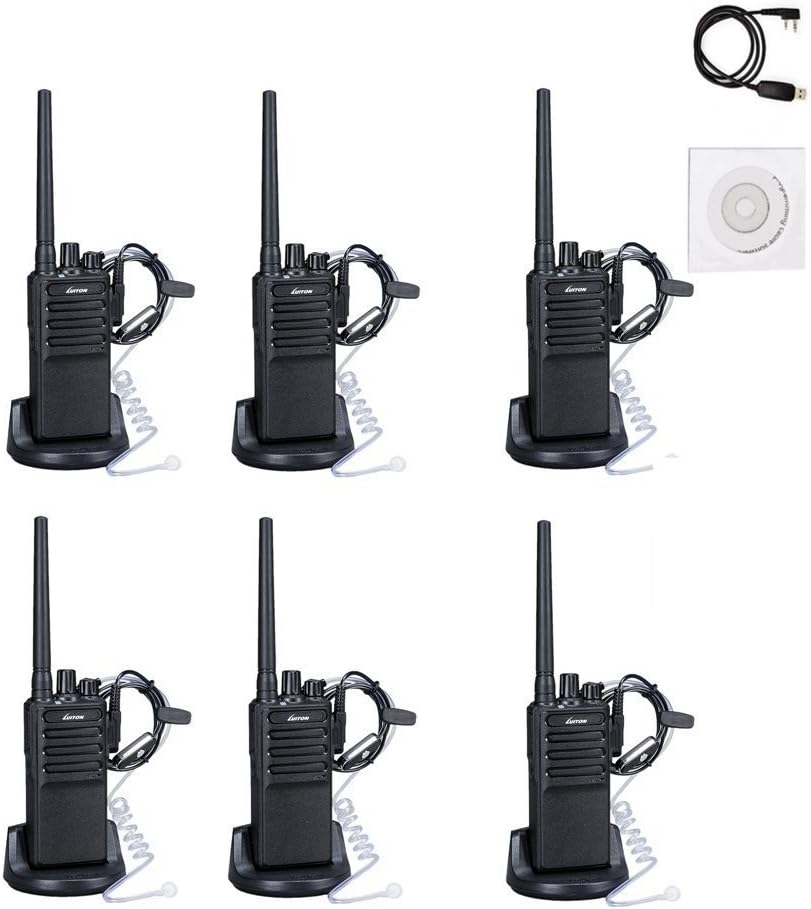
Resim: Üzeriview of the LUITON CS 6-pack contents, including radios, earpieces, charging bases, and accessories.
3. Ürün Özellikleri
- 16 Ön Ayarlı Kanal: Allows for communication across various groups or frequencies.
- Ses Karıştırıcı: İletişim gizliliğini artırır.
- Uzun Menzilli İletişim: Up to 3.6 miles under optimal conditions.
- Earpieces Included: Provides hands-free operation and discreet communication.
- Taşınabilir Tasarım: Slim body with anti-slip pattern and belt clip for easy carrying.
- Şarj Edilebilir Pil: 1500mAh battery supports extended operation with low battery alarm.
- Programming Capability: Supports programming via cable and software for customized settings.
4. Kurulum Kılavuzu
4.1. Antenin Takılması
- Antenin dişli ucunu radyonun üstündeki anten konnektörüyle hizalayın.
- Anteni saat yönünde yavaşça çevirerek yerine iyice oturtun. Aşırı sıkmayın.

Resim: Ön ve yan view of two LUITON CS radios, illustrating the antenna attachment point.
4.2. Pilin Takılması
- Radyo'nun kapalı olduğundan emin olun.
- Pil takımını radyonun arkasındaki oluklara hizalayın.
- Pil takımını yerine oturana kadar yukarı doğru kaydırın.
- Çıkarmak için, serbest bırakma mandalına basın (varsa) ve pili aşağı doğru kaydırın.
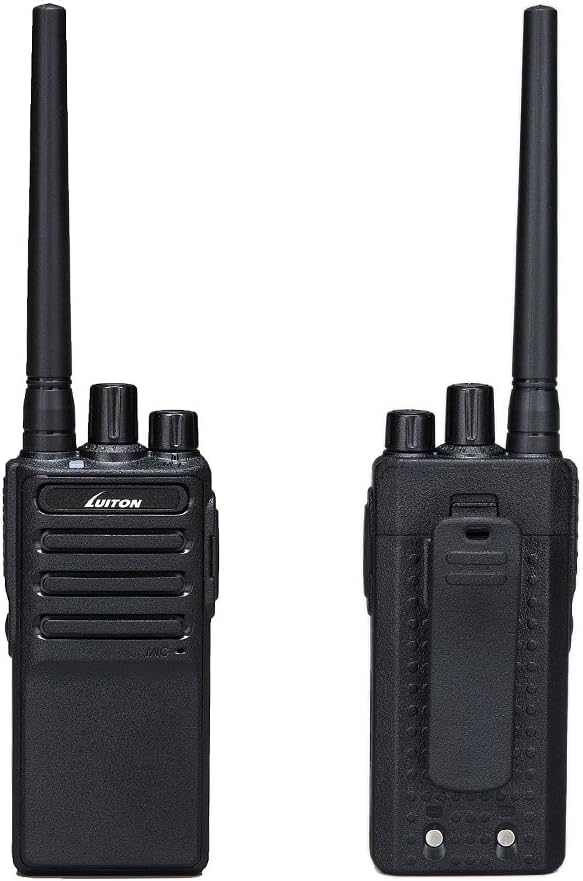
Resim: Ön ve arka views of the LUITON CS radio, highlighting the battery area and belt clip.
4.3. Pilin Şarj Edilmesi
- Place the radio with the battery installed into the charging dock, or place the battery directly into the charging dock.
- Şarj istasyonunu bir güç kaynağına bağlayın.
- A kırmızı ışık indicates charging is in progress.
- A yeşil ışık pilin tamamen şarj olduğunu gösterir.
- Şarj işlemi genellikle 3-5 saat sürer.

Image: Charging status indicators for the LUITON CS radio and its battery, showing red for charging and green for fully charged.
4.4. Kulaklığın Takılması
- Locate the earpiece jack on the side of the radio.
- Insert the earpiece plug firmly into the jack.
- Ensure the earpiece is securely connected for proper audio transmission and reception.
5. Kullanım Talimatları
5.1. Açma/Kapama ve Ses Seviyesi Kontrolü
- Güç Açık: Döndür Güç/Ses Düğmesi clockwise until you hear a click. The radio will emit a tone.
- Kapat: Döndür Güç/Ses Düğmesi counter-clockwise until you hear a click.
- Ses Ayarı: Döndür Güç/Ses Düğmesi Ses seviyesini artırmak için saat yönünde, azaltmak için saat yönünün tersine çevirin.
5.2. Kanal Seçme
- Döndür Kanal Seçme Düğmesi (usually the top-most knob) to select one of the 16 available channels.
- İletişim için tasarlanan tüm radyoların aynı kanala ayarlandığından emin olun.
5.3. İletim ve Alma
- İletmek İçin: Basılı tutun Bas Konuş (PTT) düğmesi located on the side of the radio. Speak clearly into the microphone (or earpiece microphone if attached). Release the PTT button to stop transmitting.
- Almak İçin: PTT tuşuna basılmadığından emin olun. Telsiz, seçilen kanaldaki yayınları otomatik olarak alacaktır.
5.4. Ses Karıştırıcı İşlevi
The LUITON CS radios feature a voice scrambler for enhanced privacy. This function is typically enabled or disabled via programming software. When active, it encrypts your voice transmission, making it unintelligible to other radios not using the same scrambler setting. Consult the programming software manual for details on activating and configuring this feature.
5.5. Radyo Programlama
The radio's channels, frequencies, and advanced features (like voice scrambler, squelch level, etc.) can be customized using the provided programming cable and software. Refer to the programming software's specific instructions for detailed steps. A CD containing the software is typically included.
6. Bakım
6.1. Temizlik
- Radyo yüzeyini yumuşak bir bezle silin.amp Kumaş.
- Sert kimyasallar, çözücüler veya aşındırıcı temizleyiciler kullanmayın.
- Kullanmadan veya şarj etmeden önce radyonun kuru olduğundan emin olun.
6.2. Pil Bakımı
- İlk kullanımdan önce pili tam olarak şarj edin.
- Pilin ömrünü uzatmak için aşırı şarj etmekten veya pili tamamen boşaltmaktan kaçının.
- Pilleri kullanılmadığı zaman serin ve kuru bir yerde saklayın.
- If the battery is not used for an extended period, charge it periodically (e.g., every 3 months) to maintain its capacity.

Image: Battery performance metrics for the LUITON CS radio, showing estimated standby, typical, and continuous use times, along with charging duration.
6.3. Genel Bakım
- Do not expose the radio to extreme temperatures, direct sunlight, or excessive moisture. While water-resistant, it is not fully waterproof.
- Radyo cihazınızı düşürmekten veya sert darbelere maruz bırakmaktan kaçının.
- Keep the antenna and earpiece connections clean and free of debris.
7. Sorun Giderme
| Sorun | Olası Neden | Çözüm |
|---|---|---|
| Radyo açılmıyor. | Pil zayıf veya doğru takılmamış. | Pili şarj edin veya güvenli bir şekilde yeniden takın. |
| İletim veya alım yapılamıyor. | Yanlış kanal seçildi; kapsama alanı dışında; anten gevşek. | Verify channel setting; move closer to other radios; check antenna connection. |
| Kötü ses kalitesi / Statik. | Weak signal; interference; volume too low/high; earpiece connection loose. | Move to an open area; adjust volume; re-seat earpiece. |
| Pil çabuk bitiyor. | Old battery; continuous transmission; extreme temperatures. | Replace battery if old; minimize continuous PTT use; operate in moderate temperatures. |
| Voice scrambler not working. | Not enabled or incorrectly programmed. | Verify scrambler settings using programming software. |
8. Teknik Özellikler
| Kategori | Şartname |
|---|---|
| Genel | |
| Bellek Kanalları | 16 Gruplar |
| İşlem Hacmitage | Doğru Akım 3.7V |
| Frekans Kararlılığı | ±2.5 sayfa/dakika |
| Çalışma Sıcaklığı | -20℃ ile +50℃ arası |
| Çalışma Modu | Simpleks |
| Anten Empedansı | 50Ω |
| Frekans Aralığı | 400 - 470 MHz |
| Konuşma Aralığı Maksimum | 3.6 Mil (yaklaşık 5.8 km) |
| Pil Kapasitesi | 1500mAh |
| Su Direnç Seviyesi | Su geçirmez |
| Verici | |
| RF Gücü | <5W |
| Maximum Deviation (W/N) | ≤5KHz/≤2.5KHz |
| Sahte Emisyon | ≤7.5uW |
| Bitişik Kanal Gücü | ≤-65dB/≤-60dB |
| SNR (K/A) | ≥-45dB/≥-40dB |
| QT/DQT (W/N) | 0.7±0.1KHz/0.4±0.1KHz |
| Modülasyon Hassasiyeti | 8—12mV |
| İletim Akımı | ≤1.2A |
| Alıcı | |
| Hassasiyet | -122dBm (12dB SINAD) |
| Ses gücü | 0.4W (8R Load) |
| Ses Bozulması | ≤10% |
| Arabuluculuk (W/N) | ≥65dB/≥60dB |
| Adjacent Channel Selectivity (W/N) | ≥65dB/≥60dB |
| Clutter Suppression | ≥65dB |
| Alıcı Akımı | ≤380mA |
9. Garanti ve Destek
For warranty information and customer support, please refer to the documentation provided with your purchase or contact LUITON customer service directly. Details regarding specific warranty periods and support channels are typically available on the manufacturer's official websitenizden veya perakendeciniz aracılığıyla.
For programming assistance or technical inquiries, please consult the programming software manual or contact LUITON support.