
giriiş
Thank you for choosing the Lepro LED Desk LampBu benamp is designed to provide versatile and comfortable lighting for various tasks, featuring adjustable brightness, multiple color temperatures, a flexible design, and convenient additional functions.

The Lepro LED Desk Lamp provides versatile illumination for your workspace.
- Ayarlanabilir Aydınlatma: Choose from 3 color temperatures (3000K Warm White, 4700K Natural White, 6000K Cool White) and stepless dimming from 5% to 100% brightness.
- Esnek Tasarım: Lamp features a multi-angle adjustable arm and head, allowing for precise light positioning. The base rotates 90 degrees, and the lamp head adjusts 180 degrees.
- Entegre USB Bağlantı Noktası: A 5V/1A USB output port is located on the back of the base for convenient charging of your electronic devices.
- Akıllı İşlevler: Includes a memory function to recall your last lighting setting and a 30-second timer for automatic shut-off.
- Dayanıklı Yapı: Made with a brushed aluminum alloy stand and shade, ensuring excellent heat dissipation and longevity, with ABS plastic articulations for flexibility.
Kurulum Talimatları
- İçeriği Açın: l'yi dikkatlice çıkarınamp, power adapter, and cleaning cloth from the packaging.
- L'yi konumlandıramp: l'yi yerleştirinamp on a stable, flat surface such as a desk or table.
- Gücü bağlayın: Insert the power adapter's DC plug into the power input port on the back of the lamp base. Then, plug the power adapter into a standard electrical outlet.
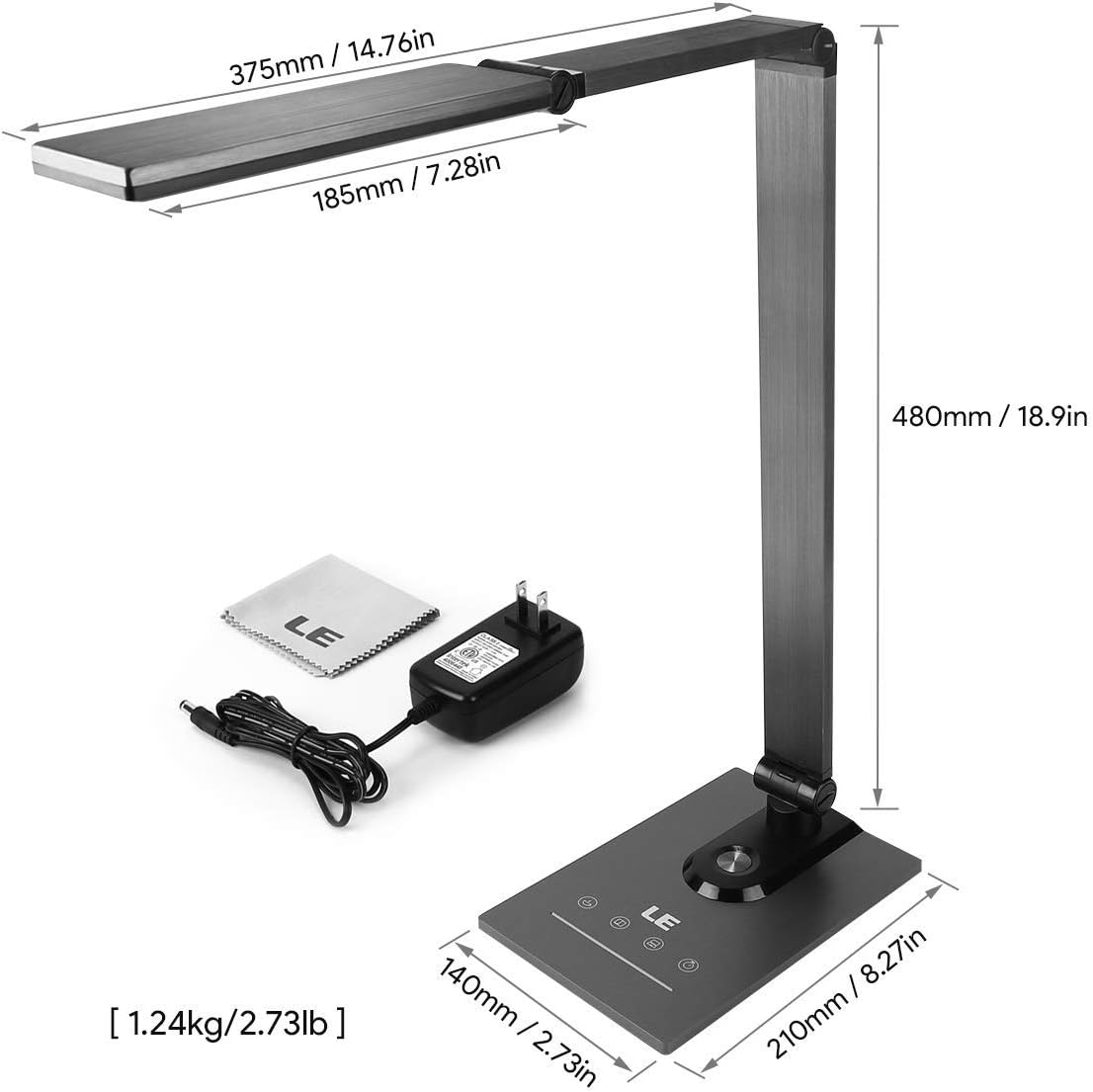
Ensure all components, including the power adapter and cleaning cloth, are present.
Kullanım Talimatları
1. Güç Açma/Kapatma
Gently touch the power symbol (O) on the lamp l'yi çevirmek için tabanamp açık veya kapalı.
2. Parlaklığın Ayarlanması
Slide your finger along the touch panel (indicated by a horizontal line with sun icons) on the lamp base to adjust the brightness level from 5% to 100%. The lamp offers stepless dimming for precise control.
3. Renk Sıcaklığını Değiştirme
Touch the mode symbol (icons resembling a coffee cup, book, and computer) on the lamp base to cycle through the three available color temperature modes:
- 3000K (Sıcak Beyaz): Ideal for relaxation or a cozy atmosphere.
- 4700K (Natural White): Suitable for general reading and daily tasks.
- 6000K (Soğuk Beyaz): Best for focused work and concentration.

Easily switch between three color temperatures and adjust brightness with the touch controls.
4. USB Şarj Bağlantı Noktası
Connect your smartphone, tablet, or other USB-powered devices to the 5V/1A USB output port located on the rear of the lamp uygun şarj için taban.

Charge your devices efficiently using the integrated 5V/1A USB port.
5. Hafıza İşlevi
Lamp En son kullandığınız parlaklık ve renk sıcaklığı ayarlarını otomatik olarak hatırlar. Işığı açtığınızda...amp on again, it will resume with these previous settings.
6. 30-Second Timer
Touch the clock symbol (SAAT) on the lamp base to activate the 30-second timer. The lamp will dim to a low light level and automatically turn off after 30 seconds, providing a convenient delay for leaving a room or falling asleep.

Utilize the timer and memory functions for enhanced convenience.
7. Adjusting Lamp Konum
Lamp's design allows for extensive adjustment to direct light precisely where needed:
- Taban Döndürme: Lamp base can be rotated up to 90 degrees horizontally.
- Kol Ayarı: The main arm of the lamp can be adjusted to various angles.
- Kafa Ayarı: Lamp head can be tilted and rotated up to 180 degrees vertically.

l'yi ayarlayınamp's arm and head to achieve optimal lighting angles.

The flexible design allows for precise light direction, suitable for various scenarios.
Bakım
- Temizlik: Use the provided cleaning cloth or a soft, dry cloth to wipe the lampYüzey kaplamasına veya elektronik bileşenlere zarar verebileceğinden, aşındırıcı temizleyiciler, çözücüler veya sert kimyasallar kullanmayın.
- Depolamak: L'yi saklıyorsanızamp Uzun süre kullanacaksanız, temiz ve kuru olduğundan emin olun. Serin, kuru bir yerde, doğrudan güneş ışığından ve aşırı sıcaklıklardan uzakta saklayın.
- LED'ler: The LED light source is integrated and not user-replaceable. Do not attempt to disassemble the lamp KAFA.
Sorun giderme
| Sorun | Olası Neden | Çözüm |
|---|---|---|
| Lamp açılmıyor. | Güç kaynağı yok veya gevşek bağlantı yok. | Güç adaptörünün hem l'ye hem de l'ye güvenli bir şekilde takıldığından emin olun.amp ve çalışan bir elektrik prizi. |
| Light flickers or brightness is inconsistent. | Unstable power supply or dirty touch panel. | Check the power source. Clean the touch control panel with a dry cloth. |
| USB charging port is not working. | Device incompatibility or faulty cable. | Ensure your device is compatible with 5V/1A USB charging. Try a different USB cable. |
| Lamp does not hold its adjusted position. | Joints may be loose or over-extended. | Gently readjust the lamp to a stable position. Avoid forcing joints beyond their intended range of motion. |
Özellikler
| Özellik | Detay |
|---|---|
| Model Numarası | 3100030-AB |
| Boyutlar (U x G x Y) | 14P x 21l x 48H cm (5.5 x 8.3 x 18.9 inç) |
| Ağırlık | 1450 Gram (3.2 lbs) |
| LED Güç | 9 Watt |
| USB Çıkışı | 5V/1A (10 Watts) |
| Giriş Voltage | 240 Volt |
| Renk Sıcaklıkları | 3000K, 4700K, 6000K |
| Parlaklık Ayarı | Stepless Dimming (5%-100%) |
| Kontrol Yöntemi | Dokunmatik Kontrol |
| Malzemeler | Brushed Metal (Base, Shade), ABS Plastic (Articulations) |
| Dahil Bileşenler | Masa Lamp, Power Adapter, Cleaning Cloth |
Garanti ve Destek
This product comes with a 1-year availability of spare parts, indicating a commitment to product support.
For any questions, technical assistance, or warranty claims, please contact the retailer where you purchased the product or visit the official Lepro webMüşteri destek bilgileri için site.
Lütfen garanti amaçlı satın alma belgenizi saklayın.