
giriiş
Satın aldığınız için teşekkür ederizasing the Max Power MPD125L Karaoke DJ Speaker System. This portable 12-inch speaker system is designed to deliver powerful sound and vibrant LED lighting for your entertainment needs. It features a built-in rechargeable battery, multiple connectivity options including USB, SD, AM/FM radio, and Bluetooth, along with a strong ampsürükleyici bir ses deneyimi için lifier.
Please read this manual thoroughly before operating the device to ensure proper use, optimal performance, and to prevent damage.
Güvenlik Bilgileri
- Yangın veya elektrik çarpmasını önlemek için üniteyi yağmura veya neme maruz bırakmayın.
- C'yi açmayınasing. İçerisinde kullanıcı tarafından bakımı yapılabilecek parça bulunmamaktadır. Tüm bakımlar için yetkili personele başvurun.
- Cihazın düşmesini önlemek için onu sağlam, düz bir yüzeye yerleştirin.
- Cihazı doğrudan güneş ışığından, ısı kaynaklarından ve aşırı tozdan uzak tutun.
- Uygun havalandırmayı sağlayın. Havalandırma açıklıklarını kapatmayın.
- Yalnızca üniteyle birlikte verilen güç adaptörünü kullanın.
- Şimşekli fırtınalarda veya uzun süre kullanılmadığında ünitenin fişini çekin.
- Güç kablosunun üzerine ağır nesneler koymaktan kaçının.
- Cihazın açıklıklarına herhangi bir nesne sokmayın.
Paket İçeriği
Lütfen tüm ürünlerin mevcut ve iyi durumda olduğundan emin olun:
- Max Power MPD125L Karaoke DJ Speaker System
- Kablosuz Mikrofon
- Kablosuz Uzaktan Kumanda
- Güç Adaptörü/Şarj Kablosu
- Kullanım Kılavuzu (bu belge)
Ürün Özellikleri
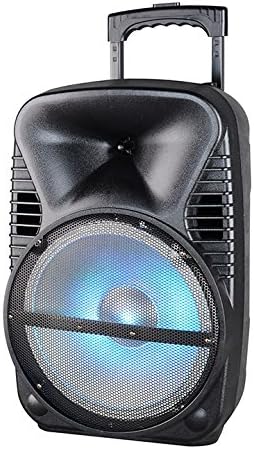
Resim: Ön view of the Max Power MPD125L Karaoke DJ Speaker System. It is a black, portable speaker with a retractable handle on top and wheels at the bottom. The front features a large speaker grille with blue LED lights illuminating the woofer, indicating its active state.
- Taşınabilir Tasarım: 12-inch speaker with built-in retractable handle and wheels for easy transport.
- Güçlü Ses: 4000W peak power output for loud and clear sound with good bass.
- Dahili Şarj Edilebilir Pil: Provides up to 4 hours of continuous playback. (Battery size: 12V/2.6A)
- LED Dance Lights: Integrated LED lights that flash, transforming any room into a disco club.
- Çoklu Bağlantı Seçenekleri:
- Bluetooth: Wireless streaming from compatible devices (laptops, smartphones).
- USB girişi: Ses oynatmak için fileUSB sürücülerden.
- SD Yuvası: Ses oynatmak için fileSD kartlardan.
- AM/FM Radyo: Built-in tuner for radio broadcasts.
- Karaoke İşlevselliği: Includes a wireless microphone for karaoke sessions.
- Full-Function Wireless Remote Control: Uzaktan rahat kullanım için.
- Empedans: 4 Ohm.
- Frekans Tepkisi: 40 Hz - 20 kHz.
Kurmak
1. Hoparlörü Şarj Etme
- Locate the DC input port on the speaker (usually on the rear panel).
- Connect the supplied power adapter to the DC input port.
- Güç adaptörünü standart bir elektrik prizine takın.
- The charging indicator light (if present) will illuminate, typically red, during charging and turn green when fully charged.
- Allow approximately 4-6 hours for a full charge before first use. The speaker can be used while charging.
2. Kablosuz Mikrofon Kurulumu
- Insert appropriate batteries (not included, usually AA) into the wireless microphone.
- Turn on the microphone. It should automatically pair with the speaker.
- Adjust the microphone volume knob on the speaker's control panel to your desired level.
3. Uzaktan Kumanda Kurulumu
- Insert appropriate batteries (not included, usually AAA) into the wireless remote control.
- Point the remote control towards the speaker's IR receiver (usually on the front panel or near the controls) to operate.
Kullanım Talimatları
1. Güç Açma/Kapatma
Locate the Power switch (usually a rocker switch) on the speaker's control panel. Flip it to the "ON" position to power on the speaker. Flip it to "OFF" to power off.
2. Mod Seçimi
Press the "MODE" button on the control panel or remote control to cycle through available input modes: Bluetooth, USB, SD, FM Radio, AM Radio, AUX (if available).
3. Bluetooth Eşleştirme
- Turn on the speaker and select Bluetooth mode. The speaker will typically announce "Bluetooth Mode" or display "BT" and enter pairing mode (indicated by a flashing Bluetooth indicator).
- On your smartphone, tablet, or laptop, enable Bluetooth and search for new devices.
- Select "MPD125L" (or similar name) from the list of available devices.
- Once paired, the speaker will confirm with an audible tone or a solid Bluetooth indicator light. You can now play audio wirelessly.
4. USB/SD Oynatma
- Insert a USB flash drive or SD card (pre-loaded with MP3 or compatible audio files) into the respective slot.
- The speaker should automatically switch to USB/SD mode and begin playing the first track. If not, press the "MODE" button to select USB or SD mode.
- Use the Play/Pause, Next Track, and Previous Track buttons on the control panel or remote to navigate.
5. AM/FM Radyo Kullanımı
- Select FM or AM radio mode using the "MODE" button.
- Press and hold the Play/Pause button (often labeled "SCAN") to automatically scan and save available radio stations.
- Use the Next Track and Previous Track buttons to switch between saved stations.
- Extend the telescopic antenna (if present) for better reception.
6. Karaoke Fonksiyonu
Ensure the wireless microphone is powered on and paired. Play your desired music through any input mode (Bluetooth, USB, etc.). Speak or sing into the microphone. Adjust the microphone volume and echo effects (if available) using the dedicated knobs on the control panel.
7. LED Dance Lights
The LED lights typically activate automatically when the speaker is powered on. There may be a dedicated button (e.g., "LIGHT" or "LED") on the control panel or remote to toggle them on/off or change patterns.
8. Ses Kontrolü
Adjust the master volume using the main volume knob on the speaker's control panel or the volume buttons on the remote control.
Bakım
- Temizlik: Use a soft, dry cloth to wipe the exterior of the speaker. Do not use liquid cleaners or abrasive chemicals.
- Depolamak: Uzun süre kullanılmayacaksa hoparlörü serin, kuru, doğrudan güneş ışığından ve aşırı sıcaklıklardan uzak bir yerde saklayın.
- Pil Bakım: To prolong battery life, avoid fully discharging the battery frequently. Recharge the battery at least once every 3 months if not in regular use.
- Havalandırma: Ensure the speaker's ventilation openings are clear of dust and debris to prevent overheating.
Sorun giderme
| Sorun | Olası Neden | Çözüm |
|---|---|---|
| Hoparlör açılmıyor. | Pil bitmiş. Güç kablosu düzgün bağlanmamış. | Connect the speaker to a power outlet and allow it to charge. Ensure the power cable is securely plugged into both the speaker and the outlet. |
| Hoparlörden ses gelmiyor. | Ses çok düşük. Yanlış giriş modu seçildi. Device not properly connected (Bluetooth/USB/SD). | Ana ses seviyesini artırın. Press the "MODE" button to select the correct input. Re-pair Bluetooth device, re-insert USB/SD, or check AUX cable connection. |
| Bluetooth cihazı eşleşmiyor. | Hoparlör eşleştirme modunda değil. Cihaz hoparlörden çok uzakta. Cihazdaki Bluetooth kapalı. | Ensure speaker is in Bluetooth mode and indicator is flashing. Cihazı hoparlöre daha yakın bir mesafeye (10 metre içinde) getirin. Cihazınızda Bluetooth'u etkinleştirin. |
| Mikrofon çalışmıyor. | Microphone is off or batteries are dead. Microphone volume is too low. | Turn on the microphone and replace batteries if necessary. Increase the microphone volume knob on the speaker. |
| Radyo alımı zayıf. | Zayıf sinyal. Anten uzatılmamış. | Hoparlörü daha iyi sinyal alan bir yere taşıyın. Teleskopik anteni tamamen uzatın. |
Özellikler
| Model Numarası | MPD125L |
| Marka | MAKSİMUM GÜÇ |
| Tepe Güç Çıkışı | 4000 Watt |
| Empedans | 4 Ohm |
| Frekans Tepkisi | 40 Hz - 20 kHz |
| Pil Boyutu | 12V / 2.6A |
| Pil Ömrü | 4 saate kadar |
| Ürün Boyutları (U x G x Y) | 33.02 x 38.1 x 58.42 cm (13 x 15 x 23 inç) |
| Ürün Ağırlığı | 15.88 kg (35 lbs) |
| Uyumlu Cihazlar | Dizüstü Bilgisayar, Akıllı Telefon |
| Bağlayıcı Türü | USB |
| UPC | 703510623201 |
Garanti ve Destek
Garanti bilgileri ve teknik destek için lütfen satın alma sırasında sağlanan belgelere bakın veya satıcınızla iletişime geçin. Herhangi bir garanti talebi için satın alma belgenizi saklayın.
For further assistance or inquiries, please visit the official MAX POWER websitesine bakın veya müşteri hizmetleri departmanıyla iletişime geçin.