
1. Önemli Güvenlik Talimatları
Montaj ve kullanımdan önce lütfen tüm talimatları dikkatlice okuyun. Bu kılavuzu ileride başvurmak üzere saklayın.
- Montaj işlemine başlamadan önce tüm bileşenlerin mevcut ve hasarsız olduğundan emin olun.
- Çizilmeleri önlemek için masayı yumuşak ve temiz bir zemine kurun.
- Malzemeye zarar vermemek için montaj sırasında vidaları aşırı sıkmayın.
- Bağlantıların sıkılığını sağlamak için periyodik olarak tüm bağlantıları kontrol edin.
- Masanın üzerinde durmayın veya oturmayın.
- Boğulma tehlikesini önlemek için küçük parçaları çocuklardan uzak tutun.
- Maximum load capacity: 50 kg (110 lbs). Do not exceed this limit.
2. Paket İçeriği
Aşağıda listelenen tüm parçaların paketinizde bulunduğundan emin olun. Herhangi bir parça eksik veya hasarlıysa, lütfen müşteri desteğiyle iletişime geçin.
- Desk tabletop (Engineered Wood)
- Metal frame components (Steel Alloy)
- Crossed steel bars (for stability)
- Ayarlanabilir ayaklar
- Assembly hardware kit (screws, bolts, etc.)
- Assembly tools (e.g., Allen key)
- Resimli kullanım kılavuzu
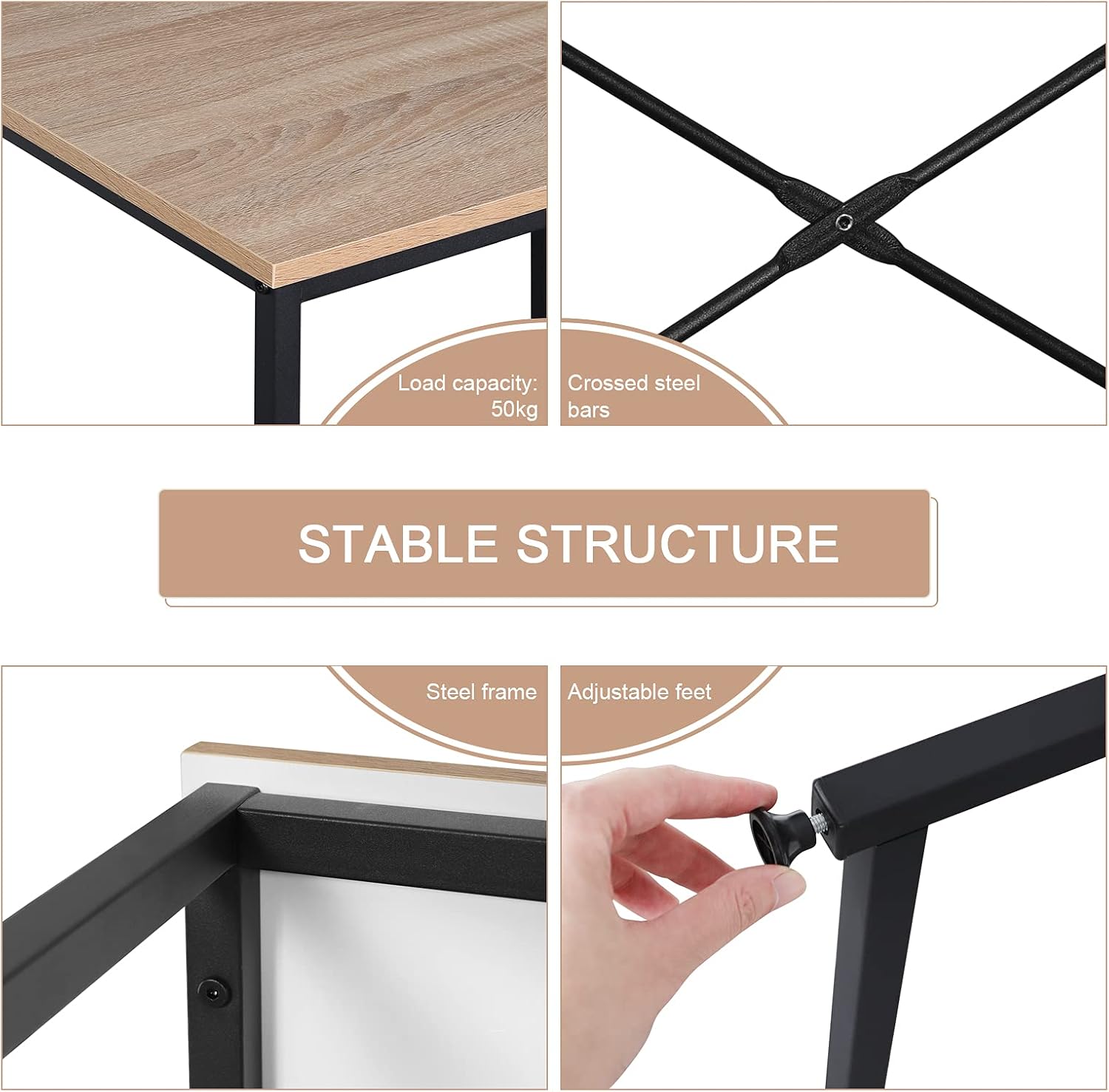
Figure 1: Key structural components including crossed steel bars and adjustable feet.
3. Montaj Talimatları
Assembly is recommended for one person and includes all necessary tools. Follow the detailed, illustrated instructions provided in the package for quick and easy setup.
Adım 1: Parçaları Paketinden Çıkarın ve Tanımlayın
Carefully remove all components from the packaging. Lay them out on a soft, clean surface. Refer to the parts list in your included manual to identify each piece.
Adım 2: Çerçeveyi Birleştirin
Connect the metal frame components using the provided screws and tools. Ensure all connections are secure but do not fully tighten until the entire frame is assembled.

Figure 2: Initial steps of frame assembly.
Step 3: Attach Cross Bars and Adjustable Feet
Secure the crossed steel bars to the frame for enhanced stability. Install the adjustable feet at the bottom of each leg. These feet help stabilize the desk on uneven surfaces.

Figure 3: Attaching the cross bars and adjustable feet.
Step 4: Secure the Tabletop
Place the engineered wood tabletop onto the assembled frame. Align the pre-drilled holes and secure the tabletop using the remaining screws. Fully tighten all screws on the frame and tabletop.

Figure 4: The assembled desk.
4. Kullanım Talimatları
The WOLTU Computer Desk is designed for versatile use in various home and office environments.
- İş istasyonu: The spacious 80x60 cm tabletop provides ample room for a computer, lamp, books, and documents.
- Diz mesafesi: The open design underneath allows for comfortable leg extension, suitable for extended periods of work or study.
- Çok İşlevli Kullanım: This desk can serve as a computer desk, office desk, study table, or gaming table.

Figure 5: Desk in use as a home office workstation.
5. Bakım
Proper maintenance ensures the longevity and appearance of your WOLTU desk.
- Temizlik: Masa yüzeylerini kuru veya nemli bir bezle silin.amp cloth as needed. Avoid harsh chemicals that may damage the finish.
- Dayanıklılık: The E1 composite wood is water-repellent and easy to clean. The metal tubes are rust-resistant.
- Kararlılık: Periodically check and adjust the leveling feet to ensure the desk remains stable on uneven floors and to prevent scratching.
- Koruma: While the tabletop is scratch-resistant, using coasters for drinks and pads for heavy objects is recommended to preserve its condition.

Figure 6: Features highlighting the desk's material durability and ease of maintenance.
6. Sorun Giderme
Yaygın sorunlar ve çözümleri.
- Masa sallanıyor:
- Tüm vidaların tamamen sıkıldığından emin olun.
- Her ayağın altındaki dengeleyici ayakları, zemindeki düzensizlikleri telafi edecek şekilde ayarlayın.
- Verify that the crossed steel bars are securely attached.
- Eksik parçalar veya hasarlı bileşenler:
- Refer to the package contents list. If parts are missing or damaged upon arrival, contact WOLTU customer support immediately for assistance.
7. Özellikler
| Özellik | Detay |
|---|---|
| Model Numarası | WOLTU (variant 80x60x70cm) |
| Boyutlar (U x G x Y) | 80 x 60 x 70 cm (31.5 x 23.6 x 27.6 inç) |
| Ağırlık | 7.34 kg (16.18 lbs) |
| Malzeme (Masaüstü) | E1 Grade Engineered Wood (MDF board) |
| Malzeme (Çerçeve) | Çelik Alaşımı |
| Renk | Light Oak (tabletop) + Black (frame) |
| Maksimum Yük Kapasitesi | 50 kg (110 lbs) |
| Montaj Gerekli | Yes (1 person recommended, tools included) |
| Özel Özellikler | Compact design, adjustable feet, X-braced frame for stability, water-repellent and scratch-resistant surface. |

Figure 7: Desk dimensions.
8. Garanti ve Destek
For any questions, concerns, or issues regarding your WOLTU Computer Desk, please contact WOLTU customer support. Refer to your purchase documentation for specific warranty details.
You can often find support contact information on the official WOLTU webÜrünü satın aldığınız site veya perakendeci aracılığıyla.