
1. Giriş
Thank you for choosing the Multilaser TC190 2.4 GHz Wireless Keyboard with Integrated Touchpad. This device is designed to provide a convenient and efficient input solution for your PC or Smart TV, combining a full keyboard with a multi-touch touchpad. This manual will guide you through the setup, operation, and maintenance of your new keyboard to ensure optimal performance and longevity.
2. Güvenlik Bilgileri
- Cihazı sudan, nemden ve aşırı sıcaklıklardan uzak tutun.
- Cihazı kendiniz sökmeye veya onarmaya çalışmayın. Tüm bakım işlemlerini yetkili personele yaptırın.
- Use only specified batteries (if applicable) and dispose of them properly.
- Cihazı düşürmekten veya güçlü darbelere maruz bırakmaktan kaçının.
- Cihazı yumuşak ve kuru bir bezle temizleyin. Sıvı temizleyiciler veya aerosoller kullanmayın.
3. Paket İçeriği
Lütfen paket içeriğini dikkatlice kontrol edin. Eksik veya hasarlı bir ürün varsa, satıcınızla iletişime geçin.
- Multilaser TC190 Wireless Keyboard with Integrated Touchpad
- USB 2.4 GHz Receiver
- Kullanıcı Kılavuzu
- (Batteries may or may not be included depending on the region/retailer)
4. Ürün Bittiview
Familiarize yourself with the components of your Multilaser TC190 keyboard.
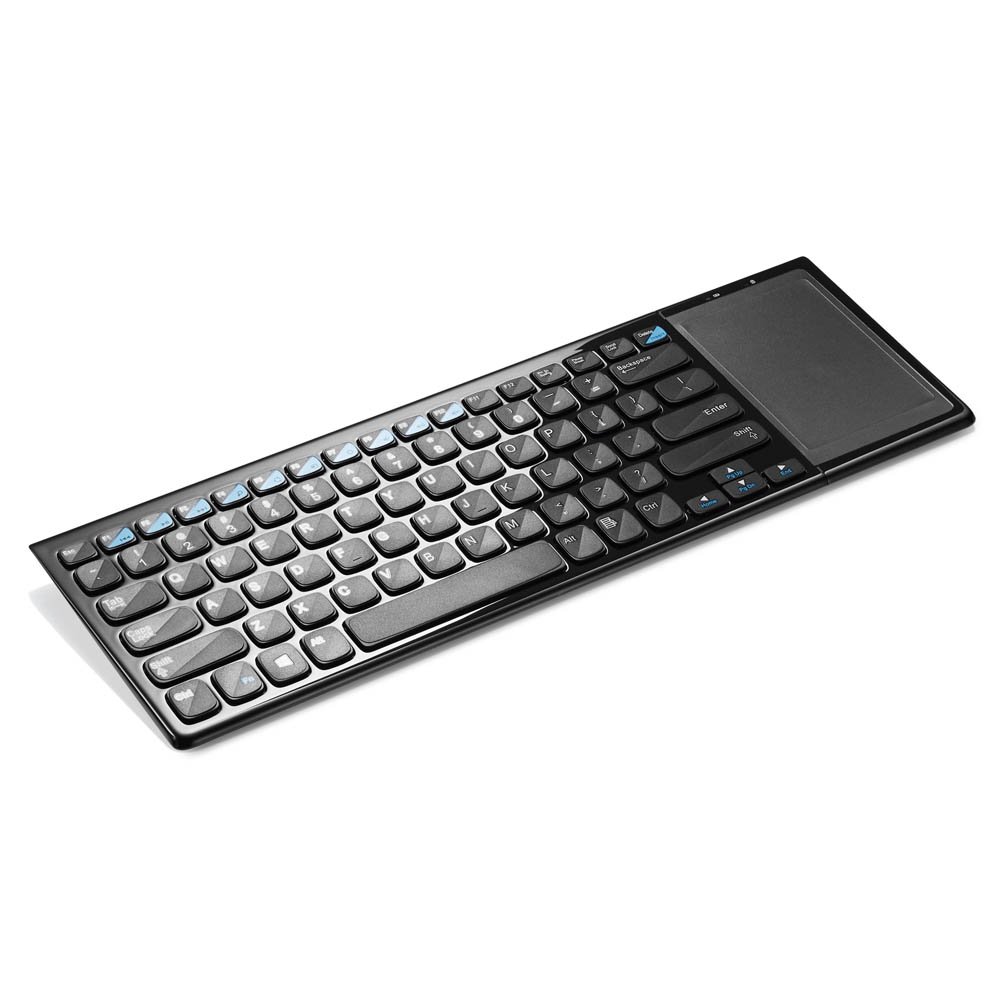
Şekil 1: Multilaser TC190 Wireless Keyboard with Integrated Touchpad. This image shows the full keyboard layout with the touchpad located on the right side, indicating its compact design and integrated functionality.
- Klavye düzeni: Standard QWERTY layout with multimedia function keys.
- Entegre Dokunmatik Yüzey: Located on the right side, supporting multi-touch gestures.
- USB Alıcı Bölmesi: Usually located in the battery compartment for storage.
- Güç düğmesi: On/Off switch to conserve battery life.
- Pil Bölmesi: For inserting required batteries.
5. Kurulum
- Pilleri Takın: Open the battery compartment cover on the back of the keyboard. Insert the required batteries (typically AAA, refer to the compartment for exact type and polarity). Close the cover securely.
- USB Alıcısını Bağlayın: Locate the USB 2.4 GHz receiver, usually stored inside the battery compartment. Plug the USB receiver into an available USB port on your PC or Smart TV.
- Güç Açık: Klavyedeki güç düğmesini "AÇIK" konumuna getirin.
- Otomatik Bağlantı: The keyboard should automatically connect to your device within a few seconds. No additional drivers are typically required for most operating systems.
6. Kullanım Talimatları
6.1. Klavye İşlevleri
The Multilaser TC190 features a standard keyboard layout. Use the keys as you would with any conventional keyboard for typing text, navigating menus, and executing commands.
- Fonksiyon Tuşları (Fn): Some keys may have secondary functions (e.g., volume control, media playback) accessible by pressing the Fn İstenilen fonksiyon tuşuyla aynı anda tuşa basın.
- Multimedya Tuşları: Dedicated multimedia keys (if present) allow quick access to media controls.
6.2. Dokunmatik Yüzey İşlevleri
The integrated multi-touch touchpad replaces a traditional mouse. Below are common gestures:
- Tek Parmakla Dokunma: Sol tık.
- İki Parmakla Dokunma: Sağ tık.
- Tek Parmakla Sürükleme: İmleci hareket ettirin.
- İki Parmak Kaydırma: Scroll up or down in documents and web sayfalar.
- Yakınlaştırmak için sıkıştırın: Use two fingers to zoom in or out (application dependent).
7. Bakım
- Temizlik: Use a soft, lint-free cloth to wipe the keyboard and touchpad. For stubborn dirt, slightly dampen the cloth with water or a mild, non-abrasive cleaner. Ensure no liquid enters the device.
- Pil Değişimi: When the keyboard's performance degrades or it stops responding, replace the batteries. Always use fresh batteries of the correct type.
- Depolamak: If storing the keyboard for an extended period, remove the batteries to prevent leakage. Store in a cool, dry place.
8. Sorun Giderme
| Sorun | Olası Çözüm |
|---|---|
| Klavye yanıt vermiyor. |
|
| Dokunmatik yüzey düzgün çalışmıyor. |
|
| Connection issues / Lag. |
|
9. Özellikler
| Özellik | Detay |
|---|---|
| Marka | Çoklu lazer |
| Örnek | TC190 |
| Bağlantı | 2.4 GHz Kablosuz (USB Alıcı) |
| Uyumlu Cihazlar | PC, Akıllı TV |
| Klavye Açıklaması | Multimedya |
| Özel Özellikler | Wireless, Integrated Multi-touch Touchpad |
| Güç Kaynağı | Pil ile çalışır |
| Ürün Ağırlığı | 800 Gram |
10. Garanti ve Destek
Multilaser products are manufactured to high-quality standards. For information regarding warranty terms and conditions, please refer to the warranty card included with your product or visit the official Multilaser website. For technical support or customer service, please contact Multilaser customer support through their official channels.
Resmi Webalan: www.multilaser.com.br (Lütfen bölgenizi kontrol edin webSite)