
giriiş
This manual provides detailed instructions for the installation, configuration, and operation of your Multilaser RE085 Dual Band Wireless Router. Please read this guide carefully to ensure proper setup and optimal performance of your device. The RE085 router offers dual-band connectivity (2.4GHz and 5GHz) with speeds up to 750 Mbps, featuring three external antennas and four LAN ports for reliable network access.
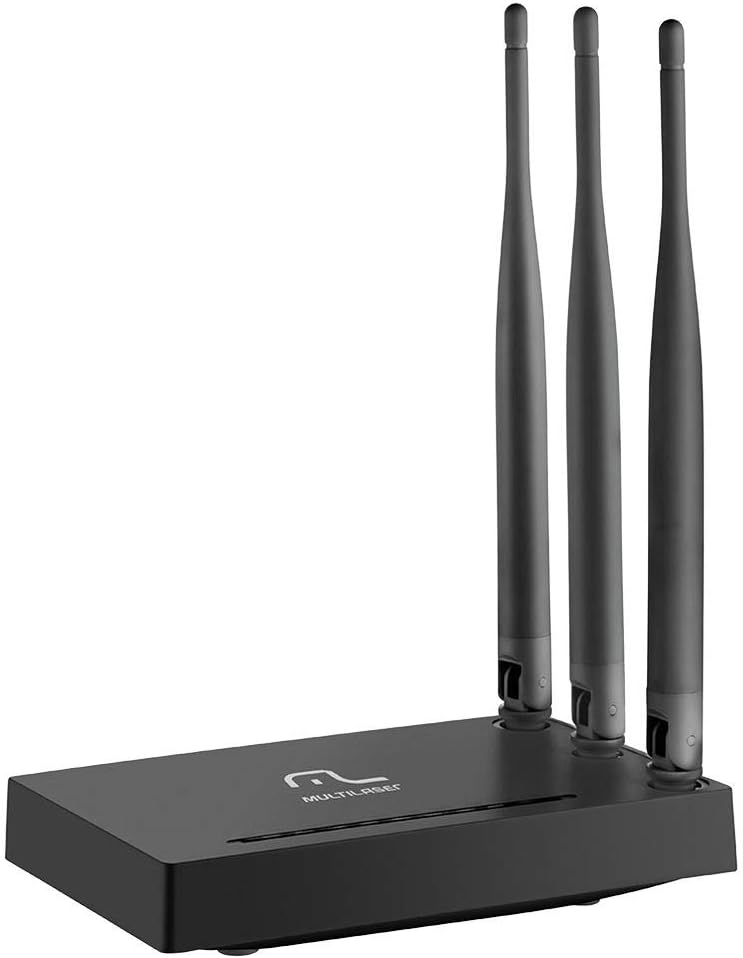
Resim: Ön view of the Multilaser RE085 router with its three external antennas in an upright position, showcasinKompakt tasarımıyla dikkat çekiyor.
Paket İçeriği
Kurulum işlemine başlamadan önce, lütfen paketinizin aşağıdaki öğeleri içerdiğinden emin olun:
- Multilaser RE085 Dual Band Wireless Router
- Güç Adaptörü
- Ethernet kablosu
- Quick Installation Guide (this document serves as a comprehensive guide)
Kurulum ve Yükleme
Follow these steps to set up your Multilaser RE085 router:
1. Fiziksel Bağlantı
- Konumlandırma: Yönlendiriciyi evinizde veya ofisinizde merkezi bir konuma, engellerden ve girişime neden olabilecek cihazlardan (örneğin, kablosuz telefonlar, mikrodalgalar) uzak bir yere yerleştirin.
- Antenleri bağlayın: Ensure the three external antennas are securely attached and oriented for optimal signal coverage.
- Güce Bağlanın: Plug the power adapter into the router's power port and then into a wall outlet. The power indicator LED on the router should light up.
- Modeme Bağlan: Connect one end of the provided Ethernet cable to the WAN port (often colored differently, e.g., blue) on the Multilaser RE085 router. Connect the other end to the LAN port on your modem or existing internet source.
- Cihazları Bağlayın (İsteğe Bağlı): For wired connections, connect one end of an Ethernet cable to any of the four LAN ports (usually yellow) on the router and the other end to your computer or other network device.

Resim: Arka view of the Multilaser RE085 router, highlighting the WAN port (typically blue) and four yellow LAN ports for wired connections.
2. İlk Yapılandırma (Web Arayüz)
- Yönlendiriciye bağlanın: Connect your computer to the router either via an Ethernet cable (to a LAN port) or wirelessly using the default Wi-Fi network name (SSID) printed on the router's label.
- Erişim Web Tarayıcı: Bir tane aç web Tarayıcınızı (örneğin Chrome, Firefox, Edge) açın ve adres çubuğuna yönlendiricinin varsayılan IP adresini yazın. Bu genellikle şöyledir:
192.168.0.1or192.168.1.1Doğru adres için yönlendiricinizin üzerindeki etikete bakın. - Giriş yapmak: Varsayılan kullanıcı adını ve şifreyi girin. Yaygın varsayılan değerler şunlardır:
adminfor both username and password. If these do not work, check the router's label or the quick installation guide. - Kurulum Sihirbazını Çalıştırın: Upon successful login, you will likely be prompted to run a Quick Setup Wizard. Follow the on-screen instructions to configure your internet connection type (e.g., PPPoE, Dynamic IP, Static IP). Your Internet Service Provider (ISP) can provide this information if you are unsure.
- Kablosuz Ayarlarını Yapılandırın:
- SSID (Ağ Adı): Change the default Wi-Fi network names for both 2.4GHz and 5GHz bands to something unique and easily identifiable.
- Parola (Güvenlik Anahtarı): Set a strong, secure password for each Wi-Fi network. Use a combination of uppercase and lowercase letters, numbers, and symbols.
- Güvenlik Türü WPA2-PSK (AES) is recommended for optimal security.
- Ayarları Kaydet: After configuring, save your settings. The router may restart to apply the changes.
Kullanım Talimatları
Once your Multilaser RE085 router is set up, you can connect your devices and manage your network.
Cihazları Bağlama
- Kablosuz cihazlar: On your smartphone, tablet, laptop, or smart TV, search for available Wi-Fi networks. Select the SSID you configured (e.g., "MyHomeNetwork_2.4GHz" or "MyHomeNetwork_5GHz") and enter the password.
- Kablolu Cihazlar: Connect devices like desktop computers, gaming consoles, or smart TVs directly to the router's LAN ports using Ethernet cables for a stable and fast connection.
Dual Band Functionality
The RE085 supports both 2.4GHz and 5GHz wireless bands:
- 2.4GHz Bandı: Offers wider coverage and better penetration through walls, suitable for general internet use, browsing, and devices further away from the router.
- 5GHz Bandı: Provides faster speeds and lower latency, ideal for bandwidth-intensive activities like online gaming, 4K video streaming, and devices closer to the router.
You can connect different devices to the band that best suits their needs and location.
Misafir Ağı
The router allows you to create up to 6 additional guest networks. This feature provides internet access to guests while isolating them from your main network, enhancing security. Access the router's web interface to configure guest networks.
Tekrarlayıcı İşlevi
The Multilaser RE085 can also function as a wireless repeater, extending the range of an existing Wi-Fi network. Refer to the advanced settings in the router's web interface for repeater mode configuration.
Bakım
Düzenli bakım, yönlendiricinizin uzun ömürlü olmasını ve en iyi performansı göstermesini sağlar.
- Normal Yeniden Başlatma: Periodically restart your router (unplug from power for 10 seconds, then plug back in) to clear its memory and refresh network connections. This can resolve minor performance issues.
- Donanım Yazılımı Güncellemeleri: Check the Multilaser official website for firmware updates. Keeping your router's firmware up-to-date can improve performance, add new features, and enhance security. Follow the instructions provided by Multilaser carefully when performing updates.
- Fiziksel Temizlik: Keep the router free from dust. Use a soft, dry cloth to gently clean the exterior. Ensure ventilation holes are not blocked.
- Şifre Yönetimi: Change your Wi-Fi and router login passwords periodically for enhanced security.
Sorun giderme
If you encounter issues with your Multilaser RE085 router, try the following troubleshooting steps:
İnternet Bağlantısı Yok
- Kabloları Kontrol Edin: Ensure all Ethernet cables (WAN, LAN) are securely connected to both the router and your modem/devices.
- Modemi Kontrol Edin: Verify that your modem is working correctly and has an active internet connection. Try restarting your modem.
- Yönlendirici Durum Işıkları: Check the LED indicators on the front of the router. The internet/WAN light should be solid or blinking, indicating an active connection.
- Yönlendiriciyi yeniden başlatın: Power cycle the router (unplug, wait 10 seconds, plug back in).
- İSS Ayarları: Confirm your internet connection type and settings (PPPoE, Dynamic IP, Static IP) in the router's web Arayüz, internet servis sağlayıcınız tarafından sağlananlarla eşleşmelidir.
Weak or Unstable Wi-Fi Signal
- Yönlendirici Yerleşimi: Yönlendiriciyi duvarlardan, büyük metal nesnelerden ve parazite neden olabilecek diğer elektronik cihazlardan uzak, daha merkezi bir yere taşıyın.
- Anten Yönü: Adjust the antennas for better signal direction.
- Bant Seçimi: For devices closer to the router, try connecting to the 5GHz band for faster speeds. For devices further away, the 2.4GHz band might offer better range.
- Parazit yapmak: Identify and minimize sources of interference (e.g., microwaves, cordless phones, Bluetooth devices).
- Kanal Seçimi: In the router's web interface, try changing the Wi-Fi channel for both 2.4GHz and 5GHz bands to a less congested one.
Forgotten Wi-Fi Password or Router Login Password
- Check Router Label: The default Wi-Fi password and router login credentials are often printed on a label on the bottom or back of the router.
- Fabrika Varsayılanlarına Sıfırla: Yönlendiriciye erişemiyorsanız web interface or have forgotten your Wi-Fi password and cannot retrieve it, you may need to perform a factory reset. Locate the small reset button (often recessed) on the router. With the router powered on, use a paperclip or pin to press and hold the reset button for about 10-15 seconds until the lights flash. The router will restart with its factory default settings, including default Wi-Fi names and passwords. You will then need to reconfigure it from scratch.
Özellikler
Key technical specifications for the Multilaser RE085 Dual Band Wireless Router:
| Özellik | Şartname |
|---|---|
| Marka | Çoklu lazer |
| Model Numarası | RE085 |
| Kablosuz İletişim Standardı | 802.11ac |
| Frekans Bant Sınıfı | Çift Bant (2.4 GHz ve 5 GHz) |
| Veri Aktarım Hızı | Saniyede 750 Megabite Kadar |
| Port Sayısı | 4 (LAN) |
| Bağlantı Teknolojisi | Wifi |
| Uyumlu Cihazlar | Oyun Konsolları, Tabletler, Akıllı Televizyonlar |
| Önerilen Kullanım | Ev |
Garanti ve Destek
For warranty information, technical support, or further assistance, please refer to the official Multilaser website veya doğrudan müşteri hizmetleriyle iletişime geçin. Garanti talepleri için satın alma kanıtı olarak satın alma makbuzunuzu saklayın.
Multilaser Official Webalan: www.multilaser.com.br