
1. Giriş
This manual provides detailed instructions for the setup, operation, and maintenance of your myTouchSmart Indoor Plug-in Simple Set Digital Timer, Model 26892-T5. Please read this manual thoroughly before using the device to ensure proper function and safety.
The myTouchSmart Digital Timer is designed to automate indoor lighting and electronics, allowing you to schedule their operation for convenience and energy efficiency.
2. Ürün Bittiview
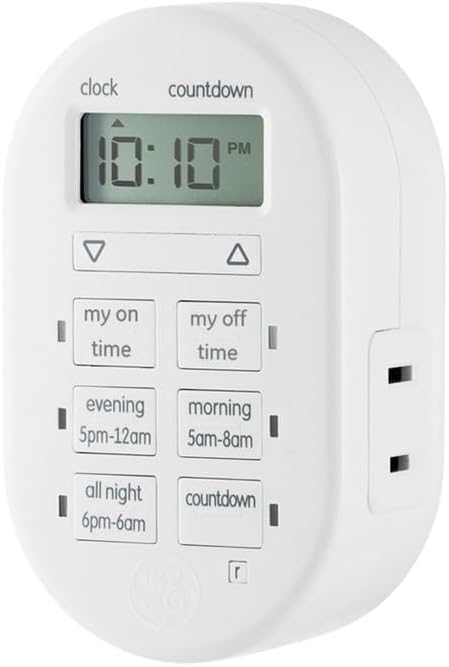
Şekil 1: Ön view of the myTouchSmart Indoor Plug-in Simple Set Digital Timer. The device is white, oval-shaped, with a digital display at the top showing "10:10 PM". Below the display are two arrow buttons (up and down). Further down are six rectangular buttons arranged in two columns: "my on time", "my off time", "evening 5pm-12am", "morning 5am-8am", "all night 6pm-6am", and "countdown". A polarized outlet is visible on the right side.
The myTouchSmart Digital Timer features a compact design with a clear digital display and intuitive control buttons. It includes a single polarized outlet for connecting your device.
Temel Bileşenler:
- Dijital gösterge: Shows current time, program settings, and countdown status.
- Yukarı/Aşağı Oklar: Used to adjust time and program settings.
- "My On Time" Button: Sets a custom turn-on time.
- "My Off Time" Button: Sets a custom turn-off time.
- Ön Ayar Düğmeleri: "Evening (5pm-12am)", "Morning (5am-8am)", "All Night (6pm-6am)" for quick scheduling.
- "Countdown" Button: Activates a countdown timer.
- Polarized Outlet: For connecting the appliance or light to be controlled.
- Mavi LED Göstergeleri: Show active programs.
3. Özellikler
- Easy-to-set digital timer for indoor lighting and electronics.
- Flexible scheduling options including custom daily On/Off times.
- Three available daily presets: Evening (5pm-12am), Morning (5am-8am), or All Night (6pm-6am).
- Customizable countdown feature (up to 24 hours in 1-minute intervals).
- Blue LED indicators show active programs.
- Large LCD screen for effortless viewIng.
- One (1) polarized outlet.
- Compatible with LED, CFL, Incandescent, and Halogen bulbs, including dimmable LED and CFL bulbs.
- Backup battery saves timer settings during power outages or disconnections.
4. Kurulum
4.1 İlk Güçlendirme
- Zamanlayıcıyı ambalajından çıkarın.
- Plug the timer into a standard 125V wall outlet. The display will illuminate.
- Allow the timer to charge its internal backup battery for approximately 15 minutes before programming. This ensures settings are retained during power interruptions.
4.2 Geçerli Saati Ayarlamak
- Basılı tutun SAAT button (located above the display) until the time digits begin to flash.
- Kullanın UP (▲) Ve AŞAĞI (▼) arrow buttons to adjust the hour. Pay attention to the AM/PM indicator.
- Basın SAAT button again to move to the minutes setting.
- Kullanın UP (▲) Ve AŞAĞI (▼) arrow buttons to adjust the minutes.
- Basın SAAT button one more time to save the current time and exit the setting mode.
5. Kullanım Talimatları
Connect the appliance or light you wish to control into the polarized outlet on the right side of the timer.
5.1 Setting Custom On/Off Times ("My On Time" / "My Off Time")
- Basın ZAMANINDA GELDİM button. The display will show "ON" and the time will flash.
- Kullanın UP (▲) Ve AŞAĞI (▼) arrow buttons to set the desired turn-on hour, then press ZAMANINDA GELDİM again to set minutes.
- Once the desired ON time is set, press ZAMANINDA GELDİM to confirm. A blue LED indicator next to the button will light up, indicating the program is active.
- Repeat the process for the BOŞ ZAMANLARIM button to set the desired turn-off time. A blue LED indicator next to the button will light up.
- To deactivate a custom program, press the corresponding ZAMANINDA GELDİM or BOŞ ZAMANLARIM button until the blue LED indicator turns off.
5.2 Önceden Ayarlanmış Programların Kullanımı
The timer offers three convenient preset programs:
- EVENING (5pm-12am): Turns on at 5:00 PM and off at 12:00 AM.
- MORNING (5am-8am): Turns on at 5:00 AM and off at 8:00 AM.
- ALL NIGHT (6pm-6am): Turns on at 6:00 PM and off at 6:00 AM.
To activate a preset program, simply press the corresponding button (AKŞAM, SABAH, veya BÜTÜN GECE). A blue LED indicator next to the button will light up, confirming the program is active. To deactivate, press the button again until the LED turns off.
5.3 Geri Sayım Zamanlayıcısını Kullanma
- Basın GERİ SAYIM button. The display will show "CD" and the time will flash.
- Kullanın UP (▲) Ve AŞAĞI (▼) arrow buttons to set the desired countdown duration (up to 24 hours, in 1-minute intervals).
- Basmak GERİ SAYIM again to start the countdown. The blue LED indicator will light up.
- The connected device will turn ON (if currently OFF) or OFF (if currently ON) after the countdown duration expires.
- Geri sayımı iptal etmek için tuşuna basın. GERİ SAYIM button again until the blue LED indicator turns off.
Note: Only one program (custom or preset) can be active at a time. Activating a new program will deactivate any previously active program. The countdown timer operates independently but will override other programs for its duration.
6. Bakım
6.1 Temizlik
To clean the timer, unplug it from the wall outlet. Use a soft, dry cloth to wipe the exterior. Do not use liquid cleaners or abrasive materials, as these may damage the device.
6.2 Pil Yedekleme
The timer includes an internal backup battery to retain settings during power outages. This battery is not user-replaceable and is designed to last the lifetime of the product. Ensure the timer is plugged in for at least 15 minutes initially to charge this battery.
7. Sorun Giderme
| Sorun | Olası Neden | Çözüm |
|---|---|---|
| Zamanlayıcı ekranı boş. | Prizde elektrik yok. | Check the wall outlet with another device. Ensure the timer is fully plugged in. |
| Connected device does not turn On/Off. | Program not active or incorrect settings. | Verify the blue LED indicator for the desired program is lit. Recheck your custom or preset time settings. Ensure the connected device is switched ON. |
| Ayarlar güç kesildikten sonra kayboluyortage. | Backup battery not sufficiently charged. | Ensure the timer is plugged in for at least 15 minutes to charge the backup battery. If issues persist, the battery may be depleted (not user-replaceable). |
| Zamanlayıcı, düğmelere basılmaya yanıt vermiyor. | Geçici yazılım hatası. | Unplug the timer from the wall outlet for 30 seconds, then plug it back in. This may reset the device. |
8. Özellikler
- Model Numarası: 26892-T5
- Marka: benimTouchSmart'ım
- Renk: Beyaz
- Elektriksel Değerler: 125V, 50/60 Hz, 15A 1875W General Purpose / Resistive, 10A 1250W Tungsten, ½ HP
- Ürün Ölçüleri: 2.55 x 5.92 x 7.3 inç
- Ürün Ağırlığı: 4 ons
- Çıkış Tipi: 1 Polarize Priz
- Uyumluluk: LED, CFL, Incandescent, Halogen bulbs (including dimmable LED/CFL)
- Sertifikalar: UL Listeli
9. Garanti ve Destek
9.1 Sınırlı Garanti
This myTouchSmart Digital Timer is backed by a bir yıllık sınırlı garanti. For details regarding warranty coverage and claims, please refer to the warranty card included with your product or visit the manufacturer's official webalan.
9.2 Müşteri Desteği
For technical assistance, troubleshooting not covered in this manual, or general inquiries, please contact myTouchSmart customer support. Contact information can typically be found on the product packaging or the official myTouchSmart webalan.
Please have your model number (26892-T5) and purchase date available when contacting support.