
giriiş
Satın aldığınız için teşekkür ederizasing the POWERFLEX PF-AZ01-Z003 Portable Bluetooth Speaker. This device is designed to provide high-quality audio playback and hands-free calling capabilities. Please read this manual carefully before using the speaker to ensure proper operation and to maximize its performance.

Resim: The POWERFLEX PF-AZ01-Z003 Portable Bluetooth Speaker is shown from an angled perspective, highlighting its black finish, front grille, and the touch-sensitive control panel on its top surface, which features illuminated volume controls.
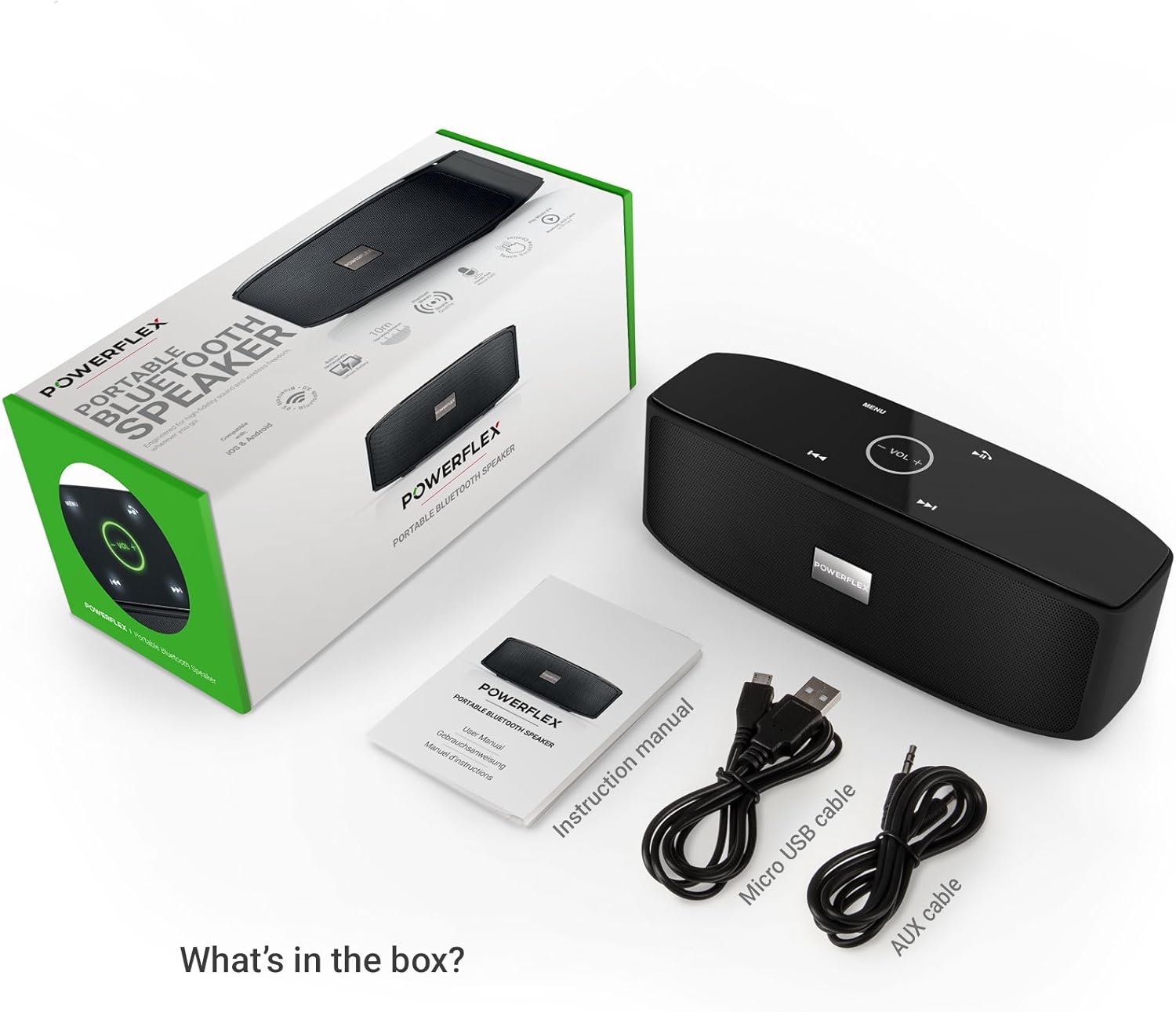
Paket İçeriği
Lütfen aşağıdaki öğelerin kutucuğunu işaretleyin:
- POWERFLEX PF-AZ01-Z003 Portable Bluetooth Speaker
- Mikro USB Şarj Kablosu
- AUX Kablosu
- Kullanıcı Kılavuzu

Resim: This image displays the POWERFLEX PF-AZ01-Z003 Portable Bluetooth Speaker alongside its accessories: a Micro USB charging cable, an AUX cable, and the instruction manual. These are the items typically found inside the product packaging.
Özelliklerview
The POWERFLEX PF-AZ01-Z003 speaker offers several key features for an enhanced audio experience:
- Üstün Ses: Equipped with dual five-watt drivers for clear highs, detailed mid-ranges, and deep bass.
- Bluetooth 3.0 Bağlantısı: Provides a stable wireless connection up to 10 meters (33 feet).
- Eller Serbest Arama: Integrated microphone allows for clear phone calls.
- Çoklu Oynatma Seçenekleri: Supports Bluetooth, AUX input, and TF (MicroSD) card playback.
- Dokunmatik Kontroller: Intuitive touch-sensitive panel for easy music and call management.
- Taşınabilir Tasarım: Compact build for easy transport.

Resim: This image presents a cutaway view of the POWERFLEX PF-AZ01-Z003 speaker, revealing its internal components, specifically the dual five-watt drivers. The visual emphasizes the speaker's design for delivering vibrant highs, detailed mid-ranges, and deep bass for true stereo sound.

Resim: This image showcases the POWERFLEX PF-AZ01-Z003 speaker positioned in front of a collection of diverse iOS and Android Bluetooth-enabled devices, including smartphones and tablets. The arrangement visually confirms the speaker's broad compatibility with various mobile operating systems.

Resim: This image demonstrates the compact design of the POWERFLEX PF-AZ01-Z003 speaker, showing it being easily placed into a backpack. The accompanying text highlights its portability and specific dimensions (190 x 58 x 70mm), indicating it fits conveniently into bags.
Kurmak
1. Hoparlörü Şarj Etme
The speaker is powered by an internal 1800 mAh rechargeable battery. Before first use, fully charge the speaker.
- Connect the Micro USB charging cable to the DC5V port on the speaker.
- USB kablosunun diğer ucunu bir USB güç adaptörüne (dahil değildir) veya bir bilgisayarın USB portuna bağlayın.
- The charging indicator light will illuminate. Once fully charged, the light will change color or turn off (refer to LED indicator section in the full manual for details).
2. Açma/Kapama
To power on the speaker, slide the ON/OFF switch to the 'ON' position. To power off, slide the switch to the 'OFF' position.
Resim: Bu görüntü ayrıntılı bir bilgi sağlar view of the speaker's rear panel, highlighting the physical ON/OFF switch, the DC5V port for charging, the AUX input jack for wired connections, and the TF (MicroSD) card slot for direct media playback.
Kullanım Talimatları
1. Bluetooth Eşleştirme
- Ensure the speaker is powered on and within 10 meters (33 feet) of your Bluetooth-enabled device.
- The speaker will automatically enter Bluetooth pairing mode, indicated by a flashing LED light (refer to LED indicator section in the full manual).
- Cihazınızda (akıllı telefon, tablet vb.) Bluetooth ayarlarına gidin ve kullanılabilir cihazları arayın.
- Select "PF-AZ01-Z003" from the list.
- Once paired, the speaker will emit an audible confirmation, and the LED light will become solid.

Resim: This image demonstrates the speaker's Bluetooth connectivity, showing a smartphone wirelessly streaming music to the POWERFLEX PF-AZ01-Z003. Blue concentric circles emanate from the phone towards the speaker, symbolizing the wireless connection, and text indicates playback from up to 10 meters.
2. Müzik Çalma
Once connected via Bluetooth, you can play music from your device. The speaker also supports AUX cable and TF card playback.
- Bluetooth: Eşleştirilmiş cihazınızdan doğrudan müzik çalın.
- AUX Girişi: Verilen 3.5 mm AUX kablosunu kullanarak bir ses cihazını AUX portuna bağlayın. Hoparlör otomatik olarak AUX moduna geçecektir.
- TF Kartı: Insert a TF (MicroSD) card with MP3 files into the TF card slot. The speaker will automatically begin playing music from the card.
3. Dokunmatik Kontroller
The speaker features touch-sensitive controls on its top panel for easy operation.
- Oynat/Duraklat: Tap the Play/Pause button (usually indicated by a triangle or two vertical bars).
- Sesi Aç/Kapat: Tap the '+' or '-' buttons to adjust the volume.
- Sonraki Parça: '>>|' düğmesine dokunun.
- Önceki parça: '|<<' düğmesine dokunun.
- Mod/Menü: Tap the 'MENU' button to switch between input modes (Bluetooth, AUX, TF).

Resim: This image shows a hand interacting with the touch-sensitive controls on the top surface of the POWERFLEX PF-AZ01-Z003 speaker. A finger is pressing the 'VOL +' button, which is illuminated in green, while a smartphone displaying music playback is visible in the foreground, emphasizing the ease of control.
4. Eller Serbest Arama
The speaker includes a built-in microphone, allowing you to answer phone calls when connected via Bluetooth.
- Gelen bir çağrı olduğunda müzik duraklayacaktır.
- Tap the Play/Pause button to answer the call.
- Speak into the speaker.
- Tap the Play/Pause button again to end the call.

Resim: This image depicts a smartphone displaying an incoming call, positioned next to the POWERFLEX PF-AZ01-Z003 speaker. The text "Make hands free calls with the built-in microphone" is prominently displayed, indicating the speaker's capability for hands-free communication.
Bakım
To ensure the longevity and optimal performance of your POWERFLEX PF-AZ01-Z003 speaker, follow these maintenance guidelines:
- Temizlik: Hoparlörün yüzeyini silmek için yumuşak ve kuru bir bez kullanın. Aşındırıcı temizleyiciler, alkol veya kimyasal çözücüler kullanmayın.
- Depolamak: Hoparlörü serin, kuru ve doğrudan güneş ışığından ve aşırı sıcaklıklardan uzak bir yerde saklayın.
- Suya Maruz Kalma: Bu hoparlör su geçirmez değildir. Suya veya aşırı neme maruz bırakmaktan kaçının.
- Pil Bakım: Pil ömrünü korumak için pili sık sık tamamen boşaltmaktan kaçının. Hoparlörü uzun süre kullanılmasa bile düzenli olarak şarj edin.
Sorun giderme
If you encounter issues with your POWERFLEX PF-AZ01-Z003 speaker, refer to the following common problems and solutions:
| Sorun | Olası Neden | Çözüm |
|---|---|---|
| Hoparlör açılmıyor. | Pil bitmiş. | Hoparlörü Micro USB kablosu kullanarak şarj edin. |
| Bluetooth üzerinden eşleştirme yapılamıyor. | Speaker is not in pairing mode; device is too far; Bluetooth is off on device. | Ensure speaker is in pairing mode (flashing LED). Move device closer. Enable Bluetooth on your device. Forget previous pairings and try again. |
| Ses yok veya ses seviyesi düşük. | Volume too low on speaker or device; incorrect input mode; loose AUX cable. | Increase volume on both speaker and connected device. Press 'MENU' to select correct input mode. Ensure AUX cable is securely connected. |
| Ses bozulması. | Volume too high; device too far from speaker. | Reduce volume on speaker and/or connected device. Move device closer to the speaker. |
Özellikler
| Özellik | Detay |
|---|---|
| Model Adı | PF-AZ01-Z003 |
| Marka | GÜÇ RFLEX |
| Bağlantı Teknolojisi | Bluetooth, USB |
| Bluetooth Sürümü | 3.0 |
| Özel Özellik | Portable, Built-in Microphone |
| Uyumlu Cihazlar | Universal (iOS & Android Bluetooth enabled devices) |
| Montaj Tipi | Masaüstü |
| Güç Kaynağı | Pil |
| Pil Kapasitesi | 1800 mAh |
| Pil Enerji İçeriği | 6.66 Watt-saat |
| Lithium Ion Cells | 1 |
| Ürün Boyutları | 23x10.6x9.6 cm |
| Ürün Ağırlığı | 760 gr |
| Renk | Siyah |
Garanti ve Destek
For warranty information and technical support, please refer to the documentation included with your purchase or contact POWERFLEX customer service. Keep your proof of purchase for warranty claims.
Üretici: GÜÇ RFLEX
Ürün ASIN: B074M8W712