
giriiş
This manual provides comprehensive instructions for the setup, operation, and maintenance of your Brifit WA3 Digital Hygrometer Thermometer. This device is designed to accurately monitor indoor temperature and humidity levels, providing essential environmental data for various applications.
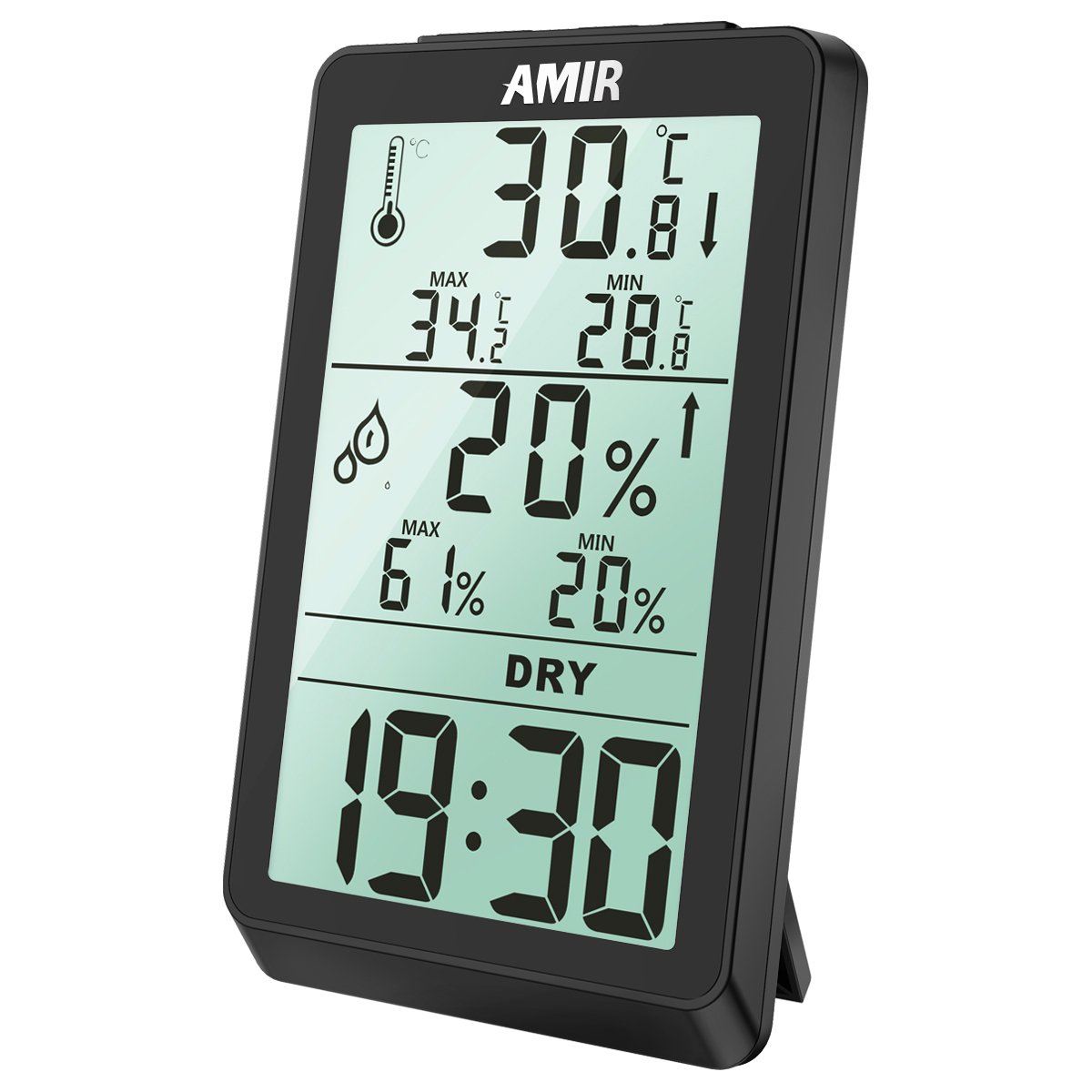
Figure 1: Brifit WA3 Digital Hygrometer Thermometer front view, showing current temperature, humidity, and time.
Ürün Özellikleri
- Large LCD display for clear readings of temperature, humidity, and time.
- Records maximum and minimum temperature and humidity values.
- Comfort level indicator (DRY, OK, WET).
- Multiple placement options: tabletop stand and wall-mountable design.
- Temperature unit selection (°C/°F).

Şekil 2: Ör.amples of the Brifit WA3 Digital Hygrometer Thermometer in use across different environments.
Kurmak
1. Pil Kurulumu
The Brifit WA3 requires batteries for operation (not included).
- Cihazın arkasındaki pil bölmesini bulun.
- Pil bölmesinin kapağını açın.
- Gerekli pilleri doğru kutuplara (+ ve -) dikkat ederek takın.
- Pil bölmesi kapağını sıkıca kapatın.
2. Yerleşim
The device offers two placement options:
- Masaüstü: Cihazın arkasındaki entegre standı açarak, onu herhangi bir düz yüzeye yerleştirebilirsiniz.
- Duvar montajı: Cihazın arkasındaki anahtar deliği şeklindeki yuvayı kullanarak, cihazı duvara bir çivi veya vida ile asabilirsiniz.

Figure 3: Illustration of the wall mount keyhole and the tabletop stand for device placement.
3. İlk Açılış
Once batteries are installed, the device will power on automatically and display current temperature, humidity, and time. Allow a few minutes for the readings to stabilize.
Kullanım Talimatları
1. Ekran Üzerindeview

Figure 4: Detailed breakdown of the hygrometer interface, indicating each displayed element.
- Sıcaklık: Current temperature in °C or °F. Includes MAX/MIN records and trend indicator.
- Nem: Mevcut bağıl nem yüzdesitage. Includes MAX/MIN records and trend indicator.
- Konfor Seviyesi: Indicates environmental comfort based on humidity.
- KURU: Nem < %40
- OK: %40 < Nem < %70
- ISLAK: Nem > %70
- Zaman: Mevcut saat, 12 saatlik veya 24 saatlik formatta.
2. Zaman ve Sıcaklık Biriminin Ayarlanması
Specific buttons for setting time and changing temperature units are typically located on the back or side of the device. Refer to the physical unit for exact button labels (e.g., "MODE", "ADJ", "°C/°F").
- To change Temperature Unit (°C/°F): Press the dedicated °C/°F button once.
- To set Time:
- Press and hold the "MODE" button (or similar) until the time display flashes.
- Use the "ADJ" button (or similar) to adjust the hour.
- Press "MODE" again to switch to minute adjustment, then use "ADJ" to set minutes.
- Press "MODE" once more to confirm and exit time setting.
- Not: Some units may have separate buttons for 12/24 hour format selection.
3. MAKS/MİN Kayıtları
The device automatically records the maximum and minimum temperature and humidity values since the last reset.
- Viewing MAX/MIN: Press the "MAX/MIN" button (or similar) once to display maximum values. Press again to display minimum values. Press a third time to return to current readings.
- Resetting MAX/MIN: While MAX or MIN values are displayed, press and hold the "MAX/MIN" button (or similar) for a few seconds until the values reset.
Bakım
1. Temizlik
Cihazı temizlemek için yumuşak, kuru bir bezle nazikçe silin. Aşındırıcı temizleyiciler, çözücüler kullanmayın ve cihazı suya batırmayın.
2. Pil Değişimi
When the display becomes dim or unresponsive, it is time to replace the batteries. Follow the battery installation steps outlined in the "Setup" section. Dispose of used batteries responsibly according to local regulations.
3. Depolama
If the device will not be used for an extended period, remove the batteries to prevent leakage and store it in a cool, dry place away from direct sunlight.
Sorun giderme
| Sorun | Olası Neden | Çözüm |
|---|---|---|
| Ekran yok veya soluk ekran | Aküler zayıf veya bitmiş; akülerin yanlış takılması. | Pilleri yenileriyle değiştirin, kutupların doğru olmasına dikkat edin. |
| Yanlış okumalar | Device placed near heat sources, vents, or in direct sunlight; sensor obstruction. | Relocate the device to a stable environment away from extreme conditions. Ensure sensors are clear. |
| Clock gains time | Internal clock drift (observed in some units). | Periodically reset the time as needed. This is a known characteristic for some units. |
| MAX/MIN değerleri sıfırlanmıyor | Düğme yeterince uzun tutulmadı. | Ensure the MAX/MIN button is pressed and held for several seconds while MAX/MIN values are displayed. |
Özellikler
| Özellik | Detay |
|---|---|
| Marka | cüzdan |
| Model Numarası | WA3 |
| Görüntü Türü | LCD |
| Şekil | Dikdörtgen |
| Güç Kaynağı | Piller (Dahil Değildir) |
| Ürün Ağırlığı | 136 gr |
| Paket Boyutları | 12.95x7.87x2.79 cm |
| UPC | 612289987813, 767421045927 |

Figure 5: Physical dimensions of the Brifit WA3 Digital Hygrometer Thermometer.
Garanti ve Destek
For warranty information or technical support, please refer to the documentation included with your purchase or contact Brifit customer service directly. Contact details are typically available on the manufacturer's official website veya ürün ambalajı.