
1. Giriş
The EZCAP USB 3.0 HDMI Video Capture Card is designed to capture full HD 1080p video and audio at 60 frames per second. This device allows you to record or stream high-definition video sources, such as game consoles, cameras, or set-top boxes, directly to your computer. It features a plug-and-play UVC (USB Video Class) operation, eliminating the need for driver installation on compatible Windows, Mac, and Linux systems. It supports various third-party software for capturing and live streaming.
2. Paket İçeriği
Paketinizde tüm öğelerin mevcut olduğundan emin olun:
- 1 x EZCAP USB 3.0 HDMI Video Capture Card (Model ezcap287)
- 1 x USB 3.0 Kablosu
- 1 x Kullanım Kılavuzu
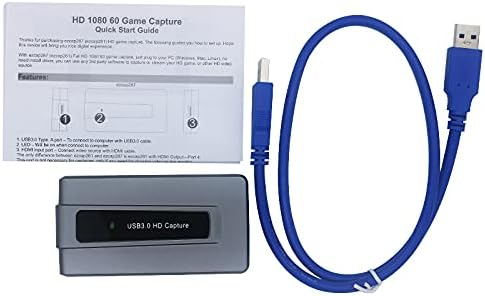
Şekil 2.1: Package contents including the capture card, USB 3.0 cable, and manual.
3. Ürün Bittiview
The EZCAP USB 3.0 HDMI Video Capture Card is a compact device designed for ease of use. It features an HDMI input port for connecting your video source and a USB 3.0 output port for connecting to your computer.

Şekil 3.1: Tepe view of the EZCAP USB 3.0 HDMI Video Capture Card, showing the 'ezcap' logo and 'USB3.0 HD Capture' text.

Şekil 3.2: Ön view of the capture card, highlighting the HDMI input port.

Şekil 3.3: Arka view of the capture card, showing the USB 3.0 output port and ventilation slots.
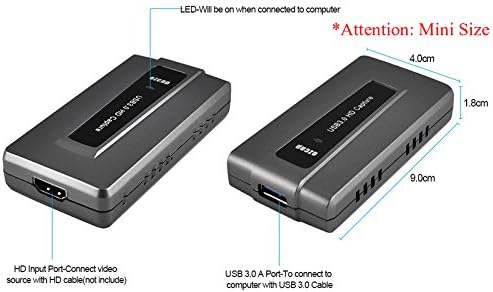
Şekil 3.4: Diagram illustrating the compact dimensions of the capture card: approximately 9.0 cm (length) x 4.0 cm (width) x 1.8 cm (height).
4. Kurulum
Follow these steps to connect your EZCAP USB 3.0 HDMI Video Capture Card:
- Video Kaynağını Bağlayın: Use an HDMI cable (not included) to connect your video source (e.g., game console, camera, set-top box) to the HDMI Input port on the capture card.
- Bilgisayara Bağlan: Use the provided USB 3.0 cable to connect the USB 3.0 A-Port on the capture card to a powered USB 3.0 port on your computer.
- Güç Göstergesi: The LED indicator on the capture card will illuminate when successfully connected to the computer.

Şekil 4.1: Connection diagram showing how to connect a camera, video conference device, game console (Xbox, PS3/PS4), or set-top box via HDMI to the capture card, which then connects to a desktop or notebook computer via USB.
5. Kullanım Talimatları
The EZCAP USB 3.0 HDMI Video Capture Card operates as a UVC device, meaning no specific drivers are required for most operating systems. You will need third-party software to capture or stream video.
5.1. Yazılım Uyumluluğu
This device is compatible with a wide range of video capture and streaming software. Some commonly used applications include:
- OBS Studio (Windows, OS X, Linux)
- Windows Medya Kodlayıcısı (Windows)
- Adobe Flash Media Live Kodlayıcı (Windows, OS X)
- VLC (Windows, OS X, Linux)
- Kablolu Yayın (Windows, OS X)
- vMix (Windows)
- Potplayer (Windows)
- QuickTime Broadcaster / Player (OS X)
The device also supports development interfaces such as DirectShow (Windows), DirectSound (Windows), V4L2 (Linux), ALSA (Linux), and QuickTime (OS X).
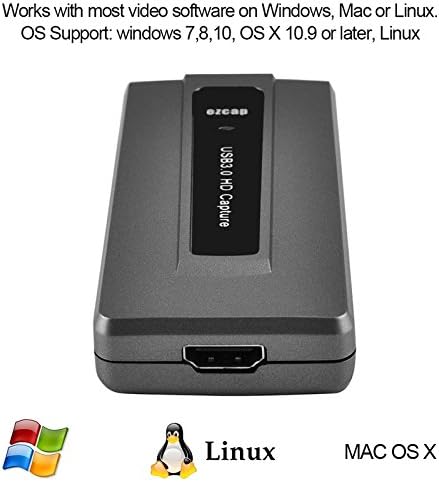
Şekil 5.1: The capture card is compatible with Windows (7, 8, 10), Mac OS X 10.9 or later, and Linux systems.
5.2. Kayıt ve Yayın Akışı
Once connected and recognized by your chosen software, you can configure the software to capture or stream the HDMI input. The device supports recording quality up to 1080p at 60 frames per second.
For live streaming, the device can be used with platforms such as Twitch, YouTube, DailyMotion, and Hitbox.

Şekil 5.2: The capture card supports Full HD 1080p video capture and streaming via its SuperSpeed USB 3.0 interface.
6. Sistem Gereksinimleri
To ensure optimal performance, your computer system should meet the following minimum requirements:
- İşletim Sistemi: Windows 7, 8, 10; OS X 10.9 or later; Linux
- Processor (PC): Intel Core i5-3400 or higher
- Graphics Card (PC): NVIDIA GT630 or equivalent
- Processor (Notebook): Intel Core i7-3537U 2.0 GHz or higher
- Graphics Card (Notebook): NVIDIA GT735 or equivalent
- Processor (Mac): i5 quad-core or above
- Graphics Card (Mac): VGA card supporting DirectX 10
- VERİ DEPOSU: 4 GB veya daha fazla
- USB Bağlantı Noktası: Powered USB 3.0 port with Intel chipset (e.g., Renesas, Fresco host controller)
- Ses Kartı: Required for audio processing
7. Özellikler
| Arayüz | USB 3.0 |
| Video Girişi | HDMI |
| Ses Girişi | HDMI |
| Video Yakalama Çözünürlüğü | Up to 1080p @ 60fps |
| Desteklenen Çözünürlükler | 720x480 (60p), 720x576 (50p), 1280x720p (50p/60p), 1920x1080 (50i/60i), 1920x1080 (24p/25p/30p/50p/60p) |
| İşletim Sistemi Uyumluluğu | Windows 7/8/10, OS X 10.9+, Linux |
| Özel Özellik | HDMI input, USB 3.0 high-speed output to PC |
8. Sorun Giderme
If you encounter issues with your EZCAP USB 3.0 HDMI Video Capture Card, consider the following:
- Sinyal yok: Ensure all HDMI and USB 3.0 cables are securely connected. Verify that your video source is powered on and outputting a signal. Check the input settings within your capture software.
- Ses Yok: Confirm that the audio output from your HDMI source is enabled and not muted. Check audio input settings in your capture software.
- Düşük Performans/Gecikme: Ensure your computer meets the minimum system requirements, especially for processor, RAM, and USB 3.0 port. Try using a different USB 3.0 port. Close unnecessary applications running in the background.
- Yazılım Cihazı Algılanamıyor: Verify that your operating system recognizes the device (it should appear as a UVC device). Try restarting your computer and capture software. Ensure your capture software is up-to-date.
- LED Göstergesi Yanmıyor: Confirm the USB 3.0 cable is properly connected to a powered USB 3.0 port on your computer.
9. Bakım
The EZCAP USB 3.0 HDMI Video Capture Card requires minimal maintenance. Keep the device clean and free from dust. Avoid exposing it to extreme temperatures, humidity, or direct sunlight. Do not attempt to disassemble the device, as this will void any potential warranty.
10. Garanti ve Destek
For warranty information and technical support, please refer to the documentation provided with your purchase or contact the manufacturer directly. Details regarding warranty periods and support channels are typically available on the manufacturer's official websitenizden veya perakendeciniz aracılığıyla.