
Unknown Yu- TLXgo-2201
Wireless Bluetooth Headset User Manual
Model: Yu- TLXgo-2201 | Brand: Unknown
giriiş
Satın aldığınız için teşekkür ederizasing the Wireless Bluetooth Headset. This manual provides essential information for the proper use, setup, and maintenance of your new headset. Please read it thoroughly before use to ensure optimal performance and longevity of the product.
Paket İçeriği
Lütfen aşağıda listelenen tüm öğelerin paketinizde yer aldığından emin olun:
- Wireless Bluetooth Headset (2 units)
- USB Şarj Kablosu (2 adet)
- Kullanıcı Kılavuzu

Image: Contents of the headset package, showing one black headset and a white USB charging cable.
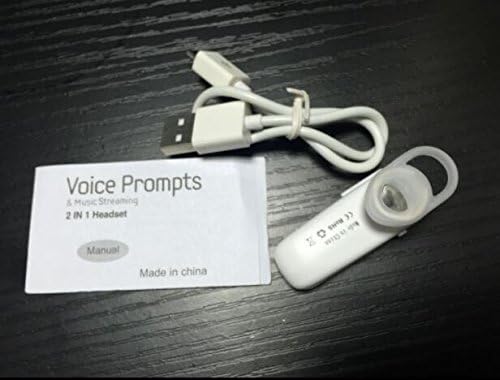
Image: Contents of the headset package, showing one white headset, a white USB charging cable, and the printed user manual.
Ürün Bittiview
The Wireless Bluetooth Headset is designed for convenience and portability, ideal for sports, driving, and daily use. It features a super mini design and supports voice prompts and music streaming.

Resim: Ön view of the product packaging, displaying the black wireless Bluetooth headset inside its clear plastic casing.
Özellikler
| Özellik | Tanım |
|---|---|
| Bluetooth Sürümü | V3.0 + EDR |
| Profesyonelleri Destekleyinfiles | Headset, Handsfree, A2DP |
| Talk Time/Playing Time | 5 saate kadar |
| Bekleme Süresi | 80 saate kadar |
| Güç Kaynağı | Dahili Şarj Edilebilir Li-ion Pil |
| Bağlantı Teknolojisi | Kablosuz |
| Form Faktörü | Kulakta |
| Ürün Ağırlığı | 15.8 ounces (for 2 units) |
| Paket Boyutları | 1.97 x 1.57 x 1.18 inç |
| Model Numarası | Yu- TLXgo-2201 |

Image: Back of the product packaging, displaying a list of product specifications including Bluetooth version, talk time, and power source.
Kurmak
Kulaklığı Şarj Etme
- USB şarj kablosunun küçük ucunu kulaklığın şarj portuna takın.
- USB şarj kablosunun daha büyük ucunu bir USB güç kaynağına (örneğin, bilgisayarın USB portuna, USB duvar adaptörüne) bağlayın.
- The indicator light on the headset will illuminate during charging. It will change color or turn off once fully charged.
- Tam şarj genellikle yaklaşık 1-2 saat sürer.
Bluetooth Aygıtıyla Eşleştirme
- Ensure the headset is fully charged before initial pairing.
- With the headset turned off, press and hold the Multi-function Button (MFB) for approximately 5-7 seconds until the indicator light flashes red and blue alternately. This indicates the headset is in pairing mode.
- Bluetooth özellikli cihazınızda (akıllı telefon, tablet vb.) Bluetooth ayarlarına gidin ve Bluetooth'un etkinleştirildiğinden emin olun.
- Arama available devices. The headset should appear in the list, typically named "MBT2013" or similar.
- Select the headset from the list to connect. If prompted for a password, enter "0000" (four zeros).
- Once successfully paired, the indicator light will stop flashing and may show a steady blue light, and you may hear a voice prompt confirming the connection.
- The headset will automatically connect to the last paired device when turned on, if the device's Bluetooth is active and within range.
Kullanım Talimatları
Güç Açık/Kapalı
- Güç Açık: Press and hold the Multi-function Button (MFB) for about 3 seconds until the blue indicator light flashes and you hear a voice prompt.
- Kapat: Press and hold the MFB for about 3-4 seconds until the red indicator light flashes and you hear a voice prompt.
Yönetim Çağrı
- Cevap Çağrısı: MFB’ye bir kez basın.
- Çağrı Sonu: Görüşme sırasında MFB düğmesine bir kez basın.
- Çağrıyı Reddet: Press and hold the MFB for about 2 seconds during an incoming call.
- Son Numarayı Tekrar Ara: Double-press the MFB when not on a call.
Müzik Çalma
- Oynat/Duraklat: Press the MFB once during music playback.
Note: Volume control may be managed directly from your connected device.
Bakım
- Temizlik: Kulaklığı temizlemek için yumuşak, kuru bir bez kullanın. Sert kimyasallar veya aşındırıcı malzemeler kullanmayın.
- Depolamak: Kulaklığınızı serin, kuru ve doğrudan güneş ışığından ve aşırı sıcaklıklardan uzak bir yerde saklayın.
- Pil Bakım: To prolong battery life, charge the headset regularly, even if not in frequent use. Avoid fully discharging the battery for extended periods.
- Suya Dayanıklılık: Bu kulaklık su geçirmez değildir. Suya veya aşırı neme maruz bırakmaktan kaçının.
Sorun giderme
- Kulaklık açılmıyor:
- Kulaklığın tamamen şarj olduğundan emin olun. Güç kaynağına bağlayın ve tekrar deneyin.
- Cihazla eşleştirilemiyor:
- Ensure the headset is in pairing mode (red and blue lights flashing alternately). Make sure Bluetooth is enabled on your device and it is within range (typically 10 meters). Try restarting both the headset and your device.
- Ses yok veya ses kalitesi düşük:
- Check the volume levels on both the headset and your connected device. Ensure the headset is properly connected to your device. Move closer to your device to avoid interference.
- Headset disconnects frequently:
- Ensure the headset is within range of your device. Check for potential interference from other wireless devices. Try re-pairing the headset.
Güvenlik Bilgileri
- Do not disassemble, repair, or modify the headset. This may cause fire, electronic breakdown, or complete damage to the product.
- Keep the headset away from extreme temperatures, humidity, and corrosive substances.
- Kulaklığınızı düşürmekten veya sert darbelere maruz bırakmaktan kaçının.
- Do not expose the headset to open flames or dispose of it in fire.
- Ürünü ve pilini yerel yönetmeliklere uygun şekilde sorumlu bir şekilde atın.
Garanti ve Destek
Garanti bilgileri veya teknik destek için lütfen satıcınızın veya üreticinin resmi iletişim bilgilerine başvurun. webLütfen garanti talepleriniz için satın alma belgenizi saklayın.
Ask a question about this manual
Ask about setup, troubleshooting, compatibility, parts, safety, or missing instructions. Manuals+ will review the question and use this page’s manual context to help answer it.