
Alarm.com ADC-V723x
Alarm.com ADC-V723 Dış Mekan Wi-Fi Kamera Kullanım Kılavuzu
Model: ADC-V723x
1. Ürün Bittiview
The Alarm.com ADC-V723 is a high-definition 1080p outdoor Wi-Fi camera designed to provide reliable surveillance for your property. Featuring High Dynamic Range (HDR) and powerful Video Analytics, it can detect and alert you to people, vehicles, and animals. Its robust design ensures performance in various lighting conditions and environments. This manual provides comprehensive instructions for installation, operation, and maintenance.
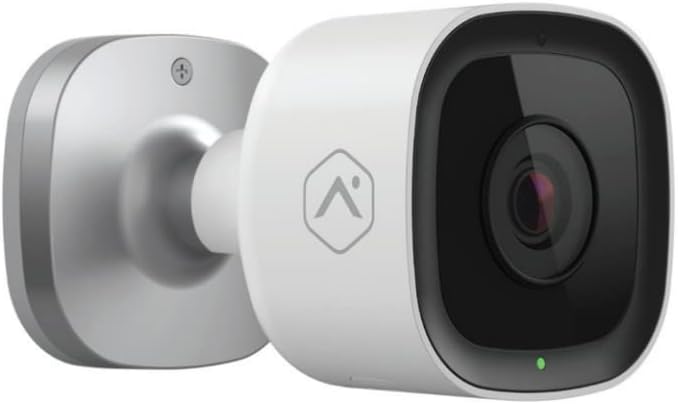
Resim: Ön view of the Alarm.com ADC-V723 Outdoor Wi-Fi Camera, showing its compact, bullet-style design and lens.
2. Güvenlik Bilgileri
- Ensure the camera is installed in a location that complies with local building codes and regulations.
- Yalnızca fotoğraf makinesiyle birlikte verilen güç adaptörünü kullanın.
- Fotoğraf makinesini çalışma aralığının dışındaki aşırı sıcaklıklara maruz bırakmayın.
- Kamerayı güçlü elektromanyetik girişim kaynaklarının yakınına yerleştirmekten kaçının.
- Temizlik veya herhangi bir bakım yapmadan önce elektrik bağlantısını kesin.
3. Paket İçeriği
Paketinizde tüm öğelerin mevcut olduğundan emin olun:
- Alarm.com ADC-V723 Outdoor Wi-Fi Camera
- Montaj Plakası
- Montaj Vidaları ve Duvar Dübelleri
- Güç Adaptörü
- Kurulum Kılavuzu (bu belge)
4. Kurulum ve Kurulum
4.1 Bir Konum Seçmek
İstenilen ortamı sağlayan bir dış mekan seçin. viewing angle and is within range of your Wi-Fi network. The camera is designed for outdoor use and is IP67 rated for weather resistance. Consider areas with good lighting or where the camera's night vision capabilities can be maximized.
4.2 Kamerayı Monte Etme
- Secure the mounting plate to the desired surface using the provided screws and wall anchors. Ensure the plate is level.
- Attach the camera to the mounting plate by aligning the camera with the plate and twisting until it locks securely.
- Adjust the camera's angle to achieve the optimal field of view.
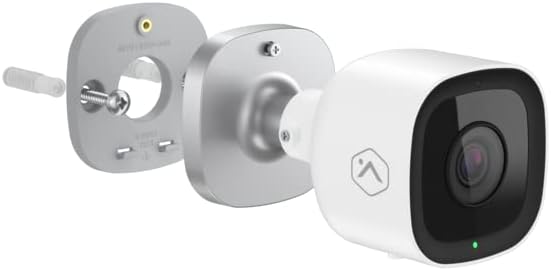
Resim: Patlamış view showing the Alarm.com ADC-V723 camera, its mounting plate, and a screw with wall anchor, illustrating the assembly process.
4.3 Powering On and Connecting to Wi-Fi
- Connect the power adapter to the camera and plug it into a suitable outdoor power outlet.
- Wait for the camera's LED indicator to show a specific status (refer to the LED status guide in Section 5.2).
- Download the Alarm.com mobile application from your device's app store.
- Follow the in-app instructions to add the ADC-V723 camera to your Alarm.com system and connect it to your Wi-Fi network. This typically involves scanning a QR code on the camera or entering its MAC address.
5. Kameranın Çalıştırılması
5.1 Canlı View ve Kayıt
Access live video feeds and recorded clips through the Alarm.com mobile app or web portal. You can view gerçek zamanlı footage, manuel kayıtları başlatın ve yenidenview event-triggered clips.
5.2 LED Durum Göstergesi
The camera features an LED indicator that communicates its current status:
- Düz Yeşil: Connected to Wi-Fi and operating normally.
- Yanıp Sönen Yeşil: Attempting to connect to Wi-Fi.
- Düz Kırmızı: Not connected to Wi-Fi or an error has occurred.
- Yanıp Sönen Kırmızı: Firmware update in progress or factory reset.
5.3 Video Analytics and Alerts
The ADC-V723 supports advanced Video Analytics. Configure detection zones and rules within the Alarm.com app to receive specific alerts for people, vehicles, or animals entering designated areas. Alerts can be customized to send notifications to your mobile device.
5.4 Night Vision and HDR
The camera is equipped with infrared night vision, allowing clear video capture up to 40 feet in low-light conditions. High Dynamic Range (HDR) technology enhances video quality by balancing bright and dark areas, providing clearer images in challenging lighting environments.
6. Bakım
- Kamera lensini düzenli olarak yumuşak bir bezle temizleyin.amp Net görüntü kalitesi sağlamak için bez kullanın. Sert kimyasallar kullanmayın.
- Periodically check the mounting hardware to ensure the camera remains securely fastened.
- Ensure the power cable is free from damage and properly secured.
- Keep the camera's firmware updated through the Alarm.com app to ensure optimal performance and access to new features.
7. Sorun Giderme
| Sorun | Olası Neden | Çözüm |
|---|---|---|
| Kamera açılmıyor | Elektrik yok, adaptör arızalı, bağlantı gevşek. | Check power outlet, ensure connections are secure, try a different outlet. |
| Wi-Fi'ye bağlanılamıyor | Incorrect Wi-Fi password, camera too far from router, network interference. | Verify Wi-Fi password, move camera closer to router, reduce interference, restart router. |
| Video kalitesi zayıf | Kirli lens, düşük bant genişliği, yetersiz aydınlatma. | Clean lens, check internet speed, ensure adequate lighting or rely on night vision. |
| Hareket uyarısı yok | Incorrect Video Analytics settings, notifications disabled. | Review and adjust Video Analytics rules in the app, enable notifications for the camera. |
8. Özellikler
| Özellik | Detay |
|---|---|
| Model Numarası | ADC-V723x |
| Video Yakalama Çözünürlüğü | 1080p (1920x1080) |
| Bağlantı | Wifi |
| Güç Kaynağı | Kablolu Elektrik |
| İç/Dış Mekan Kullanımı | Dış mekan |
| ViewAçı | 167 Derece |
| Gece Görüş Aralığı | 40 Ayak |
| Malzeme | Metal |
| Boyutlar (U x G x Y) | 2.5 x 2.5 x 4.5 inç |
| Ürün Ağırlığı | 1.32 pound |
| Uluslararası Koruma Derecelendirmesi | IP67 |
| Özel Özellik | Motion Sensor, HDR |
9. Garanti ve Destek
For warranty information and technical support, please contact your Alarm.com service provider or visit the official Alarm.com webLütfen bu siteyi ziyaret edin ve cihazı kendiniz tamir etmeye çalışmayın, aksi takdirde garanti geçersiz olabilir.
For additional resources and FAQs, please refer to the Alarm.com support portal.
İlgili belgelerADC-V723x


Ask a question about this manual
Ask about setup, troubleshooting, compatibility, parts, safety, or missing instructions. Manuals+ will review the question and use this page’s manual context to help answer it.