
1. Giriş
This manual provides detailed instructions for the installation, operation, and maintenance of your Blackweb BWA17AV015 HDMI 4K 4-Way Splitter. This device is designed to distribute a single HDMI input signal to up to four high-definition display devices simultaneously. It supports various source devices such as DVD players, Blu-ray players, satellite receivers, set-top boxes, DV cameras, A/V receivers, and other HDMI-enabled video products.
2. Paket İçeriği
Lütfen paket içeriğini dikkatlice kontrol edin. Eksik veya hasarlı bir ürün varsa, satıcınızla iletişime geçin.
- Siyahweb BWA17AV015 HDMI 4K 4-Way Splitter Unit
- 5V DC Güç Adaptörü
- Kullanıcı Kılavuzu
3. Ürün Bittiview
Siyahweb BWA17AV015 HDMI 4K 4-Way Splitter features one HDMI input and four HDMI outputs, allowing for simultaneous display on multiple screens. It is housed in a compact black casing.
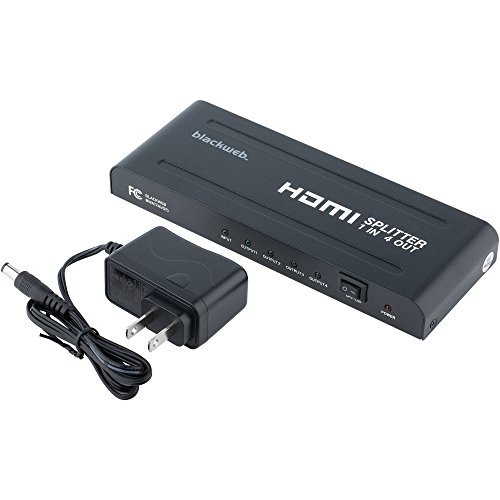
Şekil 1: Ön ve Arka View Siyahlarınweb BWA17AV015 HDMI 4K 4-Way Splitter. The image shows the compact black unit with various ports. The front typically includes status indicators, while the rear features the HDMI input, four HDMI outputs, and the power input.
3.1 Ön Panel
- Güç LED'i: Cihaz açıldığında yanar.
- Giriş LED'i: HDMI giriş sinyali algılandığında yanar.
- Output LEDs (1-4): Illuminates when an HDMI output device is connected and receiving a signal.
3.2 Arka Panel
- HDMI GİRİŞİ: Connect your HDMI source device (e.g., Blu-ray player, game console).
- HDMI ÇIKIŞI (1-4): Connect up to four HDMI display devices (e.g., TVs, monitors).
- DC 5V: Connect the provided 5V DC power adapter.
4. Kurulum Talimatları
Follow these steps to set up your HDMI splitter:
- Cihazları Kapatma: Ensure all HDMI source devices and display devices are powered off before making connections.
- HDMI Kaynağını Bağlayın: Connect one end of an HDMI cable (not included) to the HDMI output of your source device (e.g., DVD player, set-top box) and the other end to the HDMI IN Splitter üzerindeki port.
- HDMI Ekranları Bağlayın: Connect one end of an HDMI cable (not included) to an HDMI ÇIKIŞI port on the splitter and the other end to the HDMI input of your display device (e.g., TV, monitor). Repeat this step for up to four display devices.
- Gücü bağlayın: Connect the provided 5V DC power adapter to the Doğru Akım 5V port on the splitter, then plug the adapter into a standard electrical outlet. The Power LED on the splitter should illuminate.
- Cihazları Açma: Power on your HDMI display devices first, then power on your HDMI source device.
- Sinyali Doğrula: Check that the video and audio signals are displayed correctly on all connected screens. The Input LED and corresponding Output LEDs should be illuminated.
Not: Use high-quality HDMI cables for optimal performance, especially for 4K resolutions and longer cable runs.
5. Kullanım Talimatları
Once properly set up, the Blackweb BWA17AV015 HDMI 4K 4-Way Splitter operates automatically.
- Automatic Signal Distribution: The splitter will automatically detect the HDMI input signal and distribute it to all connected and powered-on HDMI output devices.
- Çözüm Desteği: The splitter supports various HDMI resolutions, including 4K (3840x2160) and 1080p. The output resolution will be determined by the lowest common resolution supported by all connected display devices.
- Ses Desteği: The splitter passes through various audio formats supported by HDMI.
No additional user interaction is typically required after initial setup.
6. Sorun Giderme
Sorunlarla karşılaşırsanız, aşağıdaki sorun giderme kılavuzuna bakın:
| Sorun | Olası Neden / Çözüm |
|---|---|
| No picture or sound on display(s). |
|
| Picture quality is poor or flickering. |
|
| Only some displays show a picture. |
|
7. Özellikler
The following are the technical specifications for the Blackweb BWA17AV015 HDMI 4K 4-Way Splitter:
- Modeli: BWA17AV015
- Ürün Ölçüleri: 7.6 x 3.3 x 0.7 inç
- Ürün Ağırlığı: 12.8 ons
- Renk: Siyah
- Bağlantı Tipi: HDMI
- Kablo Tipi: HDMI
- Giriş: 1x HDMI
- Çıktı: 4x HDMI
- Desteklenen Çözünürlükler: 4K'ya kadar (3840x2160)
- Güç Kaynağı: DC 5V (adaptör dahil)
- Uyumlu Cihazlar: Blu-Ray Player, Camera, DVD Player, Satellite Receiver, Set-Top Box, A/V Receiver, etc.
8. Bakım
To ensure the longevity and optimal performance of your HDMI splitter, follow these maintenance guidelines:
- Temizlik: Cihazın dış yüzeyini temizlemek için yumuşak, kuru bir bez kullanın. Sıvı temizleyiciler veya aerosoller kullanmayın.
- Çevre: Keep the device in a cool, dry place, away from direct sunlight, heat sources, and moisture.
- Havalandırma: Aşırı ısınmayı önlemek için ünitenin etrafında yeterli havalandırma olduğundan emin olun. Havalandırma açıklıklarını hiçbir şekilde kapatmayın.
- İşleme: Cihazı düşürmekten veya şiddetli darbelere maruz bırakmaktan kaçının.
9. Güvenlik Bilgileri
Please read and follow these safety precautions to prevent damage to the unit and ensure your safety:
- Do not expose this unit to water or excessive moisture.
- Cihazı açmaya veya üzerinde değişiklik yapmaya çalışmayın. İçinde kullanıcı tarafından onarılabilecek hiçbir parça bulunmamaktadır.
- Use only the provided power adapter. Using an incorrect power adapter may damage the unit and void the warranty.
- Keep the unit away from sources of heat, such as radiators, heat registers, stoves, or other heat-producing appliances.
- Şimşekli fırtınalarda veya uzun süre kullanılmadığında ünitenin fişini çekin.
10. Garanti ve Destek
Garanti bilgileri veya teknik destek için lütfen satın alma işleminizle birlikte gelen belgelere bakın veya Black ile iletişime geçin.web Müşteri hizmetleri. Garanti talepleri için satın alma belgenizi saklayın.
Not: Specific warranty terms and conditions may vary by region and retailer.