
PatrolEyes PE-DV5-2
PatrolEyes PE-DV5-2 Body Camera User Manual
1296P HD 32GB GPS Auto IR Night Vision Police Body Camera
1. Giriş
Thank you for choosing the PatrolEyes PE-DV5-2 Body Camera. This device is designed for professional use, offering high-definition video recording, advanced night vision capabilities, and integrated GPS for reliable evidence collection. This manual will guide you through the setup, operation, and maintenance of your new body camera to ensure optimal performance and longevity.
2. Paket İçeriği
Lütfen paketinizde tüm öğelerin mevcut olduğundan emin olun:
- PatrolEyes PE-DV5-2 Body Camera
- Battery (Included Components)
- USB Şarj/Veri Kablosu
- Duvar şarj cihazı
- Montaj Klipsi
- Kullanım Kılavuzu (bu belge)
3. Parçalar ve Kontroller
Familiarize yourself with the various parts and controls of your PatrolEyes PE-DV5-2 body camera.

Şekil 3.1: Ön view of the PatrolEyes PE-DV5-2 body camera, highlighting the central camera lens, surrounding infrared (IR) lights for night vision, and the PatrolEyes logo at the bottom. The device has a rugged, black casing.

Şekil 3.2: Front-side perspective of the PatrolEyes PE-DV5-2 body camera, providing a clearer view of the camera lens and the array of control buttons located on the side panel, including the yellow button at the top.

Şekil 3.3: Taraf view of the PatrolEyes PE-DV5-2 body camera, prominently featuring the red record button and the covered USB port for charging and data transfer.
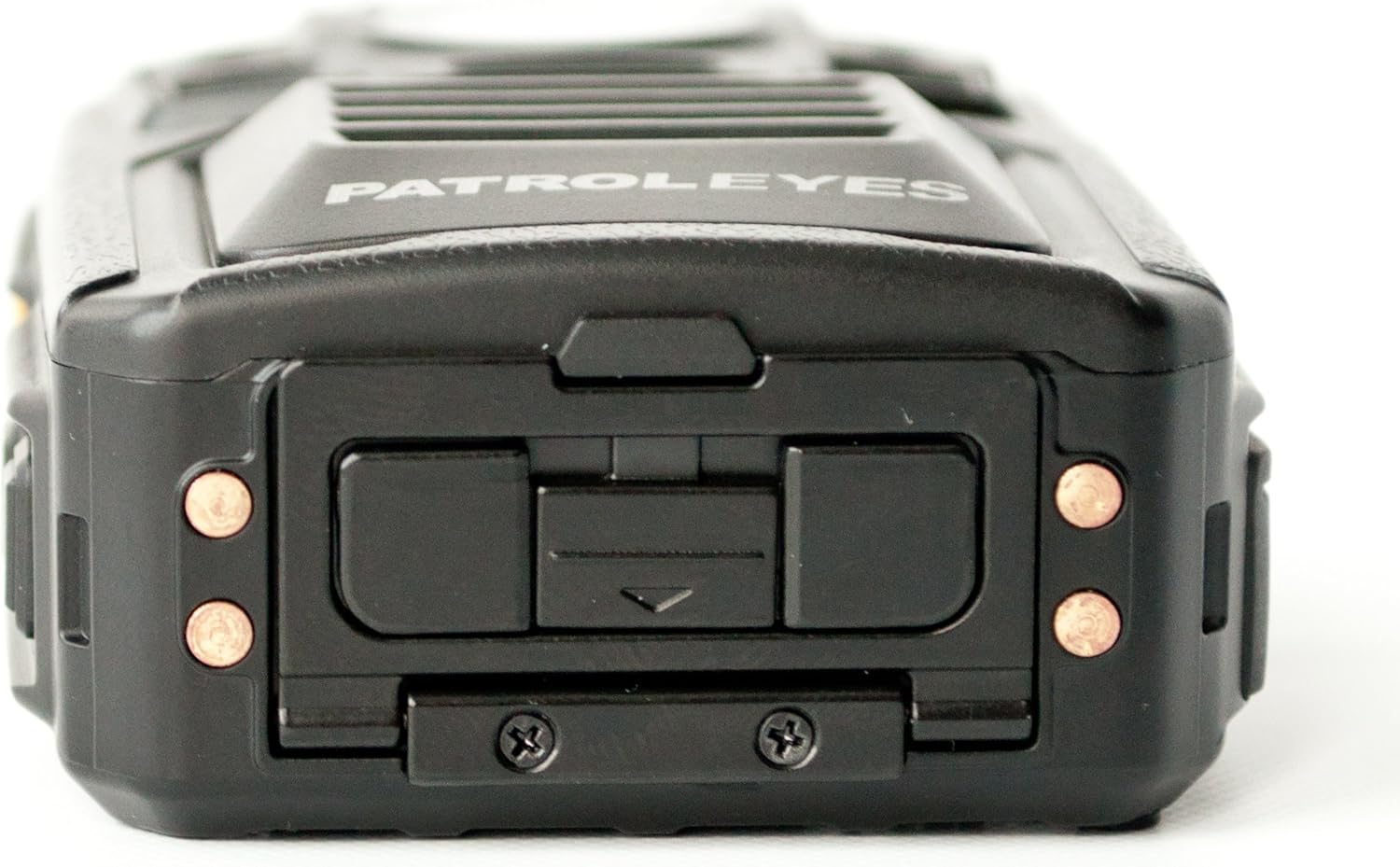
Şekil 3.4: Tepe view of the PatrolEyes PE-DV5-2 body camera, displaying the GPS indicator light and other top-mounted features.

Şekil 3.5: Alt view of the PatrolEyes PE-DV5-2 body camera, revealing the charging contacts designed for use with a docking station.
4. Başlarken
4.1. Pilin Şarj Edilmesi
Before first use, fully charge the camera's battery. The camera comes with a rechargeable battery.
- Connect the USB charging cable to the camera's USB port.
- Plug the other end of the USB cable into the wall charger and then into a power outlet.
- The charging indicator light will illuminate. It will change color or turn off once charging is complete.
Alternatively, use a compatible docking station (sold separately) for charging.
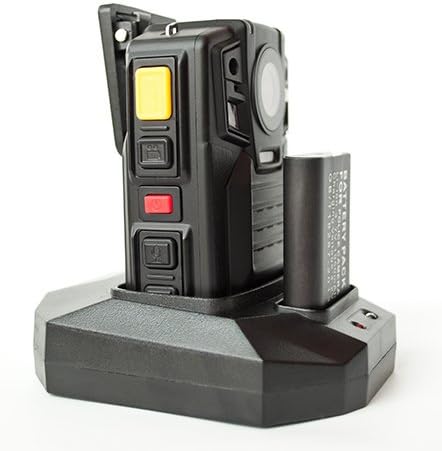
Şekil 4.1: The PatrolEyes body camera securely placed in its docking station, which also features a dedicated slot for charging an additional battery pack.

Şekil 4.2: Arka view of the PatrolEyes docking station, clearly showing the power input port and the USB data port for connecting to a computer.
4.2. Açma/Kapama
- Açmak İçin: Press and hold the Power button for a few seconds until the device vibrates and the indicator lights turn on.
- Kapatmak İçin: Press and hold the Power button until the device vibrates and the indicator lights turn off.
4.3. Attaching the Mounting Clip
Attach the provided mounting clip to the back of the camera. This allows you to securely fasten the camera to your uniform or gear.
5. Kameranın Çalıştırılması
5.1. Video Kaydı
The camera supports video capture resolutions of 1080p, 480p, and 720p.
- Kameranın açık olduğundan emin olun.
- Adanmış basın Kayıt Düğmesi (often red) once to start video recording. The recording indicator light will flash.
- Basın Kayıt Düğmesi again to stop recording. The indicator light will stop flashing.
5.2. Fotoğraf Çekmek
The camera has an effective still resolution of 33 MP.
- While in standby mode or during video recording, press the Fotoğraf Düğmesi once to capture a still image.
5.3. Night Vision (IR)
The camera features auto IR night vision with a range of 30 feet, utilizing infrared light sources.
- The camera is equipped with automatic infrared (IR) activation. In low-light conditions, the IR lights will automatically turn on to provide clear night vision footage.
5.4. GPS İşlevselliği
The integrated GPS module automatically records location data with your video footage. Ensure the camera has a clear view GPS sinyalinin en iyi şekilde alınması için gökyüzünün.
5.5. Oynatma
Tekrar yapabilirsinizview recorded videos and photos directly on the camera's screen.
- Enter Playback mode via the menu or a dedicated button (refer to on-screen prompts).
- Gezinme files using the directional buttons.
- Press the OK/Select button to play a video or view bir fotoğraf.
5.6. Bilgisayara Bağlanma
Aktarmak için files, connect the camera to a computer using the provided USB cable.
- Kamerayı açın.
- USB kablosunu kullanarak kameranızı bilgisayarınıza bağlayın.
- Kamera, bilgisayarınızda çıkarılabilir bir disk sürücüsü olarak görünecektir.
- You can now access and transfer video and photo files.
6. Bakım ve Özen
6.1. Temizlik
- Kamera gövdesini yumuşak bir bezle silin.amp bez. Sert kimyasallar veya aşındırıcı temizleyiciler kullanmayın.
- Lensi çizilmelere karşı korumak için özel bir lens temizleme bezi ve solüsyonu kullanın.
6.2. Depolama
- Kamerayı serin, kuru ve doğrudan güneş ışığından ve aşırı sıcaklıklardan uzak bir yerde saklayın.
- Ensure the battery is partially charged (around 50%) if storing for extended periods to preserve battery life.
6.3. Pil Bakımı
- Pilin sık sık tamamen boşaltılmasından kaçının.
- Yalnızca orijinal veya onaylı şarj aksesuarlarını kullanın.
7. Sorun Giderme
| Sorun | Olası Neden | Çözüm |
|---|---|---|
| Kamera açılmıyor. | Pil şarjı düşük veya hiç yok. | Pili tamamen şarj edin. |
| Video kaydı yapılamıyor/fotoğraf çekilemiyor. | Storage full. | Aktarım files to a computer and delete them from the camera. |
| Video/görüntü kalitesi düşük. | Dirty lens; low light conditions. | Clean the lens; ensure IR is active in low light. |
| GPS sinyal alamıyor. | Engellenmiş view of sky; indoor use. | Açık bir alana geçin. |
| Camera not recognized by computer. | USB kablosunda arıza var; sürücü sorunu. | Try a different USB port/cable; ensure camera is powered on. |
8. Özellikler
| Özellik | Detay |
|---|---|
| Model Numarası | PE-DV5-2 |
| Video Yakalama Çözünürlüğü | 1080p, 480p, 720p |
| Etkili Hareketsiz Çözünürlük | 33 MP |
| Kare Hızı | 30 kare/saniye |
| Gece Görüş Aralığı | 30 Ayak |
| Bağlantı Teknolojisi | Kablosuz (Wi-Fi) |
| Güç Kaynağı | Pil ile çalışır |
| Dahil Bileşenler | Pil |
| Uluslararası Koruma Derecelendirmesi | IP54 |
| Özel Özellikler | Hareket Sensörü, Gece Görüşü |
| İç/Dış Mekan Kullanımı | İç mekan, dış mekan |
| Üretici | Devriye Gözleri |
| İlk Mevcut Tarih | 14 Mayıs 2017 |
9. Garanti Bilgileri
PatrolEyes products typically come with a limited manufacturer's warranty. Please refer to the warranty card included with your purchase or visit the official PatrolEyes webAyrıntılı garanti şartları ve koşulları için web sitemizi ziyaret edin. Satın alma belgenizi garanti talepleriniz için saklayın.
10. Müşteri Desteği
For technical assistance, troubleshooting beyond this manual, or inquiries about your PatrolEyes PE-DV5-2 body camera, please contact PatrolEyes customer support. Contact information can typically be found on the manufacturer's websitede veya ürün ambalajında yer almamaktadır.
Çevrimiçi Kaynaklar: Visit the official PatrolEyes webSıkça sorulan sorular, yazılım güncellemeleri ve ek destek materyalleri için site.