
giriiş
This manual provides instructions for the proper use and care of your Helios 77M-4 50mm F1.8 vintage lens. Designed for Sony E-mount cameras, this manual focus lens offers a classic photographic experience with its distinct optical characteristics. Please read this manual thoroughly before using the lens to ensure optimal performance and longevity.
Mercek Bileşenleri
Familiarize yourself with the main components of your Helios 77M-4 lens.
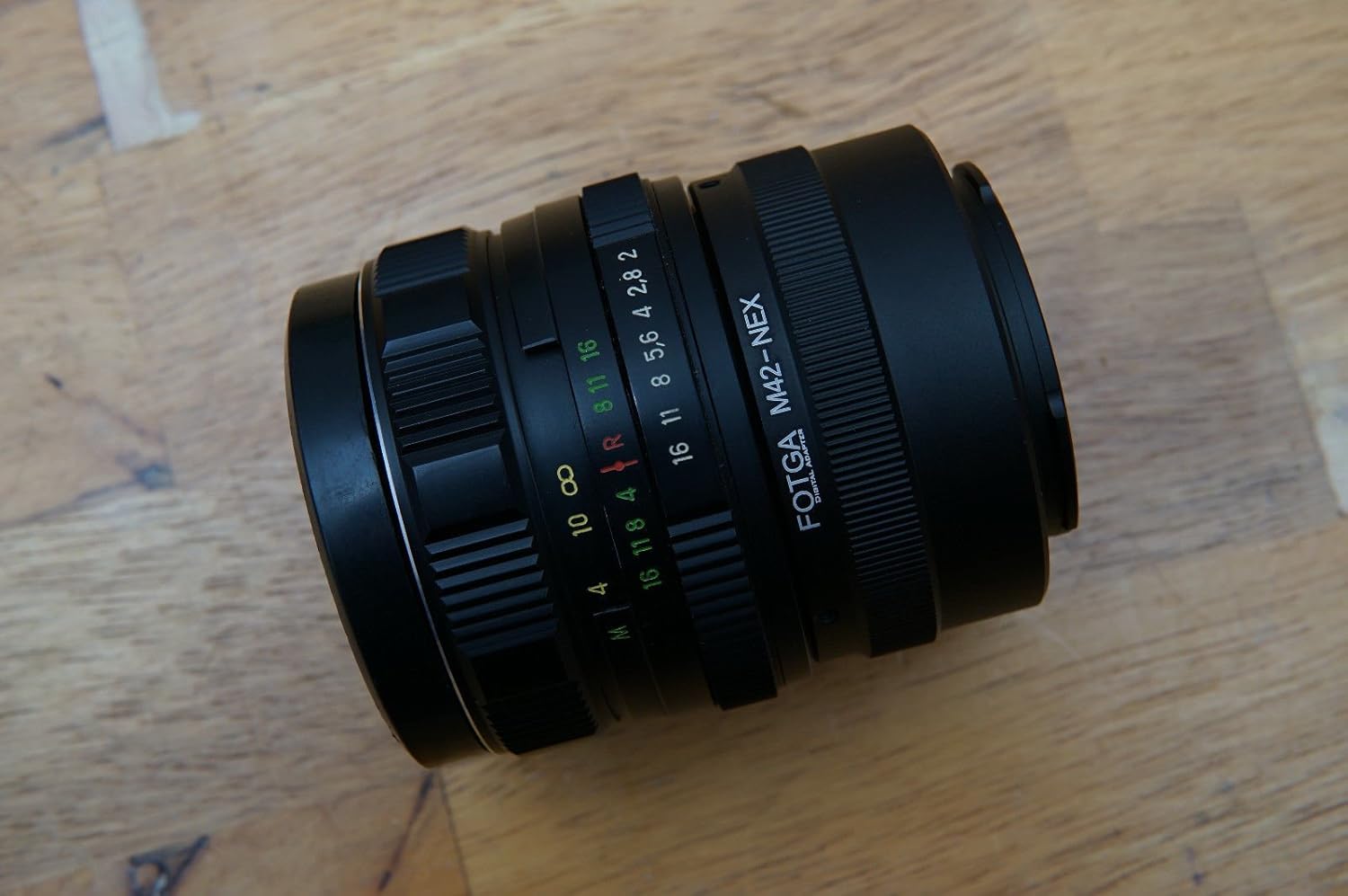
Image: The Helios 77M-4 50mm F1.8 lens, displaying its manual focus ring, aperture ring, and depth of field scale. This view highlights the robust construction and clear markings essential for manual operation.
- Odak Halkası: Used to adjust the focus manually.
- Diyafram Halkası: Used to set the desired aperture (f-stop).
- Alan Derinliği Ölçeği: Provides an indication of the depth of field at various apertures.
- Montaj Halkası: Objektifi kamera gövdesine bağlar.
Kurmak
Lensin Montajı
- Kameranızın kapalı olduğundan emin olun.
- Remove the rear lens cap from the Helios 77M-4 lens and the body cap from your Sony E-mount camera.
- Align the white index mark on the lens barrel with the corresponding white index mark on the camera body.
- Lensi kamera yuvasına yerleştirin ve yerine oturana kadar saat yönünde çevirin. Lensi zorlamayın.
- Once mounted, remove the front lens cap.

Image: The Helios 77M-4 lens securely attached to a Sony E-mount camera body. This illustrates the correct mounting position, ready for use.
Kamera Ayarları
Since this is a manual lens, you will need to adjust your camera settings:
- Kameranızı şu şekilde ayarlayın: Manuel (M) or Diyafram Önceliği (A) mod.
- Olanak vermek "Release without lens" or "Shoot without lens" in your camera's menu, as the camera will not detect an electronic connection to the lens.
- Consider using "Focus Peaking" Ve "Magnified View" features on your camera for easier manual focusing. Refer to your camera's manual for specific instructions on these features.
Lensin Çalıştırılması
Diyaframı Ayarlama
The aperture is controlled directly on the lens using the aperture ring. Rotate the ring to select your desired f-stop. A wider aperture (smaller f-number like F1.8) allows more light and creates a shallower depth of field, ideal for portraits. A narrower aperture (larger f-number) allows less light and creates a deeper depth of field, suitable for landscapes.
Manuel Odaklama
To focus, rotate the focus ring on the lens barrel until your subject appears sharp in the viewfinder or on the LCD screen. Utilize your camera's focus peaking and magnification features for precise focusing, especially at wider apertures.
- Odak Zirvesi: Highlights in-focus areas with a colored outline.
- Büyütülmüş View: Zooms in on a portion of the image for critical focus assessment.
Bakım
Lensin Temizlenmesi
- Use a soft, lint-free microfiber cloth specifically designed for optical surfaces to clean the front and rear elements.
- İnatçı lekeler için, lens temizleme solüsyonundan az bir miktarını doğrudan lense değil, beze uygulayın.
- Çizilmeyi önlemek için silmeden önce toz parçacıklarını bir üfleyici fırça ile temizleyin.
- Aşındırıcı malzemeler veya sert kimyasallar asla kullanmayın.
Depolamak
- Objektifi kullanmadığınız zamanlarda ön ve arka objektif kapaklarını mutlaka takın.
- Lensi serin, kuru, doğrudan güneş ışığından ve aşırı sıcaklıklardan uzak bir yerde saklayın.
- If storing for extended periods, consider using a dehumidifying agent to prevent fungus growth.
Sorun giderme
| Sorun | Olası Neden | Çözüm |
|---|---|---|
| Camera does not recognize lens / Cannot take photos | Manual lens, no electronic contacts. | Enable "Release without lens" or "Shoot without lens" in camera settings. |
| Görüntüler bulanık | Odaklama hatası veya kamera titremesi. | Ensure proper manual focus using focus peaking/magnification. Use a faster shutter speed or tripod to prevent camera shake. |
| Images are too dark/bright | Yanlış pozlama ayarları (diyafram, enstantane hızı, ISO). | Adjust aperture on the lens. Adjust shutter speed and ISO on the camera to achieve desired exposure. |
| Dust or smudges on images | Dirty lens elements. | Clean lens elements carefully using a blower brush and microfiber cloth. |
Özellikler
| Özellik | Detay |
|---|---|
| Örnek | Helios 77M-4 |
| Odak Uzaklığı | 50 mm |
| Maksimum Diyafram | F1.8 |
| Lens Türü | Standart Prime Lens |
| Uyumlu Montajlar | Sony E-Mount (NEX, A7 series, 6500, a6300, a6000, a5100, a5000, a3000) |
| Odak Türü | Manuel Odaklama |
| Üretici | 77M-4 (as per product data) |
Garanti ve Destek
This product is a vintage lens. Specific warranty information may vary depending on the seller and purchase conditions. Please refer to your purchase documentation for details regarding any applicable warranty.
For technical support or inquiries, please contact the retailer or the original manufacturer if contact information is available. As a vintage item, direct manufacturer support may be limited.