
giriiş
This manual provides instructions for the installation, operation, and maintenance of the Black Box SERVSWITCH EC USB Server Cable, Model EHN9000U-0006. This 6-foot (1.8-meter) cable is designed to connect a server to a KVM switch, providing both USB and VGA connectivity.
Güvenlik Bilgileri
Please read and understand all safety instructions before using this product. Failure to follow these instructions may result in damage to the product or connected equipment.
- Do not expose the cable to excessive moisture or extreme temperatures.
- Avoid bending or kinking the cable sharply, as this can damage internal wires.
- Ensure all connections are secure before powering on equipment.
- Disconnect power from devices before connecting or disconnecting cables.
Paket İçeriği
Paketinizin aşağıdaki öğeyi içerdiğini doğrulayın:
- 1 x Black Box SERVSWITCH EC USB Server Cable (EHN9000U-0006)
Ürün Bittiview
The Black Box SERVSWITCH EC USB Server Cable is a specialized cable designed for KVM (Keyboard, Video, Mouse) applications. It integrates VGA video and USB keyboard/mouse signals into a single cable for streamlined connectivity between a server and a KVM switch.
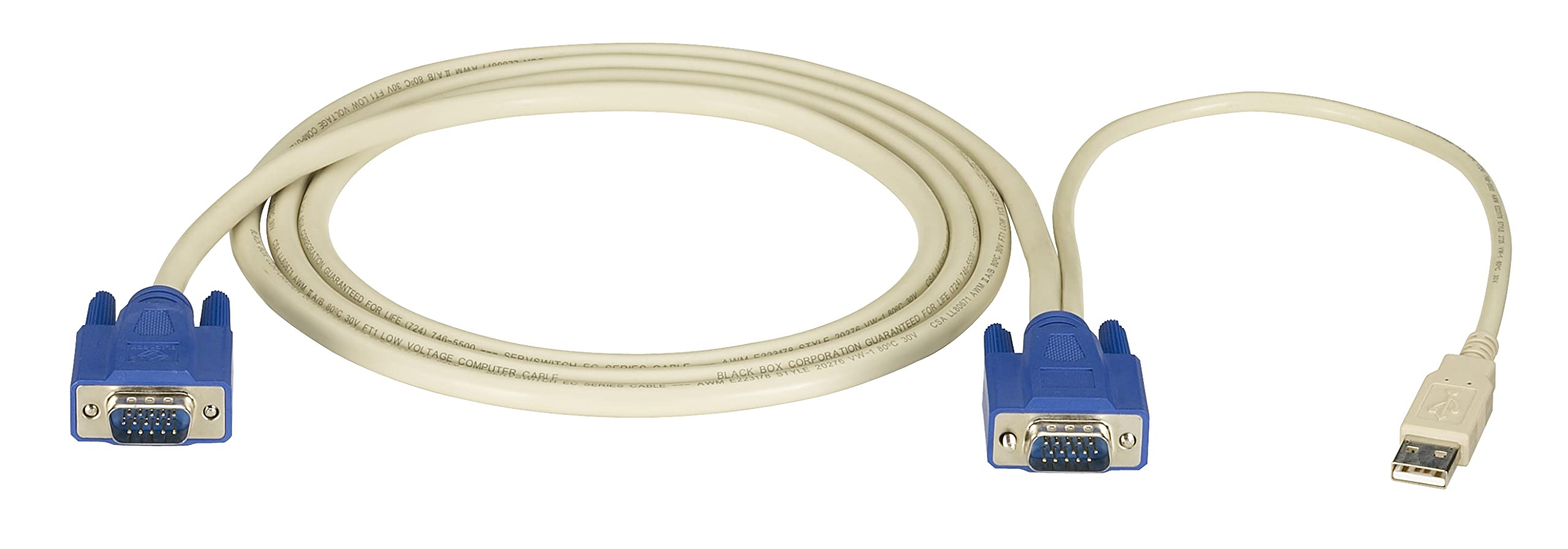
Resim: Black Box SERVSWITCH EC USB Server Cable. This image displays the 6-foot cable with its distinct VGA (HD-15) and USB connectors, designed for server-to-KVM switch connections.
Temel Özellikler:
- Entegre Bağlantı: Combines VGA video and USB data into one cable.
- Uzunluk: 6 feet (1.8 meters) for flexible placement.
- Uyumluluk: Designed for use with Black Box SERVSWITCH KVM systems.
- Karışmayan Tasarım: Helps prevent tangles and simplifies cable management.
Kurmak
- Cihazları Kapatma: Ensure both the server and the KVM switch are powered off before making any connections.
- Sunucuya bağlan: Locate the VGA output port and an available USB port on your server. Connect the corresponding VGA (HD-15 male) and USB (Type-A male) connectors of the EHN9000U-0006 cable to these ports on the server.
- KVM anahtarına bağlanın: Locate the KVM port on your KVM switch designated for the server. Connect the combined VGA (HD-15 female) and USB (Type-A female) end of the EHN9000U-0006 cable to the KVM switch's input port. Ensure a secure fit for both connectors.
- Güç Açık: Once all connections are secure, power on the KVM switch, then power on the server.
İşletim
Once the cable is properly connected and devices are powered on, the KVM switch should detect the connected server. Use the KVM switch's controls (buttons, hotkeys, or OSD) to switch to the server connected via this cable. You should then have control over the server's video, keyboard, and mouse.
- Refer to your KVM switch's user manual for specific instructions on switching between connected servers.
- Ensure the KVM switch is configured to recognize the USB keyboard and mouse signals.
Bakım
The Black Box SERVSWITCH EC USB Server Cable requires minimal maintenance. Follow these guidelines to ensure longevity:
- Temizlik: Kabloyu ve konnektörleri silmek için yumuşak ve kuru bir bez kullanın. Sıvı temizleyiciler veya çözücüler kullanmayın.
- Depolamak: When not in use, store the cable in a cool, dry place, away from direct sunlight and extreme temperatures. Avoid tight coiling to prevent internal damage.
- İşleme: Always grasp the connector housing when plugging or unplugging the cable. Avoid pulling on the cable itself.
Sorun giderme
| Sorun | Olası Neden | Çözüm |
|---|---|---|
| Video görüntü yok | Loose VGA connection; Incorrect KVM port selected; Server video output issue. | Ensure VGA connectors are fully seated and secured. Select the correct KVM port. Check server's video output directly. |
| Klavye/Fare yanıt vermiyor | Loose USB connection; KVM switch USB emulation issue; Server USB port issue. | Ensure USB connectors are fully seated. Verify KVM switch USB settings. Test server USB ports with another device. |
| Aralıklı bağlantı | Damaged cable; Loose connections; Electrical interference. | Inspect cable for visible damage. Re-seat all connections. Ensure cable is not near strong electromagnetic sources. |
Özellikler
- Modeli: EHN9000U-0006
- Marka: Kara kutu
- Kablo Tipi: USB, VGA
- Connector Type (Server End): HD-15 Male (VGA), USB Type-A Male
- Connector Type (KVM End): HD-15 Female (VGA), USB Type-A Female
- Uzunluk: 6 fit (1.8 metre)
- Renk: Siyah/Kırmızı
- Özellik: Dolaşmayan
- Uyumlu Cihazlar: Server (with VGA and USB ports)
- Ürün Ölçüleri: 5 x 0.5 x 5 inç (yaklaşık ambalaj boyutları)
- Ürün Ağırlığı: 8.4 ons (0.24 Kilogram)
- UPC: 822088018322
Garanti ve Destek
Garanti bilgileri ve teknik destek için lütfen resmi Black Box'a bakın. webSite üzerinden satın alabilir veya müşteri hizmetleri departmanıyla iletişime geçebilirsiniz. Garanti talepleriniz için satın alma fişinizi saklayın.
Kara kutu Webalan: www.blackbox.com