
giriiş
This manual provides essential information for the safe and efficient use of your SANSUI SCM39-B11 39V High-Vision LCD TV. Please read these instructions thoroughly before operating the television and retain them for future reference. This television features a reliable Japanese design, incorporating a main board developed by Toshiba Visual Solutions Corporation, with evaluation and production management handled by a specialized team in Echizen City, Fukui Prefecture.
The SCM39-B11 model is a 2017 release, designed for terrestrial digital broadcasting, and supports external HDD recording via USB connection.
Güvenlik Bilgileri
Yangın, elektrik çarpması ve yaralanma riskini azaltmak için bu televizyonu kullanırken her zaman temel güvenlik önlemlerine uyun.
- Televizyonu yağmur veya neme maruz bırakmayın.
- Havalandırma açıklıklarını kapatmayın. Hava akışının düzgün olması için televizyonun etrafında yeterli boşluk bırakın.
- Televizyonu dengesiz bir araba, sehpa, üçayak, braket veya masa üzerine koymayın.
- Şimşekli fırtınalar sırasında veya uzun süre kullanılmadığında televizyonun fişini çekin.
- Tüm bakımları yetkili servis personeline yaptırın.
Paket İçeriği
Paketin içinde tüm öğelerin mevcut olduğundan emin olun:
- SANSUI SCM39-B11 39V LCD TV
- Uzaktan kumanda
- Piller (uzaktan kumanda için)
- MiniB-CAS Card
- B-CAS Card Cover (with screws)
- Ayaklık (vidalarıyla birlikte)
- Kullanım Kılavuzu (bu belge)
- Garanti Kartı
Kurulum Kılavuzu
1. Stand Kurulumu
Carefully place the television screen-down on a soft, flat surface. Attach the included stand to the bottom of the television using the provided screws. Ensure the stand is securely fastened before placing the television upright.

Resim: Ön view of the SANSUI SCM39-B11 TV with its stand, showing the display and the two silver-colored feet.
2. Bağlantı Kabloları
Refer to the back panel of the television for connection ports.

Resim: Arka view of the SANSUI SCM39-B11 TV, displaying the back panel with various input ports including HDMI, USB, and antenna connections.
- Anten Bağlantısı: Connect your terrestrial digital antenna cable to the ANTENNA IN port.
- HDMI Cihazları: Connect DVD players, Blu-ray players, game consoles, or other HDMI-compatible devices to the HDMI 1 or HDMI 2 ports. This model has 2 HDMI ports.
- USB External HDD: For recording, connect a compatible external USB Hard Disk Drive (HDD) to the USB port.
- Güç: Connect the power cord to the AC inlet on the television and then to a wall outlet.
3. İlk Kurulum
After connecting all cables and powering on the TV, the initial setup wizard will guide you through the process. This typically includes:
- Dil seçimi.
- Region selection.
- Automatic channel scan for terrestrial digital broadcasts. Ensure your antenna is properly connected for this step.
Kullanım Talimatları
Temel İşlemler
- Güç Açma/Kapatma: Basın GÜÇ Uzaktan kumandadaki düğmeye basın.
- Kanal Seçimi: Kullanın CH +/- buttons or the number buttons on the remote.
- Ses Ayarı: Kullanın SES +/- düğmeler.
- Giriş kaynağı: Basın GİRİŞ button to cycle through connected devices (TV, HDMI 1, HDMI 2, etc.).
Recording with External HDD
This TV supports recording terrestrial digital broadcasts to an external USB HDD. Ensure your HDD is connected to the USB port.
- Kayıt Planlama: Use the Electronic Program Guide (EPG) to select programs for recording. The EPG supports a 1-week display.
- Automatic Chapter Marking: The TV can detect commercials during recording and automatically set chapter marks, allowing for easier navigation during playback.
Oynatma İşlevleri
When playing back recorded content from an external HDD, the following functions are available:
- Tekrar Oynatma: Replay a section or the entire program.
- Chase Playback: Watch a program from the beginning while it is still being recorded.
- 1.5x Speed Playback: Watch recorded content at an accelerated speed.
Görüntü ve Ses İyileştirmeleri
- Blue Light Guard: Activate this function via the remote control to reduce blue light emission by up to approximately 50%, which may help reduce eye strain.
- Picture Enhancer: This feature automatically adjusts the super-resolution processing level according to the input content, ensuring optimal image display at all times.
- Japanese Paper Speakers: The integrated speakers utilize Japanese paper for clear sound reproduction across high to low frequencies.
Ek Özellikler
- Screen Freeze Function: Pause the live broadcast or current display.
- HDMI Connected Device Linkage: Control compatible HDMI-connected devices using the TV remote.
- Bi-directional Data Communication: Supports two-way data communication.
Bakım
Televizyonu Temizlemek
- Ekran: Ekranı yumuşak, kuru ve tüy bırakmayan bir bezle nazikçe silin. İnatçı lekeler için, hafifçe silin.ampen the cloth with water or a specialized screen cleaner (ensure it is safe for LCD screens) and wipe carefully. Do not spray liquid directly onto the screen.
- Vücut: Wipe the television body with a soft, dry cloth. Avoid using abrasive cleaners, waxes, or solvents as they can damage the finish.
Uzaktan Kumanda Bakımı
- Replace batteries when the remote control's response becomes slow or inconsistent.
- Eski ve yeni pilleri veya farklı pil türlerini karıştırmayın.
- Uzaktan kumandayı nemden ve doğrudan güneş ışığından uzak tutun.
Sorun giderme
Televizyonunuzda sorun yaşıyorsanız, destek ekibiyle iletişime geçmeden önce aşağıdaki yaygın sorunlara ve çözümlere bakın.
| Sorun | Olası Neden / Çözüm |
|---|---|
| Güç yok | Ensure the power cord is securely plugged into both the TV and the wall outlet. Check if the outlet is functioning. |
| No picture / No signal | Verify antenna connection. Check the input source selection (e.g., HDMI 1, HDMI 2, TV). Perform a channel scan if necessary. |
| Ses yok | Check volume level and mute status. Ensure external audio devices are properly connected if used. |
| Uzaktan kumanda çalışmıyor | Pilleri kontrol edin ve değiştirin. Uzaktan kumanda ile televizyonun kızılötesi sensörü arasında herhangi bir engel olmadığından emin olun. |
| External HDD recording issues | Ensure the USB HDD is properly connected and formatted for the TV. Some HDDs may have compatibility issues. Try a different USB port or HDD if available. |
| HDMI device not recognized | Ensure the HDMI cable is securely connected. Try a different HDMI port or cable. Power cycle both the TV and the HDMI device. |
Ürün Özellikleri

Image: A table detailing the specifications of the SANSUI SCM39-B11 TV, including screen size, resolution, tuner type, recording capabilities, connectivity, and power consumption.
| Özellik | Şartname |
|---|---|
| Model Adı | SCM39-B11 |
| Ekran Boyutu | 39V-type (39 inches) |
| Ekran Teknolojisi | LCD |
| Çözünürlük | High-Vision (HD 1366 x 768) |
| Ayarlayıcılar | Terrestrial Digital x1, BS Digital: None, CS Digital: None |
| External HDD Recording | USB üzerinden desteklenir |
| HDMI Bağlantı Noktaları | 2 sistemleri |
| USB Bağlantı Noktaları | 1 sistemi |
| Wall Mount Compatible | VESA 200mm x 200mm |
| Ürün Ağırlığı | 6.1 kilo |
| Boyutlar (G x Y x D) | Approx. 88.8 cm x 57.5 cm x 21.0 cm (with stand) |
| Güç Tüketimi | 61W |
| Yayın Yılı | 2017 |

Resim: Ön view of the SANSUI SCM39-B11 TV with overlaid measurements for width (88.8cm), height (57.5cm), and weight (6.1kg).

Resim: Yan view of the SANSUI SCM39-B11 TV, illustrating the depth of the television body (9.9cm) and the total depth including the stand (21cm).
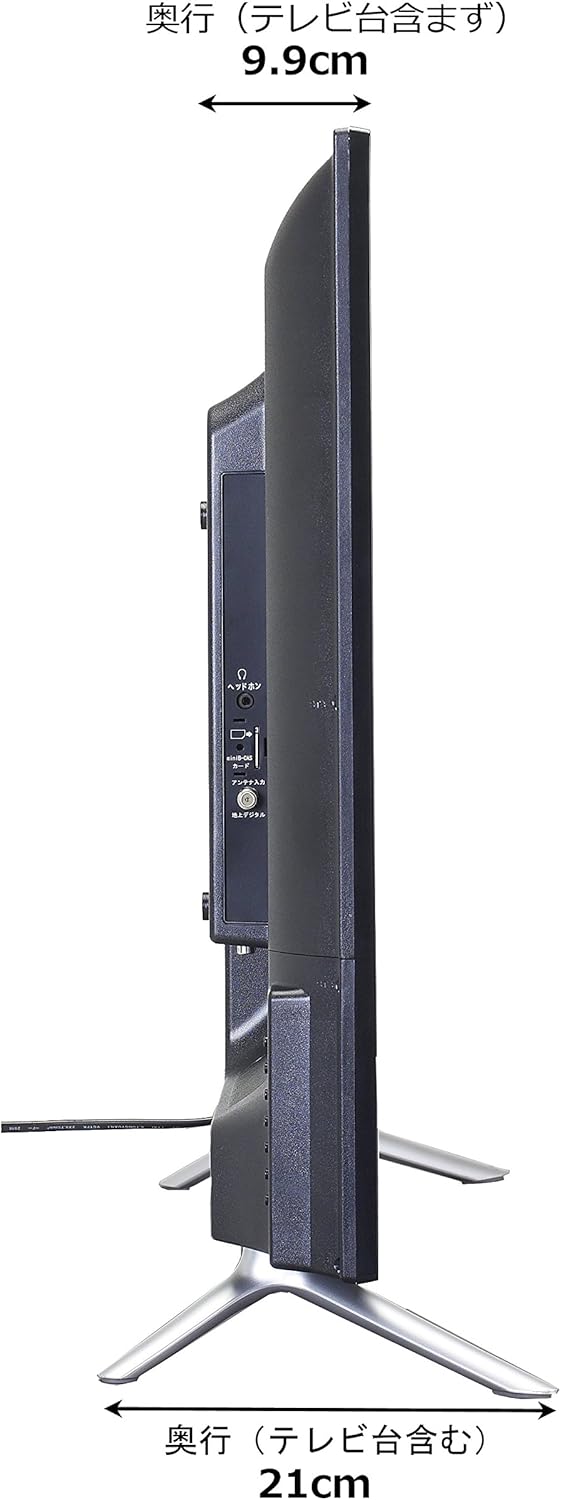
Image: Diagram showing the SANSUI SCM39-B11 TV on a stand next to a human figure (approx. 160cm tall) for visual scale, with TV dimensions indicated.
Garanti ve Destek
Your SANSUI SCM39-B11 television comes with a warranty. Please refer to the included warranty card for details regarding coverage period and terms. Keep your purchase receipt as proof of purchase.
For technical support, service, or inquiries not covered in this manual, please contact SANSUI customer service. Contact information can typically be found on the warranty card or the official SANSUI webalan.