
1. Giriş
This manual provides instructions for the installation, operation, and maintenance of your FreedConn TCOM VB Bluetooth Motorcycle Intercom. Please read this manual thoroughly before use to ensure proper functionality and safety.
2. Temel Özellikler
- Bluetooth V5.0 for stable connectivity.
- Intercom communication for 2-3 riders with an 800m range.
- Universal pairing with most Bluetooth headsets.
- Hands-free calling for mobile phones.
- Stereo music playback and music sharing with a passenger.
- Dahili FM radyo.
- CVC noise reduction technology for clear audio.
- IP65 su geçirmezlik derecesi.
- LCD screen for easy information display.
- Long battery life: up to 10 hours talk time, 7 hours intercom, 300 hours standby.

Resim: Üzeriview of FreedConn TCOM VB Intercom key features.
3. Paket İçeriği
Paketinizde tüm öğelerin mevcut olduğundan emin olun:
- TCOM-VB Main Unit (x2 for this package)
- Boom Microphone / Button Microphone (x2 sets)
- Speaker Pads (x12)
- Clip Bracket (x2)
- 3M Adhesive Mount (x2)
- Allen Anahtarı (x2)
- USB Veri Kablosu (x2)
- Kullanıcı Kılavuzu (x1)

Image: Contents of the FreedConn TCOM VB package.
4. Kurulum ve Kurulum
4.1 İnterkom Ünitesinin Montajı
The TCOM VB unit can be mounted using either the clip bracket or the adhesive mount.
- Konum seç: Kaskınızın sol tarafında uygun bir düz yüzey seçin.
- Clip Bracket Installation:
- Loosen the screws on the clip bracket.
- Slide the bracket between the helmet shell and the inner padding.
- Tighten the screws to secure the bracket.
- Adhesive Mount Installation:
- Clean the helmet surface thoroughly.
- Peel off the protective film from the 3M adhesive mount.
- Montaj parçasını kask yüzeyine en az 30 saniye boyunca sıkıca bastırın. Kullanmadan önce yapıştırıcının tamamen kurması için 24 saat bekleyin.
- Ana Üniteyi Takın: Slide the TCOM VB main unit onto the installed bracket until it clicks into place.
4.2 Hoparlör ve Mikrofon Kurulumu
Install the speakers and microphone inside your helmet.
- Hoparlör Yerleştirme: Attach the speakers to the inside of the helmet, aligning them with your ears. Use the provided speaker pads for comfort and optimal sound.
- Mikrofon Seçimi: Choose between the boom microphone (for open-face helmets) or the button microphone (for full-face helmets).
- Mikrofon Yerleşimi: Position the microphone close to your mouth for clear voice transmission.
- Kabloları Bağlayın: Plug the speaker and microphone cables into the corresponding ports on the TCOM VB main unit.

Image: Hard and soft cable microphone options for helmet installation.
Image: Step-by-step installation guide for the intercom unit.
5. Kullanım Talimatları
5.1 Güç Açma/Kapatma
- Güç Açık: Press and hold the Power button for approximately 3 seconds until the blue indicator light flashes.
- Kapat: Press and hold the Power button for approximately 3 seconds until the red indicator light flashes and the unit powers down.
5.2 Bluetooth Eşleştirme (Telefon/GPS)
To connect your TCOM VB to a mobile phone or GPS device:
- Ensure the TCOM VB unit is powered off.
- Press and hold the Power button for approximately 5-7 seconds until the red and blue indicator lights flash alternately. This indicates pairing mode.
- Telefonunuzda veya GPS cihazınızda Bluetooth'u etkinleştirin ve yeni cihazları arayın.
- Select "FreedConn TCOM VB" from the list of available devices.
- İstenirse "0000" PIN kodunu girin.
- Once paired, the blue indicator light will flash slowly.

Image: Bluetooth pairing with smartphone and GPS.
5.3 Intercom Pairing and Communication
The TCOM VB supports intercom communication for up to 3 riders, with 2 riders communicating simultaneously.
- Pairing Two Units (A & B):
- Ensure both units A and B are powered off.
- Press and hold the Power button on both units A and B simultaneously for 5-7 seconds until they enter pairing mode (red and blue lights flash alternately).
- Press the Power button on either unit A or B once. The units will search and pair with each other. Once paired, the blue light will flash slowly on both.
- Pairing Three Units (A, B, & C):
- First, pair units A and B as described above. Turn off both A and B after successful pairing.
- Next, pair units B and C. Turn off both B and C after successful pairing.
- To initiate a 3-way intercom: Power on all three units. Press the Power button on unit C once to connect to B. Then, press the Power button on unit B once to connect to A. All three units should now be connected.
- Initiate Intercom Call: After pairing, a short press of the Power button will initiate or end an intercom call.
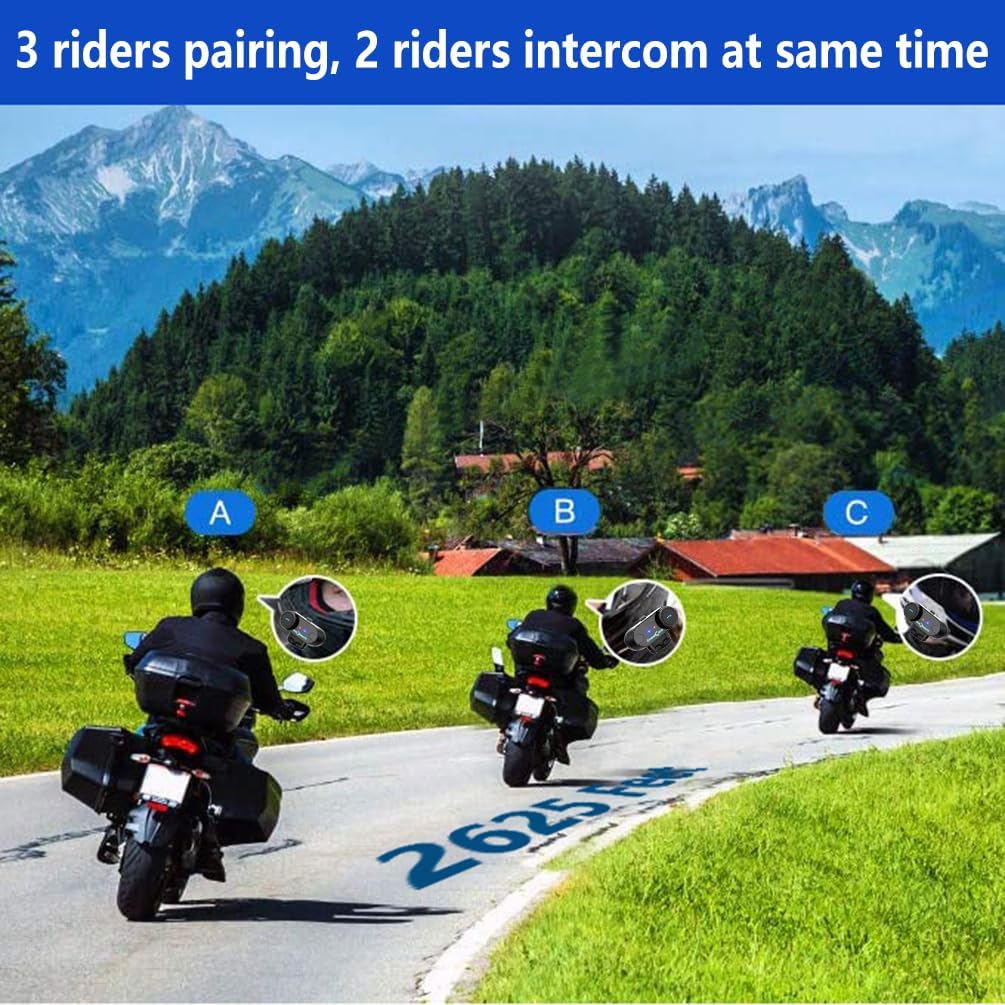
Image: 3 riders pairing, 2 riders intercom at the same time.

Image: Universal pairing feature.
Video: This video demonstrates the pairing process for three T-COMSC intercom units. The pairing steps are generally similar for TCOM VB models. First, pair two devices (A and B), then turn them off. Next, pair device B with device C. Finally, power on all three and initiate connections from C to B, then B to A for a three-way intercom.
5.4 Telefon Fonksiyonları
- Cevap Çağrısı: Telefon düğmesine kısa süre basın.
- Çağrı Sonu: Telefon düğmesine kısa süre basın.
- Çağrıyı Reddet: Telefon tuşuna 2 saniye basılı tutun.
- Son Numarayı Tekrar Ara: Telefon düğmesine iki kez basın.
- Voice Assistant (Siri/S-Voice): Short press the Voice Assistant button (if available) or a specific button combination as per your device's manual.
5.5 Müzik Oynatma
- Oynat/Duraklat: Oynat/Duraklat düğmesine kısa basın.
- Sonraki Parça: Short press the "Next" button or rotate the multi-function knob clockwise.
- Önceki parça: Short press the "Previous" button or rotate the multi-function knob counter-clockwise.
- Müzik Paylaşımı: While playing music, activate the music sharing function (refer to specific button combination in the full manual) to share audio with a paired intercom unit.

Image: Music sharing with a partner.
5.6 FM Radyo
- FM Radyoyu Açma/Kapatma: Press and hold the FM button for 2 seconds.
- Tarama İstasyonları: Short press the "Next" or "Previous" button to scan for available FM stations.

Image: Built-in FM Radio feature.
5.7 Ses Kontrolü
Adjust the volume using the multi-function knob or dedicated volume buttons (if present).
- Sesi arttır: Rotate the multi-function knob clockwise or press the Volume Up button.
- Sesi Azalt: Rotate the multi-function knob counter-clockwise or press the Volume Down button.
6. Bakım
- Temizlik: Üniteyi yumuşak, damp bez. Sert kimyasallar veya aşındırıcı temizleyiciler kullanmayın.
- Suya Dayanıklılık: The unit is IP65 waterproof, meaning it is protected against low-pressure water jets from any direction. It is not designed for submersion. Ensure the USB port cover is securely closed when not charging.
- Şarj: Charge the unit using the provided USB cable. A full charge takes approximately 2.5 hours. The indicator light will change to indicate charging status (e.g., red during charging, blue when fully charged).
- Depolamak: Cihazı uzun süre kullanmadığınız zamanlarda serin ve kuru bir yerde saklayın.

Image: Battery life and waterproof features.
7. Sorun Giderme
| Sorun | Olası Neden | Çözüm |
|---|---|---|
| Güç yok | Düşük pil | Üniteyi 2.5 saat şarj edin. |
| Cannot pair with phone/GPS | Unit not in pairing mode; Bluetooth disabled on device | Ensure unit is in pairing mode (red/blue flashing). Enable Bluetooth on your device. |
| İnterkom bağlanmıyor | Units not paired correctly; out of range | Repeat intercom pairing steps. Ensure units are within 800m range. |
| Low audio volume or no sound from speakers | Speakers not positioned correctly; volume too low; cable loose | Adjust speaker position closer to ears. Increase volume. Ensure speaker cable is fully inserted. |
| Poor microphone quality / background noise | Microphone not positioned correctly; wind noise | Position microphone closer to mouth. Ensure CVC noise reduction is active. Consider using a different microphone type if applicable. |
Not: If your two speakers or one side speaker are not working, ensure the headset cable is completely inserted into the interface and that the speaker is inserted into the correct port. If the volume is low, adjust the speaker placement as close to your ears as possible.
8. Özellikler
| Modeli: | T-COMVB-800M |
| Bluetooth Sürümü: | 5.0 |
| İnterkom Aralığı: | 800 metreye kadar (2 binici arasında) |
| Max Riders: | 3 (2 simultaneous communication) |
| Pil Kapasitesi: | 400 mAh |
| Şarj Süresi: | Yaklaşık 2.5 saat |
| Konuşma Süresi: | 10 saate kadar |
| İnterkom Süresi: | 7 saate kadar |
| Bekleme Süresi: | 300 saate kadar |
| Suya Dayanıklılık: | IP65 |
| Hoparlör Çapı: | 40 mm |
| Empedans: | 32 Ohm |
| Frekans Aralığı: | 20 Hz - 20,000 Hz |
| Gürültü kontrolü: | Aktif Gürültü Engelleme (CVC) |
| Uyumlu Cihazlar: | Mobile phones, MP3 players, GPS devices |
9. Garanti ve Destek
Garanti bilgileri ve teknik destek için lütfen resmi FreedConn web sitesine başvurun. webWeb sitesini ziyaret edin veya yerel distribütörünüzle iletişime geçin. Garanti talepleri için satın alma fişinizi satın alma belgesi olarak saklayın.
For common issues, please consult the troubleshooting section of this manual or the online FAQ resources provided by FreedConn.