
kuman KY68-UK
kuman UPS Battery Pack Expansion Board User Manual
Model: KY68-UK | Brand: kuman
1. Giriş
The kuman UPS Battery Pack Expansion Board is designed to provide an uninterruptible power supply (UPS) solution for various Raspberry Pi models, including Pi 3 Model B, B+, Pi 2 Model B, and Pi 1 Model B+ A+ A. This board ensures continuous operation of your Raspberry Pi even during power interruptions, offering portability and enhanced reliability. It features a built-in lithium battery, battery detection interface, and convenient power management functions.
2. Güvenlik Bilgileri
- Cihazı suya, neme veya aşırı sıcaklıklara maruz bırakmayın.
- Avoid dropping or subjecting the board to severe impacts.
- Ensure correct polarity when connecting batteries or power sources.
- Do not attempt to disassemble or modify the board, as this may void the warranty and pose safety risks.
- Çocukların erişemeyeceği yerde saklayınız.
- Yalnızca belirtilen şarj hacmini kullanıntage ve akım (5V/2A).
3. Paket İçeriği
Lütfen aşağıda listelenen tüm öğelerin paketinizde yer aldığından emin olun:
- 1 x Lithium Battery Expansion Board (with pre-installed lithium battery)
- 4 x Copper Standoffs
- 4 x Vida
- 4 x Somunlar
- 1 x Mikro USB Kablosu

Figure 3.1: Package contents of the kuman UPS Battery Pack.
4. Ürün Bittiview
The kuman UPS Battery Pack Expansion Board is compact and designed to integrate seamlessly with your Raspberry Pi. It provides reliable power and features for enhanced functionality.
4.1 Temel Özellikler
- UPS İşlevselliği: Provides uninterrupted DC 5V output even while charging, ensuring continuous operation of your Raspberry Pi.
- Pil Algılama: Includes an interface to monitor the battery's power level.
- Automatic Load Detection: Automatically detects load and starts output; turns off output when no load is detected.
- Expandable Battery Capacity: Features two parallel sockets for 3.7V Lithium batteries, allowing for capacity expansion.
- Entegre Güç Anahtarı: Conveniently power on/off the Raspberry Pi via a dedicated switch.
- Raspberry Pi Fan Interface: Dedicated interface for a Raspberry Pi fan, which does not occupy GPIO pins. Can also serve as a 5V power supply via DuPont line.
- Pil Göstergesi: Four LEDs indicate battery charge status (25%, 50%, 75%, 100%).
4.2 Devre Kartı Düzeni ve Bileşenleri
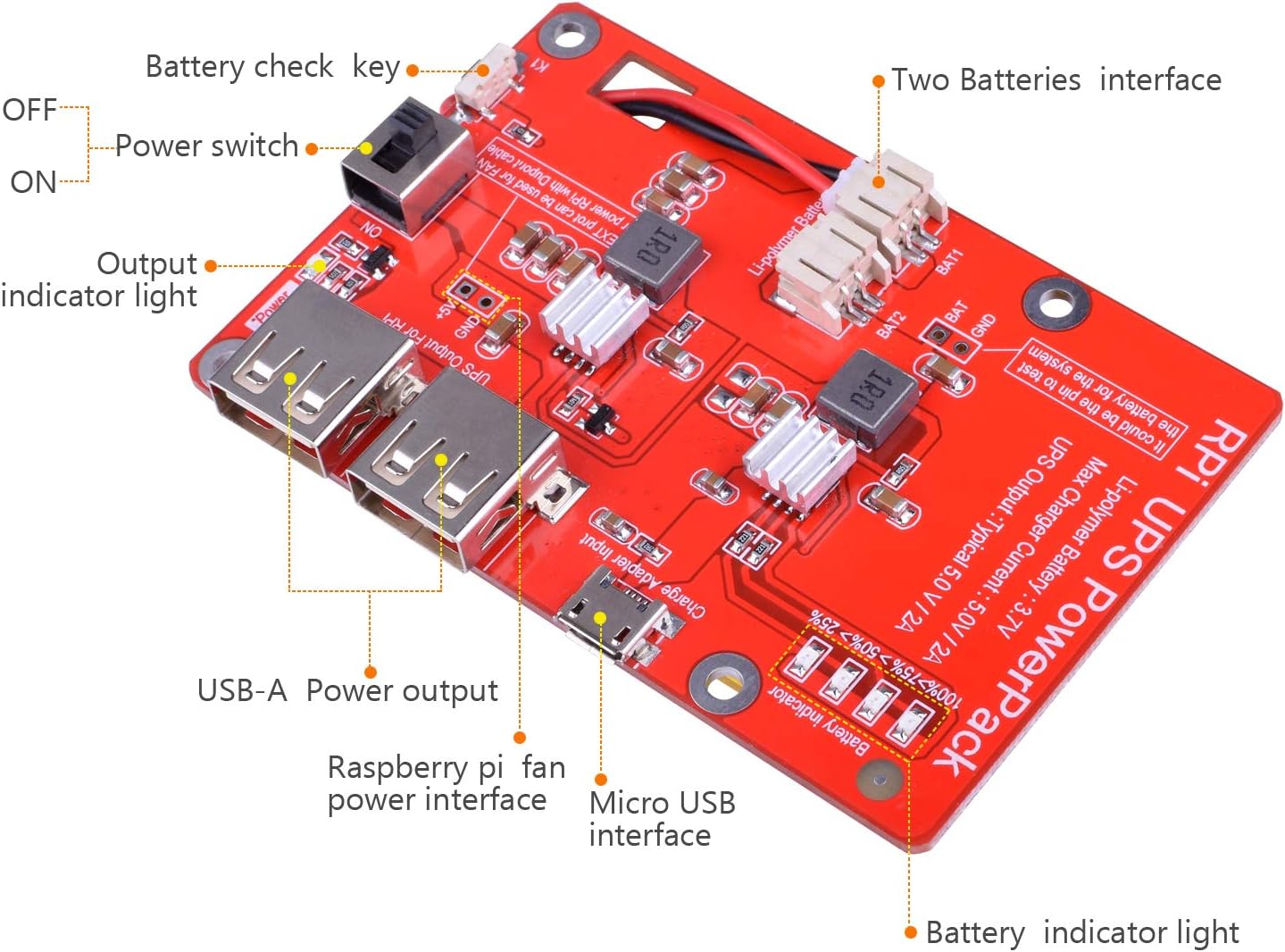
Şekil 4.1: Ayrıntılı view of the UPS Battery Pack with labeled components.
- Güç Anahtarı (AÇIK/KAPALI): Controls the power to the connected Raspberry Pi.
- Output Indicator Light: Illuminates when the board is providing power.
- USB-A Power Output: Standard USB port for connecting the Raspberry Pi or other devices.
- Raspberry Pi Fan Power Interface: Dedicated pins for connecting a cooling fan.
- Micro USB Interface (Charge Adapter Input): Used to charge the internal battery and power the board.
- Pil Gösterge Işıkları: Four LEDs showing approximate battery charge level.
- Battery Check Key (K1): Button to momentarily display battery level.
- Two Batteries Interface (BAT1, BAT2): Connectors for additional 3.7V Li-polymer batteries to expand capacity.
5. Kurulum ve Kurulum
Follow these steps to set up your kuman UPS Battery Pack with your Raspberry Pi:
- Pili Şarj Edin: Before first use, connect the Micro USB cable to the "Charge Adapter Input" port on the UPS board and plug the other end into a 5V/2A USB power adapter. The battery indicator lights will show charging progress. Charge until all four indicator lights are solid.
- Ara parçaları takın: Secure the four copper standoffs to the mounting holes on the UPS board using the provided screws.
- Mount Raspberry Pi: Align the mounting holes of your Raspberry Pi with the standoffs on the UPS board. Carefully place the Raspberry Pi onto the standoffs and secure it with the remaining screws and nuts.
- Connect Raspberry Pi: Use the provided Micro USB cable or another suitable USB cable to connect the "UPS Output For RPI" USB-A port on the UPS board to the Micro USB power input port on your Raspberry Pi.
- Optional: Connect Fan (if applicable): If using a Raspberry Pi cooling fan, connect its power cable to the "Raspberry Pi fan power interface" on the UPS board.
- Optional: Expand Battery Capacity: If you wish to expand the battery capacity, connect additional 3.7V Li-polymer batteries to the BAT1 and BAT2 interfaces. Ensure correct polarity.

Şekil 5.1: Ör.ample of the UPS Battery Pack connected to a Raspberry Pi with a display.

Şekil 5.2: Yan view of the assembled UPS Battery Pack and Raspberry Pi.
6. Kullanım Talimatları
6.1 Açma/Kapatma
To power on your Raspberry Pi using the UPS board, slide the "Power Switch" to the ON position. The output indicator light will illuminate, and your Raspberry Pi will begin to boot. To power off, slide the switch to the KAPALI position. It is recommended to properly shut down your Raspberry Pi's operating system before cutting power.
6.2 UPS İşlevselliği
When the UPS board is connected to an external 5V power source via its Micro USB input, it will charge the internal battery while simultaneously powering the connected Raspberry Pi. If the external power source is disconnected (e.g., during a power outage), the UPS board will automatically switch to battery power without interrupting the Raspberry Pi's operation.
6.3 Pil Göstergesi
The four LED lights on the board indicate the approximate battery charge level:
- Bir LED: 0-25% şarj
- İki LED: 25-50% şarj
- Üç LED: 50-75% şarj
- Dört LED: 75-100% şarj
Press the "Battery Check Key" (K1) to momentarily display the current battery level.
7. Bakım
- Şarj: Regularly charge the battery pack to maintain its health. It is recommended to keep the battery charged when not in use for extended periods.
- Temizlik: Tahtayı temizlemek için kuru, yumuşak bir bez kullanın. Sıvı temizleyiciler veya çözücüler kullanmayın.
- Depolamak: If storing the device for a long time, ensure the battery is charged to about 50-70% and store in a cool, dry place.
- Pil Değişimi: The internal lithium battery is designed for long-term use. If battery performance significantly degrades over time, consult kuman support for replacement options.
8. Sorun Giderme
| Sorun | Olası Neden | Çözüm |
|---|---|---|
| Raspberry Pi not powering on. | Power switch is OFF; Battery is depleted; Incorrect connection; Faulty USB cable. | Ensure power switch is ON. Charge the battery pack. Verify all connections are secure. Try a different Micro USB cable. |
| Battery indicator LEDs not lighting up. | Battery is fully charged or completely depleted; Battery Check Key not pressed; Board is off. | Press the Battery Check Key (K1). Ensure the board is powered on. Connect to charger to see if charging indicators appear. |
| Raspberry Pi shows low power warning (lightning bolt icon). | Insufficient current from UPS; High power consumption by Pi/peripherals. | Ensure the UPS is fully charged. Reduce the number of power-hungry peripherals connected to the Raspberry Pi. Note that the maximum output is 2A, which might be insufficient for some Pi models (e.g., Pi 3B+, Pi 4) under heavy load. |
| UPS not charging. | Faulty Micro USB cable or power adapter; Charging port issue. | Try a different Micro USB cable and a known good 5V/2A power adapter. Ensure the cable is fully inserted into the "Charge Adapter Input" port. |
| Pil çabuk bitiyor. | High power consumption; Battery degradation. | Reduce power consumption of connected devices. If the battery is old, its capacity may have diminished. Consider adding an additional battery via the expansion ports if supported. |
9. Özellikler
| Özellik | Şartname |
|---|---|
| Pil Türü | Li-polymer (3.7V) |
| Pil Kapasitesi | 3800mAh (tipik) |
| Maksimum Çıkış Akımı | 2A |
| Çıkış Hacmitage | 5.1V ± 0.1V |
| Standard Charging Current/Voltage | 2A / 5.0V |
| Boyutlar (U x G x Y) | 3.35 x 2.17 x 0.71 inç (8.5 x 5.5 x 1.8 cm) |
| Ürün Ağırlığı | 1 pound (yaklaşık 450 g) |
| Model Numarası | KY68-UK |

Figure 9.1: Dimensions of the UPS Battery Pack.
10. Garanti ve Destek
kuman products are designed for reliability and performance. For warranty information, technical support, or assistance with your UPS Battery Pack Expansion Board, please contact kuman customer service through their official website or the platform where you purchased the product. Please have your model number (KY68-UK) and purchase details ready when contacting support.
For more information and product updates, visit the official kuman store: kuman Store on Amazon
Ask a question about this manual
Ask about setup, troubleshooting, compatibility, parts, safety, or missing instructions. Manuals+ will review the question and use this page’s manual context to help answer it.