
Dinuy terminal micro 5
Dinuy Terminal Micro 5 Digital Time Switch User Manual
Modeli: Terminal Micro 5
Marka: Dinuy
1. Giriş
This manual provides comprehensive instructions for the installation, operation, and maintenance of your Dinuy Terminal Micro 5 Digital Time Switch. Please read this manual carefully before using the device to ensure safe and efficient operation. This device is designed to control electrical circuits based on programmed time schedules.
2. Önemli Güvenlik Bilgileri
- Elektrik Tehlikesi: Installation and maintenance should only be performed by a qualified electrician in accordance with all local and national electrical codes.
- Disconnect power at the main circuit breaker before installing or servicing the device.
- Cihazı neme, aşırı sıcaklıklara veya aşındırıcı ortamlara maruz bırakmayın.
- Kısa devreleri önlemek için tüm bağlantıların güvenli ve uygun şekilde yalıtıldığından emin olun.
- Do not exceed the maximum load capacity specified for the device.
3. Ürün Bittiview
The Dinuy Terminal Micro 5 is a compact digital time switch designed for DIN rail mounting. It features a clear LCD display for time and program status, along with intuitive buttons for easy programming.
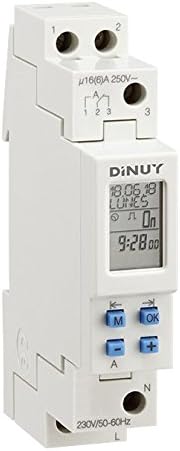
Figure 1: Dinuy Terminal Micro 5 Digital Time Switch
This image displays the Dinuy Terminal Micro 5 digital time switch. The device is white, designed for DIN rail mounting. The top section shows terminals labeled '1' and '2' for power input. Below this, there are terminals '1', '2', '3' for the switched output, with a rating of 'μ16(6)A 250V~'. The central part features a digital LCD screen displaying 'DINUY', '18.06.18', 'LUNES' (Monday), 'On', and '9:28.00'. Below the screen are four blue buttons: 'M' (Mode), 'OK', '-' (Minus/Left arrow), and '+' (Plus/Right arrow). The bottom section shows terminals 'N' (Neutral) and 'L' (Live) for the main power supply, with '230V/50-60Hz' indicated.
3.1. Bileşenler
- LCD Ekran: Shows current time, day, program status, and programming menus.
- 'M' Düğmesi (Mod): Used to navigate through different modes (e.g., time setting, program setting).
- 'OK' Button: Seçimleri ve ayarları onaylar.
- '-' Button (Minus/Left Arrow): Menülerdeki değerleri azaltır veya sola kaydırır.
- '+' Button (Plus/Right Arrow): Menülerde değerleri artırır veya sağa doğru hareket ettirir.
- Terminals L & N: Main power supply input (230V/50-60Hz).
- Terminaller 1, 2, 3: Switched output contacts (μ16(6)A 250V~).
4. Kurulum ve Kurulum
4.1. Montaj
The Dinuy Terminal Micro 5 is designed for DIN rail mounting. Snap the device onto a standard 35mm DIN rail in your electrical panel.
4.2. Kablolama Şeması
WARNING: Ensure power is disconnected before wiring.
- Connect the main Live (L) wire to the 'L' terminal at the bottom of the device.
- Connect the main Neutral (N) wire to the 'N' terminal at the bottom of the device.
- For the switched output, connect the load's Live wire to terminal '1' or '3' (depending on desired contact type, typically '1' for normally open).
- Connect the incoming Live wire for the load to terminal '2'.
- Refer to the markings on the device for precise terminal identification: Input power (L, N) and Switched output (1, 2, 3).
4.3. İlk Güçlendirme
After wiring, restore power. The display should illuminate. If the display is blank, check power connections. The device may require initial time and date setting.
5. Kullanım Talimatları
5.1. Güncel Saat ve Günü Ayarlama
- Press the 'M' button repeatedly until the time setting mode is displayed (e.g., flashing hours).
- Use the '+' and '-' buttons to adjust the hour. Press 'OK' to confirm.
- Repeat for minutes, then for the current day of the week.
- Press 'OK' to save and exit the time setting mode.
5.2. Programlama Açma/Kapama Zamanlamalarını Ayarlayın
The device allows setting multiple ON/OFF programs for different days or groups of days.
- Press the 'M' button until 'PROG' or a similar indicator appears.
- Use '+' or '-' to select a program number (e.g., '1 ON'). Press 'OK'.
- Set the desired ON time (hour and minute) using '+' and '-' and confirming with 'OK'.
- Select the days for this program (e.g., Mon-Fri, daily, specific days) using '+' and '-' and confirming with 'OK'.
- Repeat for the corresponding OFF time ('1 OFF').
- Continue for additional programs as needed.
- Press 'M' to exit programming mode and return to normal operation.
5.3. Manuel Geçersiz Kılma
To temporarily override the programmed schedule, press the 'M' button briefly during normal operation. This will cycle through 'ON', 'OFF', and 'AUTO' modes. Select 'AUTO' to resume programmed operation.
6. Bakım
The Dinuy Terminal Micro 5 requires minimal maintenance. Ensure the device is kept clean and free from dust. Use a soft, dry cloth for cleaning. Do not use abrasive cleaners or solvents.
7. Sorun Giderme
- Cihaz açılmıyor: Check main power supply and wiring connections (L and N terminals). Ensure the circuit breaker is on.
- Yük değiştirilmiyor: Verify that the program is correctly set and the device is in 'AUTO' mode. Check the load's wiring and functionality. Ensure the load does not exceed the device's maximum switching capacity.
- Yanlış zaman gösterimi: Reset the current time and day as per section 5.1.
- Programs not executing: Ensure the device is in 'AUTO' mode. Recheck program settings for correct ON/OFF times and selected days.
8. Teknik Özellikler
| Özellik | Şartname |
|---|---|
| Üretici | Dinuy |
| Üretici Ürün Kimliği | IH TER MC5 |
| Model Numarası | terminal micro 5 |
| Giriş Voltage | 230VAC, 50-60Hz |
| Anahtarlama Kapasitesi | μ16(6)A 250V~ |
| Montaj Tipi | DIN Ray |
| Paket Boyutları | 11.2x6.8x5 cm |
| Ürün Ağırlığı | 100 gr |
9. Garanti Bilgileri
This product is covered by the manufacturer's standard warranty. Please refer to the warranty card included with your purchase or contact Dinuy customer support for detailed warranty terms and conditions. Keep your proof of purchase for warranty claims.
10. Müşteri Desteği
For technical assistance, troubleshooting not covered in this manual, or warranty inquiries, please contact your local Dinuy distributor or visit the official Dinuy webiletişim bilgileri için site.
Ask a question about this manual
Ask about setup, troubleshooting, compatibility, parts, safety, or missing instructions. Manuals+ will review the question and use this page’s manual context to help answer it.