
1. Ürün Bittiview
The Aideepen TDA7492P 2x50W Dual Channel Amplifier Board is designed to provide high-quality stereo audio amplification for various speaker systems. Featuring Bluetooth wireless connectivity, this board is suitable for home or vehicle audio streaming applications.
Temel Özellikler:
- 50W+50W HIFI Board: Delivers 2x50W of power for multi-speaker setups with 8 ohms impedance.
- Upgraded Version (AD-001): Incorporates the TDA7492P chip with enhanced capacitor resistance for improved stereo sound and better heat dissipation. Features gold-plated mounting holes for durability and aesthetics.
- Bluetooth Bağlantısı: Compatible with most smartphones for wireless music streaming. Note: Not compatible with computers.
- Integrated Control Buttons: Includes responsive buttons for power, previous track, next track, play/pause, volume up, and volume down. A Bluetooth indicator flashes red and blue alternately when ready for pairing.
- Compact Design, Powerful Sound: Despite its small size, this amplifier can achieve 110-120 dB output with high-efficiency drivers.

Şekil 1.1: Üst view of the Aideepen TDA7492P Dual Channel AmpLifier Kurulu.
2. Paket İçeriği
Paketi açtığınızda tüm ürünlerin eksiksiz ve iyi durumda olduğundan emin olun.
- 1x TDA7492P Audio Receiver Ampkaldırıcı Kurulu

Şekil 2.1: amplifier board as received in its packaging.
3. Güvenlik Bilgileri
Please read and understand all safety instructions before operating this device. Failure to follow these instructions may result in electric shock, fire, or other hazards.
- Güç Kaynağı: Use a DC power supply between 8V and 24V. Ensure the power supply's output current is sufficient (at least 2A recommended for optimal performance). The power connector is 5.5mm outside diameter, 2.1mm inside diameter, with positive on the inside and negative on the outside.
- Kablolama: Always distinguish between positive and negative terminals when connecting speakers. Incorrect wiring can damage the amplifier board or speakers.
- Çevre: Do not expose the device to moisture, extreme temperatures, or direct sunlight. Operate in a well-ventilated area.
- İşleme: Avoid touching the circuit board components while the device is powered on.
4. Kurulum Talimatları
Follow these steps to set up your Aideepen TDA7492P amplifer tahtası.
- Prepare Speakers: Ensure your speakers are rated for 8 ohms impedance. Strip a small amount of insulation from the ends of your speaker wires.
- Hoparlörleri Bağlayın: Loosen the screws on the green terminal blocks (speaker outputs) on the amplifier board. Carefully insert the speaker wires, ensuring the positive (+) and negative (-) wires are connected to the corresponding terminals for each channel (L+ L- for left, R+ R- for right). Tighten the screws to secure the wires.
- Gücü bağlayın: Plug a compatible DC power adapter (8-24V, at least 2A, 5.5x2.1mm barrel connector, center positive) into the power input jack on the board.
- Güç Açık: After connecting the power, the Bluetooth indicator LED on the board will begin to flash, indicating it is ready for pairing.

Şekil 4.1: Ayrıntılı view of speaker and power connection points on the amplifer tahtası.

Figure 4.2: Labeled diagram of the amplifier board showing Bluetooth antenna, indicator, buttons, and power interface.
Setup and Connection Video:
Video 4.1: Official Aideepen video demonstrating the installation steps and Bluetooth connection process for the amplifer tahtası.
5. Kullanım Talimatları
Bir kez amplifier board is set up, you can begin streaming audio wirelessly.
- Bluetooth Eşleştirme:
- Sağlamak amplifier board is powered on and the Bluetooth indicator is flashing (red and blue alternately).
- Akıllı telefonunuzda veya Bluetooth özellikli diğer cihazınızda Bluetooth ayarlarına gidin.
- Arama Mevcut cihazlar. amplifier board will typically appear as "SANWU Audio" or a similar identifier.
- Seçin amplifier board to pair. Once connected, the Bluetooth indicator LED will typically show a solid blue light or a slower flash.
- Ses Oynatma:
- Open your preferred music player application on your connected device.
- Start playing audio. Sound will be routed through the amplifier board to your connected speakers.
- Using On-Board Controls: The amplifier board features several buttons for direct control:
- OYNAT/DURDUR: Toggles playback.
- ÖNCEKİ: Önceki parçaya atlar.
- SONRAKİ: Bir sonraki parçaya atlar.
- SES+: Sesi artırır.
- SES-: Sesi azaltır.
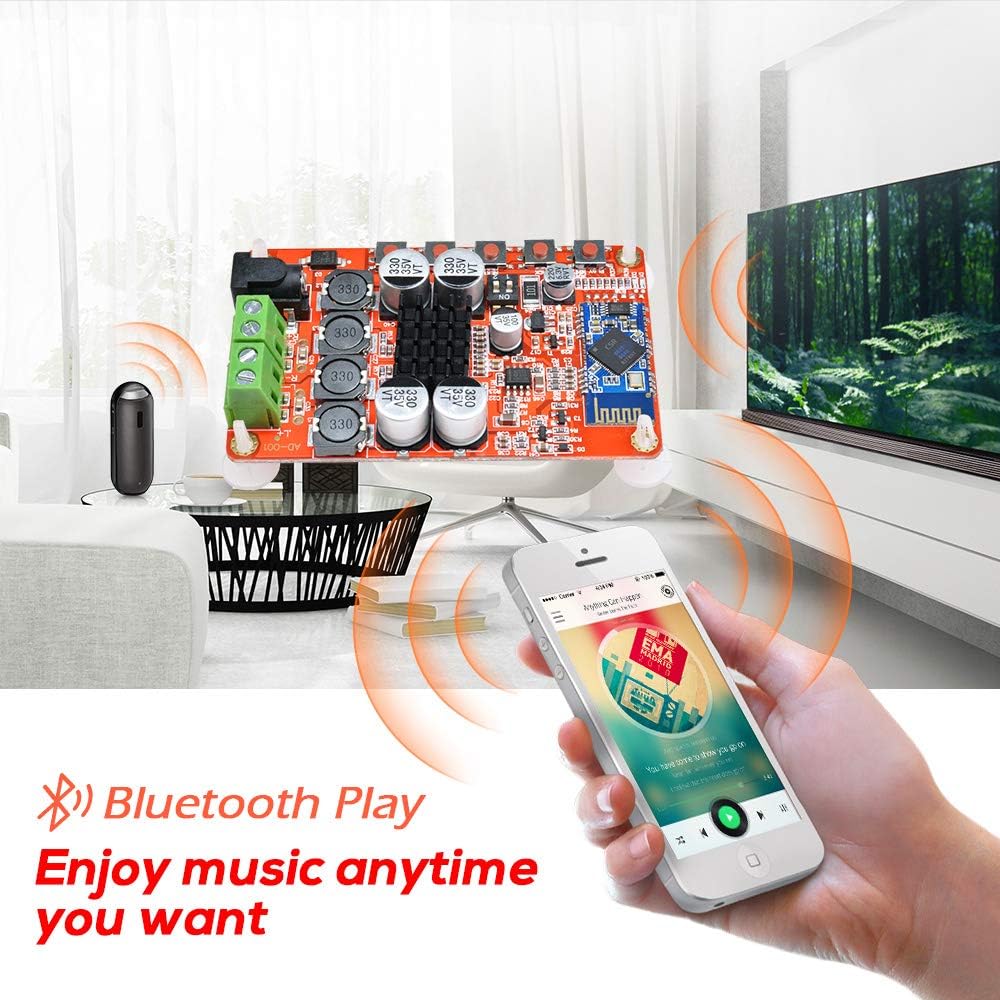
Şekil 5.1: amplifier board connected to speakers and streaming music from a smartphone via Bluetooth.
6. Bakım
Doğru bakım, cihazınızın uzun ömürlü olmasını ve en iyi performansı göstermesini sağlar. amplifer tahtası.
- Temizlik: Use a soft, dry cloth to gently wipe the surface of the board. Avoid using liquid cleaners or solvents, as these can damage components.
- Depolamak: When not in use for extended periods, store the board in a cool, dry place away from direct sunlight and dust.
- İşleme: Always handle the board by its edges to avoid touching sensitive electronic components.
7. Sorun Giderme
Eğer sorunlarla karşılaşırsanız amplifier board, refer to the following common problems and solutions:
| Sorun | Olası Neden | Çözüm |
|---|---|---|
| Hoparlörlerden ses gelmiyor |
|
|
| Bluetooth bağlanmıyor |
|
|
| Statik veya bozuk ses |
|
|
| Loud beep/chirp during power on/off or Bluetooth disconnect | This is a characteristic of the board's design. | This is normal operation and cannot be adjusted. |
8. Özellikler
Detailed technical specifications for the Aideepen TDA7492P AmpLifier Kurulu.
| Şartname | Değer |
|---|---|
| Örnek | TDA7492P |
| Çıkış Gücü | 2x50W (50W per channel) |
| Kanal Sayısı | 2 (Stereo) |
| Minimum Tedarik Hacmitage | 8 Volt (DC) |
| Maksimum Arz Hacmitage | 24 Volt (DC) |
| Hoparlör Empedansı | 8 Ohms (recommended) |
| Bluetooth Sürümü | WL Digital BT Audio Receiver |
| Ürün Boyutları (U x G x Y) | 3.9 x 2 x 1.2 inç |
| Montaj Tipi | Yüzey Montajı |
9. Garanti ve Destek
The Aideepen TDA7492P Dual Channel Amplifier Board comes with a 6-month extended warranty.
For technical assistance, troubleshooting, or warranty claims, please contact Aideepen customer service. Our team is available 24/7 to provide friendly support.
İletişim Bilgileri:
- Webalan: www.aideepen.com (Lütfen resmi bilgileri kontrol edin) web(En güncel iletişim bilgileri için lütfen siteyi ziyaret edin.)
- E-posta: Ürün ambalajına veya resmi bilgilere bakın webDestek e-postası için site.


