
1. Giriş
The Surecom SW-102 is a compact and versatile digital VHF/UHF antenna power and SWR meter designed for radio enthusiasts and professionals. It provides direct digital readout of VSWR, forward power, and reflected power without the need for calibration. Its low insertion loss allows for permanent connection within your setup. The device also features a built-in frequency counter and displays comprehensive information including frequency, power, SWR, forward power (FW), reflected power (RW), and battery voltage.
2. Güvenlik Bilgileri
- Cihazı aşırı sıcaklıklara, neme veya doğrudan güneş ışığına maruz bırakmayın.
- Cihazı düşürmekten veya şiddetli darbelere maruz bırakmaktan kaçının.
- Cihazı sökmeye veya değiştirmeye çalışmayın. Bu, garantiyi geçersiz kılar ve hasara neden olabilir.
- Use only the specified charger (5V micro USB) to prevent damage to the battery and device.
- Ensure proper connection of all cables and adapters before operation to prevent damage to the meter or connected equipment.
- This device is designed for analog radio systems only and is not compatible with DMR radios.
3. Paket İçeriği
Paketi açtığınızda aşağıda listelenen tüm öğelerin mevcut ve iyi durumda olduğundan emin olun:
- 1x SURECOM SW-102 Meter
- 1x Charger Cable (Micro USB)
- 1x Kullanım Kılavuzu
- SL16 to SMA-F Connector (included)
- SL16 to SMA-M Connector (included)
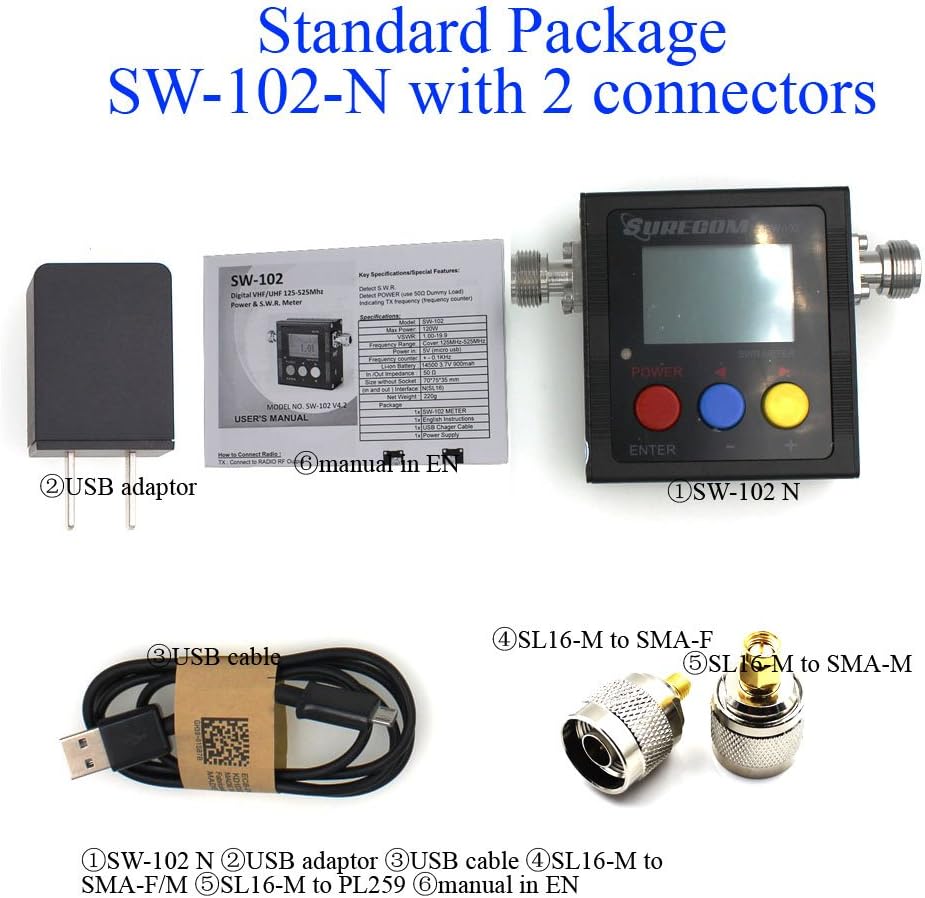
4. Ürün Bittiview
4.1. Temel Özellikler
- Direct digital readout of VSWR, Forward Power, and Reflected Power.
- Kalibrasyon gerekmez.
- Maximum measurable power range up to 120W.
- Low insertion loss (<0.15dB VHF, <0.25dB UHF) allows permanent connection.
- Built-in Frequency Counter.
- All-function display: Frequency, Power, SWR, FW, RW, Battery voltage.
- Compact and handheld size with large LCD display.
4.2. Bileşenler ve Kontroller


The SW-102 features an N-J Interface for connections. Optional accessories such as SL16 to SMA and SL16 to BNC adapters are available to ensure compatibility with various radio and antenna connectors.

5. Kurulum
5.1. Connecting the Meter
To connect the Surecom SW-102, connect the output of your transceiver to the "TX" port on the meter. Then, connect your antenna or dummy load to the "ANT" port. Ensure proper adapters or cables are used if your device has different connector types. The device ships with SL16 to SMA-F and SL16 to SMA-M connectors for common applications.
Watch the video below for a visual guide on connecting the SW-102 to your radio and antenna:
Video 5.1: Demonstration of unboxing, physical overview, and connecting the Surecom SW-102 to a radio and antenna for SWR measurement.
5.2. Açma
To power on the SW-102, press and hold the Kırmızı düğme for 2 seconds. To power off, press and hold the Kırmızı düğme tekrar 2 saniyeliğine.
6. Kullanım Talimatları
6.1. Ölçüm Alma
Once connected and powered on, the SW-102 will display real-time measurements. To measure SWR and power, ensure the meter is in a vertical position and avoid touching the antenna during measurement. Press the PTT (Push-To-Talk) button on your radio to transmit, and the meter will display the VSWR, transmit power, and other relevant data.
Cilttage Standing Wave Ratio (VSWR) is an indication of the amount of mismatch between an antenna and the feed line connecting to it. The range of values for VSWR is from 1 to ∞. A VSWR value under 2 is considered suitable for most antenna applications. The antenna can be described as having a good match. So when someone says that the antenna is poorly matched, very often it means that the VSWR value exceeds 2 for a frequency of interest.
Video 6.1: Demonstration of taking SWR measurements with the Surecom SW-102, including proper positioning and interpreting the display.
6.2. Ekrana Giriş
The LCD display provides comprehensive information at a glance. Key indicators include:
- Pil Durumu
- Çalışma Zamanı
- İletim Gücü (W)
- İletim Frekansı (MHz)
- VSWR (Cilttage) Duran Dalga Oranı
- Forward Power (FW)
- Reflected Power (RW)
Video 6.2: Detailed introduction to the Surecom SW-102's display, explaining each parameter and its significance.
6.3. Function Memory Save
To save function memory settings:
- Basın MENU (Blue button).
- Basmak F1 (Red button) to select a function (1-6).
- Değerleri aşağıdaki yöntemle ayarlayın. Blue button (-) Ve Yellow button (+).
- Basın Kırmızı düğme Onaylamak için 2 saniye basılı tutun.
- Basın Mavi düğme to SAVE and EXIT.
7. Bakım
7.1. Pilin Şarj Edilmesi
The SW-102 is equipped with a 3.7V Li-ion rechargeable battery (14500 type). To charge the device, connect the provided USB charger cable to the micro USB port on the side of the meter and plug the other end into a 5V (0.5-1A) USB power source.

Video 7.1: Instructions on how to charge the Surecom SW-102 using the provided USB cable.
7.2. Güç Tasarrufu Özellikleri
- Cihazda bir özellik var Otomatik Kapanma function, configurable from 1 to 9 minutes.
- The Arka ışık also has an AUTO OFF feature, configurable from 1 to 9 minutes, to conserve battery life.
8. Sorun Giderme
- If the device does not power on, ensure the battery is charged.
- If readings are inconsistent, check all cable connections for tightness and proper adapter usage.
- Ensure the SW-102 is used with analog radios only. Bu not compatible with DMR radios.
- For significant discrepancies in SWR readings, verify the antenna's condition and proper installation.
9. Özellikler
| Özellik | Şartname |
|---|---|
| Frekans Aralığı | 100 - 520MHz |
| Measurable Power Range | 0 - 120W |
| Maksimum Güç Girişi | 120W |
| Kesinlik | +/- %5 |
| VSWR Aralığı | 1.00 ~ 19.9 |
| Empedans | 50Ω |
| Insertion Loss (VHF) | <0.15dB |
| Insertion Loss (UHF) | <0.25dB |
| Çalışma Sıcaklığı | 0℃ ~ 60℃ |
| Input Frequency Counter | Evet |
| Pil Hacmitage Ekran | Evet |
| Pil Türü | 3.7V Li-ion Rechargeable Battery (14500) |
| Otomatik Kapanma | 1-9 minutes (configurable) |
| Şarj Girişi | 5V (mikro USB) |
| Arka Işık Otomatik Kapanma | 1-9 minutes (configurable) |
| Interface (In and Out) | N (SL16) |
| Boyut | 66*68*37 (mm) |
| Ağırlık | 220 gr |
| Ürün Ağırlığı | 13.4 ons |
| Paket Boyutları | 7.76 x 5.43 x 1.81 inç |
10. Garanti ve Destek
Specific warranty information and detailed support contacts are not provided in this manual. Please refer to the product packaging or the manufacturer's official webGaranti detayları ve müşteri destek seçenekleri için siteyi ziyaret edin.