
Biconic Bluetooth Tough Weatherproof Portable Wireless Speaker User Manual
Model: ABC-AU-BS-103-BK
Marka: Bytech
1. Ürün Bittiview
The Biconic Bluetooth Tough Weatherproof Portable Wireless Speaker is designed for robust outdoor and indoor use, providing enhanced bass and clear audio. Its wireless capabilities allow for easy connection to various devices, and its durable, weatherproof construction ensures reliable performance in diverse environments.

Şekil 1.1: Ön view of the Biconic Bluetooth Speaker, showcasinsağlam tasarımı ve hoparlör ızgarasıyla dikkat çekiyor.
Temel Özellikler:
- Kablosuz bağlantı: Seamless Bluetooth pairing with smartphones, tablets, and other compatible devices.
- Hava koşullarına dayanıklı tasarım: IPX6 water resistance protects against strong jets of water, making it suitable for outdoor use.
- Geliştirilmiş Bas: Delivers rich, deep bass for a superior audio experience.
- Taşınabilir: Compact design with a durable strap for easy transport.
- Uzun Çalma Süresi: Tek şarjla 4 saate kadar kesintisiz ses çalma imkanı.
2. Güvenlik Bilgileri
Güvenli kullanım ve hasarın önlenmesi için lütfen bu ürünü kullanmadan önce tüm güvenlik uyarılarını ve talimatlarını dikkatlice okuyun.
- Hoparlörü aşırı sıcaklıklara (sıcak veya soğuk) maruz bırakmayın.
- Do not immerse the speaker in water. While it is IPX6 water resistant, it is not designed for submersion.
- Keep the speaker away from direct heat sources, open flames, and flammable liquids.
- Use only the provided charging cable and a compatible power adapter (5V/1A recommended) to charge the device.
- Do not attempt to disassemble, repair, or modify the speaker. This will void the warranty and may cause harm.
- Çocukların erişemeyeceği yerde saklayınız.
- Hoparlörü yumuşak ve kuru bir bezle temizleyin. Aşındırıcı temizleyiciler veya çözücüler kullanmayın.
3. Paket İçeriği
Kutuyu açtığınızda tüm öğelerin pakette mevcut olduğundan emin olun:
- Biconic Bluetooth Tough Weatherproof Portable Wireless Speaker
- USB Şarj Kablosu
- Kullanım Kılavuzu (bu belge)
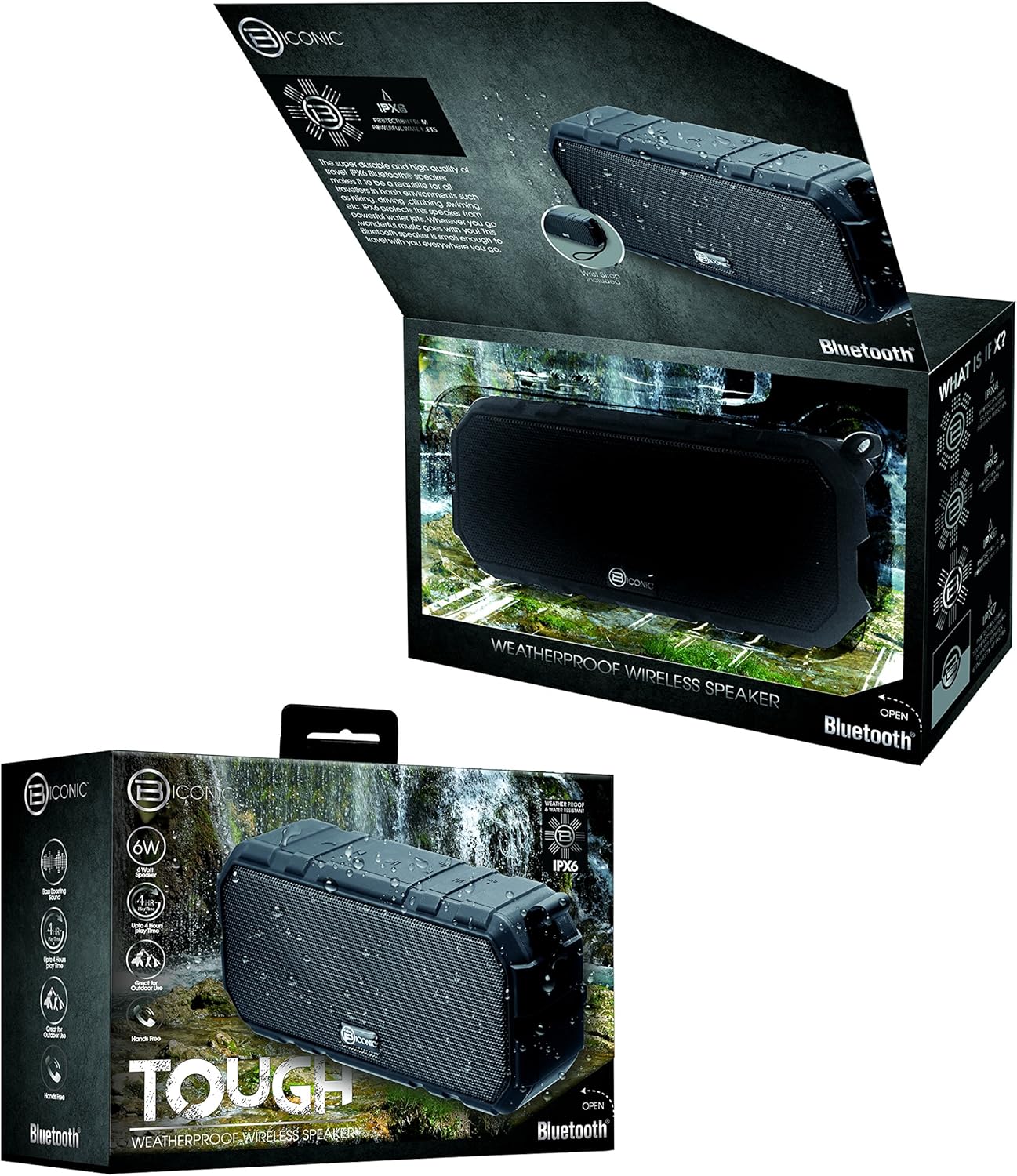
Figure 3.1: The Biconic Bluetooth Speaker shown with its retail packaging, indicating typical package contents.
4. Kurulum
4.1 Hoparlörü Şarj Etme
- Locate the charging port on the side of the speaker. This port is typically protected by a rubber flap to maintain water resistance.
- Lastik kapağını açın.
- Kutuda bulunan USB şarj kablosunun küçük ucunu hoparlörün şarj portuna takın.
- USB kablosunun daha büyük ucunu bir USB güç kaynağına (örneğin, bilgisayarın USB portuna, USB duvar adaptörüne) bağlayın.
- Şarj gösterge ışığı, hoparlörün şarj olduğunu göstermek için genellikle kırmızı renkte yanacaktır.
- Once fully charged (approximately 2-3 hours), the indicator light will change color (e.g., turn off or turn blue/green). Disconnect the charging cable and close the rubber flap securely to maintain water resistance.
4.2 Açma/Kapatma
- Açmak İçin: Press and hold the Power button (usually marked with a power symbol) for a few seconds until you hear an audible tone or see an indicator light illuminate.
- Kapatmak İçin: Press and hold the Power button again for a few seconds until you hear an audible tone or the indicator light turns off.
5. Kullanım Talimatları
5.1 Bluetooth Eşleştirme
Before first use, you need to pair the speaker with your Bluetooth-enabled device.
- Ensure the speaker is fully charged and powered on. It will automatically enter pairing mode, indicated by a flashing blue LED light.
- On your smartphone, tablet, or other Bluetooth device, go to the Bluetooth settings menu.
- Henüz etkin değilse Bluetooth'u etkinleştirin.
- Scan for available devices. You should see "Biconic Speaker" or a similar name appear in the list.
- Select "Biconic Speaker" to connect. Once successfully paired, you will hear a confirmation tone, and the blue LED light on the speaker will stop flashing and remain solid.
- Şifre sorulursa "0000" girin.
- Hoparlör açıldığında, cihaz menzil dahilindeyse ve Bluetooth etkinse, son eşleştirilen cihaza otomatik olarak yeniden bağlanacaktır.
5.2 Müzik Oynatma
Once paired, you can control music playback directly from your connected device or using the speaker's controls.
- Oynat/Duraklat: Press the Play/Pause button (often marked with a triangle or || symbol) once to play or pause music.
- Sesi aç: Press the Volume Up button (+) to increase the volume.
- Sesi kıs: Press the Volume Down button (-) to decrease the volume.
- Sonraki Parça: Press and hold the Volume Up button (+) for a few seconds to skip to the next track.
- Önceki parça: Press and hold the Volume Down button (-) for a few seconds to go to the previous track.

Şekil 5.1: Üst view of the Biconic Bluetooth Speaker, highlighting the control buttons for power, volume, and playback.
5.3 Answering Calls (Hands-Free Function)
The speaker supports hands-free calling when connected to a smartphone.
- Cevap Çağrısı: Gelen bir çağrı olduğunda, cevaplamak için Oynat/Duraklat düğmesine bir kez basın.
- Çağrı Sonu: During a call, press the Play/Pause button once to end the call.
- Çağrıyı Reddet: Gelen aramayı reddetmek için Oynat/Duraklat düğmesini birkaç saniye basılı tutun.
6. Bakım
Doğru bakım, hoparlörünüzün uzun ömürlü olmasını ve en iyi performansı göstermesini sağlar.
- Temizlik: Hoparlörü yumuşak bir bezle silin.amp cloth. Do not use harsh chemicals, solvents, or abrasive cleaners. Ensure the charging port flap is closed before cleaning with a damp Kumaş.
- Depolamak: Hoparlörü uzun süre kullanmayacağınız zaman, doğrudan güneş ışığından ve aşırı sıcaklıklardan uzakta, serin ve kuru bir yerde saklayın.
- Pil Bakım: To preserve battery life, fully charge the speaker before storing it for long periods. Recharge every 3-6 months if not used regularly.
- Suya Dayanıklılık: Always ensure the rubber flap covering the charging port is securely closed to maintain the IPX6 water resistance rating.

Figure 6.1: The Biconic Bluetooth Speaker demonstrating its water-resistant capabilities, highlighting the importance of proper sealing for maintenance.
7. Sorun Giderme
| Sorun | Olası Neden | Çözüm |
|---|---|---|
| Hoparlör açılmıyor. | Pil bitmiş. | Hoparlörü tam olarak şarj edin. |
| Bluetooth cihazıyla eşleştirilemiyor. | Bluetooth is off on your device; speaker is not in pairing mode; device is too far. | Ensure Bluetooth is enabled on your device. Power off and on the speaker to re-enter pairing mode. Move device closer to the speaker (within 10 meters). Forget the device on your phone and try pairing again. |
| Ses yok veya ses seviyesi düşük. | Hoparlör veya cihazda ses çok düşük; hoparlör bağlı değil. | Hem hoparlörün hem de bağlı cihazınızın ses seviyesini artırın. Hoparlörün doğru şekilde eşleştirildiğinden ve bağlandığından emin olun. |
| Ses bozulması. | Ses çok yüksek; parazit; düşük pil. | Sesi kısın. Hoparlörü diğer elektronik cihazlardan uzaklaştırın. Hoparlörü şarj edin. |
8. Özellikler
| Özellik | Detay |
|---|---|
| Model Numarası | ABC-AU-BS-103-BK |
| Marka | Baytek |
| Bağlantı Teknolojisi | Bluetooth |
| Hoparlör Maksimum Çıkış Gücü | 3 Watt |
| Ses Çıkışı Modu | Stereo |
| Suya Dayanıklılık Derecesi | IPX6 (Water resistant, not submersible) |
| Pil Türü | 1 Lityum İyon pil (gerekli) |
| Oyun Zamanı | 4 saate kadar |
| Ürün Boyutları | 2.54x2.54x2.54 cm |
| Ürün Ağırlığı | 522 gr |
| Montaj Tipi | Masaüstü |
9. Garanti ve Destek
For warranty information and technical support, please contact Bytech customer service. Details are typically provided on the product packaging or the official Bytech webalan.
Herhangi bir garanti talebiniz için lütfen satın alma belgenizi saklayın.
Not: Garanti koşulları bölgeye göre değişiklik gösterebilir.