
giriiş
This manual provides comprehensive instructions for the setup, operation, and maintenance of your GPX Digital AM/FM Clock Radio, model C224B. Please read this manual thoroughly before using the device to ensure proper functionality and to maximize your user experience. Keep this manual for future reference.
Ürün Bittiview
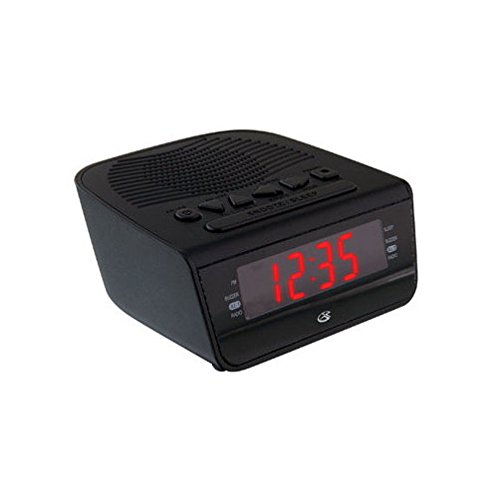
Şekil 1: Ön view of the GPX Digital AM/FM Clock Radio. This image shows the compact black unit with its digital display and control buttons.
The GPX Digital AM/FM Clock Radio (C224B) is designed for reliable timekeeping and audio entertainment. Key features include a clear multi-display clock, AM/FM radio tuner, dual alarm functionality, and a battery backup option to ensure continuous operation during power interruptions. Its compact and modern design makes it suitable for various indoor settings.
Kurmak
1. Paketten çıkarma
Carefully remove the clock radio from its packaging. Ensure all components are present: the clock radio unit and the power adapter.
2. Güç Bağlantısı
- Plug the power adapter into the DC input jack located on the back of the clock radio.
- Plug the other end of the power adapter into a standard wall outlet (AC 120V, 60Hz).
- Ekran yanarak cihazın güç aldığını gösterecektir.
3. Yedek Pil Kurulumu (İsteğe Bağlı)
Dış mekan kullanımı sırasında yedek güç kaynağı içintages, install batteries (not included).
- Cihazın alt kısmında bulunan pil bölmesini bulun.
- Pil bölmesinin kapağını açın.
- Insert the required batteries (e.g., 2 x AAA, check unit for specific type) according to the polarity markings (+ and -).
- Pil bölmesi kapağını sıkıca kapatın.
Not: Batteries are for backup only and will not power the display or radio functions continuously. They preserve time and alarm settings during a power interruption.
Kullanım Talimatları
1. Saati Ayarlama
- Basılı tutun SAAT AYARI Ekran yanıp sönene kadar düğmeye basın.
- Kullanın SAAT Ve DAKİKA Zamanı ayarlamak için düğmeler.
- Basmak SAAT AYARI Tekrar onaylamak ve zaman ayarı modundan çıkmak için.
2. Alarmların Ayarlanması (Alarm 1 ve Alarm 2)
This unit features dual alarms, allowing you to set two independent wake-up times.
- Basılı tutun ALARM 1 TAKIMI (veya ALARM 2 TAKIMI) button until the alarm time flashes.
- Kullanın SAAT Ve DAKİKA buttons to adjust the desired alarm time.
- Basmak ALARM 1 TAKIMI (veya ALARM 2 TAKIMI) again to confirm the time.
- Immediately after confirming the time, use the ALARM MODU button to select the alarm source: Zil or RADYO.
- The alarm icon (e.g., AL1 or AL2) will appear on the display, indicating the alarm is active.
To turn off an alarm, press the corresponding ALARM 1 AÇIK/KAPALI (veya ALARM 2 AÇIK/KAPALI) button. The alarm icon will disappear.
3. AM/FM Radyo Kullanımı
- Basın RADYO AÇIK/KAPALI radyoyu açmak için düğmeye basın.
- Basın BANT AM ve FM frekans bantları arasında geçiş yapmak için kullanılan düğme.
- Kullanın AYAR + or EZGİ - buttons to manually tune to a desired station.
- To automatically scan for the next available station, press and hold AYAR + or EZGİ - birkaç saniyeliğine.
- kullanarak ses seviyesini ayarlayın. SES + or HACİM - düğmeler.
- Radyoyu kapatmak için tuşuna basın. RADYO AÇIK/KAPALI Tekrar düğmeye basın.
4. Erteleme Fonksiyonu
Alarm çaldığında, tuşuna basın. UYUKLAMA Alarmı yaklaşık 9 dakika süreyle geçici olarak susturmak için düğmeye basın. Erteleme süresi sona erdikten sonra alarm tekrar çalacaktır.
5. Uyku Fonksiyonu
The sleep function allows the radio to play for a set duration before automatically turning off.
- Radyo çalarken, tuşuna basın. UYUMAK Kullanılabilir uyku süreleri arasında geçiş yapmak için düğmeye art arda basın (örneğin, 90, 60, 30, 15 dakika, KAPALI).
- Radyo, seçilen süre sonunda otomatik olarak kapanacaktır.
Bakım
1. Temizlik
To clean the unit, wipe the exterior with a soft, slightly damp cloth. Do not use abrasive cleaners or solvents, as these may damage the finish. Ensure the unit is unplugged before cleaning.
2. Pil Değişimi
If the battery backup function is not working, or if the unit loses time during a power outage, the backup batteries may need replacement. Follow the "Battery Backup Installation" steps in the Setup section to replace them.
Sorun giderme
| Sorun | Olası Neden | Çözüm |
|---|---|---|
| Ünite açılmıyor. | Güç adaptörü bağlı değil veya priz arızalı. | Ensure power adapter is securely plugged into the unit and a working wall outlet. Try a different outlet. |
| Alarm çalmıyor. | Alarm ayarlanmamış, alarm sesi çok düşük veya alarm kapatılmış. | Verify alarm time and source (buzzer/radio) are set correctly. Ensure alarm is activated (icon visible). Increase radio volume if alarm source is radio. |
| Zayıf radyo alımı. | Zayıf sinyal veya parazit. | Adjust the position of the unit or the antenna (if external). Move away from other electronic devices that may cause interference. |
| Elektrik kesintisi sonrasında saat/ayarlar kayboldu.tage. | Yedek bataryalar bitmiş veya takılı değil. | Yedek bataryaları yenileriyle değiştirin veya yenilerini takın. |
Özellikler
- Modeli: C224B
- Güç Kaynağı: AC 120V, 60Hz (main); Battery Powered (backup)
- Görüntüleme Türü: LED Dijital Ekran
- Radyo Bantları: Sabah/FM
- Boyutlar (Yaklaşık): 5.12" G x 5.12" Y
- Yaklaşık ağırlık.): 3 Pound
- Renk: Siyah
- Malzeme: Plastik
Garanti ve Destek
For warranty information or technical support, please refer to the warranty card included with your product or visit the official GPX website. Do not attempt to repair this unit yourself, as this may void your warranty.
GPX Official Webalan: www.gpx.com