
1. Giriş
The Imperial DABMAN i400 is a versatile audio adapter designed to enhance your existing stereo system with modern radio and streaming capabilities. It provides access to thousands of internet radio stations, digital radio (DAB+), and traditional FM radio. Additionally, it supports audio streaming via Bluetooth, UPnP/DLNA, and USB, offering a comprehensive listening experience.
2. Güvenlik Talimatları
- Güç Kaynağı: Yalnızca kutu içeriğinde bulunan güç adaptörünü kullanın. Ses seviyesinin doğru ayarlandığından emin olun.tage yerel elektrik kaynağınıza uygundur.
- Su ve Nem: Cihazı yağmura, neme veya damlayan/sıçrayan sıvılara maruz bırakmayın. Cihazın üzerine vazo gibi sıvı dolu nesneler koymayın.
- Havalandırma: Yeterli havalandırma sağlayın. Havalandırma açıklıklarını kapatmayın. Cihazı hava akışını engelleyebilecek yumuşak yüzeylere yerleştirmekten kaçının.
- Isı Kaynakları: Cihazı radyatörler, ısıtma petekleri, sobalar veya diğer ısı üreten cihazlar gibi ısı kaynaklarından uzak tutun.
- Temizlik: Temizlemeden önce elektriği kesin. Yumuşak, kuru bir bez kullanın. Sıvı veya aerosol temizleyiciler kullanmayın.
- Servis: Bu ürüne kendiniz servis vermeye çalışmayın. Tüm servis işlemleri için kalifiye servis personeline başvurun.
3. Paket İçeriği
Lütfen paketin içindeki tüm ürünlerin eksiksiz olduğundan emin olun:
- Imperial DABMAN i400 Internet Digital Radio
- Güç Adaptörü
- Telescopic Antenna with F-connector
- Wire Antenna with F-connector
- RCA Kablosu
- Ses Kablosu (3.5 mm jak)
- Uzaktan kumanda
- Kullanım Kılavuzu (bu belge)

Image: Imperial DABMAN i400 with its power adapter, telescopic antenna, wire antenna, RCA cable, 3.5mm audio cable, and remote control.
4. Ürün Bittiview
Ön View

Image: The front of the Imperial DABMAN i400, showing its display and control buttons on the top edge.
The front of the DABMAN i400 features a clear 3.2-inch LCD display for navigation and information. Control buttons are located on the top edge of the device for easy access to functions like power, mode selection, volume, and station presets.
Arka View ve Bağlantılar
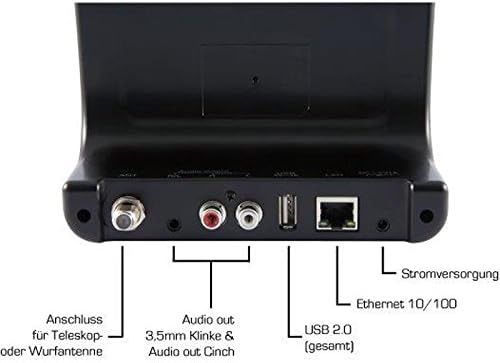
Image: The rear panel of the Imperial DABMAN i400, detailing its various connection ports. From left to right: Antenna connection (ANT), Audio output (RCA L/R and 3.5mm jack), USB 2.0 ports, Ethernet 10/100 (LAN), and Power supply (DC 5V/1A).
- KARINCA: F-connector for connecting the telescopic or wire antenna for DAB+/FM reception.
- Ses Çıkışı (Sağ/Sol): RCA (Cinch) stereo audio output for connecting to an amplifier veya stereo sistem.
- Ses Çıkışı (3.5 mm Jak): 3.5mm stereo audio output for connecting to other audio devices.
- USB 2.0: USB port for playing media from a USB storage device.
- LAN: Ethernet port (RJ45) for wired network connection.
- DC 5V/1A: Birlikte verilen güç adaptörü için güç girişi.
5. Kurulum
- Anteni Bağlayın: Screw the telescopic antenna or connect the wire antenna to the KARINCA F-connector on the rear panel. Extend the telescopic antenna for optimal reception.
- Ses Sistemine Bağlan: Use the provided RCA cable to connect the Audio Output (R/L) on the DABMAN i400 to an available audio input (e.g., AUX, CD, LINE IN) on your amplifier or stereo system. Alternatively, use the 3.5mm audio cable if your system has a compatible input.
- Ağ bağlantısı:
- Kablolu (LAN): Yönlendiricinizden bir Ethernet kablosunu şuraya bağlayın: Yerel Ağ port on the rear of the DABMAN i400.
- Wireless (WLAN): The device will prompt you to set up Wi-Fi during the initial startup wizard. Select your network and enter the password.
- Gücü bağlayın: Güç adaptörünü prize takın DC 5V/1A input on the rear panel, then plug the adapter into a wall outlet. The device will power on automatically or enter standby mode.
- İlk Kurulum Sihirbazı: Upon first power-on, the device will guide you through an initial setup process, including language selection, time/date settings, and network configuration. Follow the on-screen instructions.
6. Kullanım Talimatları
Temel Gezinme
Use the control buttons on the top of the device or the remote control to navigate menus, select options, adjust volume, and change modes.
Mod Seçimi
Press the 'Mode' button (or equivalent on remote) to switch between available modes:
- İnternet Radyosu: Access thousands of online radio stations worldwide. Browse by genre, location, or search for specific stations.
- DAB+ Dijital Radyo: Enjoy high-quality digital radio broadcasts. The device will scan for available stations in your area.
- FM Radyo: Tune into traditional analog FM radio stations.
- Bluetooth: Stream audio wirelessly from your Bluetooth-enabled smartphone, tablet, or computer.

Image: Bluetooth connectivity icon.
To pair: Select Bluetooth mode on the DABMAN i400. On your external device, search for available Bluetooth devices and select 'DABMAN i400'.
- UPnP/DLNA: Müzik akışı files from compatible devices on your local network (e.g., a network-attached storage (NAS) drive or a computer running a media server).

Image: UPnP (Universal Plug & Play) icon.
- USB Oynatma: Sesi çal files (e.g., MP3) from a USB flash drive connected to the USB port on the rear of the device.

Image: MP3 music file simge.
Ön Ayarlar
Save your favorite stations as presets for quick access. Refer to the on-screen menu for instructions on how to save and recall presets.
Air Music Control App
Control your DABMAN i400 using the Air Music Control App available for smartphones and tablets. This app allows for convenient remote control and browsing of stations.

Image: Air Music Control App icon.
7. Bakım
- Temizlik: Wipe the device with a soft, dry, lint-free cloth. Do not use abrasive cleaners, waxes, or solvents.
- Yazılım Güncellemeleri: Periodically check for available software updates through the device's system settings menu to ensure optimal performance and access to new features.
- Depolamak: Cihazınızı uzun süre saklayacaksanız, güç bağlantısını kesin ve serin ve kuru bir yerde saklayın.
8. Sorun Giderme
- Güç Yok:
- Güç adaptörünün cihaza ve çalışan bir elektrik prizine güvenli bir şekilde bağlandığından emin olun.
- Başka bir elektrik prizini deneyin.
- Ses Yok:
- Check the volume level on both the DABMAN i400 and your connected audio system.
- Ensure the audio cables are correctly connected to the appropriate input on your audio system.
- Verify that your audio system is set to the correct input source.
- Cannot Connect to Wi-Fi/Internet:
- Wi-Fi yönlendiricinizin açık ve düzgün çalıştığından emin olun.
- Wi-Fi şifresini tekrar kontrol edin.
- Try moving the device closer to your Wi-Fi router or use a wired LAN connection.
- Restart your router and the DABMAN i400.
- Poor DAB+/FM Reception:
- Ensure the antenna is fully extended and positioned for optimal reception.
- Try repositioning the device or antenna.
- Check if you are in an area with good DAB+ or FM coverage.
- Bluetooth Eşleştirme Sorunları:
- Ensure the DABMAN i400 is in Bluetooth pairing mode.
- Make sure your external device's Bluetooth is enabled and discoverable.
- Move your external device closer to the DABMAN i400.
- Cihazların eşleştirmesini kaldırıp tekrar eşleştirmeyi deneyin.
9. Özellikler
| Özellik | Şartname |
|---|---|
| Marka | İmparatorluk |
| Model Numarası | 22-241-00 |
| Renk | Siyah |
| Ekran Boyutu | 3.2 inç |
| Bağlantı Teknolojisi | Bluetooth, LAN (Ethernet), WLAN (Wi-Fi), RCA (Cinch) L/R, 3.5mm Audio Jack |
| Özel Özellikler | Portable (as an adapter), Internet Radio, DAB+, FM, UPnP/DLNA |
| Toplam USB Bağlantı Noktaları | 1 |
| Uyumlu Cihazlar | Bluetooth devices, UPnP/DLNA compatible devices |
| Güç Kaynağı | AC (güç adaptörü aracılığıyla) |
| Desteklenen Radyo Bantları | FM, DAB, DAB+, İnternet Radyosu |
| Ürün Boyutları | 15U x 8.1G x 14Y santimetre |
| Dahil Bileşenler | Power Adapter, Telescopic Antenna, Wire Antenna, RCA Cable, Audio Cable, Remote Control, User Manual |
| Desteklenen Diller | German, English, French, Dutch |
10. Garanti ve Destek
Üretici Garantisi
The Imperial DABMAN i400 comes with a manufacturer's warranty. Please refer to the warranty card included in your package or the manufacturer's official website for specific terms and conditions. Spare parts availability is guaranteed for 1 year.
Müşteri Desteği
For technical assistance, troubleshooting beyond this manual, or warranty claims, please contact Imperial customer support. Contact information can typically be found on the manufacturer's webSitede veya ürün ambalajında.