
giriiş
The EZCAP 218 is a portable cassette player designed to convert your old cassette tapes into digital MP3 format. This device allows you to preserve your audio recordings by transferring them to a computer, where they can be stored, transferred to an MP3 player, or burned onto a CD. It also functions as a standalone cassette player for listening to your tapes on the go.
Paket İçeriği
Lütfen aşağıda listelenen tüm öğelerin paketinizde yer aldığından emin olun:
- EZCAP 218 Cassette to MP3 Converter
- USB Veri Kablosu
- Kulaklıklar
- Software CD (containing recording software and user guide)
- User Guide (physical copy)

Image: Contents of the EZCAP 218 package, showing the cassette player, USB cable, earphones, and software CD.
Ürün Bittiview
Familiarize yourself with the components and controls of your EZCAP 218 device.
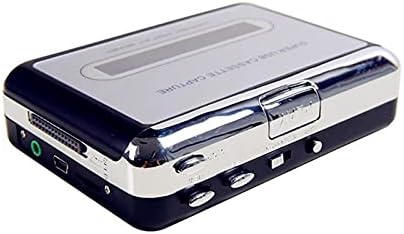
Resim: Üst view of the EZCAP 218 device, highlighting the playback controls and cassette window.

Resim: Yan view of the EZCAP 218, showing the USB port for PC connection and the 3.5mm earphone jack.

Resim: Açısal view of the EZCAP 218, showing the "OPEN" slider for accessing the cassette compartment.
Sistem Gereksinimleri
To ensure proper operation and MP3 conversion, your computer must meet the following minimum specifications:
- İşletim Sistemi: Windows 2000, XP, Vista, 7, 8, 10
- İşlemci: Pentium 4 CPU or above
- VERİ DEPOSU: 512MB veya üzeri
- Sabit Disk Alanı: 1GB Free HDD Space
- USB Bağlantı Noktası: Bir adet kullanılabilir USB 2.0 Bağlantı Noktası
- Optik sürücü: CD-ROM for software installation
Kurmak
Cihazın Güçlendirilmesi
The EZCAP 218 can be powered in two ways:
- USB Gücü: Connect the supplied USB cable to the device and to an available USB port on your computer or a USB power adapter.
- Pil Gücü: Pil bölmesine iki (2) adet AA pil (dahil değildir) takın.
Yazılım Kurulumu
Before connecting the device to your computer for conversion, install the recording software from the included CD.
- Insert the software CD into your computer's CD-ROM drive.
- Follow the on-screen instructions to install the recording software.
- Once installed, you may need to restart your computer.

Image: The EZCAP 218 device with the USB cable connected, ready for PC connection.
Kullanım Talimatları
Kaset Bandı Yükleme
- Slide the "OPEN" button/slider to open the cassette compartment.
- Insert your cassette tape with the open side facing up.
- Close the cassette compartment firmly until it clicks.
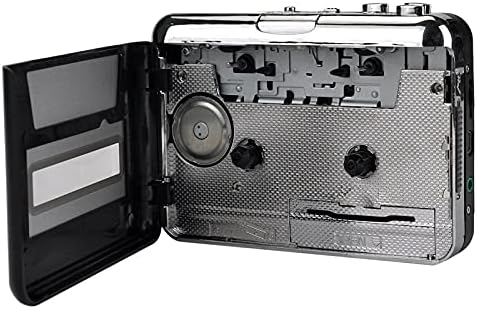
Image: The EZCAP 218 with its cassette compartment open, ready for a tape to be inserted.
Playing Cassette Tapes
To listen to your cassette tapes:
- Kaset bandının takılı olduğundan emin olun.
- Connect the supplied earphones to the 3.5mm earphone jack on the side of the device.
- Basın OYNAMAK düğme.
- Ses seviyesini ses kontrol düğmesini kullanarak ayarlayın.
- Kullanın FF (Hızlı İleri Sarma) ve YENİDEN (Rewind) buttons for navigation.
- Basın DURMAK Oynatmayı durdurmak için düğmesine basın.
- The device supports auto-reverse and bi-directional playback.
Converting Cassette Tapes to MP3
Follow these steps to convert your cassette audio to MP3 format on your computer:
- Ensure the recording software is installed on your computer.
- Connect the EZCAP 218 to your computer using the USB cable.
- Load the cassette tape you wish to convert into the device.
- Open the recording software on your computer.
- Configure the software settings (e.g., recording level, output format to MP3, save location) as per the software's instructions.
- Basın OYNAMAK button on the EZCAP 218.
- Initiate recording within the software.
- Allow the tape to play through completely for accurate conversion.
- Once the tape finishes, stop the recording in the software.
- Save the recorded audio file as an MP3.
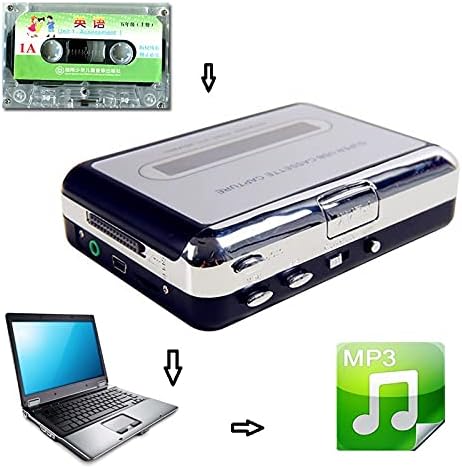
Image: A visual representation of the conversion process: a cassette tape is inserted into the converter, which connects to a laptop, resulting in an MP3 digital file.
Not: The supplied software may offer features like automatic track separation. Refer to the software's specific user guide for detailed instructions on advanced recording options.
Sorun giderme
| Sorun | Olası Neden / Çözüm |
|---|---|
| Cihaz açılmıyor. |
|
| Oynatma sırasında ses yok. |
|
| Cannot convert to MP3 / Software not detecting device. |
|
| Poor audio quality during conversion. |
|
Bakım
To ensure the longevity and optimal performance of your EZCAP 218, follow these maintenance guidelines:
- Temizlik: Periodically clean the tape heads and pinch rollers using a cotton swab lightly dampened with isopropyl alcohol. Ensure the device is powered off and dry before use.
- Depolamak: Cihazı serin, kuru ve doğrudan güneş ışığından ve aşırı sıcaklıklardan uzak bir yerde saklayın.
- Piller: Cihazınızı uzun süre kullanmayacaksanız pil sızıntısını önlemek için pilleri çıkarın.
Özellikler
| Özellik | Detay |
|---|---|
| Model Adı | ezcap218 |
| Bağlantı Teknolojisi | Yardımcı, USB |
| Desteklenen Ses Biçimi | MP3 |
| Bağlayıcı Türü | 3.5mm Jack (for earphones) |
| Medya Formatı Türü | Kaset |
| Güç Kaynağı | USB or 2 x AA Batteries (not included) |
| Boyutlar (U x G x Y) | 4.33" x 3.15" x 1.18" (approximately 11 x 8 x 3 cm) |
| Özellikler | Auto Reverse, Bi-directional Playback, Fast Forward, Rewind |
Garanti ve Destek
Garanti bilgileri ve teknik destek için lütfen satın alma işleminizle birlikte verilen belgelere bakın veya doğrudan üreticiyle iletişime geçin. Satın alma belgenizi olası garanti talepleri için saklayın.