
1. Ürün Bittiview
The Tenergy 11W Dimmable LED Desk Lamp (Model FY-0001) is designed to provide versatile lighting for various tasks, featuring adjustable brightness, multiple color temperatures, and a convenient USB charging port. Its sleek design and flexible arm make it suitable for home and office environments.

Image: The Tenergy 11W LED Desk Lamp, gösterasing its modern design and adjustable features.
2. Kutuda Neler Var?
- Tenergy 11W Dimmable LED Desk Lamp
- USB Şarj Kablosu
- Güç Adaptörü
- Kullanım Kılavuzu (bu belge)

Image: The Tenergy 11W LED Desk Lamp and its included accessories laid out on a surface.
3. Kurulum
- Tüm bileşenleri dikkatlice ambalajından çıkarın.
- l'yi yerleştirinamp base on a stable, flat surface.
- Güç adaptörünü l'ye bağlayınamp'nin güç girişi portu, genellikle tabanın arka tarafında bulunur.
- Güç adaptörünü standart bir elektrik prizine takın.amp's indicator light should illuminate, indicating it is ready for use.
4. Kullanım Talimatları
4.1 Güç Açma/Kapatma
l'yi çevirmek içinamp on or off, gently touch the Açık/Kapalı button located on the touch control panel on the lampüssü.
4.2 Parlaklığın Ayarlanması
Lamp offers 5 levels of brightness. Use the + Ve - buttons on the touch control panel to increase or decrease the light intensity.
4.3 Changing Light Modes (Color Temperature)
Lamp features 4 distinct light modes, each with a different color temperature, optimized for various activities:
- Okuma Modu: Provides a bright, neutral white light ideal for reading.
- Çalışma Modu: Offers a cooler, more focused light to enhance concentration.
- Rahatlama Modu: Emits a warm, soft light for a comfortable and calming atmosphere.
- Uyku modu: Delivers a very warm, dim light suitable for winding down before sleep.
To switch between these modes, repeatedly touch the corresponding icon on the control panel.

Image: Visual representation of the four adjustable light color temperatures available on the lamp.
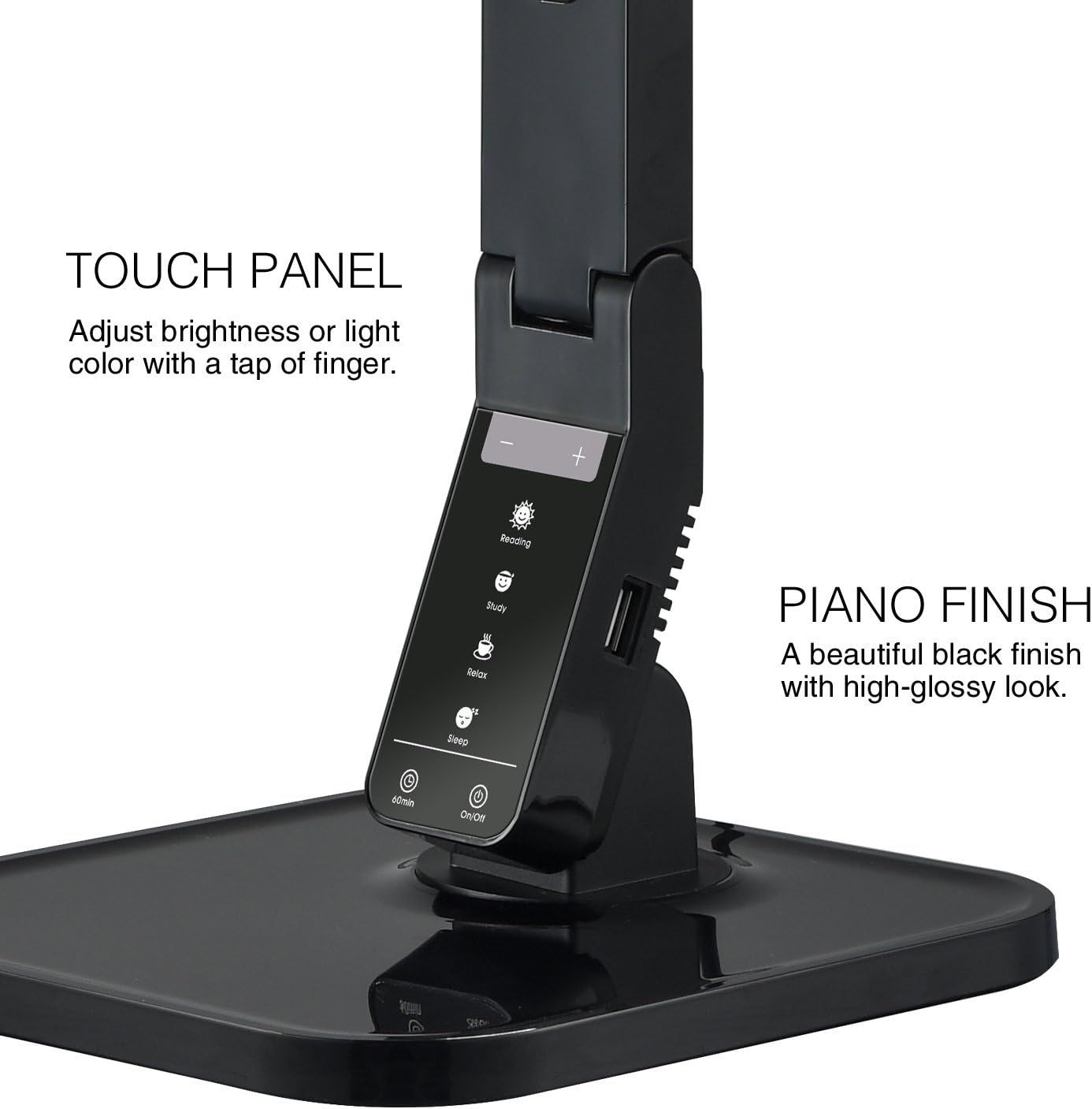
Image: The touch control panel with various light mode and brightness adjustment icons.
4.4 USB Şarj Bağlantı Noktasının Kullanımı
A USB charging port is integrated into the lamp's base, allowing you to charge compatible devices such as smartphones or tablets. Simply connect your device's USB charging cable to the port.

Image: A smartphone being charged via the integrated USB port on the lampüssü.
4.5 L'nin Ayarlanmasıamp Kol
Lamp features an adjustable arm that allows you to direct the light precisely where needed. The arm can be folded, extended, and swiveled to achieve optimal positioning.

Image: Illustrations demonstrating the flexibility and adjustability of the lamp's arm.
4.6 Zamanlayıcı İşlevi
Lamp includes a 60-minute timer function. To activate, press the 60dk button on the control panel. The lamp 60 dakika sonra otomatik olarak kapanacaktır.
4.7 Resmi Ürün Videosu
Video: An official product video from Tenergy Corporation demonstrating the features and benefits of the 11W LED Desk Lamp, including its adjustable lighting, USB charging, and sleek design.
5. Bakım
- Temizlik: l'yi temizlemek içinamp, especially its glossy finish, use a soft, dry microfiber cloth. Avoid abrasive cleaners or harsh chemicals that may damage the surface.
- Depolamak: Uzun süre kullanılmayacaksa l'yi saklayınamp serin ve kuru bir yerde.
6. Sorun Giderme
- Lamp açılmıyor: Güç adaptörünün hem l'ye hem de l'ye güvenli bir şekilde takıldığından emin olun.amp and a working electrical outlet. Check if the outlet is receiving power.
- USB portu şarj etmiyor: l'yi doğrulayınamp is powered on and the USB cable is properly connected to both the lamp and your device. Ensure your device is compatible with USB charging.
- Işık titriyor: If the light flickers, try unplugging the lamp for a few minutes and then plugging it back in. If the issue persists, contact customer support.
7. Özellikler
| Model Numarası | FY-0001 |
| Marka | Enerji |
| Netage | 11 watt |
| Işık Kaynağı Türü | NEDEN OLMUŞ |
| Parlaklık Seviyeleri | 5 |
| Light Colors / Modes | 4 (Reading, Study, Relax, Sleep) |
| Kontrol Yöntemi | Dokunmak |
| Bağlantı Teknolojisi | USB |
| Güç Kaynağı | Kablolu Elektrik |
| Ürün Boyutları | 7"D x 6.75"G x 16.7"Y |
| Malzeme Türü | Plastik |
| Bitiş Türü | Parlak |
8. Garanti ve Destek
For warranty information or technical support, please visit the official Tenergy webSitelerini ziyaret edin veya müşteri hizmetleri departmanıyla iletişime geçin. Garanti talepleri için satın alma fişinizi saklayın.
Tenergy Store: https://www.amazon.com/stores/Tenergy/page/5AE2FFA8-E197-4708-9169-C4D8CB488E9E