
1. Ürün Bittiview
The ADATA HM900 (model AHM900-6TU3-CEUBK) is a 6TB external hard disk drive designed for high-capacity data storage and transfer. This mechanical hard disk drive offers ample space for extensive data needs and supports simultaneous operations without compromising performance. It connects via USB, making it compatible with various devices, including personal computers and televisions.

Şekil 1: Ön taraf view of the ADATA HM900 External Hard Drive.
2. Kurulum Talimatları
2.1 Paket İçeriği
İşleme başlamadan önce, paketin içinde tüm öğelerin mevcut olduğundan emin olun:
- ADATA HM900 External Hard Disk Drive
- USB Veri Kablosu
- Güç Adaptörü
- Hızlı Başlangıç Kılavuzu (eğer dahilse)
2.2 Connecting the Hard Drive
- Güç Adaptörünü bağlayın: Plug the power adapter into the DC IN port on the back of the ADATA HM900. Connect the other end of the power adapter to a wall outlet. The device requires 12 Watts of power.
- USB Kablosunu bağlayın: Insert one end of the provided USB data cable into the USB port (marked 'SS' for SuperSpeed USB) on the back of the hard drive.
- Cihazınıza Bağlanın: Plug the other end of the USB cable into an available USB port on your computer, television, or other compatible device.
- Güç Açık: The drive should power on automatically. A status indicator light will typically illuminate to show it is active.
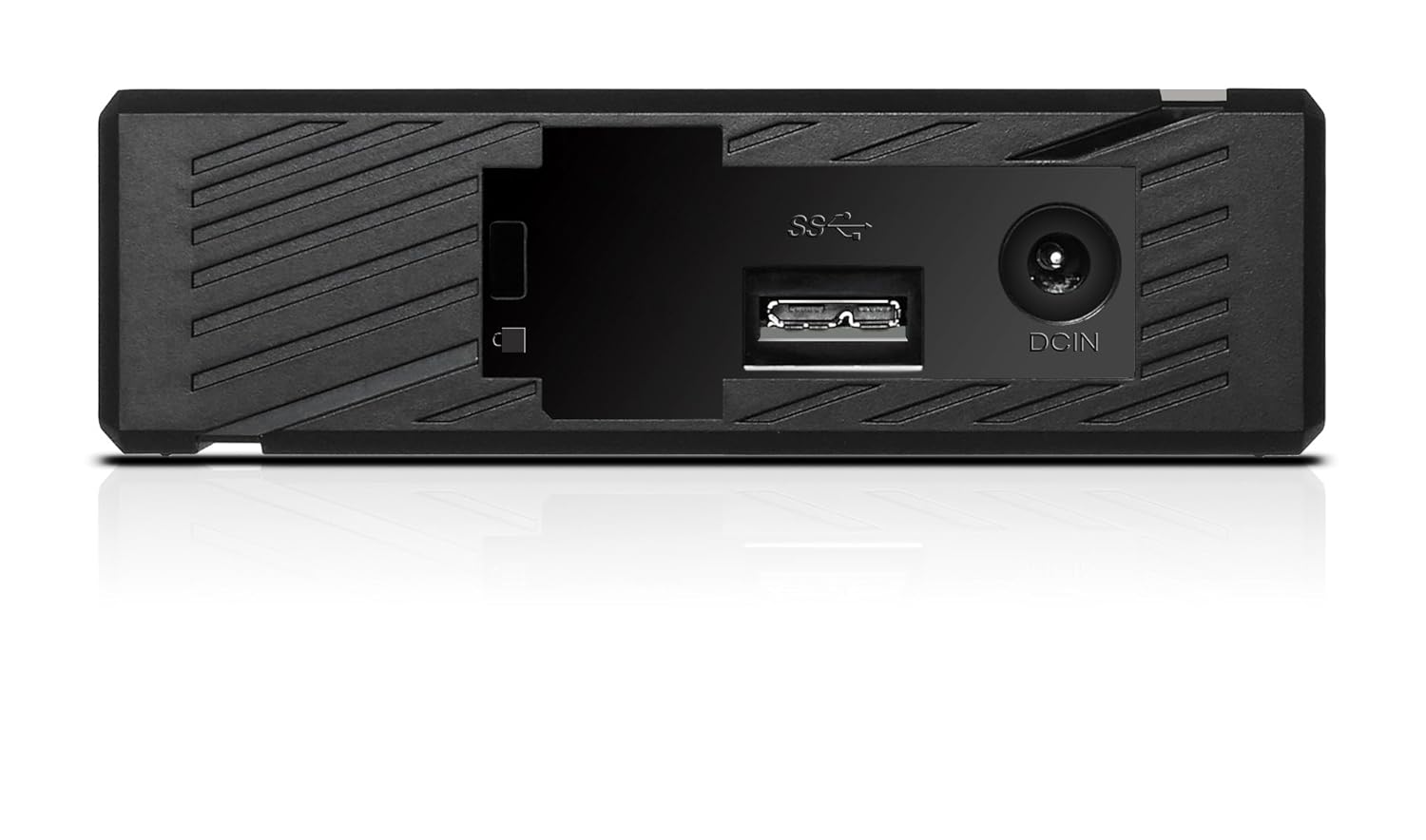
Şekil 2: Arka view of the ADATA HM900, highlighting the USB and DC IN ports for connection.
3. Sabit Sürücüyü Çalıştırma
3.1 İlk Tanıma
Upon first connection, your operating system (Windows, macOS, Linux) or compatible device (e.g., smart TV) should automatically detect the ADATA HM900. For computers, it may appear as a new drive letter or volume in 'My Computer'/'This PC' or 'Finder'.
3.2 Veri Aktarımı
Aktarmak için files, simply drag and drop them to and from the HM900 drive icon. For larger transfers, it is recommended to use your operating system's copy/paste functions or dedicated backup software.
3.3 Using with a Television
The ADATA HM900 is compatible with televisions that support external storage devices. Connect the drive as described in Section 2.2. Refer to your television's user manual for specific instructions on how to access and play media files from an external USB drive.
4. Bakım ve Özen
Proper care ensures the longevity and reliability of your ADATA HM900 external hard drive:
- Güvenli Bağlantı Kesme: Always safely eject or unmount the hard drive from your operating system before physically disconnecting the USB cable or power. This prevents data corruption.
- Fiziksel Koruma: Avoid dropping or subjecting the drive to strong impacts, as it contains a mechanical hard disk that can be damaged.
- Çevresel Koşullar: Sürücüyü serin, kuru bir ortamda, doğrudan güneş ışığından, aşırı sıcaklıklardan ve yüksek nemden uzakta saklayın ve çalıştırın.
- Temizlik: Sürücünün dışını temizlemek için yumuşak ve kuru bir bez kullanın. Sıvı temizleyiciler veya çözücüler kullanmayın.
5. Sorun Giderme
5.1 Sürücü Algılanamadı
- Bağlantıları Kontrol Edin: Ensure both the power adapter and USB cable are securely connected to the drive and your device.
- Başka Bir USB Bağlantı Noktasını Deneyin: Connect the drive to a different USB port on your computer or device.
- Gücü Doğrulayın: Confirm the power adapter is plugged into a working electrical outlet and the drive's indicator light is on.
- Cihazı Yeniden Başlat: Restart your computer or television and try connecting the drive again.
- Disk Yönetimi'ni (Windows) / Disk Yardımcı Programını (macOS) kontrol edin: For computers, check if the drive appears in disk management tools, even if it doesn't have a drive letter assigned.
5.2 Yavaş Veri Aktarım Hızları
- USB 3.0 Portunu Kullanın: Ensure the drive is connected to a USB 3.0 (or higher) port on your device for optimal speeds. USB 2.0 ports will result in slower transfers.
- Diğer USB Aygıtlarından Kaçının: Büyük aktarımlar sırasında diğer yüksek bant genişliğine sahip USB aygıtlarını çıkarın.
- Sürüş Sağlığını Kontrol Edin: Run a disk check utility on your computer to ensure the drive is healthy.
6. Özellikler
| Özellik | Şartname |
|---|---|
| Marka | ADATA |
| Model Numarası | AHM900-6TU3-CEUBK |
| Dijital Depolama Kapasitesi | 6TB |
| Sabit Disk Açıklaması | Mekanik Sabit Disk |
| Sabit Disk Form Faktörü | 2.5 inç |
| Bağlantı Teknolojisi | USB |
| Ürün Boyutları (LxWxY) | 19 x 12.1 x 3.65 Santimetre |
| Ürün Ağırlığı | 998 gr |
| Netage | 12 Watt |
| Uyumlu Cihazlar | Television, Personal Computers |
| İlk Mevcut Tarih | 11 Kasım 2016 |
7. Garanti ve Destek
Ayrıntılı garanti bilgileri için lütfen ürününüzle birlikte verilen garanti kartına bakın veya resmi ADATA web sitesini ziyaret edin. website. Support resources, including drivers and firmware updates, may also be available on the ADATA support portal.