
giriiş
Thank you for choosing the Relaxdays Adjustable Laptop Table. This versatile table is designed to provide a comfortable and ergonomic workspace in various settings, such as your sofa, bed, or armchair. With its adjustable height, tiltable surfaces, and mobile design, it offers flexibility for your daily tasks. Please read this manual carefully before assembly and use to ensure safe and optimal performance of your product.
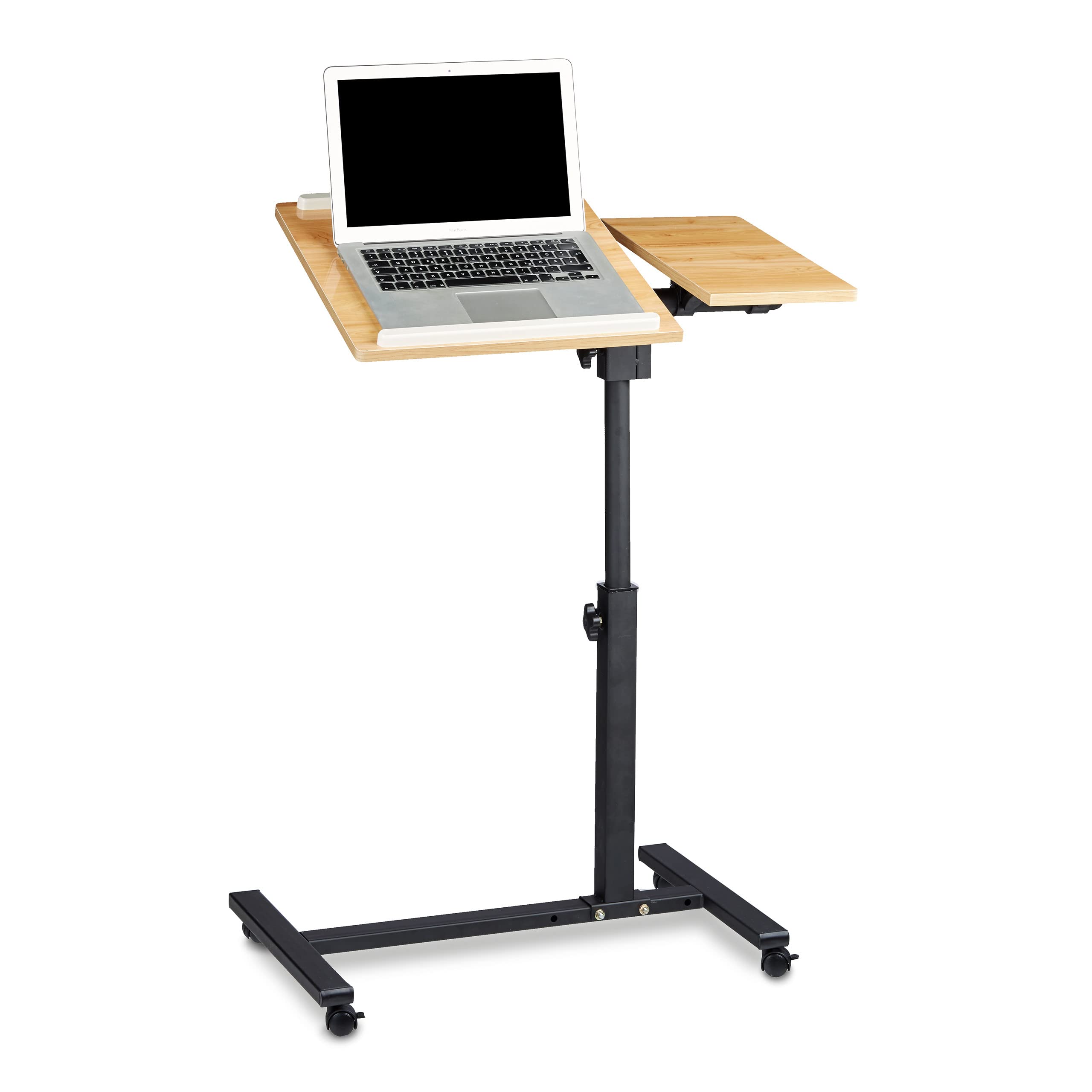
Image: The Relaxdays Adjustable Laptop Table, yellow model, featuring its main design with two table surfaces and a mobile base.
Güvenlik Talimatları
- Do not overload the table: Ensure the weight placed on the table does not exceed the maximum load capacity. The maximum load capacity is 20 kg at a height of 65 cm, and 10 kg at a height of 95 cm.
- Kararlılık: Always ensure the table is stable before use. Do not use if the table feels unstable or wobbly.
- Toplantı: Follow all assembly instructions carefully. Incorrect assembly can lead to instability and potential injury.
- Çocuklar: Keep small children away from the table during assembly and ensure they do not play with the table unattended.
- Moving the table: Always unlock the wheels before moving the table. Lock the wheels once the table is in the desired position to prevent accidental movement.
- Ayarlamalar: When adjusting the height or tilt, ensure no objects are on the table that could fall off. Secure all adjustment knobs tightly after making changes.
Paket İçeriği
Montaja başlamadan önce, tüm parçaların eksiksiz ve hasarsız olduğundan emin olun. Herhangi bir parça eksik veya hasarlıysa, lütfen müşteri desteğiyle iletişime geçin.
- 2x Table Supports (wooden surfaces)
- 1x Steel Frame (for assembly)
- 4x Tekerlekler
- Mounting Material (screws, nuts, washers)
- 1x Screwdriver (for assembly)

Resim: Patlamış bir view showing all individual components of the laptop table, including the two table surfaces, the central pole, the base with wheels, and various small parts for assembly.
Kurulum ve Montaj
Follow these steps to assemble your Relaxdays Laptop Table. A screwdriver is included for your convenience.
- Tekerlekleri tabana takın: Securely attach the four wheels to the base frame using the provided screws and screwdriver. Ensure the brakes on two of the wheels are functional.
- Çerçeveyi Birleştirin: Connect the vertical support pole to the base frame. Use the appropriate mounting hardware and tighten securely.
- Attach Table Surfaces: Mount the two wooden table surfaces to the top of the vertical support. One surface is typically larger and designed for the laptop, while the smaller one is for a mouse or other accessories.
- Install Anti-slip Bars: Place the two anti-slip bars on the main laptop surface. These prevent your laptop from sliding when the surface is tilted.
- Son Sıkma: Tüm vidaların ve bağlantıların sıkı ve güvenli olduğundan emin olmak için tekrar kontrol edin.

Image: A diagram illustrating the dimensions of the table (60 cm width, 40 cm depth, 62-95 cm height) and key assembly points.
Video: An official Relaxdays video demonstrating the assembly and adjustable features of a similar laptop table model.
Kullanım Talimatları
Your Relaxdays Laptop Table offers several adjustable features for optimal comfort and functionality.
Yükseklik Ayarı
To adjust the table's height, locate the adjustment knob on the vertical pole. Loosen the knob, raise or lower the table to your desired height (between 62 cm and 95 cm), and then tighten the knob firmly to secure the table in place.
Surface Tilt Adjustment
The main laptop surface can be tilted up to 180 degrees. Loosen the tilt adjustment knobs located beneath the main surface, set the desired angle, and then tighten the knobs to lock it. The anti-slip bars will help keep your device in place.
Surface Rotation
Both table surfaces can be rotated 360 degrees independently. Simply rotate the surfaces to achieve the best orientation for your needs. Ensure the surfaces are securely positioned before placing heavy items.

Image: The main table surface shown tilted, demonstrating its adjustable angle feature.
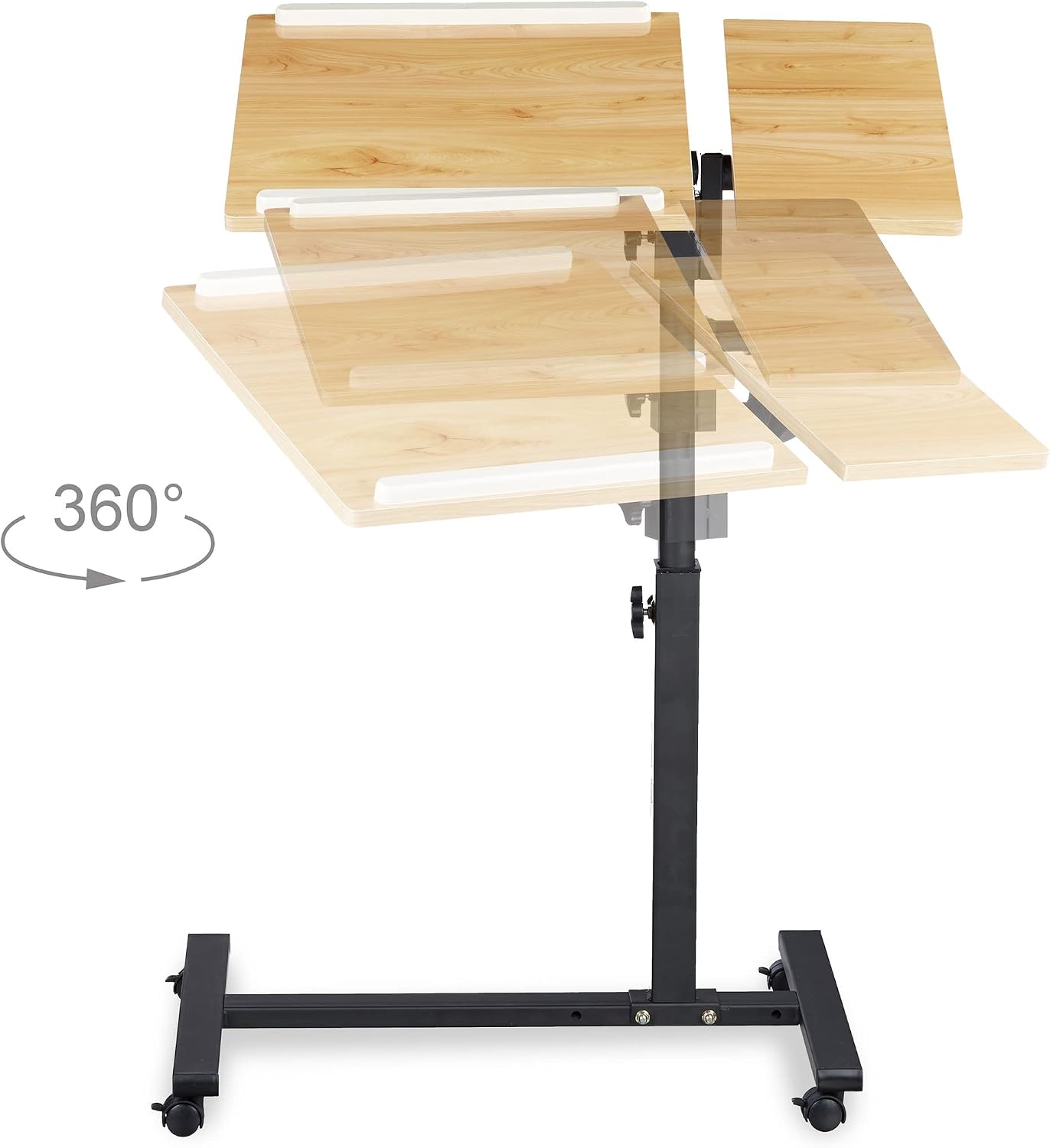
Image: The table surfaces shown rotating 360 degrees, highlighting their rotational flexibility.

Resim: Ayrıntılı view of the anti-slip bars on the table surface and the adjustment knobs for height and tilt.
Video: An official Relaxdays video demonstrating the height and tilt adjustment features of a similar laptop table.
Bakım
- Temizlik: Masa yüzeylerini yumuşak bir bezle silin.amp Bez kullanın. Aşındırıcı temizleyicilerden veya sert kimyasallardan kaçının, çünkü bunlar yüzeye zarar verebilir.
- Denetleme: Tüm vidaları ve bağlantıları periyodik olarak kontrol ederek sıkılıklarını koruyun. Gerekirse, sağlamlığı korumak için yeniden sıkın.
- Jant Bakımı: Keep the wheels free of dust and debris to ensure smooth movement. If wheels become stiff, clean them and apply a small amount of silicone spray if needed.
- Depolamak: If storing the table for an extended period, ensure it is clean and dry. Store in a cool, dry place away from direct sunlight.
Sorun giderme
| Sorun | Olası Neden | Çözüm |
|---|---|---|
| Masa sallanıyor veya dengesiz. | Gevşek vidalar veya düz olmayan yüzey. | Check and tighten all assembly screws. Ensure the table is on a flat, even surface. |
| Tekerlekler düzgün dönmüyor veya kilitlenmiyor. | Debris in wheels or faulty brake mechanism. | Clean any debris from the wheels. Ensure the brake levers are fully engaged or disengaged. If wheels are damaged, consider replacement. |
| Yükseklik ayarlama mekanizması sıkışmış durumda. | Adjustment knob too tight or internal mechanism obstructed. | Loosen the adjustment knob completely. Gently try to move the pole. If still stuck, check for any obstructions. Do not force. |
| Table surface does not tilt or rotate freely. | Adjustment knobs too tight or mechanism obstructed. | Ensure the tilt/rotation adjustment knobs are sufficiently loosened. Check for any physical obstructions. |
Özellikler
| Özellik | Detay |
|---|---|
| Marka | Rahatlama Günleri |
| Model Numarası | 10020396_48 |
| Malzeme | Wood (surfaces), Steel (frame) |
| Renk | Sarı |
| Boyutlar (Derinlik x Genişlik x Yükseklik) | 40 cm genişlik x 60 cm uzunluk x 95 cm yükseklik |
| Ayarlanabilir Yükseklik Aralığı | Yaklaşık 62 cm ila 95 cm |
| Table Surface Tilt | 180 dereceye kadar |
| Table Surface Rotation | 360 derece |
| Max Load Capacity (65 cm height) | 20 kilo |
| Max Load Capacity (95 cm height) | 10 kilo |
| Ağırlık | 5.6 Kilogram |
| Özel Özellikler | Portable, 4 wheels with brakes, 2 anti-slip bars |
| Montaj Gerekli | Evet |
Garanti ve Destek
Relaxdays products are manufactured to high-quality standards. For any questions, concerns, or issues regarding your product, please refer to your purchase documentation or contact the retailer directly. While specific warranty details are not provided in this manual, standard consumer rights apply.
For further assistance, you may visit the official Relaxdays store page: Relaxdays Mağazası