
1. Giriş
This manual provides essential information for the installation, operation, and maintenance of your Honeywell DC313N Series 3 LED Wireless Doorbell. This system offers a reliable and easy-to-install solution for your home or business, featuring a wireless connection, adjustable volume, and visual LED alerts. The pre-configured doorbell and push button are ready for use upon receipt, ensuring a straightforward setup process.
2. Paket İçeriği
Kutuyu dikkatlice açın ve tüm eşyaların eksiksiz ve iyi durumda olduğundan emin olun. Paket şunları içermelidir:
- 1 x Portable Doorbell Chime Unit
- 1 x Kablosuz Basmalı Düğme
- 1 x CR2032 3V Button Cell Battery (for push button)
- Fixings for Push Button (screws and wall plugs)
- Kullanıcı Kılavuzu

Image: The Honeywell DC313N Wireless Doorbell and push button shown in their retail packaging.
3. Özellikler
| Özellik | Şartname |
|---|---|
| Model Numarası | DC313N |
| Boyutlar (Çan Ünitesi) | Yaklaşık 50x50x50 cm |
| Ağırlık | 186 Gram |
| Kablosuz Frekans | 868 MHz |
| kablosuz Menzil | 150 metreye (492 feet) kadar |
| Audible Volume Range | 80 meters (84 dB) |
| Melodiler | 6 seçilebilir melodi |
| Güç Kaynağı (Zil) | 4 x 1.5V LR6 (AA) batteries (not supplied) |
| Güç Kaynağı (Basmalı Düğme) | 1 x CR2032 3V battery (supplied) |
| Weather Resistance (Push Button) | IP55 dereceli |
| Özel Özellikler | Portable, LED Strobe, Adjustable Volume, Secret Knock Function |
4. Kurulum ve Kurulum
The Honeywell DC313N doorbell kit is designed for easy installation, with the chime unit and push button pre-configured for immediate use.
4.1. Pillerin Takılması
- Çan Ünitesi: Open the battery compartment on the back of the portable chime unit. Insert 4 x 1.5V LR6 (AA) batteries, ensuring correct polarity (+/-). Close the compartment securely.
- Butona basınız: The CR2032 3V button cell battery is typically pre-installed. If not, open the push button casing and insert the battery with the positive (+) side facing up. Close the casing.
4.2. Basmalı Düğmenin Montajı
The push button can be mounted using screws or the optional screw-free installation method.
- Vida Kurulumu: Position the push button at your desired location (e.g., door frame). Mark the screw holes. Drill pilot holes if necessary, then secure the push button using the provided screws and wall plugs.
- Screw-Free Installation: Clean the mounting surface thoroughly. Remove the protective film from the adhesive pad on the back of the push button. Press the push button firmly onto the desired surface for at least 30 seconds. Ensure the surface is smooth and clean for optimal adhesion.
Ensure the push button is installed in a location where it is protected from direct heavy rain, although it is IP55 rated for weather resistance.
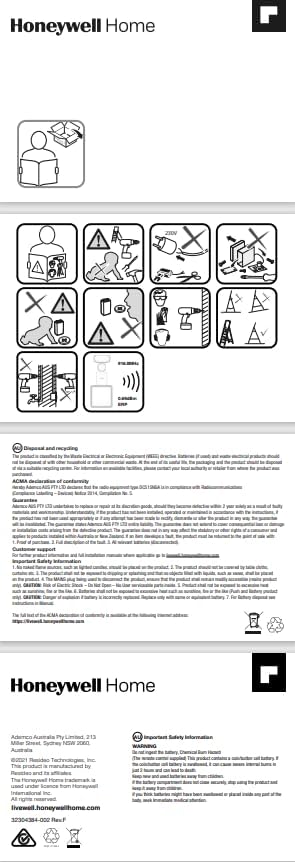
Image: Installation diagrams and safety warnings from the product manual.
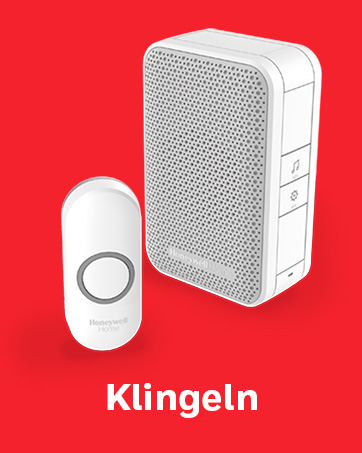
Image: The Honeywell DC313N portable chime unit and wireless push button.
4.3. Zil Ünitesinin Konumlandırılması
The portable chime unit can be placed anywhere within your home or garden, as long as it is within the 150-meter wireless range of the push button. For optimal performance, avoid placing the chime unit near large metal objects or other electronic devices that may cause interference.
5. Kullanım Talimatları
5.1. Bir Melodi Seçmek
The doorbell offers 6 different melodies. To change the melody, locate the melody selection button on the chime unit (refer to the unit's markings for exact location). Press this button repeatedly to cycle through the available melodies until you find your preferred sound.
5.2. Sesi Ayarlama
The chime unit features an adjustable volume control. Use the volume buttons (usually marked with '+' and '-') on the chime unit to increase or decrease the sound level to suit your environment. The audible range is up to 80 meters (84 dB).
5.3. LED Visual Alert
In addition to the audible chime, the DC313N features an LED strobe light that provides a visual alert when the push button is pressed. This is particularly useful in noisy environments or for individuals with hearing impairments.
5.4. Secret Doorbell Function
The doorbell includes a 'secret knock' function. If the push button is pressed three times quickly, the chime unit will play a different, distinct melody. This allows you to differentiate between regular visitors and specific family members or friends.
6. Bakım
6.1. Pil Değişimi
- Çan Ünitesi: When the chime unit's sound becomes weak or inconsistent, it's time to replace the 4 x AA batteries. Open the battery compartment, remove old batteries, and insert new ones, observing polarity.
- Butona basınız: The CR2032 3V battery in the push button has an extended lifespan of up to 2 years. If the doorbell fails to ring when the button is pressed, replace this battery.
6.2. Temizlik
Clean the doorbell chime unit and push button with a soft, dry cloth. Do not use abrasive cleaners or solvents, as these can damage the finish or internal components. The push button is weather-resistant (IP55), but avoid submerging it in water.
7. Sorun Giderme
| Sorun | Olası Neden | Çözüm |
|---|---|---|
| Kapı zili çalmıyor. | Dead or low batteries in chime or push button | Replace batteries in both units. Ensure correct polarity. |
| Short wireless range or intermittent ringing | Obstructions (thick walls, metal objects) or interference | Reposition the chime unit closer to the push button. Avoid placing near large metal objects or other wireless devices. |
| Chime volume is too low | Volume setting is low | Increase the volume using the '+' button on the chime unit. |
| LED flaş çalışmıyor. | Arızalı LED veya düşük pil | Replace batteries. If issue persists, contact support. |
8. Garanti ve Destek
Honeywell Home products are known for their quality and reliability. For specific warranty information, please refer to the documentation included with your purchase or visit the official Honeywell Home website. Information regarding the availability of spare parts for this model is not provided.
For technical support or further assistance, please contact Honeywell Home customer service through their official channels.