
Flash Furniture GO-WY-85-8-GG
Flash Furniture HERCULES Series 24/7 Intensive Use 300 lb. Rated Black Mesh Multifunction Ergonomic Office Chair with Seat Slider User Manual
Model: GO-WY-85-8-GG
giriiş
This manual provides comprehensive instructions for the assembly, operation, maintenance, and troubleshooting of your Flash Furniture HERCULES Series 24/7 Intensive Use Office Chair. Please read this manual thoroughly before assembly and use to ensure proper function and longevity of your product.

Şekil 1: Ön view of the HERCULES Series Office Chair.
Kurulum ve Montaj
Before beginning assembly, ensure all components are present and undamaged. It is recommended to assemble the chair on a soft, clean surface to prevent scratching.
Bileşen Kontrol Listesi:
- Koltuk Montajı
- arkalık
- Armrests (Left and Right, check for 'L' and 'R' markings)
- Chair Base (Chrome)
- Tekerlekler (5 adet)
- Gaz Kaldırma Silindiri
- Donanım Paketi (vidalar, rondelalar, Allen anahtarı)
Montaj Adımları:
- Tüm parçaları dikkatlice kutularından çıkarın ve yerleştirin.
- Beş tekerleği, sandalyenin tabanındaki her ayağın ucundaki deliklere yerleştirin. Yerlerine oturana kadar sıkıca bastırın.
- Gazlı kaldırma silindirini sandalyenin tabanındaki orta deliğe yerleştirin.
- Attach the armrests to the seat assembly using the provided screws. Ensure the 'L' and 'R' markings on the armrests correspond to the correct sides of the seat.
- Attach the backrest to the seat assembly. Align the holes and secure with screws.
- Birleştirilmiş koltuğu ve sırtlığı dikkatlice gazlı kaldırma silindirinin üzerine yerleştirin, ortalanmış ve sabit olduğundan emin olun.
- Verify all screws are tightened and the chair is stable before use.

Figure 2: The HERCULES Series Office Chair ready for use in a home office environment.
Kullanım Talimatları
Your HERCULES Series chair offers multiple adjustment features to customize your seating experience for optimal comfort and ergonomic support.
1. Koltuk Yükseklik Ayarı:
To raise the seat, lift the pneumatic seat height adjustment lever (typically on the right side, under the seat) while taking your weight off the seat. To lower the seat, lift the same lever while seated. Adjust until your feet are flat on the floor and your knees are at a 90-degree angle.
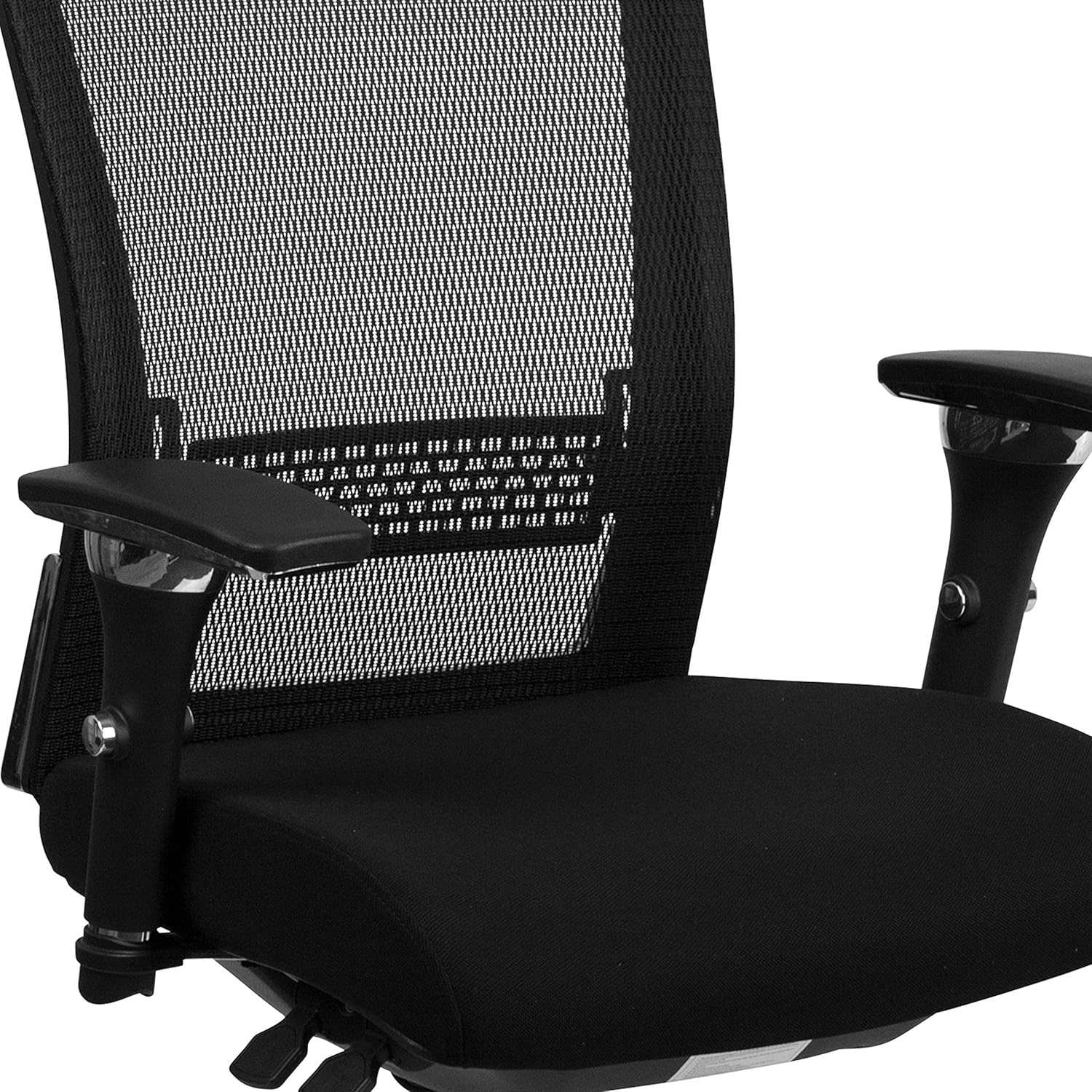
Şekil 3: View of the adjustment levers located beneath the seat.
2. Synchro Tilt Control:
The 2-to-1 synchro tilt control allows the chair's back and seat to recline at different rates, increasing the angle between your torso and thighs for added comfort. Use the lever on the left side (when seated) to engage or disengage the tilt. Adjust the tension knob (usually a large round knob under the front of the seat) to control the resistance of the tilt.
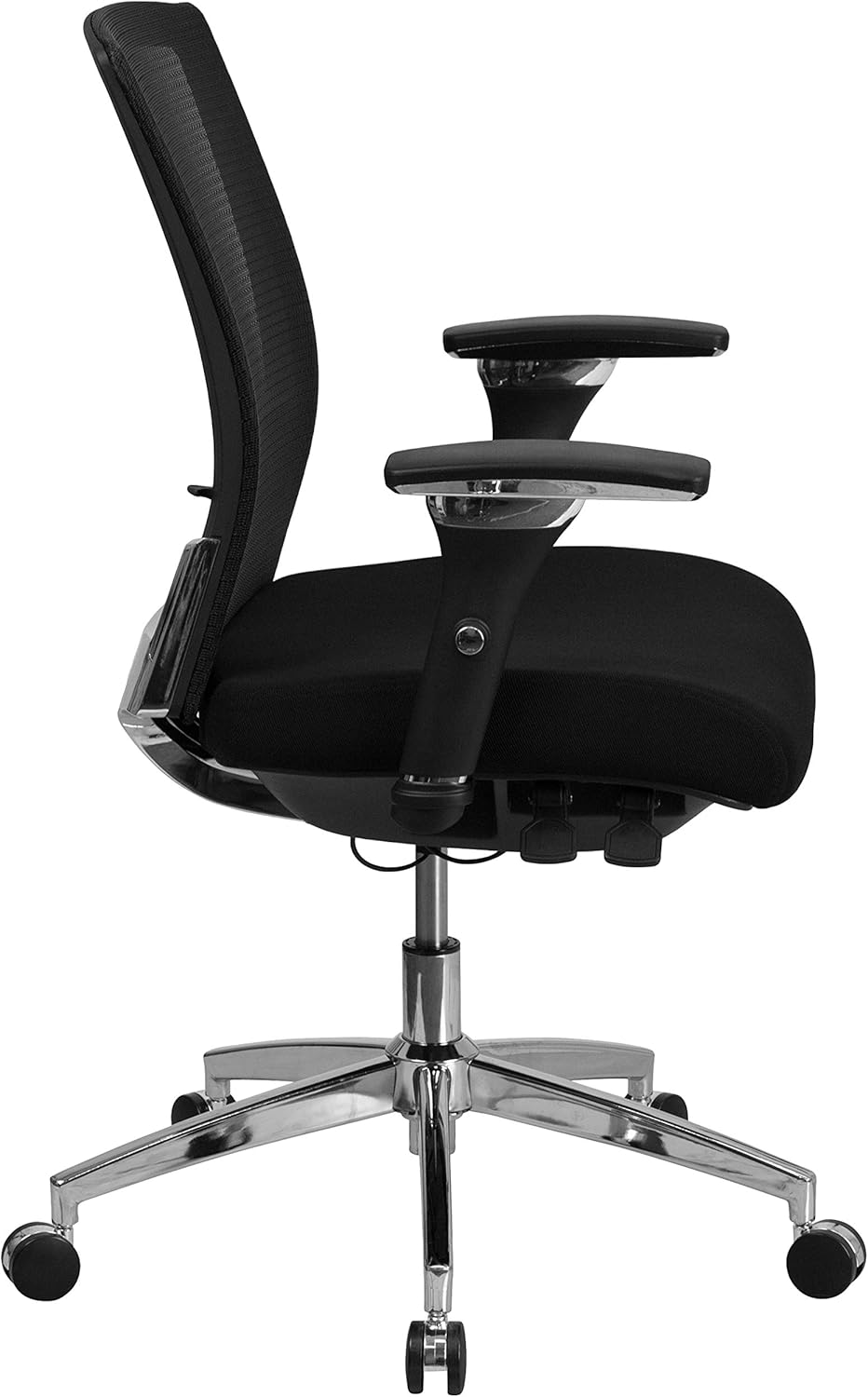
Şekil 4: Yan profile showing the chair in a reclined position, illustrating the synchro tilt function.
3. Seat Depth Adjustment:
To adjust the seat depth, locate the paddle control (often near the front-left under the seat). Lift the paddle and slide the seat forward or backward to accommodate the length of your thighs. This ensures your back remains in contact with the backrest while avoiding pressure behind your knees.
4. Kol Dayama Ayarı:
The armrests are height adjustable. Press the button on the side of the armrest support and slide the armrest up or down to your desired height. The arm pads also pivot inward and outward for greater customization, providing optimal support for your arms and shoulders.

Figure 5: Detail of the adjustable armrest, highlighting the height adjustment button and pivot function.
5. Lumbar Support Adjustment:
The adjustable lumbar support is located on the backrest. You can slide it up or down to position it correctly for your lower back curve, providing targeted support and minimizing back strain.

Şekil 6: Ayrıntılı view of the adjustable lumbar support mechanism on the mesh backrest.
6. Döndürme Fonksiyonu:
The chair features a 360-degree swivel seat, allowing for easy movement and access to different areas of your workspace without needing to reposition the entire chair.
Bakım
Düzenli bakım, ofis sandalyenizin görünümünü ve işlevselliğini korumanıza yardımcı olacaktır.
Temizlik Talimatları:
- For general cleaning of the fabric and mesh, use a damp Bez. Sert kimyasallardan veya aşındırıcı temizleyicilerden kaçının.
- Wipe down the chrome base and plastic components with a soft, damp Kumaş.
- For stubborn stains on fabric, a mild soap solution can be used, but always test on an inconspicuous area first.
Genel Bakım:
- Tüm vida ve cıvataların sıkılığını düzenli olarak kontrol edin. Gerekirse tekrar sıkın.
- Keep the casters clean from debris (hair, dust, etc.) to ensure smooth rolling.
- Sandalyeyi uzun süre doğrudan güneş ışığına veya aşırı sıcaklıklara maruz bırakmaktan kaçının, çünkü bu malzeme bozulmasına neden olabilir.
Sorun giderme
Bu bölümde, ofis sandalyenizle ilgili karşılaşabileceğiniz yaygın sorunlar ele alınmaktadır.
| Sorun | Olası Neden | Çözüm |
|---|---|---|
| Chair does not stay at desired height or sinks. | Gas lift cylinder malfunction or improper engagement. | Ensure the pneumatic lever is fully disengaged when not adjusting. If the issue persists, the gas lift cylinder may need replacement. Contact customer support. |
| Armrests are loose or adjust too freely. | Loose screws or worn adjustment mechanism. | Check and tighten the screws securing the armrests to the seat. If the internal mechanism is worn, replacement armrests may be needed. |
| Casters do not roll smoothly or are difficult to insert. | Debris in casters or manufacturing tolerance. | Remove any hair or debris from the caster wheels. For insertion, ensure proper alignment and apply firm, even pressure. If they do not lock, ensure the base holes are clear. |
| Back support feels broken or chair leans. | Structural damage or loose connections. | Inspect the connections between the backrest and seat assembly for loose screws or damage. If structural damage is apparent, discontinue use and contact customer support. |
Özellikler
- Marka: Flaş Mobilya
- Model Adı: Flash Furniture HERCULES Series
- Model Numarası: GO-WY-85-8-GG
- Renk: Black Fabric/Mesh
- Ürün Ölçüleri: 25"D x 27"G x 41.75"Y
- Maksimum Ağırlık Öneri: 300 Pound
- Ürün Ağırlığı: 43 pound
- Sırt Tarzı: Rectangular, Mesh
- Koltuk Malzemesi: Fabric with Foam Fill (CAL 117 fire retardant foam)
- Taban Malzemesi: Heavy Duty Chrome
- Tekerlekler: Dual Wheel Casters
- Özel Özellikler: Adjustable Height Arms, Adjustable Lumbar Support, Synchro Tilt, Seat Depth Adjustment, Waterfall Seat Edge, 360-degree Swivel
- Ürün Bakım Talimatları: Damp cloth (DC-Damp kumaş)
- UPC: 889142011163
- ASIN: B01KA7WXMA
Garanti ve Destek
Garanti Bilgileri:
Specific warranty details for the Flash Furniture HERCULES Series Office Chair are not provided in the available product data. Please refer to the original product packaging or the manufacturer's official webAyrıntılı garanti şartları ve koşulları için siteyi ziyaret edin.
Müşteri Desteği:
For technical assistance, replacement parts, or further inquiries, please contact Flash Furniture customer support. Contact information can typically be found on the manufacturer's websitede veya ürün ambalajında yer almamaktadır.
Ask a question about this manual
Ask about setup, troubleshooting, compatibility, parts, safety, or missing instructions. Manuals+ will review the question and use this page’s manual context to help answer it.