
giriiş
Thank you for choosing the Divoom Onbeat 500 Portable Wireless Bluetooth Speaker. This device is designed to deliver powerful sound with convenient wireless connectivity. This manual will guide you through the setup, operation, and maintenance of your speaker to ensure optimal performance and longevity.
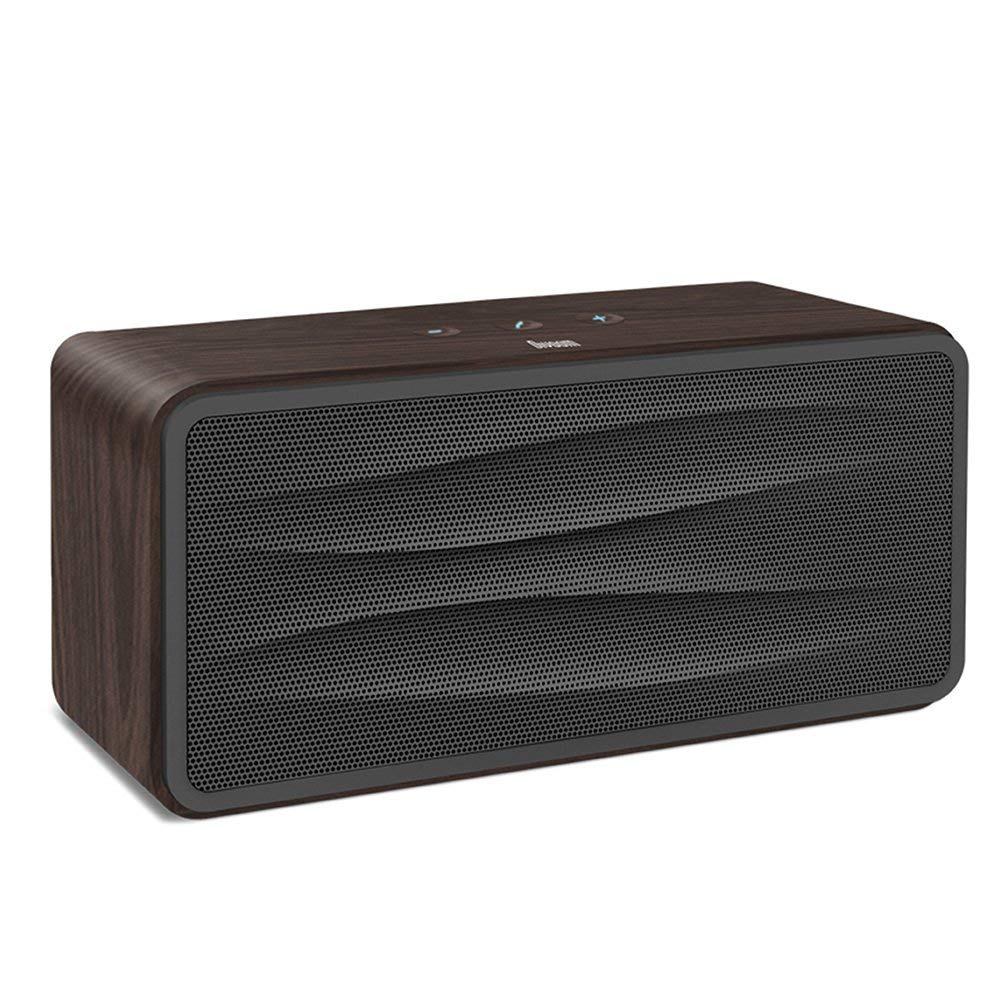
Şekil 1: Ön view of the Divoom Onbeat 500 speaker. This image displays the speaker's main grille and overall design.
Paket İçeriği
Lütfen paketi aşağıdaki öğeler açısından kontrol edin:
- Divoom Onbeat 500 Speaker
- Mikro USB Şarj Kablosu
- Yardımcı Kablo
- Kullanım Kılavuzu (bu belge)
- Garanti Kartı
Ürün Özellikleri
The Divoom Onbeat 500 speaker offers a range of features for an enhanced audio experience:
- Güçlü Ses: 2.1 channel design with a proprietary passive bass radiator for rich audio.
- NFC Teknolojisi: Tap-to-pair functionality for quick and easy Bluetooth connection.
- Bluetooth Bağlantısı: Wirelessly play and control music from up to 33 feet (10 meters) away.
- Dahili Hoparlör: Allows you to make and take calls directly from the speaker.
- Uzun Ömürlü Pil: Integrated 5000mAh battery provides extended playback time.
- Yardımcı Giriş: Bluetooth özelliği olmayan cihazlara kablolu bağlantı için.
Kurmak
1. Hoparlörü Şarj Etme
Before initial use, fully charge your Divoom Onbeat 500 speaker. Use the provided Micro USB charging cable to connect the speaker to a USB power source (e.g., computer USB port, USB wall adapter). The charging indicator light will illuminate during charging and turn off or change color when fully charged. A full charge typically provides 8-10 hours of playback.
2. Açma/Kapama
- Açmak İçin: Sesli bir komut duyana veya gösterge ışığı yanana kadar Güç düğmesini birkaç saniye basılı tutun.
- Kapatmak İçin: Hoparlör kapanana kadar Güç düğmesini birkaç saniye daha basılı tutun.
3. Bluetooth Eşleştirme
The Onbeat 500 offers two methods for wireless connection:
NFC (Near Field Communication) Pairing:
If your device supports NFC, you can pair quickly:
- Ensure NFC is enabled on your smartphone or tablet.
- With the Onbeat 500 powered on, gently tap your NFC-enabled device against the NFC area on the speaker.
- Confirm the pairing request on your device. The speaker will indicate a successful connection.
Standart Bluetooth Eşleştirme:
For devices without NFC or for manual pairing:
- Power on the Divoom Onbeat 500 speaker. It will automatically enter Bluetooth pairing mode if no device is connected, or you may need to press a dedicated Bluetooth button (refer to speaker controls).
- On your audio device (smartphone, tablet, computer), go to the Bluetooth settings and enable Bluetooth.
- Arama available devices. You should see "Divoom Onbeat 500" in the list.
- Select "Divoom Onbeat 500" to connect. The speaker will confirm the connection with an audible prompt.
4. AUX Bağlantısı
To connect a device using the auxiliary cable:
- Connect one end of the provided auxiliary cable to the AUX-in port on the Divoom Onbeat 500.
- Yardımcı kablonun diğer ucunu cihazınızın kulaklık girişine veya ses çıkışına bağlayın.
- The speaker will automatically switch to AUX mode, or you may need to select it manually (refer to speaker controls).

Şekil 2: Taraf view of the Divoom Onbeat 500, illustrating the location of the charging port, AUX input, and control buttons.
Hoparlörü Çalıştırma
1. Müzik Çalma
Once connected via Bluetooth or AUX, you can control music playback from your connected device. The speaker may also have integrated controls for volume adjustment, play/pause, and track skipping. Refer to the speaker's physical buttons for these functions.
2. Hoparlör Fonksiyonu
When connected to a smartphone via Bluetooth, the Divoom Onbeat 500 can be used as a speakerphone:
- Bir Aramayı Cevaplama: Press the Call button (often indicated by a phone icon) on the speaker.
- Aramayı Bitirme: Tekrar Ara tuşuna basın.
- Bir Aramayı Reddetme: Arama tuşuna basılı tutun.

Şekil 3: Arka view of the Divoom Onbeat 500, highlighting the passive bass radiator for enhanced low-frequency sound.
Bakım
1. Temizlik
Hoparlörünüzün görünümünü ve işlevselliğini korumak için:
- Dış yüzeyini yumuşak, kuru ve tiftiksiz bir bezle silin.
- Yüzeye zarar verebileceğinden aşındırıcı temizleyiciler, alkol, benzen veya diğer kimyasal çözücüler kullanmayın.
- Herhangi bir açıklıktan içeriye nem girmesini önleyin.
2. Pil Bakımı
To prolong the life of the built-in lithium-ion battery:
- Pilin sık sık tamamen boşaltılmasından kaçının.
- Uzun süre kullanılmayacaksa hoparlörü serin ve kuru bir yerde saklayın.
- Charge the speaker at least once every three months if stored for a long time to prevent deep discharge.
Sorun giderme
If you encounter issues with your Divoom Onbeat 500, please refer to the following common solutions:
| Sorun | Olası Çözüm |
|---|---|
| Hoparlör açılmıyor | Ensure the battery is charged. Connect the speaker to a power source using the Micro USB cable and try again. |
| Hoparlörden ses gelmiyor | Check the volume level on both the speaker and your connected device. Ensure the speaker is correctly paired via Bluetooth or connected via AUX. Try re-pairing the Bluetooth device. |
| Bluetooth eşleştirme başarısız oldu | Hoparlörün eşleştirme modunda olduğundan emin olun. Cihazınızın Bluetooth'unu kapatıp açın. Cihazınızı hoparlöre yaklaştırın. Cihazınızdaki önceki Bluetooth bağlantılarını temizleyip tekrar deneyin. |
| Kötü ses kalitesi | Ensure the speaker and connected device are within range (for Bluetooth). Check for interference from other wireless devices. Try a different audio source or cable. |
Özellikler
Detailed technical specifications for the Divoom Onbeat 500 speaker:
- Model Adı: Divoom Onbeat 500
- Hoparlör Tipi: Bilgisayar Hoparlörü
- Bağlantı Teknolojisi: Bluetooth
- Kablosuz İletişim Teknolojisi: Bluetooth
- Kontrol Yöntemi: Dokunmak
- Güç Kaynağı: Pil ile çalışır
- Pil: 1 Lityum İyon pil (5000 mAh)
- Sesli Wattage: 20 Watt
- Hoparlör Maksimum Çıkış Gücü: 100 Watt
- Surround Ses Kanalı Yapılandırması: 2.1
- Uyumlu Cihazlar: Android, Windows, iPhone (iOS)
- Bağlantı Tipi: USB (şarj için)
- Ürün Ölçüleri: 22.5 x 7.49 x 10.49 cm (UxGxY)
- Ürün Ağırlığı: 1.55 kilo
- Renk: Kömür
- Özel Özellikler: NFC, Built-in Speakerphone, Passive Bass Radiator
Garanti ve Destek
Your Divoom Onbeat 500 speaker comes with a limited warranty. Please refer to the included Warranty Card for detailed terms and conditions, including warranty period and coverage.
For technical support, service inquiries, or further assistance, please visit the official Divoom website or contact their customer service department using the information provided on your Warranty Card or product packaging. Please have your model number (Onbeat 500) and purchase details ready when contacting support.